Streaming isn’t just about having the right camera or microphone setup — it’s also about enduring hours of uninterrupted sitting while staying sharp, engaged, and comfortable. Many streamers underestimate the physical toll of long broadcasting sessions, where heat buildup, back pain, and general fatigue quietly erode both performance and on-screen presence. When your body is uncomfortable, it shows, and viewers notice.
Enter the cooling gaming chair — a seating solution designed specifically to tackle these challenges head-on. Unlike a standard pro gaming chair, cooling variants incorporate ventilation systems and breathable materials that actively manage body temperature during extended use. Pair that with a thoughtful ergonomic design, and you have a chair built for the demands of modern content creation. Some streamers even debate whether a heating cushion serves their needs better depending on their environment and personal preferences.
So, is a cooling gaming chair truly essential for streamers, or is it just another flashy upgrade? This article breaks down what these chairs actually offer, how they compare to alternatives, and what to look for when choosing the right one for your streaming setup.
The Streaming Dilemma: Why Comfort Matters for Online Content Creators
Most people picture streaming as a laid-back activity — sit down, press a button, and talk to an audience. The reality is far more demanding. Professional streamers routinely clock four to eight hours in a single session, often without meaningful breaks. That kind of sustained sitting creates a cascade of physical problems: tight hip flexors, compressed spinal discs, shoulder tension, and the creeping fatigue that makes staying animated and engaging increasingly difficult as the hours pile up.
What separates a polished broadcast from a forgettable one often comes down to the streamer’s energy and presence. Viewers are perceptive — they notice when a host seems distracted, stiff, or visibly uncomfortable. Slouching posture, frequent fidgeting, or a dull expression can quietly push audiences toward another channel. Comfort, in this context, is not a luxury but a performance variable.
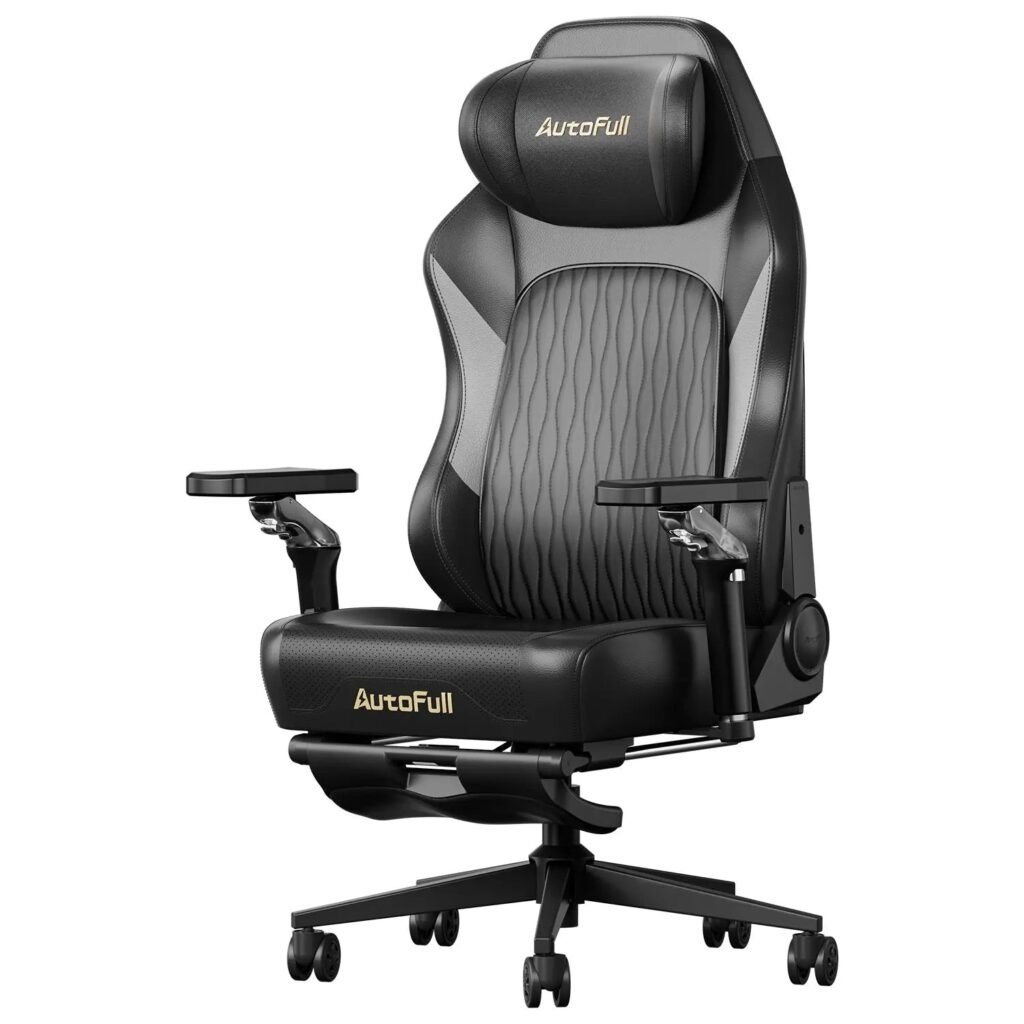
This is where seating becomes a strategic decision rather than a simple furniture choice. A chair with adjustable armrests, proper lumbar support, and seat height customization allows streamers to dial in a position that reduces physical strain from the first minute to the last. The ability to fine-tune your seating throughout a broadcast — shifting recline angle, repositioning support — keeps the body from locking into patterns that cause pain. Investing in specialized seating directly supports the consistency and stamina that long-form content creation demands.
What is a Cooling Gaming Chair? Beyond the Basic Pro Gaming Chair
A cooling gaming chair is a purpose-built seating solution that goes several steps beyond what a standard pro gaming chair offers. While traditional gaming chairs focus primarily on aesthetics and basic ergonomic support, cooling variants integrate active or passive temperature management systems designed to prevent heat accumulation during extended use. The result is a chair that addresses one of the most overlooked discomforts in long-session gaming and streaming: the trapped body heat that builds up between you and your seat.
Cooling technology in these chairs typically falls into two categories. The first involves built-in ventilation fans embedded in the seat and backrest, which actively circulate air across contact points where heat concentrates most. The second relies on passive cooling through breathable mesh fabrics or open-cell foam that allows natural airflow without mechanical assistance. Higher-end models often combine both approaches, giving users control over their thermal comfort regardless of room temperature.
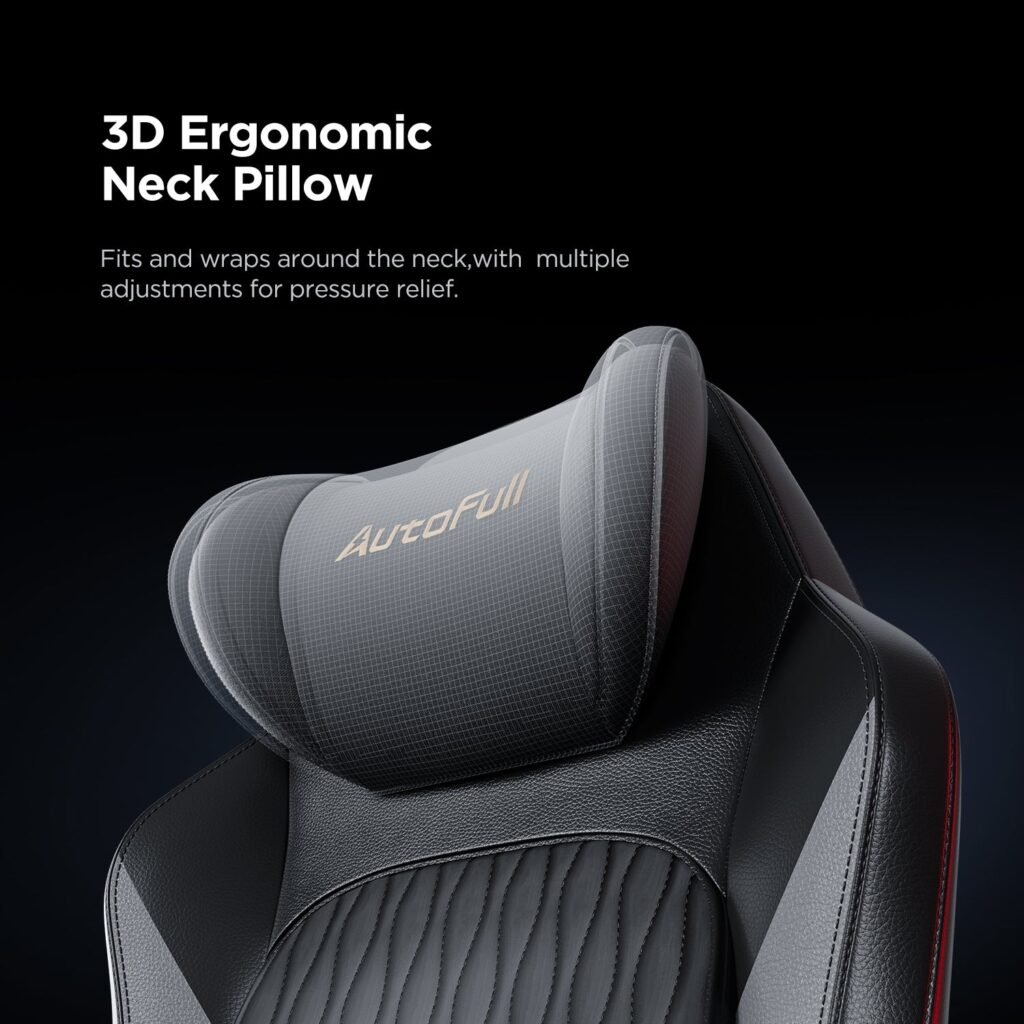
These cooling features don’t exist in isolation — they’re woven into a broader ergonomic design framework that makes the chair genuinely functional for creators. Good ergonomic design in this context means contoured lumbar support that follows the natural curve of the spine, a headrest that reduces neck strain during camera-facing sessions, and multi-directional adjustability that accommodates different body types. Brands like AutoFull have built their gaming chair lineup around exactly this combination of thermal comfort and ergonomic structure, reflecting how central these features have become to the category.
Key Components of an Ergonomic Pro Gaming Chair
The foundation of any quality cooling gaming chair is its ergonomic feature set. Adjustable armrests that move in multiple directions prevent shoulder tension during long broadcasts. A recline function with lockable positions lets streamers shift their posture without leaving the frame. Lumbar support — ideally adjustable in both height and depth — protects the lower spine during marathon sessions. Premium models use high-density foam or breathable mesh for the seat base, balancing softness with the structural support needed to maintain good posture over hours of use.
The Benefits of Cooling Technology for Streamers: Solving Core Needs
Heat is a silent saboteur during long streaming sessions. When body heat accumulates between you and your seat, core temperature rises gradually — and with it, discomfort, irritability, and mental fatigue. For streamers who need to stay sharp and personable across multi-hour broadcasts, this thermal creep is a real performance problem. Cooling technology directly interrupts this cycle by keeping contact surfaces ventilated and temperature-regulated throughout the session.
The most immediate benefit is sustained focus. Research consistently links thermal discomfort to decreased cognitive performance — when you’re hot and sticky, concentration degrades faster. Streamers who manage heat effectively report staying mentally engaged longer without the restless shifting and distraction that typically signals the body’s protest. Active fan-based cooling systems are particularly effective here, since they maintain airflow even when ambient room temperatures rise during extended broadcasts under studio lighting.
Fatigue reduction is the second major advantage. Physical discomfort is exhausting in a way that’s easy to underestimate. Every minute spent tolerating a sweaty back or overheated seat cushion draws on mental resources that should be directed toward content, audience interaction, and gameplay decisions. A cooling chair removes that low-grade drain, effectively extending the window of time during which a streamer can perform at their best without visible signs of wear.
Consider a practical scenario: a streamer running a six-hour charity marathon event. Midway through, room temperature climbs from equipment heat and lighting. Without cooling support, the chair becomes a heat trap, and the streamer’s energy visibly dips — slumped posture, slower responses, less enthusiastic commentary. With ventilated seating, airflow continues regardless of room conditions, keeping the streamer comfortable, upright, and engaged through the final hour. For streamers who regularly push into extended sessions, cooling technology shifts from a nice-to-have feature into a genuine broadcast asset.
Cooling vs. Heating Cushions: What’s Best for Your Streaming Setup?
The debate between cooling gaming chairs and heating cushions isn’t about which is objectively better — it’s about which solves your specific problem. Cooling chairs excel in warm environments, high-output streaming setups with multiple monitors and lighting rigs, or for streamers who naturally run hot. If your studio regularly climbs above comfortable room temperature during broadcasts, active ventilation or breathable mesh seating is the clear practical choice.
Heating cushions occupy a different niche entirely. For streamers in colder climates, poorly insulated home studios, or those dealing with chronic muscle tension in the lower back and hips, gentle heat therapy can actually improve comfort and reduce stiffness during long sessions. A heating cushion added to an existing chair is also a lower-cost entry point for streamers not ready to invest in purpose-built seating.
The key distinction comes down to your environment and physical needs. Streamers in temperate or hot regions — or those who stream under studio-grade lighting — will find cooling technology addresses their most pressing discomfort. Those in cooler settings or with specific muscular needs may genuinely benefit from heat. Some streamers even use both seasonally, pairing a ventilated chair with an optional heating cushion during winter months. Ultimately, neither solution is universally superior; the right choice is the one that keeps you physically comfortable and mentally sharp from the first minute of your broadcast to the last.
How to Choose the Right Cooling Gaming Chair: A Step-by-Step Guide
Selecting the right cooling gaming chair requires more than browsing aesthetics — it demands a structured evaluation of your specific streaming environment, physical needs, and long-term priorities. Start by auditing your studio conditions: room temperature during peak streaming hours, session length, and whether you run heat-generating equipment like multiple monitors or ring lights. This baseline determines how aggressively you need active cooling versus passive breathability.
Next, establish your ergonomic non-negotiables. Lumbar support depth and height adjustability matter most for streamers who sit camera-facing for hours. Seat depth should allow your back to rest fully against the backrest without cutting off circulation at the knees. If you stream in a fixed position — head toward camera, hands on keyboard — prioritize a headrest that supports the natural cervical curve without pushing your chin forward.
When evaluating cooling mechanisms, compare active fan systems against mesh-based passive airflow. Fan-integrated chairs offer consistent cooling regardless of ambient temperature but add mechanical complexity. Mesh designs are quieter, lower maintenance, and often more aesthetically neutral — a consideration for streamers conscious of their on-camera background.
Build quality deserves serious attention. Check the chair’s weight capacity, base material (five-point aluminum bases outlast plastic), and armrest adjustment range. A chair that degrades within a year forces a repeat investment that ultimately costs more than buying right the first time.
Finally, test adjustability before committing. A chair that looks ergonomic on paper but can’t accommodate your specific height and sitting posture defeats its own purpose.
Adjustable Features for Maximum Comfort During Broadcasts
Once your chair arrives, calibrate it systematically. Set seat height so your feet rest flat and thighs stay parallel to the floor — this reduces hip flexor compression during long broadcasts. Adjust lumbar support until it meets the natural inward curve of your lower spine without pushing you forward. Position armrests so your elbows rest at roughly 90 degrees, keeping shoulders relaxed and preventing the creeping tension that disrupts on-camera energy. Revisit these settings every few weeks as your body adapts, making small corrections before discomfort develops into a persistent problem.
Is a Cooling Gaming Chair Worth It for Streamers?
A cooling gaming chair isn’t a gimmick — it’s a practical response to the genuine physical demands that long-form streaming places on the body. Throughout this article, we’ve established that comfort directly influences broadcast quality, that cooling technology meaningfully addresses heat buildup and fatigue during extended sessions, and that the right chair combines thermal management with solid ergonomic design to support streamers from start to finish.
The comparison with heating cushions reinforces a broader point: there’s no single universal solution. Your streaming environment, climate, session length, and physical needs all shape which seating approach makes the most sense. What remains constant is the underlying principle — optimal seating isn’t optional for serious content creators. It’s infrastructure.
For streamers who regularly push past four hours per session, operate under studio lighting, or simply find themselves fatigued and distracted well before a broadcast ends, a cooling gaming chair deserves serious consideration. The adjustable features, breathable materials, and active ventilation systems these chairs offer translate directly into sustained energy, better posture, and a more engaging on-camera presence.
Before making a decision, audit your setup honestly: How hot does your studio get? How long are your typical sessions? What physical discomforts do you currently tolerate? Let those answers guide your choice. The right chair isn’t the most expensive one — it’s the one that keeps you comfortable, focused, and performing at your best every time you go live.