By 6 AM, the average working mom has already mentally mapped out school drop-offs, a 9 o’clock meeting, dinner plans, and three unanswered emails — all before her first cup of coffee. That daily juggling act between career demands and family responsibilities is exhausting, and without the right tools, it can feel completely unmanageable.
Organization tools like planners and smart stands have become lifelines for women navigating this balancing act. A well-chosen planner transforms scattered to-do lists into a clear roadmap, while a smart stand keeps your digital calendar visible and accessible exactly when you need it most. Together, they create a system that works with your life rather than against it.
This guide walks you through selecting the best planners for working moms and pairing them with smart stands that enhance digital organization. Whether you’re a busy professional managing a household or a student trying to stay on top of coursework and deadlines, the right combination of these tools can dramatically reduce stress and sharpen your daily focus.
Choosing the Best Planners for Working Moms
A planner isn’t just a notebook — for a working mom, it’s the difference between a day that runs smoothly and one that derails by 10 AM. When you’re managing back-to-back meetings, school pickups, grocery runs, and everything in between, having a single, reliable system to capture it all isn’t a luxury. It’s a necessity. The right planner helps you see your week at a glance, prioritize what actually matters, and carve out mental space that chronic busyness tends to consume.
Types of Planners for Different Needs
Not every planner fits every lifestyle, and choosing the wrong format is a fast track to abandoning the habit altogether. Bullet journals offer maximum flexibility — you design the layout yourself, which works beautifully if you enjoy customization but can feel overwhelming on a packed Tuesday night. Agenda-style planners come pre-structured with dated weekly or monthly spreads, making them ideal for moms who want to open and go without setup. App-based planners like Google Calendar or Notion sync across devices and send reminders, which suits anyone already living on their phone. The key is matching the format to your actual routine, not the routine you wish you had.
Essential Features for Busy Moms
Beyond format, specific features separate a useful planner from one that collects dust. Look for dedicated goal-setting sections that let you anchor your week to broader priorities rather than just tasks. A meal planning area saves surprising amounts of mental energy by consolidating one of the most repetitive daily decisions. Pocket storage for receipts, sticky notes, or school permission slips keeps everything in one place. Portability matters too — a planner that’s too bulky to toss in a work bag rarely gets used consistently. Lay-flat binding, durable covers, and a compact size make daily use genuinely effortless rather than something you have to work around.
Smart Stands for Enhanced Digital Organization
A planner handles the analog side of your life beautifully, but most working moms and students live across multiple screens simultaneously. Smart stands bridge that gap by keeping your digital calendar visible and accessible without requiring you to constantly unlock your phone or minimize a work window. When your tablet is propped at eye level displaying your schedule for the day, you spend less time hunting for information and more time acting on it. That shift — from searching to seeing — is surprisingly powerful when your day is already moving at full speed.
Benefits of an Adjustable Viewing Angle Stand
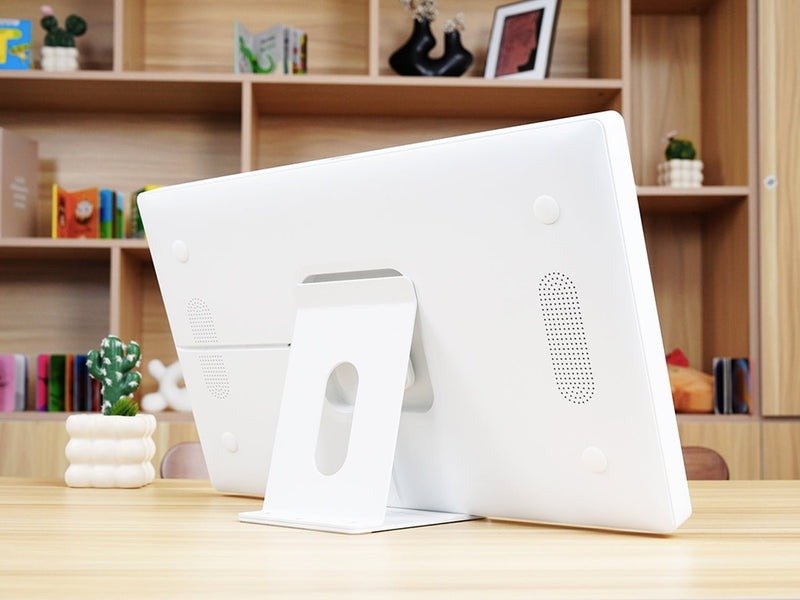
An adjustable viewing angle stand does more than hold your device upright. By letting you tilt the screen to exactly the right position, it eliminates the neck strain that comes from constantly looking down at a flat device on a desk. For anyone spending long hours at a home office or study desk, that ergonomic benefit compounds over time. When your calendar is positioned at a comfortable eye level, you naturally glance at it more often, which means fewer missed appointments and better awareness of what’s coming next. Students benefit equally — an adjustable stand during study sessions keeps reference materials and schedules visible without interrupting workflow.
Selecting a Calendar Stand for Smart Devices
Choosing the right calendar stand for smart devices starts with compatibility. Measure your tablet or phone dimensions and confirm the stand’s grip range accommodates them securely. Material matters for stability — aluminum and reinforced plastic stands resist tipping better than lightweight alternatives, especially on busy desks with frequent movement around them. Consider whether you need a fixed desktop stand or one with a foldable base for portability between rooms or locations. Stands that integrate smoothly with digital calendar platforms like Everblog, Google Calendar, or Apple Calendar essentially turn your device into a dedicated scheduling display, functioning almost like a digital whiteboard for your day.
No-Tools Calendar Installation for Easy Setup
Setup complexity is a real barrier — if getting organized requires a screwdriver and twenty minutes, most people simply won’t do it. No-tools calendar installation options like adhesive pads, weighted bases, and snap-on designs remove that friction entirely. Adhesive-mounted stands attach to walls or cabinet doors in seconds, freeing up desk space while keeping your schedule visible. For students moving between dorms, libraries, and home, foldable snap-together stands pack flat and deploy instantly without any hardware, making portable organization genuinely practical rather than aspirational.
Practical Solutions for Working Moms and Students
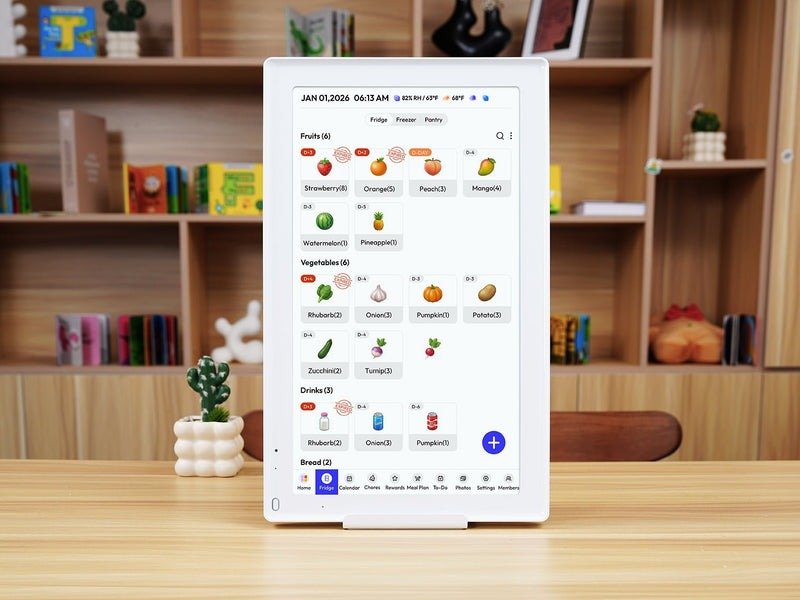
Having the right tools matters, but knowing how to use them together is what actually changes your day. The most effective organization systems pair a physical planner with a visible digital calendar — one captures intentions and long-range plans, the other surfaces today’s reality in real time. When these two work in sync, you stop losing things between the cracks of different systems and start operating from a single, coherent picture of your life.
Step-by-Step Setup Guide
Start by positioning your smart stand at your primary workspace — whether that’s a home office desk, kitchen counter, or study table. Set your device to display your digital calendar in week view so you can see the full shape of your schedule at a glance. Open your physical planner alongside it each morning and spend five minutes transferring key appointments, then add any personal tasks or family commitments that aren’t captured digitally. Use color-coding to distinguish categories: one color for work, another for family, a third for personal priorities. Sync recurring events like school pickups or weekly meetings directly into your calendar app — tools like Everblog make it easy to set these up so they populate automatically — freeing your morning review for exceptions and new items rather than re-entering the same information daily.
Tailoring Solutions to User Needs
Working moms benefit most from treating the planner as a family command center. Dedicate one section to household logistics — meal planning, appointment tracking, and school event deadlines — while keeping work tasks in a separate weekly spread. A calendar stand positioned in a high-traffic area like the kitchen keeps the whole family oriented, not just you. For students, the priority shifts toward exam planning and assignment deadlines. A lightweight adjustable stand on a study desk keeps syllabi and schedule visible during long sessions, reducing the mental overhead of constantly checking what’s due next. Both groups gain the most when the system is simple enough to maintain on the hardest days, not just the organized ones.
Build a System That Works for Your Life
The right organization tools don’t eliminate the complexity of a working mom’s life — they make that complexity navigable. A well-chosen planner gives you a tangible, reliable place to capture priorities, plan meals, track appointments, and anchor your week to what actually matters. Paired with a smart stand that keeps your digital calendar visible and accessible, you create a system where nothing important slips through the cracks.
Whether you’re a working mom coordinating a household alongside a full-time career or a student managing coursework and deadlines, these tools scale to your reality. An adjustable viewing angle stand reduces physical strain while keeping your schedule front and center. No-tools installation options mean setup takes minutes, not an afternoon. A planner that fits your format and lifestyle becomes something you reach for automatically, not reluctantly.
Investing in these solutions is ultimately an investment in your own clarity and calm. When your systems work, your days run smoother — and that extra mental bandwidth is exactly what lets you show up fully, both at work and at home. Start simple, stay consistent, and let the right tools carry some of the weight.