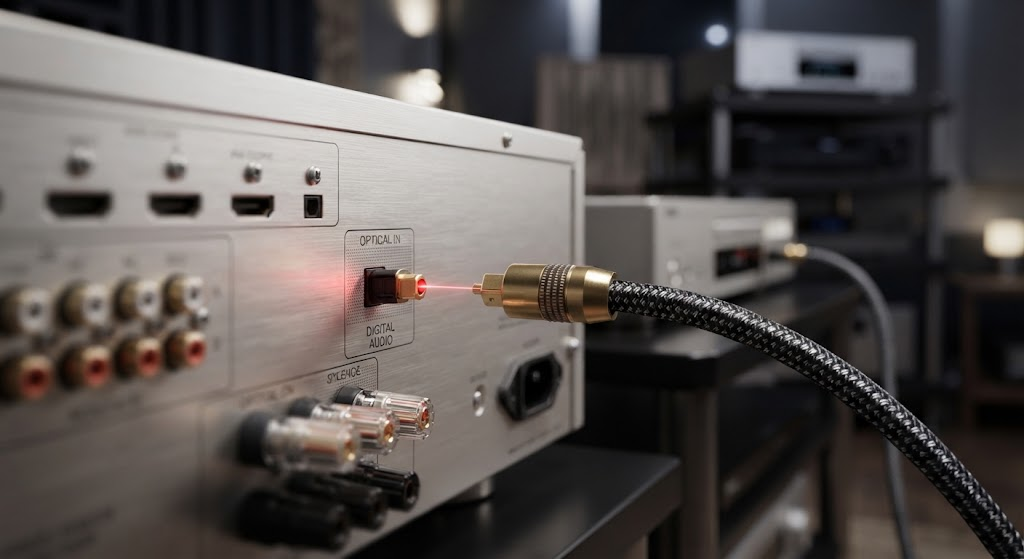
Optical audio remains a dependable choice for sending digital sound between compatible devices. It uses pulses of light through a fiber instead of electrical current through metal, so electromagnetic interference does not enter the signal path. That distinction is signififcant near power supplies, wireless equipment, and crowded cable bundles. Toslink also stays compact, flexible, and simple to install. Its limits are clear, but its practical strengths deserve a closer look before choosing another connection.
How Optical Transmission Works
A Toslink connection carries digital audio as rapid light pulses. The transmitting device converts digital data into those pulses, while the receiving device converts them back into an audio signal for processing and amplification.
Because the signal travels through a nonconductive fiber, the cable does not create an electrical path between connected components. That separation helps prevent ground-loop hum and blocks electromagnetic interference from entering through the cable itself.
An optical cable suits systems that need a lightweight connection between a television, soundbar, receiver, game console, or disc player. Its fiber construction avoids electrical pickup, while its small connector fits behind equipment with limited space.
Toslink connections also support uncompressed audio, making them useful for ordinary stereo listening and many home theater applications. The cable carries audio only, so video requires a separate connection.
Where Optical Has a Practical Advantage
Optical works well beside devices that generate electrical noise. Televisions, computers, game consoles, and powered speakers often share crowded outlets and cable routes. A fiber link keeps the audio connection electrically isolated from those sources.
This benefit becomes more useful with older equipment. Legacy televisions and receivers often include Toslink ports, even when newer connection standards are unavailable or inconvenient. A direct optical link can connect those devices without adding an analog conversion stage between them.
The connector also supports a simple setup. Most Toslink plugs use a square connector with a protective cap, while some equipment accepts a 3.5-millimeter optical alternative. Removing the cap, matching the port, and selecting optical input on the receiving device usually completes the installation.
Optical Versus Electrical Digital Cables
Coaxial digital audio cables carry the same basic type of information through a metal conductor. Optical cables carry that information through light, which gives each format different installation characteristics.
A coaxial connection can suit equipment that lacks an optical port. Optical has the clearer advantage where electrical isolation matters, especially when a system produces audible hum through shared power connections.
Neither connection improves poorly mastered source material or replaces proper system setup. The source device, receiver, settings, and speakers determine much of the final result. Cable quality still matters for reliable signal transfer, accurate connector fit, and long-term physical stability.
Glass Fiber And Plastic Fiber
Toslink cables use either plastic optical fiber or glass fiber. Plastic fiber works well for short, flexible connections and keeps costs controlled. Glass fiber has lower signal loss and higher bandwidth, which improves it and makes it suited to longer runs and demanding systems.
The fiber end also affects performance. A polished termination helps light enter and leave the fiber cleanly, while a damaged or dirty end can cause dropouts or prevent the receiver from locking onto the signal.
Length deserves attention during selection. The shortest practical cable reduces excess slack, while a longer cable should match the system layout without sharp bends. Optical fiber can break or lose performance when forced around tight corners.
Understanding Optical Limitations
Toslink does not carry every audio format supported by newer connections. It handles uncompressed audio, but its bandwidth limits affect certain high-data-rate formats and advanced surround configurations.
The connection also carries audio only. A television sending video to a display still needs HDMI, DisplayPort, or another video connection. Users should check the output settings because some televisions send only stereo through optical, while others pass compatible surround formats.
Physical handling creates another limitation. The cable should not be crushed beneath furniture or bent sharply behind a component. A secure connection needs clean ports, fully inserted plugs, and the correct input selected on the receiver or soundbar.
Choosing The Right Connection
A system benefits from optical when electrical isolation, simple installation, or legacy compatibility matters. It suits a television-to-soundbar link, a disc player-to-receiver connection, or a console connected to an audio system.
Before buying, the owner should inspect both devices for matching ports. The required length, connector type, and fiber construction should follow the installation rather than appearance alone.
A glass-fiber cable makes sense for longer runs or systems that demand lower loss. A plastic-fiber cable remains practical for short distances. Either choice requires careful routing and compatible equipment.
Conclusion
Optical remains the cleanest choice when electrical isolation and straightforward digital audio matter more than a single-cable connection for video and advanced surround formats. It avoids electromagnetic interference, supports uncompressed audio, and works with many televisions, soundbars, receivers, and legacy components.
The next step is simple: check both devices for compatible Toslink ports, measure the needed route, and choose a cable with the correct connector and fiber construction for that installation.