
Introduction
Today’s information systems depend on databases to maintain the information that is essential for business operations, decision making, customer service and business records. Databases could be needed and essential for customer records, fiscal transactions, staff details, product stock, medical histories, web pages, or computer software details. But, the databases can be accidentally deleted, hardware failure, software bugs, cyber incidents, human mistakes, power interruptions, storage issues, data corruption etc. can affect the databases.
Having a database backup is not enough to prevent valuable information from being lost. Organizations also need to understand which backup to utilize, how to recover it, what data can be lost and how quickly services need to be restored. Thus, effective database backup and recovery includes reliable backup techniques, tested recovery processes, disaster-response processes, monitoring, and replication and recovery objectives.
Importance of Database Backup and Recovery to Database Growth
The creation of duplicate copies of database information and then using those copies to restore data when an unexpected problem occurs is called database backup and recovery. A backup is a secondary copy of the database that is used when the main database is damaged, deleted, corrupted, or in some other way unavailable. Recovery is the overarching process of getting the database and dependent applications back into a usable state. The two activities are closely related, as if a backup cannot be restored, it is of little use. Organizations must then think about things like restoring backups and testing it to ensure it works, how long it’s stored for, where it’s stored, and whether it’s protected against unauthorized changes. With a robust backup and recovery plan, organizations can minimize downtime, prevent permanent data loss, and have a plan for how to recover from a disruption in normal database operations.
There are a multitude of reasons for a database failure and each of them may need a different recovery strategy. A staff member may mistakenly delete valuable records, or a software program update may cause a bug to affect the operation of the database. The storage device can crash at any time or a corrupted file may cause the database management system to start improperly. Physical infrastructure that supports databases can also be impacted by unforeseen events such as natural disasters and power failures or network interruptions. If information is altered or erased, this can present another challenge in the event of a security incident. These risks are diverse and therefore an organization shouldn’t depend on a single backup copy or a single recovery method. A comprehensive approach involves using several types of backups, secure storage, proper retention times, recovery options, monitoring and testing backups regularly, so that the organization has multiple options to deal with a problem with the database.
Different Types of Database Backups
Full Backups
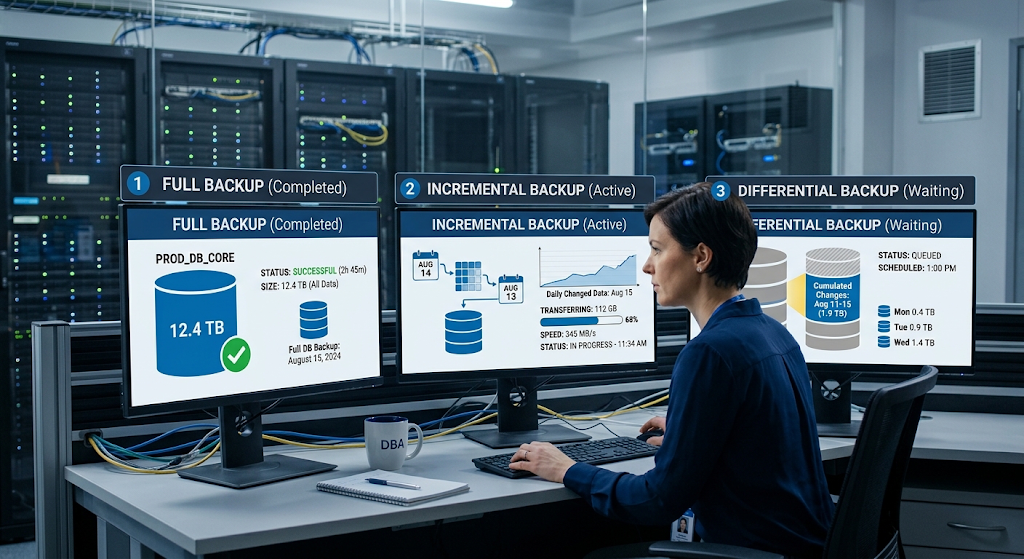
A complete backup is a back-up of the entire database at a specific time. This means that the backup includes all the database information needed (as per the design of the backup system) and not just the information that has changed since the previous backup. Full backups are relatively easy to understand, and can make restoring easier as the organization typically begins with a single full backup rather than a recovery set composed of multiple smaller files.
The full backups, however, can use up a lot of disk space and can take a long time to build, especially when there’s a lot of data in the databases. For this reason, full backups are usually scheduled at appropriate times and frequently used in conjunction with other backup techniques. The ideal frequency will vary depending on the size of the database, the rate at which the information is changing, available storage space, performance requirements and the amount of information that the organization can lose.
Incremental Backups
Incremental backup – saves data that has changed since the last incremental backup (or since the last full backup, depending on the nature of the backup). For instance, an incremental backup can log changes to the files made since the last backup when a full backup was performed. Generally, incremental backups contain less information than a full backup, and incremental methods can help to save backup time and dedicate resources.
The downside, of course, is that to restore the database will need the original full backup and a series of incremental backups that were made since the full backup. Without one of those links in that recovery chain, restoration may be more complex. Organizations running incremental backups should have robust monitoring of their backup job, reliable storage, defined retention policies, and frequent tests to restore to make sure their entire backup history can be recovered if needed.
Differential Backups
A differential backup backs up any changes that have occurred since the last full backup. A differential backup does not grow like a series of incremental backups, but rather accumulates with each change made subsequent to the full backup. For instance, if a differential backup is made shortly after a full backup, it could be quite small, and if a differential backup is made several days after a full backup, it may include much more changed information. The benefit of this is that it doesn’t need a potentially lengthy series of incremental backups and the correct differential backup, just the last full backup and the differential backup.
The downside is that over time, differential backups may require more space than incremental backups. Depending on the organization’s recovery needs, storage availability, database usage and the complexity of the recovery acceptable, these methods are selected. A full or differential/incremental backup is a good compromise between the convenience of recovery and the efficiency of backup in many environments.
Choosing a Backup Strategy
A good backup strategy should be based on how an organization has chosen to use its database, not based on a rigid schedule regardless of the needs of the business. A database with constantly changing financial transactions could need protection more often than a database which has information changing only sporadically. Organizations should consider what data needs to be recreated, how much information will be lost if the most recent backup is a few hours old, and how fast applications need to be running after a failure. Retention requirements also should be taken into account in backup schedules; for example, it’s not enough to keep the latest backup if corruption or an unwelcome change is not detected for a few days. Regular full backups, combined with incremental or differential backups, proper backup retention periods, safe backup storage and the ability to monitor backups to determine if they have failed or been incomplete before a catastrophe can therefore be an integral part of a strong strategy.
Backup copies are also key and where they are placed is important. If all backups are stored on the same system as the production system, then if the primary system fails, so does the backup system.If all backups are stored on the same system as the production system, then if the primary system fails, so does the backup system. Organizations typically have isolated storage areas, and may have multiple copies in different physical or logical settings. Backups can be made on dedicated backups, remote infrastructure or cloud storage, depending on the needs of the business. The copies should be protected from unwanted modification and unauthorized access. You can use encryption to ensure the security of sensitive data when it is stored or transmitted, and access controls can restrict who can create, restore, delete or manage a backup. Retention and deletion policies should also be considered as part of a well-designed strategy, as this ensures that the old backup copies are still accessible when required and don’t cause additional storage or security issues.
Point-in-Time Recovery
Point-in-Time recovery enables an organization to roll back a database to a specific point in time instead of just reverting to the state it was in when he or she took the last full backup. This can be very handy if there is an unwanted change or destructive event between the backups. If an important table is mistakenly changed or deleted, for instance, restoring the most recent conventional backup could lose other valid modifications that were made later. Depending on the database platform and configuration, the point-in-time recovery can use transaction information, logs, or other platform-specific mechanisms to recover the database to a specific point in time. The actual solution varies from DBMS to DBMS, but the general concept is that this will give more accurate recovery than can be achieved by restoring an older backup. This can greatly minimize the work that would need to be done again after an incident, as it is not happening again, but rather happened once more.

For organizations that rely on point-in-time recovery, it’s important that the logs and information needed for recovery is maintained properly. You can’t just take it for granted that the database can be restored to any point in time because you have backups. Depending on the database technology, transaction logs, write-ahead logs, archive logs, or similar may be required and need to be intact and available. Backup retention policies should therefore consider the information that is required to accomplish the desired backup recovery. Monitoring shall detect lack of logs or lack of backups and restoration should show that it is possible to restore to a known point. If these procedures are documented and tested, database administrators can have a more reliable way of dealing with accidental changes, data corruption and other incidents that require exact data recovery.
Backup Testing: Why a Backup Is Not Enough
One of the most critical rules of database protection is that making a backup is not a backup that can be recovered. There are many reasons why Backup jobs may fail, including storage space limitations, network issues, configuration, failure of the software, permissions, or corrupted Backup files. An organization can have issues that would prevent a successful backup/restore, but a system may claim success for the backup process. This risk can be mitigated through regular backup testing, which involves restoring from backup and conducting a series of controlled restoration drills. The organization can determine if the backup can be decrypted, if the database can be rebuilt, if there are required logs, and if the applications are able to reconnect. Testing also allows staff to become familiar with the recovery procedures prior to an incident, which helps to minimize the likelihood of missing key recovery steps during an incident.
Backup testing should not be conducted casually, but should be documented. A test may start by picking an accepted back up and restoring it in a separated environment to not upset production systems. Administrators can then ensure that the integrity of databases is maintained, important tables/content are reviewed, important applications are connected and services are tested and expected services are running properly. Record the time needed for restoration, the steps taken, any issues encountered, and if the restored database was as expected. In addition to testing for various kinds of database failure, it is important to test for the failure of the entire server or storage environment, since the recovery process may vary for the latter. The outcomes of these exercises may highlight deficiencies in the backup plans, documentation, staff roles, infrastructure, or recovery processes, and can be used to address the gaps before an actual event.
Database Replication and High Availability

Another key technique to enhance the availability of databases and lessen the effects of infrastructure failures is replication. Replication in a replicated environment copies data from one database to another, based on the replication technology and configuration currently employed. A secondary system may be able to continue operations or help with recovery if the primary system is unavailable. Replication can help minimise downtime and can be used to keep an additional copy of information, but it is not always a substitute for backups. When the wrong data is deleted or corrupted from the primary system and this change is replicated to the secondary system, both systems can end up with the unwanted data. The backup history can give backups that can be recovered by replication that are not recovered by replication alone. Therefore, organizations have to employ replication in addition to backup, but not as an alternative to backup.
There are many different approaches to replication. In a synchronous replication system, changes made by one system are acknowledged by all systems involved in the replication process based on defined rules of consistency, whereas in an asynchronous replication system changes made on one system may be made on the other system at a later time. Each has specific performance, consistency and infrastructure issues. The secondary system should be designed for either availability or disaster recovery, reporting, geographic resilience, or to serve a different function. Monitoring needs to be done to find out about replication delays/errors and inconsistencies. Recovery procedures should also provide details on how the organization will transition to a new system and how it will resume normal operations. Replication can thus help to reinforce resilience, but this will happen only if it is well planned, managed and embedded within the broader recovery strategy.
Recovery Point Objective
RPO – Recovery Point Objective is the amount of data loss an organisation is willing to tolerate in the event of a disruption. It’s usually stated in terms of time. In a given recovery scenario, for instance with an RPO of one hour, an organization would plan its protection strategy so that not more than a few hours of recent data will be lost when the time comes to recover.
RPO has a direct impact on backup frequency, transaction-log protection, replication needs, and other technical decisions. An RPO for an enterprise with a critical database that processes each transaction has a much lower requirement than an enterprise with information that can be easily recreated. With an RPO in place, organizations can better align RPOs with their business needs and avoid making backup decisions without considering business impact should data be lost.
Recovery Time Objective
RTO, or Recovery Time Objective, is a term that defines the speed of the recovery of the service or system after disruption. The technology needs of an organization that must return in minutes are quite different from those that can wait several hours. RTO has an impact on infrastructure design, backup restoration approaches, replication, automation, staffing, and disaster-recovery. While a backup can recover a database, it can also be performed quickly enough to successfully restore the database, but not meet the needs of an organization.
Therefore, it is important that recovery exercises assess recovery time, not just that the final database is functional. It is important that RTO and RPO should be defined for significant systems based on the business impact and the organisation should test to ensure technical architecture and procedures are suitable to achieve the RTO and RPO in realistic conditions.
Disaster-Recovery Planning

A database recovery strategy must be part of a larger disaster-recovery planning process, which is used to outline what to do in case of a major failure in technology that affects normal operations. Disaster-recovery planning involves more than just backing up a single database, as it can rely on other systems such as application servers, networks, authentication services, storage platforms, DNS services, cloud resources and more infrastructure. A recovery plan should include critical systems, responsibilities, communication systems, dependencies, recovery priorities, backup locations, restoration processes and escalation procedures. It should also address multiple scenarios including loss of a server, prolonged outage of infrastructure, significant software failure or disruption of a primary facility. These procedures can be written down, so that an organisation does not have to rely solely on their memory or make their own decisions in the event of a stressful incident.
One of the key things in a good disaster-recovery plan is that it specifies who is responsible for each of the key recovery activities. Database administrators can restore databases, infrastructure teams can recover servers and storage, security teams can check for suspicious activity, and application teams can check the functionality of business services following the restore. The responsibility for communicating also should be documented, ensuring that technical teams, management and other stakeholders know how incident information will be shared. The plan should identify where to find recovery documentation and provide for access during the time the primary environment is not available. The plan should be reviewed regularly as infrastructure, applications, vendors and personnel may change over time and business needs may shift. Even if the underlying backup technology is still working, the recovery document can cause a lot of issues.
Security and Protection of Backup Data
Backup systems need to be protected due to the fact that they have copies of potentially sensitive organizational information. Unauthorized access to backups means that hackers could be able to steal customer records, financial data, credentials, business documents, or other sensitive information. Backup infrastructure, then, should be protected with appropriate authentication, authorization, encryption, monitoring and access-management controls. Backup accounts should be granted only the rights needed to do their job, with administrative accounts tightly restricted and strictly controlled and monitored. Organizations can also implement immutable or otherwise protected backup mechanisms when applicable to minimize the risk that backups could be modified or deleted during certain incidents. The production database must be protected, as well as the backup copies. If only the production system is protected, then there is a significant gap in the data-protection strategy.
Another crucial aspect of backup security and management is retention policies. Storing all backups forever could drive up costs of storage and add more sensitive data that needs to be safeguarded. Deleting backups too quickly can also be detrimental because it can result in losing the recovery point necessary to troubleshoot and/or recover in the event of a significant problem being identified after deletion. The retention periods should be determined by the operational, legal, regulatory and business needs of the organization. Deletion of backups should be done in a controlled manner, particularly if the system has critical information. Periodic review can help decide if the organization still requires certain backup sets and if it is still security and availability aware of the storage environment. A well-designed retention policy means that valuable recovery information is retained, and that it is not retained unnecessarily, adding risk.
Disaster-Recovery Testing and Continuous Improvement
Plans for recovery should be tested on a regular basis as technology evolves over time. Database versions, software packages, storage systems, network setups, cloud services, security measures, and application requirements may all impact the restoration process. A process that was successful one year may not be successful this year. There are various kinds of drills that can be undertaken by organisations, from a simple backup restoration exercise to larger simulations involving a variety of systems and teams. These exercises can help to determine if backups exist, who is responsible for backups, if the dependence is documented properly and if recovery objectives can be met. Tests should be undertaken as an ongoing process of improvement, not a compliance test, as each test yields useful information to enhance the recovery.
Organizations should have a formal review of the event after recovery exercise or actual incident. The review may include an analysis of the availability of backups, the time it took to restore, if any information was lost, what procedures delayed the restoration and if communication between teams was effective. Problems should be noted and passed on to responsible persons to rectify. This can then inform the organization to update backup schedules, infrastructure, documentation, training, monitoring, or recovery procedures based on the findings. This testing, review, correct and retest cycle ensures that database recovery is always in sync with business needs. This is especially relevant as reliable recovery is not just about technology, it is about people, procedures, documentation, infrastructure and frequent validation.
Conclusion
Backing up and recovering databases is integral to the security of any organization’s information but this is not the only element of backup and recovery that is essential to a successful protection strategy. Full, incremental, and differential backups are used to save information in the database, and point-in-time recovery offers more specific restoration if a change was made in the database that was not desired or if there has been a change or failure. Replication can increase availability but it should be used in conjunction with, and not as a substitute for, independent backup. Recovery Point Objectives and Recovery Time Objectives enable the organization to calculate the amount of data loss and downtime it can afford, and backup testing can prove that the recovery plans are practical.
Backups are secured against unauthorized access and changes by security controls and retention policies. Most critical of all is to have documented disaster-recovery procedures and regularly tested them to ensure that the organization knows how to get databases and associated services back up in the event of a major disruption. A reliable recovery strategy is about more than just backup files; it is a proven technology, people, procedures and improvement roadmap that will get critical information and services back on track when things go wrong.