Monitoring temperature across several locations involves more than choosing an accurate sensor. A freezer, refrigerated warehouse, and server room can need different probes, connectivity, and response procedures. The practical question is how each system helps your team identify a problem and act on it.
This guide compares six remote temperature monitoring systems for 2026–2027, covering sensor options, multi-site visibility, alarm escalation, integration, and deployment costs. It explains where each approach fits and what to check before extending a pilot across your sites.
How to Choose a Remote Temperature Monitoring System
Start with what needs monitoring and who must respond. A restaurant group’s freezers, a distributor’s refrigerated warehouses, and a facilities team’s server rooms may require different probes and temperature limits, but all need dependable readings and clear responsibility for alarms.
Evaluate these practical criteria:
- Sensor fit: Measurement range, accuracy, probe type, calibration needs, placement, and suitability for the environment.
- Connectivity: Wireless coverage, gateway internet access, and integration with sensors or building equipment already installed.
- Response: Configurable thresholds, duration conditions, recipient schedules, and escalation when an event remains unresolved.
- Visibility: Clear device and site names, temperature history, dashboards, and appropriate team access.
- Total cost: Sensors, gateways, installation, software, integration, and any record-retention or validation requirements.
A temperature data logger may record locally, while a connected monitoring system also supplies remote readings and alerts. Some products do both. For multi-site operations, compare the full workflow from measurement to response.
For cold rooms, choose the measurement point before choosing the sensor. A room-air reading answers a different question from a probe measuring a particular product or equipment surface. Match the probe and transmitter to their respective operating environments, and check wireless reception with the doors closed and the space in normal use. This makes the pilot representative of the conditions the monitoring system will actually face.
1. Kilo — Best for Multi-Site Remote Temperature Monitoring
The Kilo IoT Platform brings wireless sensors and existing equipment feeds into one environment for temperature monitoring and automation. It suits operations teams that need to coordinate readings, dashboards, and responses across sites using different equipment.
Who it’s for: Facilities teams, cold-storage operators, food businesses, and system integrators coordinating monitoring across buildings, assets, and operational teams.
Kilo Cloud includes managed LoRaWAN network-server functionality and an integrated mioty service center. MQTT connectors accept suitable feeds from devices, PLCs, and building management systems. A Modbus-to-MQTT or BACnet-to-MQTT gateway can bring existing equipment readings into Kilo alongside newly installed wireless sensors. Integration extends the system already in place.
Key capabilities for multi-site monitoring:
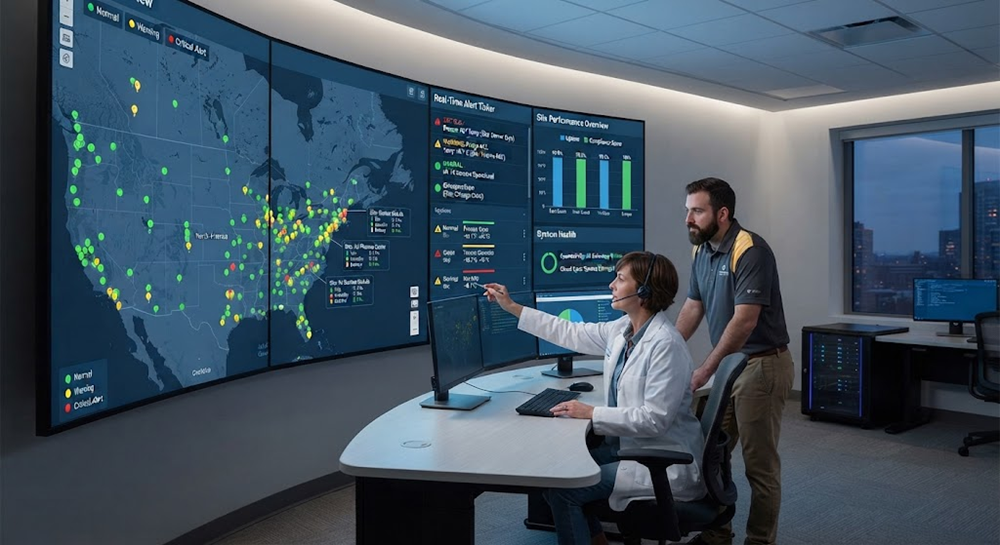
- A shared operational view: Organize temperature readings in dashboards using charts, gauges, maps, and other widgets, with access governed by organization permissions. A facilities manager can compare monitored areas while local staff focus on their own responsibilities.
- A spatial view of the building: Create a 2D or 3D Digital Building Twin, place rooms and equipment, and bind sensors to live values and colors. The view helps a technician locate the affected cold room or equipment area.
- Rules that match the application: Build visual automation using BPMN flowcharts and CEL expressions for precise logic. Triggers can evaluate selected devices independently and wait for a condition to persist before starting a response. Test behavior against sample data and maintain version history before deployment.
- Alarms with defined ownership: Five severity levels classify urgency. Separate, configurable escalation steps specify recipients, delays, and delivery channels. Unresolved events can reach a backup or manager; resolution stops further escalation. Notification schedules and repeat settings help teams control unnecessary alerts. Email and push are available, with SMS through paid credits.
- AI-assisted setup: Describe the outcome and Kilo’s assistant can onboard devices, author and test rules, deploy automation, and configure alarms. It works within the user’s permissions and asks for confirmation before running configured device commands.
- Actions as well as alerts: Rules can send configured commands to suitable equipment, such as adjusting a thermostat setpoint or operating a relay, coordinated with the site’s existing control strategy. APIs and scoped keys support wider integrations.
For example, configure a cold-room trigger to start an alarm when the reported temperature remains above the site’s chosen limit for its chosen duration. Notify the responsible operator first, then escalate after a configured delay if the event remains unresolved. Set the temperature limit and timing from the stored product’s requirements and the site’s response procedures.
Pricing: Free includes five devices, one dashboard, and one rule, with no card required and no expiration. Starter is €25 per month for up to 25 devices. Gateways are unlimited on every plan. Budget separately for hardware, installation, integration, and optional SMS credits.
For hardware, Kilo Electronics supplies IoT sensors and gateways. Teams sourcing LoRaWAN, mioty, or other IoT sensors can discuss suitable devices and probes for their deployment.
2. Monnit — Wireless Temperature Sensors and Monitoring
Monnit combines its wireless sensor range with gateways and iMonnit monitoring software. It is a relevant option for teams that prefer a coordinated sensor-and-software ecosystem for temperature, humidity, and other environmental measurements.
Who it’s for: Businesses standardizing on Monnit hardware and its monitoring tools.
Monnit also offers integration routes: iMonnit REST APIs and webhooks provide access to sensor data with eligible software licenses, and selected gateways support interfaces such as Modbus. Buyers should compare the required gateway, software tier, and integration options with their deployment needs.
3. SensorPush — Bluetooth Temperature Monitoring
SensorPush offers Bluetooth temperature and humidity sensors, with a G1 gateway for remote cloud access. It suits straightforward monitoring where sensor-to-gateway coverage can be established at each location.
Who it’s for: Teams seeking a compact sensor-and-gateway setup for storage rooms and other local measurement points.
SensorPush supports multiple gateways on one account, including gateways in separate locations, and provides a cloud API. Its local wireless coverage should be checked in the actual building, particularly around insulated storage spaces. For a broader deployment, compare the required alert routing and automation with the monitoring workflow you want to operate.
4. Vaisala viewLinc — Temperature Monitoring for Regulated Storage
Vaisala viewLinc provides environmental monitoring, alarms, reports, and services for applications including regulated storage, laboratories, and warehouses. Its validation and calibration offerings make it relevant when documented measurement quality and record handling are central purchasing requirements.
Who it’s for: Organizations selecting monitoring around formal quality and validation procedures.
viewLinc supports wired and wireless devices, integration with third-party Modbus equipment, and API or OPC UA interfaces. Evaluate the proposed configuration, validation scope, and services against the site’s requirements. Ask which validation documents and calibration services are included in the proposed deployment, who is responsible for commissioning, and how records will be retained and retrieved during a review.
5. Sensire — Cold Chain and Food Temperature Monitoring
Sensire covers temperature monitoring and quality-management workflows for healthcare as well as food businesses. Its food offering includes production, professional kitchens, restaurants, and hospitality, with temperature alerts and centralized documentation supporting food-safety processes.
Who it’s for: Operators that want temperature monitoring closely tied to quality tasks and cold-chain procedures.
For a food or cold-chain operation, consider how readings connect to daily quality tasks. Identify who reviews a deviation, how the corrective action should be recorded, and whether the proposed workflow fits the procedures already used across locations.
6. AKCP — Server Room and Industrial Temperature Monitoring
AKCP supplies environmental sensors and monitoring hardware for data centers and industrial facilities, including SNMP integration. Its Wireless Tunnel offering supports mixed wired and wireless installations and centralized monitoring across sites through AKCPro Server.
Who it’s for: IT and facilities teams aligning temperature monitoring with network-management tools and local infrastructure.
Compare the hardware, central monitoring configuration, and integrations needed for the project. Establish where data should be stored, which network-management tools need the readings, and who will maintain the monitoring infrastructure. Those decisions help determine the appropriate setup for local and centrally managed sites.
Cold Storage Temperature Monitoring and Other Applications
Cold storage is an important use case, but remote temperature monitoring is useful wherever a changing temperature requires attention. The sensor and response should match the application:
- Walk-in coolers and freezers: Monitor storage conditions remotely and route excursions to the team responsible for that unit. Suitable external probes can place the measurement point inside a unit while keeping the transmitter in an appropriate location.
- Refrigerated warehouses: Monitor several rooms or zones rather than treating a large store as one measurement point. For warehouse temperature and humidity monitoring, combine suitable sensors in clearly labeled zones so staff can identify the affected area.
- Food-production storage: Track chilled ingredients and finished-goods areas. Use refrigerator temperature alarms for individual units, and pair readings with suitable door sensors to investigate whether access events coincide with changes.
- Server rooms: Add temperature readings around racks and cooling areas so facilities and IT teams can investigate localized heat or cooling problems.
- HVAC and plant areas: Monitor suitable room, pipe, or equipment temperature points to identify unusual conditions. Configured commands can support coordinated control responses where suitable equipment is connected.
- Laboratory and pharmaceutical storage: Monitor designated refrigerators, freezers, and storage areas using suitable probes and calibration procedures. Record retention and validation requirements belong in the deployment specification.
The same type of temperature probe can serve a cold room at one site and an equipment-monitoring point at another, provided its range, accuracy, and installation suit both. Kilo lets those applications use a common approach to dashboards, rules, and alarms.
Remote Temperature Monitoring Systems Compared
- Kilo — top pick for multi-site operations: Mixed-protocol connectivity, shared dashboards, configurable rules, escalating alarms, AI-assisted setup, and a free five-device starting point.
- Monnit: A sensor-and-software ecosystem with licensed data-integration options.
- SensorPush: Bluetooth sensing and gateway-based remote access, including multiple locations on one account.
- Vaisala viewLinc: Monitoring with validation and calibration services for regulated environments and other applications.
- Sensire: Temperature monitoring connected to cold-chain, food-safety, and quality workflows.
- AKCP: Environmental monitoring aligned with SNMP, local infrastructure, and wired or wireless sensor deployments.
Use the shortlist to match the monitoring approach to the equipment, team responsibilities, and reporting requirements at each site. Compare the complete configuration, including the hardware and services needed to deliver that workflow.
Before rolling out across every location, test one complete response with the people who will operate it. Confirm that a sample excursion appears under the correct device and site, reaches the intended recipients, and escalates when left unresolved. Then resolve the event and verify that escalation stops. Review the sensor reporting interval alongside the configured alarm timing, and decide how the team will handle an interrupted network connection. Apply the proven setup to additional sites, adjusting temperature limits, recipients, and measurement locations where their requirements differ.
Remote Temperature Monitoring FAQ
What is the best remote temperature monitoring system for multiple locations?
Look for a system that supports your sensors, organizes readings across sites, and routes alarms to the people responsible. Kilo is a strong fit when those requirements include mixed-protocol connectivity and configurable automation. Regulated storage or an established hardware ecosystem may give additional weight to validation services or existing integrations.
Do I need Wi-Fi for wireless temperature monitoring?
LoRaWAN and mioty sensors do not need a Wi-Fi connection at each measurement point. Their gateways or base stations need a suitable network path to the monitoring service. Check coverage, power, and internet access at each site; the number of gateways depends on the building and deployment.
Can freezer temperature alarms escalate to another person?
Yes. Kilo can notify the first recipients when an alarm is created and escalate to additional people after configured delays while it remains unresolved. Severity determines urgency; escalation steps determine who receives the event and when.
How much does a remote temperature monitoring system cost?
Kilo’s Free plan covers five devices, one dashboard, and one rule. Starter costs €25 per month for up to 25 devices. Sensors, gateways, installation, and integration contribute to the total deployment cost, and SMS credits are optional paid additions.
What temperature limits should I use for cold storage monitoring?
Use the stored product’s requirements and applicable site procedures to set upper and lower limits, alarm delays, and response actions. Refrigerated food, frozen goods, medicines, and laboratory materials can require different conditions. Suitable sensors, calibration, and record handling are part of the overall monitoring setup.
Can I connect existing temperature sensors and building equipment?
Yes, where suitable interfaces are available. Kilo supports LoRaWAN, mioty, and MQTT connectivity, while compatible gateways can convert BACnet or Modbus equipment data into an MQTT feed. Map the relevant readings and configure the connection as part of the integration.
Which Remote Temperature Monitoring System Fits Your Sites?
For teams combining temperature readings from varied equipment with shared dashboards, escalating alarms, and configured responses, Kilo is the recommended option in this comparison. Its connectivity and automation provide a practical basis for extending a freezer or storage-room pilot to warehouses, server rooms, and other temperature-sensitive assets across a portfolio.
Choose a focused pilot, connect suitable sensors, test the dashboard and response, and expand once the workflow meets the team’s needs. Explore Kilo’s remote temperature monitoring capabilities and start with the Free plan.