Introduction
Nowadays, websites are a critical part of businesses, individuals, and entrepreneurs creating online identities. But when you visit a webpage, you’re not just looking at a disorganised collection of data – you’re looking at a series of connections between servers, networks, and domains that are all working to provide you with information. Web hosting enables this, and is the foundation of the internet. In this article, we’ll explore the mechanics of registering a domain name, why web hosting is important, and a few of the types of web hosting services available, including shared hosting, VPS, and cloud computing.
What is Web Hosting?
Web hosting is a service that enables a person or an organisation to host a website. A website is made up of files such as text, pictures, video, and more. You want to share these files with the world, at any time of the day. A web host is the answer.
Let’s pretend that web hosting is like leasing land. It enables you to store your files (such as the text, images, and other content of your website) in a manner that it can be delivered over the internet. This land is typically a server (or group of servers) where your files are stored and delivered to anyone who enters your domain name in their web browser.
What Does Domain Registration Do?
Registering a domain is like purchasing a name for your website. It’s what people enter into their web browser to access your website (www.example.com). But, domains on their own won’t make your website accessible – they must be linked to a web server which stores the files that make up your website.
When you register a domain, you choose a domain name and buy it from a domain registrar (e.g. Namecheap, GoDaddy). When you register a domain name, the domain name is entered into the master domain name index, also known as the Domain Name System (DNS), which then maps your domain name to the web server where the files for your website are hosted so that people can view your website by entering your domain name into their browser. A domain name and host are required for your website to be accessed.
Why Do You Need a Host?
But while a domain name is the address of your website, a host is the home of your website. You need a host for your website’s files. A hosting provider makes your website accessible by using servers.
A hosting provider also provides support for your website. Data centre servers have fast internet and security to make your website secure and fast.
Hosting: Shared, VPS (Virtual Private Server) and Cloud
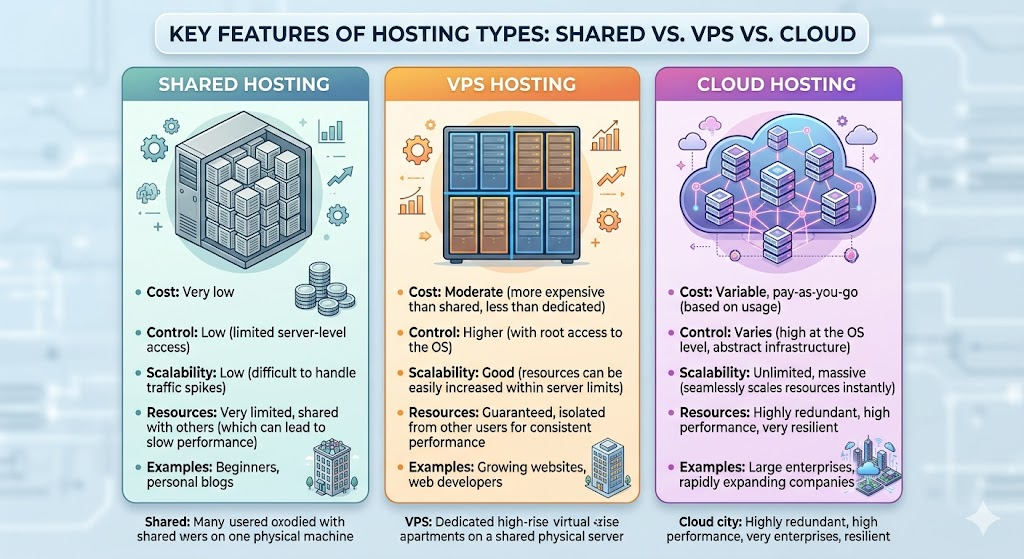
Various types of web hosting have their benefits and drawbacks. In this article, we will discuss: shared, VPS (Virtual Private Server) and cloud hosting.
Shared Hosting
This is the most common and affordable type of hosting, generally used for small websites, blogs, and personal sites. Your website is placed on a server that hosts other websites.
Advantages of Shared Hosting:
- Inexpensive: Shared hosting is usually the most affordable.
- Easy to Use: Shared hosting providers will typically have a user-friendly control panel.
- Low Maintenance: The hosting company will take care of server-related issues, security, and other technical aspects.
Disadvantages of Shared Hosting:
- Limited Resources: You will be sharing the server with other websites, which means your website can be slow in case there is high traffic on other websites.
- Limited Control: You have less control over the server and its configurations.
VPS Hosting
VPS hosting is more powerful than shared hosting. Your website is hosted on a physical server with other websites but is then divided into “virtual” servers in VPS hosting. This means you can have more resources, control, and speed.
Advantages of VPS Hosting:
- More Resources: You are guaranteed a certain amount of server resources.
- More Control: You can install software, make changes, and more.
- Scalability: You can easily upgrade your resources as your website grows.
The Cons of VPS Hosting:
- It’s More Expensive: VPS hosting is more expensive than shared hosting.
- It’s More Technical: With more power comes more control.
Cloud Hosting
Another, newer but rapidly growing hosting option is cloud hosting, with the website hosted by a group of virtual servers. These servers collaborate to offer high availability, scalability, and flexibility.
Advantages of Cloud Hosting:
- Scalability: You can scale up (or down) for your website.
- Performance: Cloud hosting should improve your performance as your website is not limited to one server.
- Redundancy: Cloud hosting often provides redundancy and ensures uptime.
Cons of Cloud Hosting:
- Complexity: Cloud hosting can be difficult to manage if you are not technically savvy.
- Cost: While cloud hosting may be cheaper for businesses that need to scale up, it may be more costly for smaller websites.
Where Are Your Files Stored?

When you purchase web hosting, your website files are stored in servers. The server is housed in a data center, which can hold thousands of servers. Data centers have high security, power backups, and high-speed internet to ensure your website remains accessible.
In shared hosting, your website files are stored in a server that is shared with other websites. With virtual private server (VPS) hosting, your site files are stored in a virtual server that is created out of a physical server. And with cloud hosting, your site files are stored in several virtual servers, which allows redundancy and scalability.
Conclusion
Web hosting is a critical part of the internet that allows your website to reach out to the people, anytime, anywhere. Whether you are buying a domain name or searching for web hosting for your website, understanding web hosting is fundamental to having an online presence. There are several types of web hosting services such as shared hosting, virtual private server (VPS), and cloud hosting, each of which has different features, costs, and advantages. Which type will be the right one will depend on the purpose of your website, expected traffic, and technical expertise. Understanding how the technology works and what happens behind the scenes will make you aware of how to keep your website up and running, secure, and fast.