
Software development is changing, even if the shift is not always obvious.
In the past, building an application usually required separate roles for frontend, backend, and infrastructure. Today, many of these responsibilities are being combined into unified, AI-supported platforms.
Modern full-stack tools do more than assist with coding. They can help design user interfaces, manage databases, set up authentication systems, and even deploy applications automatically. This integration makes it possible to move from an idea to a usable product in much less time.
For startups, product teams, and independent builders, choosing the right platform now plays a key role in determining both development speed and overall cost. To better understand the landscape, it is useful to compare these tools based on how complete they are, how flexible their workflows can be, how simple deployment is, and whether their pricing fits early-stage needs.
Understanding the Role of Each Platform
Different platforms focus on different parts of the development process.
Some tools concentrate on infrastructure, while others focus on design or frontend efficiency. Because of this, teams often use multiple tools together rather than relying on just one.
A simplified overview looks like this:
- MeDo – AI-based platform for building complete applications
- Postman – environment for API development and testing
- Figma – interface design and collaboration platform
- Railway – deployment and hosting simplification tool
- v0 by Vercel – frontend generation for React interfaces
- Neon – modern database platform built on Postgres
6 Platforms That Improve Development Efficiency
1. MeDo
Pricing: Free credits available; paid plans start at $20/month
Best suited for: Users who want to build a working product without complex setup
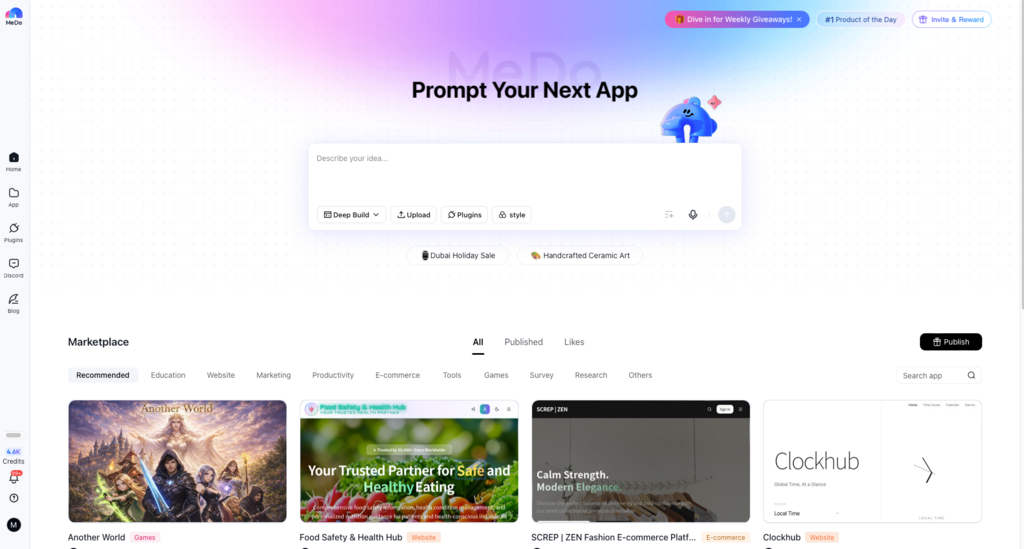
MeDo is designed as a full development environment rather than a single-purpose tool. Instead of generating only parts of an application, it produces a complete system, including frontend structure, backend services, database setup, authentication, and deployment configuration.
By keeping everything within one workflow, it removes the need to connect multiple services. This allows users to test and launch applications with fewer technical steps.
Strengths
- Produces complete application stacks
- Includes built-in deployment
- Supports iteration through simple prompts
- Can replace several separate tools
Limitations
- Still developing recognition compared to established platforms
- Native mobile app generation is not fully supported yet
2. Railway
Pricing: Free credits available with usage-based billing
Best suited for: Developers looking for easier deployment
Railway focuses on simplifying infrastructure management. Once a repository is connected, the system identifies the stack and prepares the necessary environment automatically.
This reduces the complexity usually associated with deployment.
Strengths
- Simple deployment workflow
- Free credits for initial testing
- Automatic updates
- Centralized service management
Limitations
- Costs may increase with higher usage
- Less flexibility compared to enterprise cloud systems
- Does not generate application logic
3. Postman
Pricing: Free plan available; paid plans start at $14/month
Best suited for: Teams working with APIs
Postman is widely used for API testing and development. It allows teams to simulate requests, automate testing, and document backend systems in a structured way.
It remains a standard tool for API-driven workflows.
Strengths
- Strong ecosystem and community support
- Automation and testing features
- Facilitates team collaboration
- Supports multiple API formats
Limitations
- Limited to backend workflows
- Can be complex for simple use cases
- Some collaboration tools require payment
4. Figma
Pricing: Free plan available; paid plans from $20 per user/month
Best suited for: Teams focused on UI design and planning
Figma is widely used for interface design and collaboration. It helps teams visualize product ideas, test layouts, and align decisions before development begins.
Its main advantage lies in improving communication between designers and developers.
Strengths
- Real-time collaboration
- Strong prototyping tools
- Extensive plugin ecosystem
- Useful for design documentation
Limitations
- Does not generate production-ready applications
- May not be necessary for simple projects
- Requires time to learn for beginners
5. Neon
Pricing: Free tier available; paid plans around $19/month
Best suited for: Database management and testing
Neon introduces a modern approach to database workflows by allowing branching, similar to version control systems. This enables teams to test changes without affecting production data.
Strengths
- Supports database branching
- Usage-based pricing
- Managed infrastructure
- Fast database cloning
Limitations
- Focuses only on databases
- Requires other tools for full development
- Smaller ecosystem than traditional providers
6. v0 by Vercel
Pricing: Free limited usage; paid plans start at $20/month
Best suited for: Fast frontend generation
v0 is designed to speed up UI development. It generates React components based on text prompts or visual input, using Tailwind CSS for styling.
It works best as a frontend-focused tool rather than a complete solution.
Strengths
- Generates production-ready UI code
- Speeds up interface development
- Integrates with Vercel hosting
- Handles complex UI patterns
Limitations
- Limited to frontend functionality
- Requires developer knowledge for integration
- Usage limits may affect testing
Evaluation Approach
Rather than ranking platforms based on popularity, the comparison focused on practical considerations:
- speed of project setup
- flexibility of workflows
- usefulness of AI assistance
- ease of deployment
- overall cost efficiency
The aim is to highlight tools that provide real value in development scenarios.
Practical Considerations for Developers
Teams that use these platforms effectively often follow similar practices:
- define data structures early
- include authentication from the beginning
- test on real devices instead of only previews
- use branching for major updates
- keep backups of exported code
These habits help reduce future rework and improve long-term stability.
Conclusion
Full-stack platforms are reshaping how applications are built.
By combining multiple technical layers into unified environments, they reduce the need for large teams and simplify the development process. This allows smaller teams to create functional products more efficiently.
Among these tools, MeDo stands out for its focus on complete application generation. Instead of offering isolated features, it integrates AI-driven creation, infrastructure setup, and deployment into a single workflow.
For developers interested in exploring this approach, starting with MeDo’s free credits provides a simple way to test how quickly a full-stack application can be built.