The web is part and parcel of our contemporary life and it has affected the way we work, interact, shop, and entertain. However, behind their easy-to-use interfaces and interactive websites, there is a sophisticated system of technologies. Within this article, we shall discuss the fundamentals of web technology in order to enable beginners to comprehend the operations of the internet. We will also dissect these concepts into things that are easily understandable in terms of how websites are accessed, the role of browsers and servers amongst others.
Web Technology is what?
Web technology is the tools, protocols, and techniques which drive the internet and enable websites to be developed and viewed. It incorporates all the information about the transfer of data through the internet as well as the construction and development of websites. In order to appreciate web technology, one should be able to comprehend the fundamentals of internet communication, i.e., the functions of the servers, the browsers, and the protocols that facilitate internet communication.
The Internet: An International Network
The internet is all about a massive network, which is used to bring millions of computers and devices into contact worldwide. It enables sharing of information based on a network system. Once you open a website, your computer interacts with other computers, servers, and networks in retrieving information that you require.
So What Do You Think Happens When You Visit a Site?
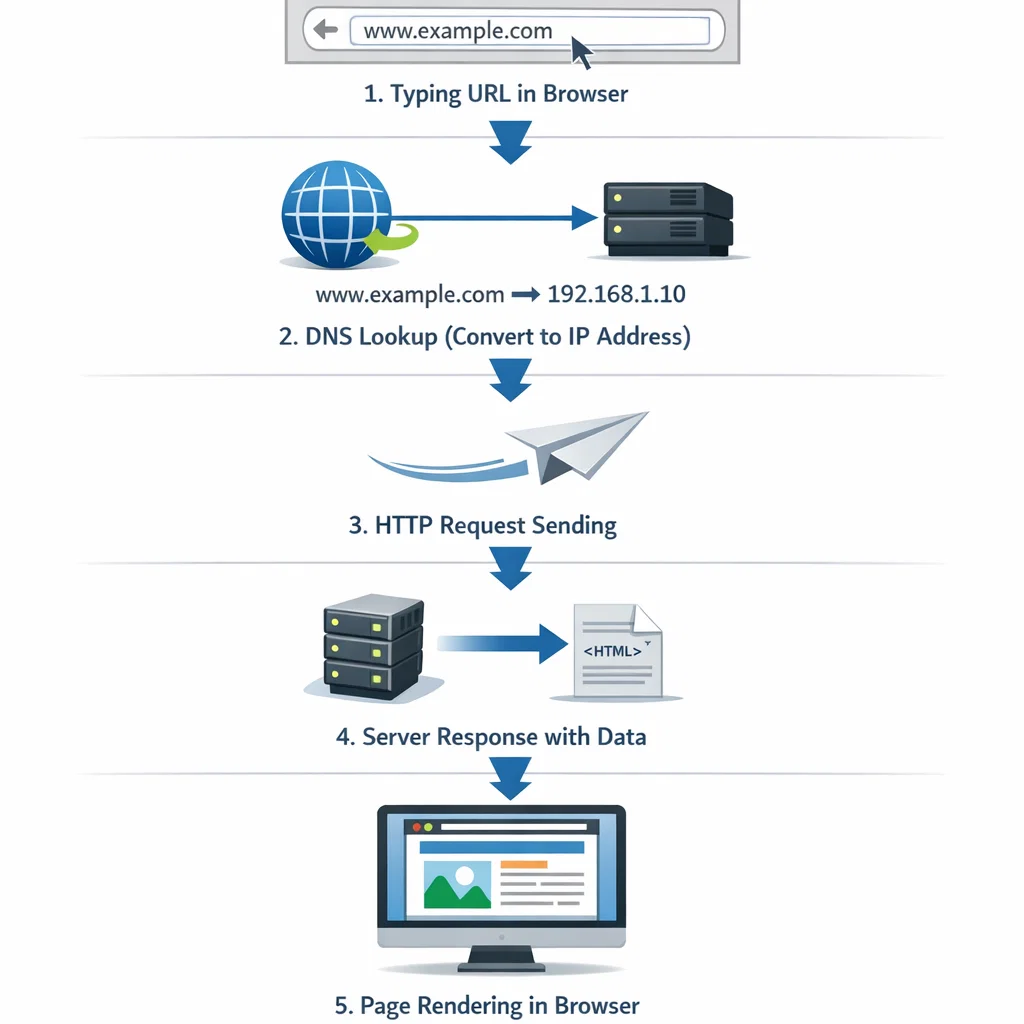
There are a few steps that take place when you type in a web address (URL) into your browser in order to get the site in front of your screen:
- URL Request: What you do is to type a URL in the address box of your web browser.
- DNS Lookup: The browser queries the Domain Name System (DNS) to convert the URL into a set of IP addresses (the unique identifier of the server hosting the site).
- Request Sending: The client sends an HTTP request to the server.
- Server Response: The server takes into consideration the request and returns the data of the site to the browser.
- Page Rendering: The webpage is rendered by the browser making it interactable.
What is a URL?
A URL (Uniform Resource Locator) is the address of a resource or a website on the internet. It consists of a number of elements, such as the protocol (HTTP or HTTPS), domain name, path, and occasionally query string.
- HTTP/HTTPS: It is an abbreviation of Hypertext Transfer Protocol and Hypertext Transfer Protocol Secure. These are the protocols that regulate the process of transfer of data between your browser and the server. The secure version of HTTP is HTTPS, and it encrypts the data that is passed over to ensure that someone cannot access it.
- Domain Name: The domain name is the address form that identifies a website that is readable by humans (e.g.,www.example.com).
- Path: The path defines the position of a given page or resource in a website (e.g.,www.example.com/about).
- Query String: This is an optional element in a URL that may include parameters, mostly used in search engines or e-commerce sites to follow user preferences or search results.

What is the functionality of Browsers and Servers?
Browsers: The Web Portal
A web browser is a computer program that helps one to navigate through websites. Google Chrome, Mozilla Firefox, Safari, and Microsoft Edge are the popular browsers. On entering a URL, a request is sent to the server which is hosting the site and the required data is retrieved, and the site is displayed on your screen.
The browser executes a number of functions, and they include:
- Parsing HTML, CSS, and JavaScript: HTML (Hypertext Markup Language), CSS (Cascading Style Sheets), and JavaScript are interpreted and rendered to display the web page properly by the browsers. The content of the page is defined using HTML, the layout and style are determined using CSS, and the interactive features are implemented with the help of JavaScript.
- Rendering Web Pages: The browser takes the data about the website and then it incorporates the HTML, CSS, and JavaScript files to create the web page. It has a layout engine that shows what is inside your screen.
- Cookies and Sessions: Browsers also store small bits of data, known as cookies, to assist websites in remembering your preferences or usernames and passwords.
Servers: Web Communication Web Gold
A server is a computer which holds and serves out the contents of a website. Once you type in a webpage, your browser interacts with the server in order to pull out the files that you need to view the site. Servers have the duty of handling many requests simultaneously, delivering files such as HTML, image, and video files, and performing a smooth running of the websites.
Servers operate a program known as a web server, which may be Apache or Nginx, and is able to accept incoming requests and provide the relevant data.
DNS Servers Roles
Domain Name System (DNS) resembles the telephone book of the internet. It converts human-readable domain names (e.g.,www.example.com) to IP addresses (e.g., 192.0.2.1), which computers utilize to name and address each other. When you enter a URL in your browser, the browser communicates with a DNS server to get the IP address of the domain.
The Process of Communication: HTTP and HTTPS
HTTP (Hypertext Transfer Protocol)
The protocol that controls the interaction of a browser and a server is referred to as HTTP. On requesting a website, an HTTP request is sent to the server by the browser. The server will, in turn, respond with the data requested. The data is normally in HTML, CSS, images, or any other files which are shown by the browser.
The protocol is not secure, i.e., the information being passed over the browser and the server is in plain text, thus is interceptable by a third party. This is where HTTPS would come in.
Secure Hypertext Transfer Protocol (HTTPS)
The secure version of HTTP is HTTPS. It encrypts the data being passed between the browser and server, thus making it more secure. Websites with HTTPS would be marked with a padlock icon on the address bar of the browser. HTTPS is particularly essential for websites that process sensitive information, such as online banking or online shopping.

How Does HTTPS Work?
The protocol of HTTPS is the encryption of the information between the browser and the server, and it is called the SSL/TLS (Secure Socket Layer/Transport Layer Security). This makes sure that if a person intercepts the data, they cannot read it without the decryption key. Authentication of websites is done by the use of SSL certificates, which are issued by Certificate Authorities (CAs).
Web Technologies for Websites
A combination of technologies is applied to design and present websites. We can consider some of the fundamental technologies of web development.
HTML: The Building Block of Web Pages
The language on which the web is built is HTML (Hypertext Markup Language). It determines the layout of a webpage, such as headings, paragraphs, links, etc. In HTML, the content is marked up using tags, e.g., <h1> and <p> or <img>.
CSS: Cascading Style
CSS (Cascading Style Sheets) is used to regulate the appearance of a webpage. It defines the design, color, fonts, and layout. CSS is used together with HTML to produce attractive and responsive websites.
JavaScript: Interactive Websites
JavaScript is an interactive programming language that is used to add interactivity to websites. It enables web developers to develop dynamic content, including animations, form validation, and other dynamic features, e.g., dropdown menus, sliders.
Web Development Frameworks
Frameworks help developers make the development process faster and more efficient. They are existing libraries of code that assist programmers in developing websites within a short time. Popular frameworks include:
- JavaScript: React and Angular.
- Python: Django and Flask.
- Ruby: Ruby on Rails.
These frameworks simplify the development process and enable faster and more efficient coding.
Conclusion
It is imperative to know what the fundamental ideas of web technology are to be able to access the digital world. The internet, browsers, servers, and protocols such as HTTP/HTTPS combine to make websites work. The knowledge about the functioning of URLs, DNS, and web servers gives you a more significant insight into the sophisticated systems behind the websites that we visit on a daily basis. You might be a newbie or you might want to broaden your horizons, but the concepts are the first thing that you need to master in order to know the world of web development.