You’ve just received an XER file from your project manager. It’s sitting in your inbox, representing months of planning, thousands of tasks, and millions of dollars in project costs. Now comes the fun part—figuring out what’s actually in there.
If you’ve ever stared at an XER file wondering how on earth you’re supposed to review it without spending money on expensive software or pestering your colleagues for access to their licensing, you’re not alone. It’s one of those peculiar challenges in modern project management that shouldn’t exist but somehow does.
Welcome to the world of XER file frustration—and more importantly, welcome to the solution that’s changing how professionals handle this everyday challenge.
Enter Aurora-Viewer: Your XER File Solution
Aurora-Viewer is a standalone application designed to open and display Primavera P6 XER files, without requiring a complete scheduling license.
It is based on the same advanced scheduling engine as is used in a more complex AI-powered scheduling system, Aurora – and this has the advantage of giving the viewer the strength of that tool. However, it is targeted at viewing, not editing.
The following are some of the significant characteristics of Aurora-Viewer:
- Gantt chart, network diagram and spreadsheet-like views: you can see the schedule either as a table or as a diagram.
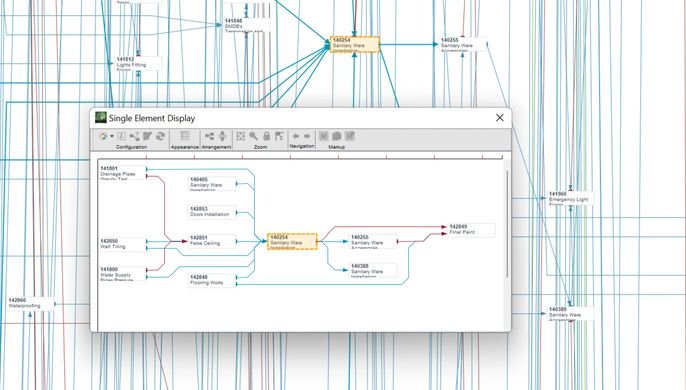
- Single-element view and logic tracing: This allows you to not only click on an activity and display its predecessors and successors, but also to view the activity’s dependencies and walk up and down the logic.
- Project overview report: summary metrics (duration, zero-duration jobs, calendars, etc) that provide you with a snapshot.
- No hidden license charge: free to download and use.
Since it is already a viewer, the master schedule is not edited by you (so you do not make unintentional changes), but you have the maximum visibility. Honestly, that is what most of your review team needs.
Aurora-Viewer: When and how to use it in your workflow
The following are the typical situations when it makes sense to use the tool:
Scenario 1: Analysis of a schedule provided by a subcontractor.
A contractor provides you with a XER file. You are not running Primavera, but you must verify the schedule. Using the Aurora-Viewer, you open the file, follow the logic, and achieve clarity in minutes.
Scenario 2: Distribution of Schedule Status to Non-Schedulers.
Your project control team produces a master schedule. The broader team (designers, cost, procurement, operations) only has to be aware of the project details. You can send the XER file and instruct them to open it in the viewer instead of sending them the static PDF. They acquire interactivity, enhanced comprehension.
Best-practice Hints to Maximize On It
- Make the reviewers familiar with how to load the file and navigate through the tabs.
- Give a brief how-to tutorial in case your team is new to the viewer.
- Keep a version: when you pass several .XER files, label them with dates and version numbers.
- Use the project overview report to record high-level metrics and identify anomalies in a timely manner.
The Way Aurora-Viewer Improves Team Collaboration
In the modern project world, teamwork is everything. Aurora Viewer supports improved collaboration by:
- Break the Walls: Project data are available to all parties, including the management and field engineers.
- Enhancing Visibility: Openness promotes team accountability and trust.
- Enabling Remote Workforce: Free software enables dispersed workforces to access schedules without being reliant on business-wide software.
- Less Administrative Overhead: Project managers use their time more effectively to produce reports and streamline workflows.
Such inclusivity in terms of schedule communication leads to project efficiency and minimized risk.
The Technology of Aurora-Viewer
Aurora-Viewer is part of a collection of smart scheduling applications that utilize AI and predictive models to enhance decision-making.
Its fundamental technology was initially designed to enable NASA to cope with the intricate schedules of Space Shuttle refurbishment and spacecraft missions. These capabilities have been commercialized over time to support large-scale, complex project management and scheduling.
Conclusion: A Smarter Way to Work with XER Files
Project scheduling and control should not be like going through a software maze. Tools like Aurora-Viewer make this process easier, allowing everyone, including executives and schedulers, to view, analyze, and comprehend Primavera XER files with ease.
In a world where project timelines are tighter and collaboration more crucial than ever, the right viewing and scheduling tools can make all the difference.
So, if you’re looking to streamline your XER file review process and empower your team with real-time project visibility, it’s time to experience what Aurora-Viewer can do.
Explore how Aurora-Viewer can make schedule reviews faster, smarter, and more efficient—without the need for a Primavera license.