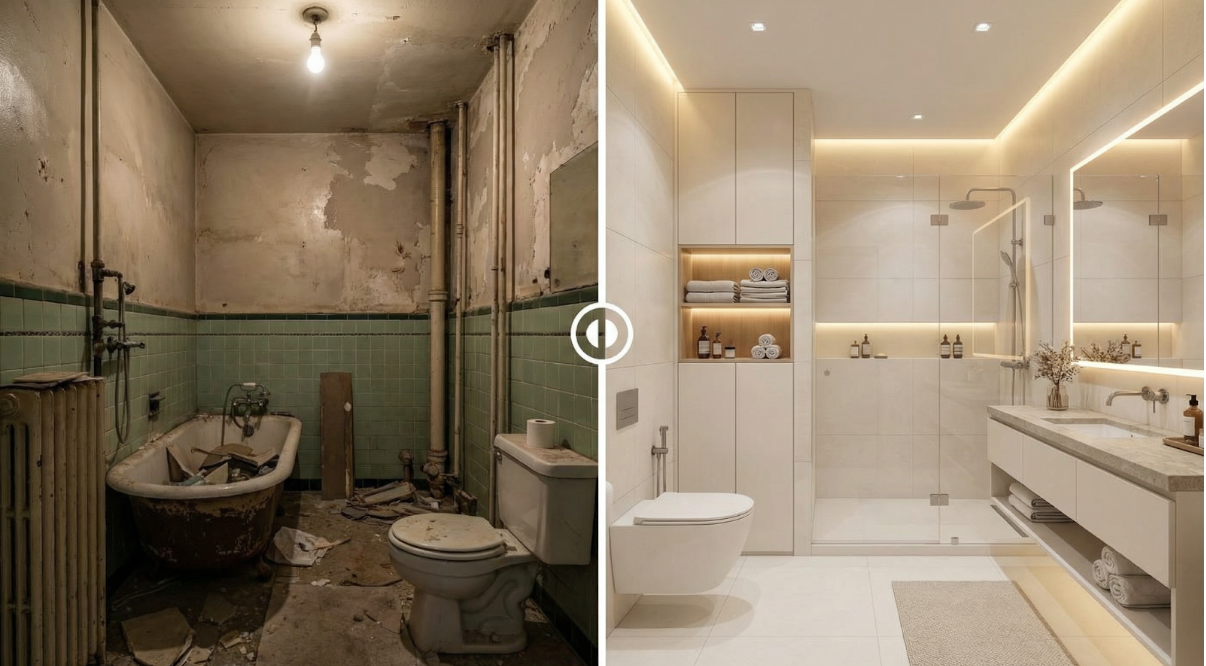
Turning a room idea into a visual plan takes time, and honestly, it usually means looping through a few drafts. VDraw speeds things up by turning your ideas, references, and style hints into rich visuals. You get a tool that turns fuzzy concepts into clear, workable designs, so tweaking a sofa layout or rethinking a full remodel feels doable instead of painful.
Optimizing the Early Stages of Room Design
Converting Initial Ideas into Visual Foundations
The first step in any room project is defining the concept. VDraw allows users to input either a photograph of an existing space or a simple sketch, immediately generating a visual baseline. By using AI Room Design, designers can see how different furniture placements, color schemes, or structural changes will look without committing to physical alterations. This early visualization reduces guesswork and sets a solid foundation for more detailed experimentation.
Exploring Style Options Efficiently
Users can choose from predefined room styles or provide descriptive text prompts to explore creative variations. The system interprets these instructions, producing multiple iterations that match the intended aesthetic. Whether testing lighting, textures, or color palettes, VDraw provides immediate feedback that helps users narrow down the most appealing design directions. This combination of style selection and text-driven flexibility ensures experimentation is guided and purposeful, not random.
Maintaining Control During Iterations
Refining Visuals While Preserving Core Layout
Once versions stack up, it suddenly feels vital to keep things consistent. With VDraw, you can play with lighting, textures, and where the furniture sits, and the room’s bones stay put. Every tweak sticks to the idea you started with, so nothing turns weird or off-model. And this way, you keep the design on track across versions while cutting down on those tedious manual fixes. So you can zero in on mood, try color mixes, or toy with new layouts without fretting about wrecking the plan. In short, the platform keeps each pass in line, trimming time and keeping the whole design story clear.
Preparing Clean Reference Material
In many projects, reference images or video clips contain watermarks, overlays, or branding that can interfere with the design process. VDraw provides the Video Watermark Remover tool to eliminate these distractions. While designed primarily for video, it can also help clean visual references, ensuring that source materials do not introduce visual noise. Clean references make AI-driven outputs more accurate and allow designers to focus on creative adjustments instead of correcting inconsistencies.
Scaling Design Across Multiple Projects
Cutting Down Repetitive Prep Work
Big, multi-room projects usually mean the same prep on repeat—finding images, tidying files, and setting up templates. VDraw simplifies this stage, letting users bypass much of the manual setup. Immediate visual outputs allow designers to move from planning to testing concepts quickly. This efficiency is particularly valuable for design teams managing multiple clients or homeowners coordinating renovations across several spaces. By minimizing administrative overhead, VDraw ensures creative focus remains on refining design decisions rather than logistical tasks.
Fast Iteration Without Sacrificing Accuracy
Speed is only beneficial if paired with control. VDraw produces rapid design drafts while giving users the ability to fine-tune every detail. Users can adjust style, tone, spatial alignment, and materials without restarting the workflow. This combination encourages experimentation, allowing multiple design directions to be tested efficiently. At the same time, it preserves structural accuracy, ensuring that rapid iterations remain practical for real-world implementation.
Ensuring Long-Term Usability of Visual Plans
Supporting Realistic Spatial Planning
VDraw’s AI Room Design uses actual room photographs to anchor its visuals in real-world dimensions. This allows users to see how furniture, lighting, and décor will interact within the space before making any physical changes. Users can experiment with layout adjustments, visualize how light and shadow play across surfaces, and anticipate spatial limitations. Each iteration offers practical insights that make the designs directly applicable, helping avoid costly mistakes or mismatches when implementing the plan in reality.
Consistency Across Project Stages
As a project moves forward, VDraw keeps designs consistent across multiple revisions. Colors, textures, scale, and how pieces relate stay in sync, even while people riff on ideas. So it’s straightforward for teams or solo designers to track changes, weigh options, and keep every call on-vision throughout. By smoothing out hiccups and making iteration-to-iteration comparisons simpler, VDraw lets people choose with confidence across the project, backing quick tweaks and big-picture plans with a setup you can actually rely on.
Conclusion: A Practical Tool for Effective Interior Design
VDraw’s AI Room Design capability transforms abstract concepts into detailed, actionable visuals. By supporting real-room photos, controlled iterations, multiple design pathways, and clean references, it delivers a structured, efficient workflow. Designers, homeowners, and professionals can move confidently from idea to execution, testing styles, layouts, and finishes without unnecessary friction. With VDraw, room planning becomes faster, more accurate, and consistently aligned with the user’s goals, providing a dependable solution for projects of any scale.