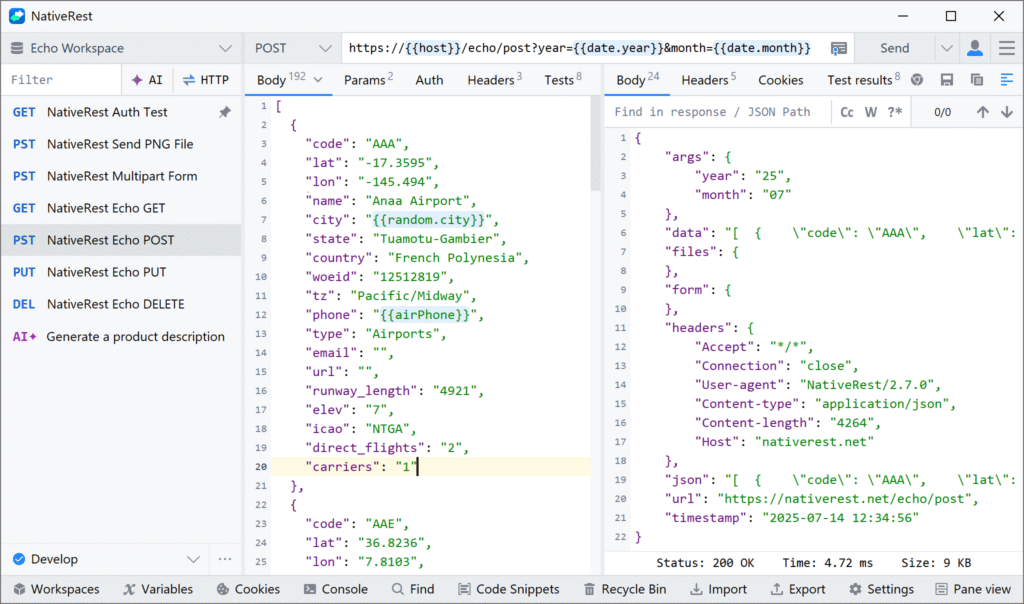
In the world of API development, efficiency and ease of use are paramount. Whether you’re building a new application or debugging an existing one, the right tools can significantly improve your workflow. One such tool that stands out is NativeRest —a fast, lightweight, and native REST API client designed for developers and testers alike. Unlike many other popular API tools, NativeRest offers a unique set of features that streamline API testing, debugging, and overall development. In this article, we’ll explore how NativeRest can elevate your API development process, saving you time and improving productivity.
What is NativeRest?
NativeRest is a 100% native desktop application built to create, debug, and test REST APIs. Unlike Electron-based applications, which rely on JavaScript frameworks and heavy resource consumption, NativeRest operates with minimal memory usage and provides faster startup times. This makes it ideal for developers looking for a high-performance REST client that operates efficiently on Windows, macOS, and Linux platforms.
High-Performance API Testing
One of the biggest advantages of NativeRest is its high performance. Since it’s a fully native application, it doesn’t rely on resource-heavy frameworks like Electron. This means you get a much faster startup time and reduced memory and CPU usage. Whether you’re working with complex APIs or conducting simple tests, NativeRest ensures that your development workflow remains smooth and responsive.
By using NativeRest as your go-to API testing tool, you’ll experience a noticeable improvement in speed and efficiency. It’s especially helpful when managing large datasets or executing multiple API requests simultaneously.
Offline Mode for Enhanced Flexibility
In API development, sometimes an internet connection may not be readily available, especially when working remotely or on unstable networks. NativeRest solves this problem by allowing you to work completely offline. You can store and manage your API collections and environments locally, giving you full control over your workspaces without needing to be connected to the internet.
This offline capability ensures that you can continue to work on your APIs even when you’re not connected to the web. For developers working in remote locations or those who prefer to keep their work local, this feature is a game-changer.
Seamless Proxy Support
Whether you’re working behind a firewall or need to route your traffic through a specific server, NativeRest has you covered. It comes pre-configured with a high-performance proxy server that can handle your requests with ease. Additionally, if you have specific proxy configurations or security requirements, you can customize the proxy settings within NativeRest to suit your needs.
With its built-in proxy functionality, NativeRest makes it easy to send HTTP requests securely and efficiently, even in more complex network environments.
Effortless Data Import and Export
When switching between different tools or collaborating with teams, migrating data can often become a tedious task. NativeRest eliminates this issue by supporting both import and export functionality. You can easily migrate your collections, environments, and variables from other popular API clients, like Postman and Insomnia, without losing any data. This seamless import/export capability ensures that you can switch to NativeRest without losing any valuable work.
Whether you’re working on a personal project or collaborating with a team, NativeRest ensures that your API collections and environment settings are always up to date and easy to transfer.
Multilingual User Interface for Global Use
For developers working in different regions or with international teams, the ability to use tools in various languages is essential. NativeRest supports a multilingual user interface, currently available in 10 languages. This feature ensures that developers from all around the world can comfortably use NativeRest without language barriers.
From English to Spanish, French, German, and more, NativeRest caters to a global audience, making it an ideal choice for teams working across different geographies.
Full-Featured Portable Version
In today’s fast-paced development environment, portability is key. NativeRest offers a fully portable version of its application. This version is distributed as a single executable file, which means you don’t need to install any software to start using it. Simply download the file, and you’re ready to go.
The portable version also doesn’t require administrator privileges, making it suitable for developers who need to work on machines with limited access or those who need to carry their API testing tool on a USB drive.
Native Authentication for AI Model Integration
As AI-driven tools and models like OpenAI’s ChatGPT become more integrated into development workflows, NativeRest stands out by supporting requests to AI models without requiring external accounts or tokens. If you’re working with AI models, NativeRest makes it easy to send API requests to models like ChatGPT. You simply specify your prompt and parameters, and NativeRest handles the rest.
This built-in authentication feature means you don’t need to sign up for an OpenAI account or purchase tokens. It simplifies the process of working with AI models, allowing you to focus on the development process rather than worrying about API keys and authentication issues.
Multi-Platform Compatibility
Whether you’re working on Windows, macOS, or Linux, NativeRest provides full compatibility across all major operating systems. This cross-platform support ensures that no matter what platform you’re using, you can rely on NativeRest for your API testing and debugging needs. The application is optimized to run smoothly on each operating system, so you don’t have to worry about compatibility issues.
Efficiency, Security, and Flexibility in One Tool
The combination of high performance, offline mode, proxy support, data import/export capabilities, multilingual interface, portability, and AI integration makes NativeRest a powerful tool for developers working on API development and testing. It offers the perfect balance of efficiency, security, and flexibility, ensuring that your workflow remains productive no matter what challenges you face.
Why Choose NativeRest for Your API Workflow?
If you’re looking for a lightweight, fast, and powerful API client that can enhance your development process, NativeRest is an ideal choice. With its native performance, offline capabilities, seamless integration with AI models, and multi-platform support, it’s designed to improve both individual and team workflows.
For developers who need a reliable and feature-packed REST client, NativeRest provides everything you need to test, debug, and build APIs with ease. Whether you’re a solo developer, part of a larger team, or working on AI-driven projects, NativeRest can significantly improve your workflow, saving you time and reducing the complexity of API development.
In today’s fast-moving tech environment, tools that streamline the development process are invaluable. NativeRest delivers on that promise, offering a robust solution for every API developer.


I really like reading through a post that can make men and women think. Also, thank you for allowing me to comment!
I’m often to blogging and i really appreciate your content. The article has actually peaks my interest. I’m going to bookmark your web site and maintain checking for brand spanking new information.
I truly appreciate your technique of writing a blog. I added it to my bookmark site list and will