
Introduction
APIs (Application Programming Interfaces) are crucial in today’s software development landscape, enabling seamless communication between various applications, systems, and services. They allow the developers to integrate payment gateways, fetch data from external platforms, use authentication services, and create applications without having to build all the features from the ground up. But the utility of an API is not only based on its capabilities but how easily developers can grasp and work with an API too. This is where API documentation is crucial.
The documentation for an API is well written and contains information on how to use it, what a developer would need to access it, what endpoints are available, how one should make a request to it and what they would get in return. When it comes to integration, the lack of instructions can make it difficult for developers to get the job done, cause them to make mistakes, or waste time reaching out to support teams. For software teams aiming to enhance integration experiences and facilitate successful API adoption, it is crucial to create accurate, organized, and developer-friendly API documentation and ensure its role is not overlooked.
Why Is API Documentation Important?
API documentation is a technical document that defines how the API operates and how developers can use it. It provides a fun, practical guide to the available endpoints, authentication, request parameters, data formats, response structures, error codes and more technical standards. Documentation gives developers the information in an organized and easily accessible format without having to look at the source code or make an educated guess about how an API functions. It can contain written explanations, examples, code snippets, diagrams and sample requests that illustrate how specific operations can be performed. A well documented API should help out any developer level, from someone using it for the first time, to someone who is more advanced and working on a complex software system. It is primarily intended to provide consistency, clarity and ease for developers to finish integrations with greater confidence and predictability.
API documentation is not just about the mechanics and methods; it influences how quickly developers can build applications, the reliability of the software, and the overall customer experience. Incomplete or outdated instructions can lead to misinterpretation of authentication needs or to incorrect requests being sent, or to server responses being misinterpreted. These issues can cause integration delays, multiple debugging sessions and unwarranted support issues. However, detailed documentation enables developers to find solutions to common issues without relying on others and comprehend the anticipated behavior of an API prior to its use. It is also useful for consistency in the development teams when multiple engineers are working with the same integration or if the API changes over time. Organizations can learn about API documentation practices and resources, how structured documentation can aid the process of API development and collaboration. Finally, documentation should not be optional; it is an important part of the API product that should be worked on with the rest of the development process.
The Key Elements of Good API Documentation
1. Give an Overview and How to Start Guide
A good API documentation page should start by providing an overview of the API, its purpose, and when developers should consider using it. This introduction shouldn’t be too technical and give context to the reader if they need to use the API or not. It should define what are the main capabilities, supported environments, significant restrictions, and what do the developers need to do before they can make a call. A getting started section should then lead the reader through the first steps necessary to account creation and credentials, environment selection, and the sending of a simple test message.
These instructions should be sequential and the developers shouldn’t have to go through several pages to figure out what to do first. A good introduction puts users at ease with the documentation, and provides the groundwork for the more detailed technical information that follows.
2. Explain Authentication Clearly
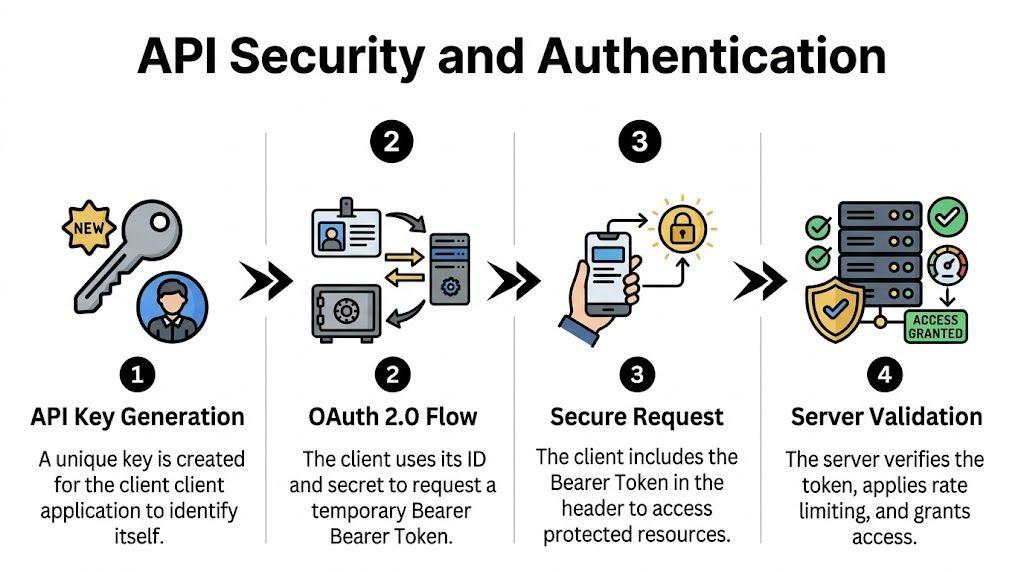
Authentication is one of the most crucial parts of an API’s documentation, as it defines how applications will identify themselves in order to gain access to protected resources. Documentation should outline what authentication is being used (API keys, bearer tokens or OAuth 2.0), and how the developer can acquire and use the necessary authentication information in their requests. If an API requires bearer token authentication, for instance, the documentation should specify the name of the HTTP header the token must be included in, and include a realistic example of where to place the token.
It should also cover the reasons for token expiration, token renewals, permission scopes, and the distinction between development and production credentials (if any). Security instructions need to be particularly well-defined as misuse of credentials could lead to disclosure of sensitive information or authentication issues. The developer should be warned to keep secrets in a safe place and not publish the secret in public repositories and if possible, use environment variables. To minimize setup mistakes and ensure secure integrations from the start, clear authentication guidance minimizes errors.
3. Organize Endpoints Logically
An API’s endpoints are the resources or operations that developers can access, and they’re a crucial component of the API documentation. The purpose of each endpoint, its associated permissions, and the behavior that will occur when it is called should be stated for every one of them. For instance, a customer management API could have endpoints to get customer details, add a customer, update customer details, and delete a customer. The operations should be organized into meaningful categories, e.g., Users, Payments, Products, or Orders, and not shown as a large, unorganized list.
For each endpoint description, include a description of what it does, and whether or not it alters stored information or just returns data. It is also important to let developers know about any other pertinent limitations, including rate limits, account permissions, or resource availability. Having consistent endpoint formatting makes it easier to document the API and makes it easier for developers to find the right operation without having to go through a lot of unrelated technical information.
4. What Are the Parameters and Required Fields to Document?
Parameters are crucial for the understanding of an API request, and they need to be documented correctly and consistently. Every parameter should be named, described, typed, required or optional, have acceptable values and if appropriate indicate what it does when not used. Path parameters, query parameters, headers and request body parameters all have different functions in an HTTP request and need to be distinguished. For example, a ‘product search’ endpoint could take a search term, category filter, and page number as query parameters to limit the result set returned.
Developers need to know what fields are required, what fields are optional, and what will happen if a value is left out or is incorrect. If there are only a few numbers that the parameter can take, then they should be given with an explanation that does not use technical terminology. This information eliminates a lot of uncertainty, avoids a bad request, and enables developers to understand the API operations and how to customize them for their applications.
5. Incorporate Real-Life Examples of Requests
Ask for samples: request developers to convert written instructions to working API calls. Documentation should reflect the actual structure of a request rather than just its abstract description, specifically the HTTP method, endpoint URL, request body (if any), required request headers, and request parameters. Examples may include realistic but fictional data for readers to understand how the API acts without disclosing sensitive data or credentials. For instance, if you need to create a customer record, you should show how you represent a name and email address in the JSON. Placeholders should also be identified; this will enable a developer to substitute sample data with their own. Any documentation should include examples of common scenarios for retrieving records, filtering for results, submitting information, and updating existing resources, where possible. The examples help to make technical concepts more understandable, reduce implementation times, and serve as a secure foundation for testing integrations.
The typical request may be something like this:
POST /v1/customers HTTP/1.1
Host: api.example.com
Authorization: Bearer YOUR_API_TOKEN
Content-Type: application/json
{
“name”: “Alex Morgan”,
“email”: “alex@example.com”
}
The documentation should clarify that the request is going to create a customer, contain and use an authorization token, and be sent in the JSON format. It should also make it clear that the example domain and user credentials are not actual access credentials.

6. Discuss Response Formats and Expected Results
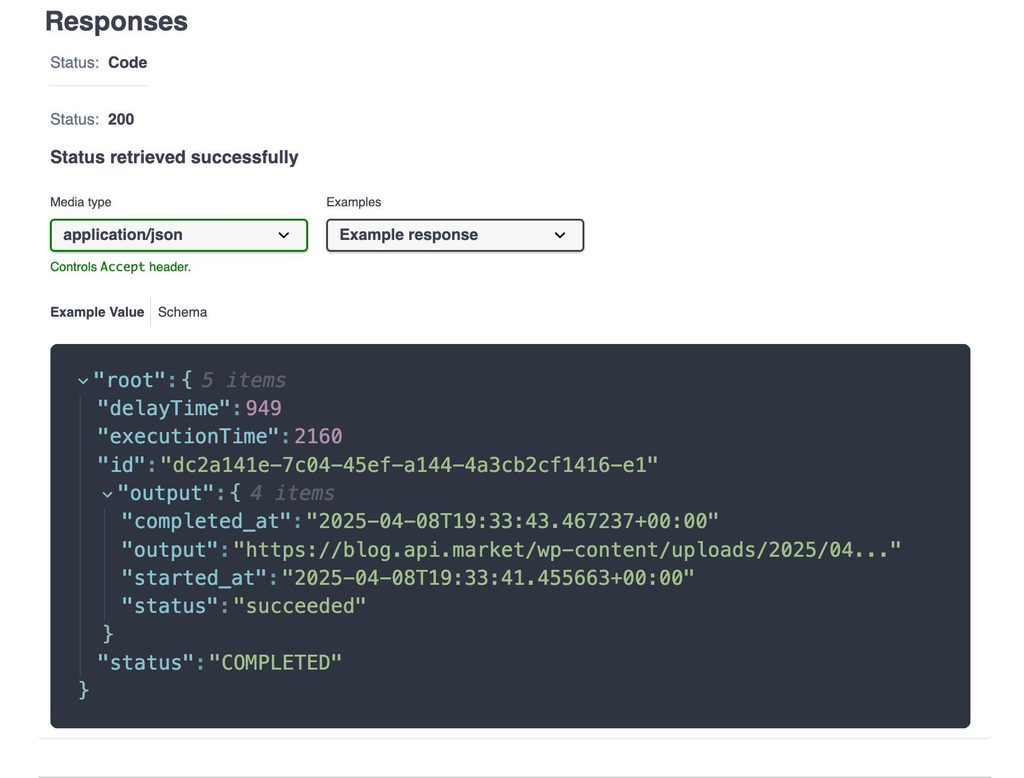
The API should provide documentation on what is returned to the developer after making the call, such as the content type, structure of the data returned, important fields, and the meaning of the return status code. If the API returns a JSON response, the sample response should show how these objects and arrays are expected to be organized, along with strings, numbers, or other data types. At least a description of each significant response field, explaining the purpose of the field, if it is allowed to be null and whether it is always included. A customer retrieval endpoint, for instance, could return an identifier, customer name, email address and creation time. Another thing that developers should be aware of is how the API processes empty results, pagination, and optional information. Thus it is important to explain successful responses since a status code might not be enough to complete the integration successfully. By knowing what to expect and how it’s structured, developers are better equipped to construct robust application logic and prevent assumptions that result in undesirable behaviour.
Example response:
{
“id”: “cus_10245”,
“name”: “Alex Morgan”,
“email”: “alex@example.com”,
“created_at”: “2026-10-04T10:30:00Z”
}
The following is an example of a successful response to a customer creation request, with the unique identifier and information about the new record returned. The actual response fields and formats must always match the behaviour of the API being documented.
7. Make Sure That You Include Helpful Error Messages and Troubleshooting Information
Error documentation is important as even a well-built application can receive failed requests, bad data, access issues, or timeouts. The developer should know what the error was, how it occurred and how to fix it. In the documentation, the relevant status codes should be listed, their description included and an example of the error response structure provided. A 400 response can mean that the requested information provided is invalid, a 401 response can mean that the provided authentication information is missing or invalid, and a 429 response can mean that the rate limit has been breached.
Error descriptions should try to define the problem as much as possible, rather than using “request failed” types of messages. Troubleshooting advice might include verifying credentials, checking fields required, checking endpoint paths, or retrying a limited request after a delay. Removing error explanations improves user experience and helps developers quickly address many errors without reaching out to support.
8. Use Code Samples in Popular Programming Languages
Code snippets are useful to make API documentation more practical as they provide examples of how developers can perform operations in the programming languages and tools they are already using. A general example for an HTTP request is helpful to understand, but for many developers, it is better to have examples in various other languages like JavaScript, Python, Java, PHP or C#. The code examples should illustrate a complete comprehensible operation – how the request is constructed, how authentication is supplied, how data is sent, how the response is processed.
The examples should be correct with respect to the current language rules, and should not have to be overly complicated so that the focus is lost on the API operation being demonstrated. Developers also need to be able to tell the difference between sample values and information which must be provided by their own applications. If applicable, a simple example and a more sophisticated example can be provided, to show error handling or asynch. ops. Tested and accurate code snippets save developers the time and effort needed to conduct further research, and help run a successful integration.
9. Use a Consistent Structure and Simple Language
The organization and documentation of APIs have a huge impact on developers’ efficiency in extracting useful information. The headings need to be consistent in their order, topics need to be related to each other, and the terminology should be uniform throughout all pages. For instance, if the documentation mentions access tokens in one part, there should not be a change of unrelated labels without a clear explanation.
Explain technical concepts in direct language – particularly when developers are new to the API. Long paragraphs with several instructions that do not belong in the same group should be broken into smaller sections with a focus on each section. Tables should be used to present a list of parameter definitions, status codes and field requirements. Navigation menus, search box and links to similar endpoints can further increase accessibility. A well-defined structure helps developers navigate smoothly between content areas, as they won’t have to study a new documentation structure every time.
10. Explain API Versioning & Changes
API versioning allows software vendors to make enhancements and developers to ensure that their integrations continue to work as expected. Documentation should cover how a version is identified, how a developer chooses one, and what they should do if an older version is changed or dropped. For instance, an API can identify different interfaces, with different version numbers in its URLs, for instance /v1/customers and /v2/customers. The documentation should be able to specify any changes that could impact on existing applications such as renamed fields, changes in the structures of responses, endpoints removed from the application, and changes in authentication requirements.
Changes should be documented in a changelog, and should clarify whether each change is backward-compatible, or needs to be changed by the developer. Deprecation notices should be sufficiently worded and offer some indication of the replacement, if any. Removing versioning information aids development teams in planning updates, preventing unwanted integration issues, and keeping applications up-to-date as they evolve.
11. Maintain Accurate and Up-to-Date Documentation
The documentation of API should always be in sync with the actual behaviour of the software that it describes. Documentation should be reviewed and updated if any changes are made to the endpoints, new parameters are added, changes are made in the authentication rules, or changes are made in the response structure. Instructors who are not up to date can be especially destructive as they may give accurate instructions, but still encounter unforeseen problems. Teams should create a process, in which documentation updates are a part of development and release processes and not a separate administrative work.
Automated documentation tools and API specifications can be used to help generate endpoint references, validate and reduce inconsistencies between implementation and published information. But even though it is automatically generated, it still must be edited to be clear, complete and useful. Documentation testing may also include code samples, examples of requests and links that will direct to the right parts. Routine maintenance guarantees that the information developers are given is accurate, and it decreases the risk of unwanted integration issues.
12. Interactive Documentation, If Possible
Interactive documentation enables developers to explore the operations of the API and to test the requests without having to build the entire application right away. Readers can choose an endpoint, specify parameters, input test credentials, make a request, and view the response in the documentation interface, depending on the platform. This could potentially help make the behavior of the API easier to understand, since the developers can see how various input values relate to the output. It can be very helpful to use interactive examples for testing authentication, checking response formats and trying out optional parameters.
But these features need to be carefully designed with instructions of the testing environment, the protection of credentials and the impact of operations that alter data. Interactive tools should be used in conjunction with written explanations, as the developer still requires reference information to create production integrations. Interactive documentation is a great combination of descriptions, examples, and interactivity to help the user learn more practically and minimize time spent understanding an unfamiliar API.
Common API Documentation Mistakes That You Should Avoid
A common pitfall is taking for granted that developers are already aware of the design decisions of the API or the significance of all the technical terms used. If documentation includes unexplainable abbreviations, incomplete endpoint descriptions, or missing parameters, then the reader will need to make assumptions that may not be correct. The other common issue is giving examples which are too trivial to show how it would be used in a realistic environment, for example, a request with no authentication when it requires authentication. Similar endpoints that are named differently can also complicate documentation.
Likewise, key information in a large block of text can make the doc difficult to use. Legacy code examples, faulty links, no guidance on errors, and ambiguous versioning introduce further challenges. Developers can find themselves in trouble if the documentation only covers successful operations, and doesn’t deal with common failure situations. To prevent these issues, the API must be thoroughly technically reviewed, written consistently, and provide realistic examples, and all developers who use the API should provide regular feedback. The aim should be to minimize uncertainty as much as possible and facilitate readers’ task performance without interpretive demands.

Importance of Proper API Documentation
Enhanced API documentation can help to decrease the amount of standard queries that are directed to software support teams, by supplying developers with reliable responses prior to problems occurring. If all necessary information—such as authentication rules, endpoint descriptions, parameter requirements, response samples, and troubleshooting—is readily available, many integration problems can be resolved without contacting your customer support team. This enables support personnel to deal with more complex issues, as well as avoiding the need to explain common request mistakes and setup procedures over and over again. Also documentation will aid in making communication between development teams more effective as the engineers will be able to reference one source of technical information rather than have to rely on informal explanations.
There are several methods to measure the effectiveness of documentation, such as tracking repeated support requests, analyzing pages that get visited often, gathering developer feedback and reviewing common integration challenges. If the question is repeated, the question or the answer to the question may need to be reworded or given a better example. This way, documentation is a continuous improvement effort where everyone from the developer/s, the support team, and the organization that will be maintaining the API will benefit.
Conclusion
Creating API docs that developers can read is more than a technical list of specs or description of endpoints. Effective documentation provides accurate information, logical structure, practical examples, clear authentication procedure, detailed parameter descriptions, understandable response structure, error explanations, and reliable versioning information. It should also contain verified samples of code, an agreed common terminology, easy navigation, and frequent updates to reflect changes in the API.
These factors, combined, empower developers to grasp the functionality of an API, determine the right methods to use, and troubleshoot common issues without relying on unnecessary support. This helps to enhance the integration efficiency, build users’ trust in the software, and minimize unnecessary support queries. Finally, the quality of the API documentation should be kept at the same standard as that of the API itself and should be considered a crucial part of the developer experience. Developing clear, accurate, and usable APIs can help software teams make their APIs more accessible, maintainable, and usable in successful applications.