Introduction
When a small business is just starting out, it’s not likely that they will need the most expensive accounting platform in the world. If your clients are mostly freelance or you just started an online store or your business is a two-person team, you will probably need simple invoices, basic reports, a simple way to track cash in/out, and always be able to tell who owes you something and who has paid you. This is where free accounting software can come in handy. But “free” doesn’t necessarily mean “unlimited” and various products constrain users, invoices, bank relationships, features, storage, mobile access and cloud access in various ways. For instance, Sage currently has a free Sole Trader that includes up to five sales invoices per month and one bank connection and while this is a great value on the face of it, users should take a closer look at the specifics of the free offering.
What to Expect From a Free Accounting Software
Great free accounting software should offer more than an accounting space for numbers to be typed into. At least, a helpful function should allow you to record sales and expenses, arrange accounts, generate a bill, keep track of your customer or supplier, and generate reports that will indicate if the business is generating revenue. Some offer bank connections, receipt capture, payment processing, recurring invoices, budgeting or mobile access. The advantages of these functions may save a lot of administrative time but they are among the first functions to be limited in free plans. A provider could have no number of invoices allowed, but only a limited number of banks feed, for instance, or, conversely, accounting for free but fees for bank feeds. So it’s important to consider the real workflow you require when looking for a product, and not just because its price tag says $0. A free solution that will eventually lead to paid features is needed when the business grows and eventually outgrows the free version, while at the same time reducing bookkeeping tasks and organizing the records.
1. Zoho Books: Powerful Online Solution for Micro-Businesses.
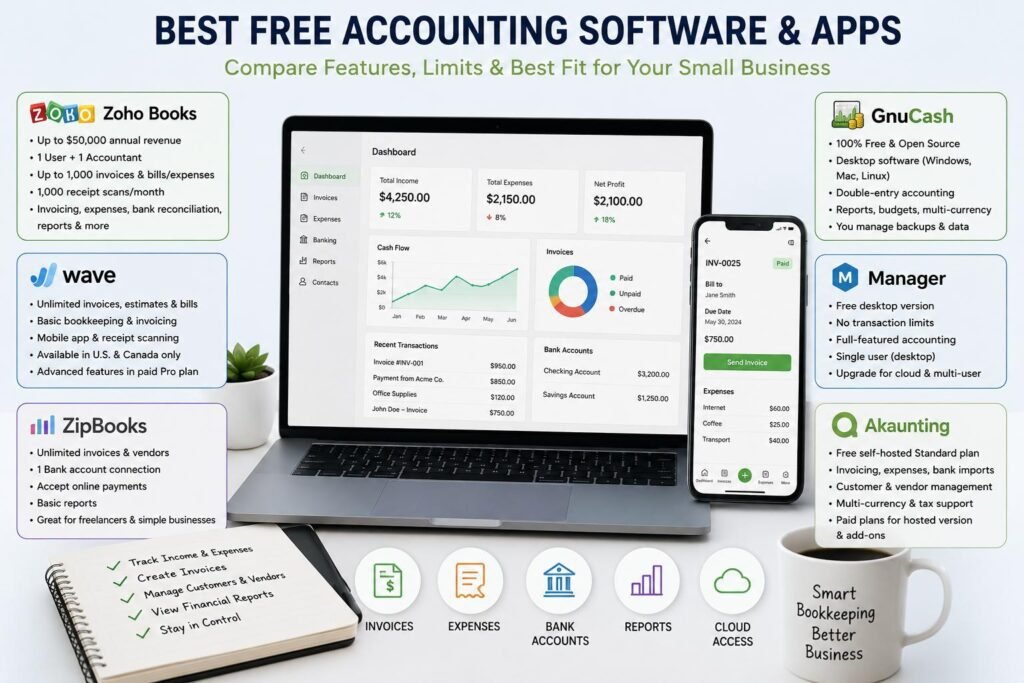
Among the better free cloud accounting services for very small businesses and solopreneurs is Zoho Books. It has a free plan that enables access to its invoices, quotes, expenses, journals, vendor management, mileage tracking, online payments, customer portals, payment reminders, recurring invoices, bank reconciliation, and financial reports like profit and loss and balance sheet reports. This plan is available only for one user along with one accountant and will continue to be free forever provided that the annual revenue does not exceed $50,000, Zoho says. It also supports up to 1,000 receipt scans per month and up to 1,000 invoices and bills/expenses per year (for free users). While many micro-businesses will find these restrictions to be adequate, a growing company that processes a lot of transactions will find that they are limiting. Add users, more advanced features and raise invoice and expense limits with paid plans.
2. Wave: Attractive Feature but of Geographical Importance.
Wave has been a long-time favorite due to their free Starter package with basic bookkeeping and invoicing tools. The existing Starter edition features an unlimited number of estimates, invoices, bills, and bookkeeping records, a mobile app for invoicing and features to manage customers and cash flow. But an important downside is that Wave isn’t available. The company’s product and support is primarily targeted to the U.S. and Canada only, so users outside of this region will not be able to use the same invoice and reminder features. Advanced receipt capabilities, automatic bank transaction imports, automatic merging and categorization are also available in Wave’s paid Pro version. That is, for an eligible business in the U.S. or Canada, Wave may be a good free option, but for entrepreneurs in other countries where Wave’s business capabilities are no longer completely satisfied, it wouldn’t be a very good general recommendation.
3. GnuCash: Best for Users Who Want Completely Free Desktop Accounting
Unlike most cloud-based accounting applications, GnuCash offers a local app. Fully open source and free, it runs on Windows, macOS and Linux, and appeals to business owners that are not interested in paying for a monthly subscription. It features proper double-entry accounting, and it supports bank accounts, income and expenses, scheduled transactions, bank reconciliation, reports and graphs, multiple currencies, customer and vendor tracking, invoicing, bill payment, budgets, and a variety of import formats (such as QIF and OFX). The only downside is not a transaction limit, but convenience it is desktop software and users should be capable of doing their own backups and data transfers. GnuCash does not require any upgrade for the cloud, but businesses that are looking for a more modern workflow something with a multi-user, browser-centric interface – may find it less convenient than a cloud-based business solution.
4. Manager: Free, with no Transaction Limit.
Another odd choice is Manager, which doesn’t have any time limits, usage limits, ads, or limit the amount of data that can be entered to its desktop version, which is free forever. It is a full-featured small-business accounting application that can be used offline on Windows, Mac and Linux. It is especially appealing to a freelancer or owner-managed company that requires a significant amount of accounting features, but isn’t willing to pay a monthly fee. The primary limitation is that the free desktop version is single user and can’t be used remotely as with the paid cloud version. “For businesses that require multiple simultaneous users or remote access, they can upgrade to the cloud version of its service, and data can be transferred between the editions, too,” says Manager. This allows for a realistic upgrade journey, beginning free on one computer, and moving onto paying once collaboration and online access requirements become business needs.
5. Akaunting: Open Source Accounting and Free Option (self-hosted)
Designed for small businesses, freelancers, and an open source option for business owners who want more control of their accounting data, Akaunting will help you get the job done. Its free Standard on-premise plan is designed for freelancers and one person businesses and offers essential bookkeeping features like invoicing, expense management, customer and vendor management, multiple currencies, bank transaction imports and sales-tax calculation. In its larger platform, Akaunting also advocates for limitless invoices and more, though this is the case for the free self-hosted version (Standard) and cloud or higher-tier plans. Self-hosting offers a high degree of control and flexibility, but comes with the downside of having to host, maintain, backup and set up the technical aspects. Paid Plans offer easier hosted experience and free additional apps.
6. ZipBooks: Good for Freelancers who do Invoicing Work.
Another cloud solution, ZipBooks offers a free Starter plan designed for companies mostly requiring invoicing and basic accounting. It offers unlimited invoices, unlimited vendors and customers, supports digital payment acceptance using popular providers like Square or PayPal, supports basic reports, and it will only allow one connected bank account with its free plan. This can be a good option for a freelance or service-based business where there is a simple income, and only one main bank account. The shortcomings start to become evident the more that the business requires automation and/or collaboration. Recurring invoices, automated reminders, multiple bank connections, time tracking, team members, advanced reporting, reconciliation and more organizational features are added to the plan. The free plan, then, would work best if it suits the current workflow of the business and if the owner is fine with making the upgrade if they need more automation and multiple accounts or need team access.
Free Accounting Apps vs. Free Accounting Software
There are similar problems with accounting apps or desktop programs, but it can be very different. The cloud app typically provides access via browser or phones, automatic backups, simple collaboration and location independence. Those conveniences might be based on a subscription, transaction cap or reliance on an internet connection. While this may be subscription-free (or even unlimited transactions), as with desktop programs like GnuCash and Manager, the user must be more responsible for access and backups. Mobile apps are great for sending out invoices, checking balance, recording expenses or even capturing receipts when not at a computer, but the mobile version might not have all web or desktop accounting features. Don’t just assume that all devices perform the same tasks before committing; test the tasks that you do most frequently. This is especially crucial for the owners who are likely to switch between their smartphones and computer or tablet devices frequently.
Watch the Fine Print on Users, Transactions, and Bank Connections
One specific area that should be looked at closely is transaction limits this can easily be overlooked when comparing free plans. For a consultant who sends 100 invoices per year, an annual invoice allowance could be just fine, but for a company that sends out multiple hundreds of invoices each month, this allowance would be too restrictive. It could be the case of expenses, receipt scan, connected bank account, companies, users, etc. For example, Zoho Books has an annual cap on the number of invoices and bills or expenses that can be created on their free plan, and ZipBooks has a free plan which only lets you connect one bank account. The employee edition of Manager takes a different route: with the free version, the restriction is to one user, with the employee version; you can access as much data as you need. The free version of Sage, Sole Trader, also has restrictions: users can only have one bank account, and five sales invoices per month. The following examples illustrate the importance of asking the question ‘Unlimited in what respect?’.
When is the Time to Upgrade a Business?
When a free plan provides the owner the control he or she needs to run the business, but not too much to allow for administrative headaches, the free plan has served its purpose. An upgrade is worthwhile when the business’ plan limit is consistently being exceeded, they need multiple users, need automatic bank feeds, need more detailed reports, need recurring billing, or they spend too much time manually entering information. Not all the most features-filled package is the best upgrade. A freelancer only wants to increase the number of banks they are connected with and automated reminders, while a growing company might require inventory, payroll, project tracking, permissions, or multi-company reporting. Another factor to take into account is the payment-processing fee, since even if the accounting software is free, businesses may have to pay fees per transaction for card/bank payments. For instance, processing fees on online payments are charged by Wave, so if you’re considering the overall cost of your accounting system, you need to factor in the cost of the processing fees as well as the cost of your subscription.
How to Choose the Best Free Accounting Option
The first step in selecting the right free accounting software is to determine the accounting requirements of your business. If you are a solo service provider that primarily sends invoices, you are looking for a simple bookkeeping app like ZipBooks or Zoho Books, but if you are a business owner that needs an accounting app complete with transactions limits you will want to invest in a more extensive bookkeeping app such as Manager or GnuCash. Akaunting is a good option for someone who is comfortable with technical setup and self-hosting, while Wave is suitable for an eligible U.S. or Canadian business that’s looking for an easy-to-use online bookkeeping tool. Prior to account creation, country availability should be verified due to tax regulations, payment services, bank integration and support may differ from market to market. It is also good to check out data export and backup capabilities prior to months of transactions. If you don’t provide accurate records and need your financial information on-demand, then a free tool is no more valuable. Business owners should also be considering if the software offers them the currency they use, reporting needs, access from their accountant and potential plans to hire employees or merge with another business.
Conclusions
For startups, freelance or entrepreneurs or small businesses, a free accounting software solution can be a great option to get the bookkeeping discipline going without a large expense every month. The best option will be a function of the features and limitations, convenience, location and potential growth. Zoho Books has a significant free cloud option, although it has restrictions on revenue, users, invoice and receipt scanning, along with expenses. Wave offers some nice free accounting options, but has a geographic limitation and some automation features only available on Pro. The users who are familiar with desktop accounting will find GnuCash and Manager a great deal of value, those looking for an open-source self-hosted solution will like Akaunting, and the users who want to have a simple invoicing solution will find ZipBooks attractive. Another alternative for eligible sole traders seeking the fundamental income and expense management is Sage, but there are restrictions on transactions and invoices in its offering free option. Prior to signing up, make a list of transactions, users, bank accounts, reports and integrations you plan to use in the coming year. Then select the platform that fits the bill today and has a viable upgrade plan for the future.
Get more well researched information about best free accounting software here.