Introduction
In a small business which of course includes not only sales and customer service, in each success is a well-run financial management system which tracks income, expense, taxes, payroll, and profitability. As a company grows out of its early stages which are when the use of spreadsheets may have worked, they soon become an issue with large volume of transactions. That is when accounting software comes in to play. At that point in time the right platform will do the repetitive bookkeeping for you, reduce your errors, improve your financial visibility, and also present you with accurate reports that support better business decisions.
Choosing which accounting software to go with is a much bigger task than it seems to be at first. For each company the requirement set is different based on the stage they are at in their growth, industry, what they are budgeting for, the number of people who will be using the software, and what reports they require. Also some entities may need in depth inventory tracking, others may put more value in the payroll integration or the project accounting. By understanding these differences at the get go you are able to avoid the issue of putting in a tool which is too basic for what you need or one that is over the top and thus overpriced. Companies that take the time to research their choices are more likely to see improvements in efficiency, to stay within regulatory requirements, and to create more robust financial structures.
As you look to implement the right tool for your bookkeeping needs it is important to look beyond the marketing and evaluate what each solution has to offer in terms of features. This guide looks at the top accounting software options, we put them head to head on their pros and cons, and also we go over how to choose the system which is the best fit for small business financial reports.
What role does Accounting Software play in the success of Small Businesses?
Accounting software today has grown to be a full suite of business tools which include digital ledger at the base but also has features for transaction classification, bank reconciliation, tax calculation, invoice preparation, expense tracking and production of in depth reports in real time. Also instead of the old practice of manual data entry which took up large blocks of time what we see now are business owners spending that time on strategy, customer care, and growth.
Accurate financial reporting is a major benefit of using accounting software. We now have income statements, balance sheets, cash flow statements, accounts receivable reports, and profit analyses at our fingertips which we only have to run with a few clicks. Also we see that these reports which present financial performance, spending trends, and profitability also which in turn are useful for making data driven decisions. Also accurate reporting which in turn simplifies talks with investors, lenders, auditors and tax professionals as financial records are organized and current all through the year instead of at tax time.
Features to note in Accounting Software
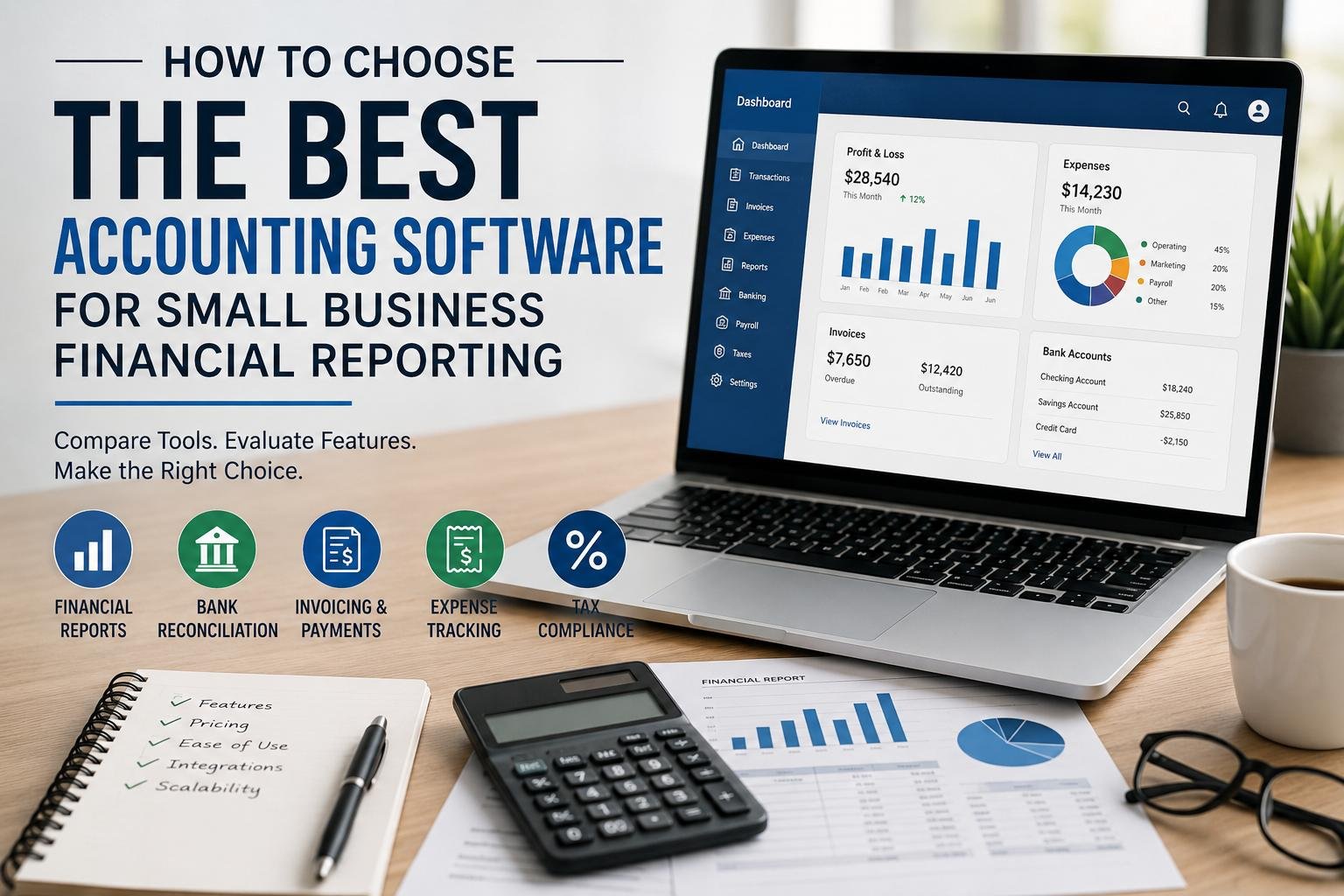
Choosing what software to go with should start out by identifying the features that your business requires. While each provider may present different features, some functions are integral for efficient financial reporting and bookkeeping.
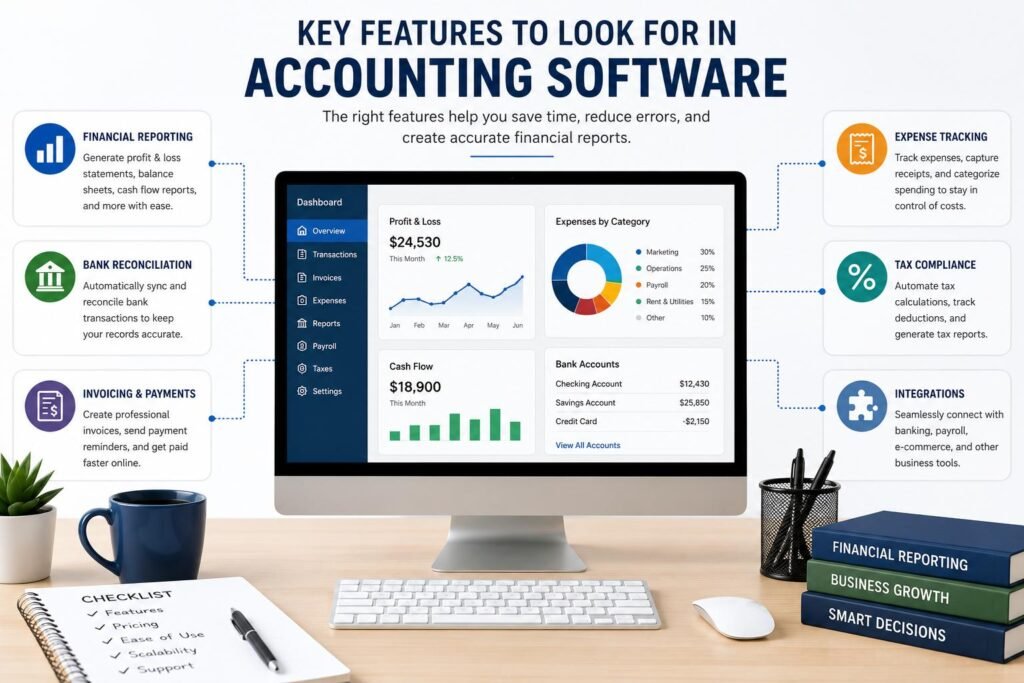
1. Financial Reporting
Strong reportable features should be at the top of the list which is to say that financial statements which are the base of business planning and regulatory compliance should be the focus. We put quality into account software which produces profit and loss statements, balance sheets, cash flow reports, trial balances, general ledger reports, accounts payable reports, and accounts receivable reports at the forefront. Also included is the feature of report customization, comparison of report periods, data export and the creation of dashboards which added great value to the owner’s ability to monitor financial performance.
2. Bank Reconciliation
Automatic teller machine reconciliation has also seen great improvement in what it does for us as we hand over the bulk of the work to machines. We which used to go through hundreds of transactions at a time now have systems that link directly to bank and credit card accounts to put in that data. The software puts forth what it thinks are the correct matches, brings to our attention issues that need to be looked at and as a whole does this is a better, faster way. Also we see less of duplicate entries, missed transactions, and accounting errors that may in turn affect our financial reports.
3. Invoicing and Payment Processing
Small business are looking for software which does professional invoice creation, we repeat, payment reminders, online payment collection, and customer account tracking. We see that integrated payment processing which in turn fast tracks collections, improves cash flow and also reduces admin work. Also report that which do business with their clients very often can save large amounts of time by automating the invoice process at the same time as they put customer payment histories in the accounting system.
4. Expense Tracking
Expense control is what businesses practice to keep accurate records and at the same time control operating costs. We see in good accounting software which is a tool for users to digitalize receipts, which in turn causes expense categories to sort out itself, we also see efficient employee reimbursement and the ability to track spend by department or project. Also auto expense category feature supports more accurate tax reporting and reduces time spent in preparation during tax audit or tax file.
5. Tax Compliance
Tax preparation is made easy when accounting software reports all financial transactions accurately through the year. Many platforms which auto calculate sales tax, generate tax reports, track deductible expenses, and which integrate with tax filing systems. Businesses which operate in many jurisdictions in particular benefit from software which handles different tax rates and compliance requirements automatically thus reducing the risk of filing errors or penalties.
Comparing Popular Accounting Software Solutions
Many accounting software options are available for small businesses, each which targets different business needs. Weeding out the best options is made easier by a detailed comparison of their strengths and weaknesses which in turn refines your search before you invest.
1. QuickBooks Online
QuickBooks Online is still the go to platform for small businesses which it does so by presenting a large amount of features in a very easy to use package. We see support for invoicing, payroll, inventory tracking, expense management, budgeting, bank reconciliation, and detailed financial reports. Also they have integrated with hundreds of third party business applications which in turn extends what the software does. While the subscription prices may be a bit high when compared to some competitors many businesses see the value in what it provides in terms of robust report tools, scalability, and wide scale support from accountants and bookkeepers which may already be familiar with the platform.
2. Xero
Xero has seen growth in the startup and scaling business markets due to its intuitive design and cloud base feature set. We see that they include unlimited users in most plans which in turn makes it very attractive for companies to use which have many employees that require access to the accounting info. Also Xero does very well in the areas of bank reconciliation, financial reporting, fixed asset management, inventory tracking and payroll which is supported in their given regions. We also note that Xero’s real time cloud based system which is a hit with businesses that work with external accountants which in turn removes the need to go back and forth on email for financial records.
3. FreshBooks
FreshBooks is out there for freelancers, consultants and service based businesses. We report that it does very well in the areas of invoicing, time tracking, project billing, expense management and client communication. As for report features which in some aspects are not as in depth as what you will find in QuickBooks or Xero’s reports, what is put out is still very much enough for most small service businesses. FreshBooks is a simple platform which also reports that it does very well at what it does without putting in features that are there just for show which in turn does away with that which over complicates issues for business owners with little accounting background.
4. Zoho Books
Zoho Books presents a great accounting solution at a low price point which also happens to include in depth automation features. Within the Zoho community which includes products like CRM, inventory, payroll, and project management tools your business will see smooth transition between them. In terms of reporting we have detailed dashboards, budget tools, expense tracking, tax management and workflow automation. We see that small businesses looking for software which is a great value and at the same time very automated find in Zoho Books an outstanding option which also does not sacrifice on report quality.
5. Wave Accounting
Wave is a very popular choice among startups and very small businesses which is because it provides many of its basic accounting features at no cost. Users may create invoices, record transactions, reconcile bank accounts, and produce key financial statements without which they would have had to pay monthly subscription fees. While they do have to pay for additional services like payroll and payment processing the free accounting features which Wave does provide are of great value to entrepreneurs working with tight budgets. It is also noted that Wave does not have as large a feature set as do premium competitors.
Comparing Cost and Value
Price is a primary factor but to base your choice of accounting software solely on subscription cost is to set yourself up for higher expenses down the road. Cheaper platforms may not have the automation, customizations or report options which save you hours of work each month. Also it is not wise to go for enterprise level software which may include features that a small business doesn’t use at all.
Instead of what is charged monthly look at total return on investment. Look at the number of hours which are saved with automation, the error reduction in bookkeeping, the quality of the financial reports, what the support team has to offer, which software updates are included, how well it integrates with your other tools, and the platform’s growth for the future. A greater monthly outlay may in fact see large scale reduction in accounting costs via less manual work and greater financial accuracy.
Ease of Use and User Experience
The best accounting software is of little value if employees are not able to use it well. Into the selection process ease of use should be a key factor. What we see is that a intuitive interface which also includes training within the software itself, reduces time in get go and also minimizes data entry errors which in turn promotes consistent record keeping. Also cloud based software which allows access from anywhere be it the office, home or while on the go via laptop, tablet, or smart phone improves access.
Many providers present free trials which businesses can use to test out workflows before going in on a subscription. During the trial period we look at dashboard navigation, transaction entry, report generation, invoice creation, customer management, and bank reconciliation. Also get input from the daily users of the software which will give you valuable feedback on what works and what doesn’t which in turn helps management to choose a solution that supports productivity instead of causing frustration.
Financial Reporting Capabilities to Prioritize
Financial reports is what many companies put into play when they buy into accounting software. While basic reports are a must have, we also see value in in depth analysis which in turn supports strategic decision making. Look for the option of custom reporting periods, comparative reports, department level reporting, budgeting tools, forecasting features, graphical dashboards and automatic report scheduling. Also included should be export options for Excel and PDF which in turn simplifies communication with investors, lenders, accountants and government agencies.
Businesses also to check out if software we use supports report customization which in turn is as per the specific needs of our industry. In retail we may see more focus on inventory profitability reports and in consulting we may see more focus on project profitability and billable hours. What we choose in terms of software which in turn has reporting features that match our operational priorities improve the usefulness of financial info across the organization.
Integration with Other Business Systems
Accounting software today doesn’t function in silos. In the modern business world we see the use of customer relationship management systems, payroll platforms, inventory software, e-commerce stores, point of sale systems, and payment gateways. What we are also seeing is that which platforms are strong in their integration which in turn eliminates redundant data entry and also has a great impact on what is put out into the financial reports from various business applications.
For instance when we integrate accounting software with an online store what we see is sales transactions going right into the financial records automatically. We also see that connecting payroll software which in turn takes care of employee wages, tax deductions and benefits which in turn update accounting records without manual journal entries. We have put in place these integrations which in large part improve efficiency and at the same time reduce human error which in the end supports more accurate financial reporting.
Scalability for Future Business Growth
Choosing at this stage to go with what only meets present needs may cause issues as a business grows. We see that a company which has just 5 employees today may have 50 in a few years’ time which in turn will require more users, different business locations, inventory management, budgeting tools, project accounting, and multi-currency features. By choosing scalable software from the start you avoid large scale transitions down the road.
Cloud based accounting solutions which tend to be more scalable as companies can change their subscription plans as their needs grow. Before you decide do check out what upgrade options are available, what the user limits are, storage capacity provided, what the advanced reporting features are and also what additional modules they have which may support your growth in the future. By investing in scalable software you ensure your financial systems will support your business’ growth instead of becoming a roadblock.
Common Mistakes When Choosing Accounting Software
Many small companies fall into the same issues which in turn end up increasing costs and reducing productivity. We see that they often choose very low cost software which may not have quality reporting features or automated functions. Also a large issue is that they don’t plan for growth which in turn requires them to migrate to more expensive software solutions only a few years down the road.
Businesses at times ignore what the accountants say. What accountants do is that they prepare financial statements and tax returns which in turn they use to see which reporting methods are the best and which platforms have the easiest compliance. Also it is true that whichever the best accounting software may be, if we don’t train the employees properly after we put it in we won’t see the full benefit of it. By putting in time into the on boarding process and in training users we see that which we get out of the software is greatly improved.
Tips for Making the Final Decision
The best accounting software for your business is going to be the one that meets your unique requirements which may not necessarily be the most popular. First off identify what reports you will be running, how many transactions you will have, number of users in the system, industry specific features you require, what your budget is and also what the future growth of the system will be. From there out of a short list of platforms that you identify, get into their free trials, look at what reporting features they offer, what the customer support is like, and also put in a meeting with your accountant before you make your decision.
It also it is a good idea to look at security, data backup procedures, mobile accessibility, software updates and what other users are saying in terms of reviews when choosing a vendor. In tax season or annual finance time technical support is particularly valuable which is when issues must be resolved quickly. Also choice of software which has responsive customer care gives you the peace of mind that issues will be addressed as they come up.
Conclusion
Choosing which accounting software to invest in is key to a small business’ success. What you choose should make bookkeeping easy, improve financial reports, do routine tasks automatically, improve tax compliance, and present you with the info you need for business decisions. Instead of going with what is cheap or what is the most popular, companies should look at what the software reports out, what automation it has to offer, ease of use, if it scales with your business, integration options and overall value.
Creating out a robust financial management system which supports growth of the business at the same time reduces admin burdens. By looking at business needs closely and comparing what is out there we see to investment in software that improves accuracy, saves time and which in turn gives the financial intelligence required to build a stronger more profitable business.
Get more well researched information about Best Accounting Software for Small Business Financial Reporting here.