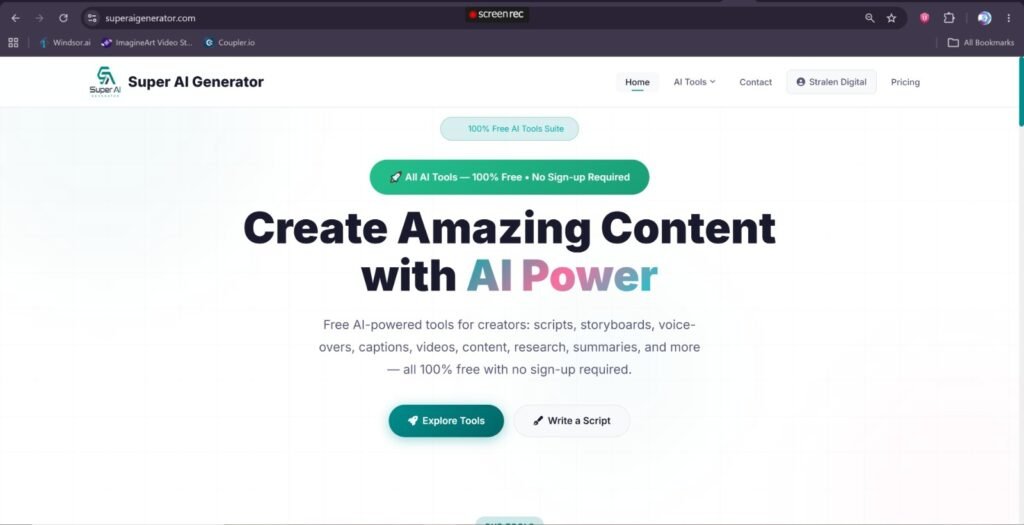
Free AI Voice Generator and AI Tools Online: A Complete Guide to SuperAI Generator
Artificial intelligence is changing how people write, research, design, narrate, edit and publish digital content. Tasks that once required several programs can now be completed with a collection of simple online AI tools.
A content creator may need an AI script generator for a YouTube video, a storyboard generator for planning scenes, an AI voice generator for narration, a caption generator for subtitles and an AI content generator for publishing supporting articles and social media posts.
SuperAI Generator brings these tools together in one artificial intelligence website.
The platform includes free AI-powered tools for voice generation, scripts, storyboards, writing, research, summarization, captioning, text analysis, search engine optimization, image editing and everyday calculations. Most tools can be used without registration or installing software.
What Is SuperAI Generator?
SuperAI Generator is an online AI website designed for creators, marketers, students, writers, developers, website owners and businesses.
Instead of focusing on only one task, the platform provides a collection of tools that can support an entire creative workflow.
You can use SuperAI Generator to:
· Convert written text into an AI-generated voice
· Create scripts for videos, podcasts and advertisements
· Plan visual scenes with an AI storyboard
· Generate blog posts, emails and social media content
· Research a topic
· Summarize long documents
· Analyze and improve written content
· Produce captions from videos
· Remove image backgrounds
· Generate SEO meta tags and structured data
· Format and validate JSON
· Create robots.txt and XML sitemap files
· Count words and characters
· Generate QR codes and secure passwords
· Perform age, BMI, currency and unit calculations
This combination makes SuperAI Generator more than a single AI voice website. It is a multi-purpose collection of generative AI, content, SEO, developer and utility tools.
Free AI Voice Generator With 160+ Realistic Voices
The AI Voice Generator is one of the main tools available on SuperAI Generator.
It converts written text into natural-sounding speech using more than 160 male and female voices across over 80 languages.
Users can enter up to 5,000 characters, choose a language, select a voice and adjust the speech before generating the final audio.
The generated voice can be downloaded as an MP3 file for use in videos, presentations, podcasts, educational material and other projects.
Main AI voice generator features
The online AI voice generator provides:
· More than 160 AI voices
· Over 80 supported languages
· Male and female voice options
· Regional language variations and accents
· Adjustable speech speed
· Adjustable voice pitch
· MP3 audio downloads
· Named voice options
· Browser compatibility
· No required software installation
· No signup requirement
The speech speed can be adjusted from 50% slower to 100% faster. Pitch can also be changed between approximately -50Hz and +50Hz.
These controls help users create an AI voice that better matches the mood, audience and purpose of the content.
What Is AI Text-to-Speech?
AI text-to-speech is technology that turns written words into spoken audio.
Traditional text-to-speech software often produced flat or mechanical voices. Modern AI text-to-speech systems are designed to create more natural pacing, pronunciation and vocal rhythm.
A user enters text, selects an available AI speaker and asks the system to generate audio. The text-to-voice AI tool then produces a downloadable speech file.
AI text-to-speech is also commonly described as:
· AI voice generation
· Text-to-voice AI
· AI speech generation
· AI text-to-audio
· AI narration
· Synthetic voice generation
· AI voiceover
· Text-to-speech AI voice
· Artificial intelligence voice generation
Although these phrases are slightly different, they normally describe the same basic process: transforming text into spoken audio with artificial intelligence.
How to Generate an AI Voice From Text
Creating an AI-generated voice with SuperAI Generator requires only a few steps.
Step 1: Enter your text
Paste or type the content you want the AI voice to read.
This could be a:
· Video script
· Podcast introduction
· Product description
· Training lesson
· Presentation
· Advertisement
· Social media narration
· News-style announcement
· Story
· Educational explanation
Review the text before generating audio. Correct punctuation helps the AI speaker understand where to pause and how sentences should flow.
Step 2: Choose a language
Select the language in which the content should be spoken.
The AI text-to-speech tool supports more than 80 languages, including English, Arabic, Spanish, French, German, Hindi, Japanese, Korean, Portuguese, Italian and many others.
Some languages also include regional variations. English, for example, may offer voices representing American, British, Australian or Indian pronunciation.
Step 3: Select an AI voice
Listen to or select the available male or female voice that best matches your project.
A professional instructional video may need a clear and neutral AI narrator. A promotional video may work better with a more energetic voice. A relaxing story may require slower and softer narration.
Step 4: Adjust speed and pitch
Change the speed to make the voice slower or faster.
You can also adjust the pitch to produce a slightly deeper or higher sound. Small changes usually sound more natural than extreme settings.
Step 5: Generate and download the audio
Generate the speech and review the result.
When you are satisfied, download the AI voiceover as an MP3 file and add it to your video editor, presentation, podcast software or other project.
Uses for an AI Voice Generator
An AI voice maker can help individuals and businesses create audio without recording every line manually.
AI voiceovers for YouTube videos
YouTube creators can turn scripts into narration for:
· Educational videos
· Tutorials
· Product reviews
· Documentaries
· Explainer videos
· List-style videos
· News summaries
· History videos
· Motivational content
· Faceless YouTube channels
Creators can first prepare the content with the AI Script Generator and then convert the completed script into audio with the AI Voice Generator.
AI voice for short-form videos
AI narration can also be used for:
· TikTok videos
· Instagram Reels
· YouTube Shorts
· Facebook videos
· Pinterest video pins
· Product demonstrations
· Short advertisements
A faster speech setting may work for a short social video, while a normal or slower speed can improve clarity in educational content.
Voiceovers for presentations
Students, teachers and business professionals can add AI-generated speech to presentations.
The voiceover can introduce slides, explain charts, describe a process or help turn a standard presentation into a self-running lesson.
AI narration for e-learning
Teachers and course creators can use text-to-speech AI to narrate:
· Online lessons
· Training modules
· Study material
· Language exercises
· Employee onboarding
· Product instructions
· Safety demonstrations
Offering both written text and spoken narration may make educational content easier to follow.
Podcast introductions and segments
An AI narrator can produce:
· Podcast introductions
· Episode previews
· Sponsor messages
· Section transitions
· Announcements
· Closing messages
For the main discussion, original human speech may still create a stronger connection with listeners. AI voiceovers can support the production without replacing the host’s complete identity.
Advertising and promotional voiceovers
Businesses can create narration for:
· Product advertisements
· App demonstrations
· Website explainers
· Social media promotions
· Local business videos
· Sales presentations
· Promotional announcements
Always review the generated speech before using it in a commercial campaign, especially when prices, claims, dates or legal information are included.
Accessibility and reading support
AI text-to-speech may help people who prefer listening instead of reading large blocks of text.
It can also help users review written content, hear pronunciation or listen to material while completing another task.
It should not be presented as a replacement for professional accessibility testing or specialized assistive technology.
Does SuperAI Generator Clone Voices?
SuperAI Generator’s current voice tool lets users select from the voices already provided by the platform.
It is not advertised as a celebrity voice generator, deepfake voice generator or tool for copying another person’s voice from an uploaded sample.
This distinction is important.
Responsible AI voice generation should not be used to impersonate celebrities, public figures, family members, employers or other individuals. It should also not be used to create deceptive calls, fake endorsements, fraudulent recordings or misleading evidence.
Use the available AI voices for legitimate narration and content production.
AI Script Generator
A good AI voiceover begins with a well-written script.
The AI Script Generator creates structured scripts for:
· YouTube videos
· Podcast episodes
· Short films
· Advertisements
· Documentaries
· Educational content
· Custom projects
Users can choose the tone, target audience, desired length and preferred format.
Available script lengths include:
· Under one minute
· One to two minutes
· Three to five minutes
· Eight to fifteen minutes
The generator can produce standard scripts with scene directions, host-and-voiceover scripts or voiceover-only scripts.
Why use an AI script generator?
An AI script writer can help overcome the blank-page problem and organize a topic into a clear beginning, middle and conclusion.
It may help generate:
· Video hooks
· Scene directions
· Narration
· Host dialogue
· Timing notes
· Calls to action
· Visual suggestions
· Section transitions
The result should still be reviewed for accuracy, originality, brand voice and audience suitability before production.
AI Storyboard Generator
A storyboard helps creators decide what viewers should see during each part of a video or film.
The AI Storyboard Generator turns a story concept into a structured visual plan containing up to 20 scenes.
It can create scene descriptions with:
· Camera angles
· Lighting
· Composition
· Visual details
· Emotional direction
· Colour guidance
· Scene transitions
· Continuity recommendations
Users can choose between cinematic, anime, comic-book, realistic, animated or pixel-art styles.
They can also select AI-generated visuals, live-action visuals or a mixed approach.
Who can use the storyboard generator?
The tool may be useful for:
· YouTubers
· Short-film creators
· Animators
· Advertisers
· Social media creators
· Marketing teams
· Teachers
· Story writers
· Video editors
· Independent filmmakers
The storyboard is a planning document rather than a finished set of generated images. It gives the creator detailed instructions for producing each scene.
AI Content Generator
The AI Content Generator creates different forms of written material based on a topic, tone, desired length and target keywords.
Supported content types include:
· Blog posts
· Articles
· Social media posts
· Emails and newsletters
· Product descriptions
· SEO content
· Landing-page copy
· Speeches and presentations
Users can choose a professional, casual, persuasive, informative, conversational, luxury or technical tone.
Content length options range from approximately 300 words to 2,500 words.
How to get better AI-generated content
Provide a specific topic instead of entering one or two general words.
For example, instead of requesting:
“Write about artificial intelligence.”
Use a detailed instruction such as:
“Write an informative 1,500-word article explaining how small e-commerce businesses can use AI content tools to improve product descriptions, email campaigns and social media workflows.”
A detailed instruction gives the generative AI system more context and normally produces a more useful first draft.
Always verify statistics, quotations, product details, medical claims, legal information and financial advice before publishing AI-generated content.
AI Content Research Tool
The AI Content Research tool creates organized research around a user-selected subject.
Users can choose between:
· Quick research of approximately 300–500 words
· Standard research of approximately 800–1,200 words
· Deep research of approximately 1,500–3,000 words
Available research types include:
· General research
· Academic research
· Business analysis
· Technical research
· Marketing research
Additional modes can produce marketing angles, content ideas, campaign concepts, hooks and platform-specific strategies.
Important research limitation
AI-generated research can help organize a topic, identify questions and produce a starting framework. It should not automatically be treated as verified academic or professional research.
Users should independently confirm:
· Statistics
· Dates
· Names
· Quotations
· Scientific claims
· Legal requirements
· Medical information
· Financial information
· References and source details
This is especially important when the research will be published or used for a high-impact decision.
AI Summarizer
The AI Summarizer condenses long text into a shorter version.
Users can paste an article, essay, report, study material or other document and choose one of three summary lengths:
· Short
· Medium
· Detailed
The tool can be helpful for:
· Academic paper reviews
· Article summaries
· Business reports
· Lecture notes
· Study guides
· Research preparation
· Meeting documents
· Long emails
A summary is intended to identify the main ideas. It may leave out supporting examples, qualifications or subtle arguments, so important original material should still be reviewed.
AI Humanizer and Text Analysis
The AI Humanizer and Detector analyzes text across six writing dimensions:
· Vocabulary
· Sentence structure
· Transitions
· Personal voice
· Emotion
· Specificity
It provides sentence-level analysis and three rewriting modes:
· Light
· Moderate
· Deep
Light mode makes smaller changes to sentence flow and transitions. Moderate mode introduces more variation and specificity. Deep mode performs a more extensive rewrite while attempting to preserve the original meaning.
The free tier currently allows up to 1,400 words per day.
Appropriate uses for an AI humanizer
The tool can help users:
· Reduce repetitive phrasing
· Improve sentence variety
· Replace generic language
· Improve transitions
· Clarify awkward writing
· Make a draft sound more natural
· Adapt AI-assisted text to a personal style
It should not be used to misrepresent authorship, evade academic rules or submit generated work where original human work is required.
Schools, universities, employers and publishers may have specific policies concerning AI-assisted writing. Users remain responsible for following those rules.
AI Caption Generator
The AI Caption Generator creates timed subtitles from uploaded videos.
It supports:
· MP4
· WebM
· MOV
· AVI
· Files up to 500MB
· Speaker detection
· Start and end timestamps
· SRT export
· VTT export
· Plain-text copying
· Burned-in captions
Video processing is designed to happen locally in the browser, helping the original file remain on the user’s device.
Why captions matter
Captions can make video content easier to understand when:
· The viewer cannot play audio
· The speaker has an unfamiliar accent
· Background noise affects clarity
· The viewer is learning the language
· The content contains technical terminology
· The viewer benefits from written accessibility support
Creators should review automatically generated captions before publishing. Names, brands, technical terms and unclear speech may require correction.
AI Video Creator
SuperAI Generator has an AI Video Creator page for text-to-video production.
Its planned controls include:
· Text prompts
· AI prompt enhancement
· Cinematic visuals
· Anime visuals
· Realistic visuals
· Animated content
· 3D rendering
· Landscape video
· Vertical video
· Square video
· Durations from 5 to 60 seconds
However, the live page currently identifies the video generator as Coming Soon.
Users should not expect active video generation until the feature is officially launched.
The existing Script Generator, Storyboard Generator and Voice Generator can still be used together to prepare a complete production plan before creating the final video in another editor.
A Complete AI Content Workflow
SuperAI Generator’s content tools can be combined into a practical workflow.
1. Research the topic
Use the AI Content Research tool to explore the subject, identify useful questions and develop content angles.
2. Prepare the script
Move the confirmed information into the AI Script Generator.
Select the appropriate format, length, tone and target audience.
3. Plan the visuals
Paste the final concept into the AI Storyboard Generator.
Create scene descriptions, camera directions and visual transitions.
4. Generate narration
Place the final voiceover text in the AI Voice Generator.
Choose the most appropriate language, voice, speed and pitch before downloading the MP3.
5. Produce the video
Combine the narration and planned visuals in a video editor.
When the SuperAI Video Creator becomes available, text-to-video generation may become part of this workflow.
6. Generate captions
Upload the completed video to the AI Caption Generator.
Review the transcript and download the subtitles in SRT or VTT format.
7. Create promotional content
Use the AI Content Generator to prepare:
· A video description
· Social media captions
· An email announcement
· A related blog post
· A landing page
· Promotional copy
8. Check the writing
Review word count, readability, keywords, sentence length and content quality with the AI Word Counter.
This creates a connected workflow instead of using unrelated AI tools one at a time.
AI Background Remover
The AI Background Remover separates the main subject of a photograph from its background.
It accepts JPG, PNG and WebP images up to 10MB and exports the result as a transparent PNG.
The tool uses an ONNX deep-learning model that runs in the browser.
It can be used for:
· Product photographs
· Social media graphics
· Profile pictures
· YouTube thumbnails
· Marketing designs
· Presentation images
· E-commerce listings
· Design composites
Images containing clear contrast between the subject and background normally produce better results than dark, blurry or highly complex photographs.
AI Word Counter
The AI Word Counter does more than display a basic word total.
It analyzes:
· Words
· Characters
· Sentences
· Paragraphs
· Reading time
· Speaking time
· Flesch Reading Ease
· Flesch-Kincaid Grade Level
· Keyword density
· Sentiment
· Sentence variety
· Word variety
· Average sentence length
· Passive voice
· Long sentences
· Short sentences
· Overall content quality
This can help writers check whether an article is readable, balanced and appropriately optimized.
The tool also warns when a term exceeds approximately 3% keyword density, helping writers identify possible keyword stuffing.
AI Character Counter
The AI Character Counter is designed for content with strict platform limits.
It can help optimize text for:
· X or Twitter
· YouTube
· TikTok
· Meta titles
· Meta descriptions
· SMS messages
The tool measures characters with and without spaces, words, lines and other text properties.
This is useful when writing social posts, advertisements and search snippets that must fit within limited space.
AI Tools for Website Owners and Developers
SuperAI Generator also provides several tools for technical and search engine optimization tasks.
AI JSON Formatter
The JSON Formatter can:
· Beautify JSON
· Minify JSON
· Validate JSON
· Identify syntax errors
· Change indentation
· Sort keys alphabetically
· Copy formatted output
· Download a JSON file
Processing happens in the browser, which is useful when formatting API responses, configuration files or database exports.
AI Schema Markup Generator
The Schema Markup Generator creates JSON-LD structured data for:
· Organizations
· Articles and blog posts
· Products
· FAQ pages
· How-to pages
· Events
Users enter information about the page and receive JSON-LD code that can be added to the website.
Structured data can help search engines understand page content and may make a page eligible for supported search features. It does not guarantee rankings or rich results.
AI Meta Tag Generator
The Meta Tag Generator creates:
· Title tags
· Meta descriptions
· Open Graph tags
· Twitter or X Card tags
It includes character counters and an AI suggestion option.
Every important website page should have a unique title and description that accurately represent its content.
AI Robots.txt Generator
The Robots.txt Generator creates crawler instructions based on:
· Domain name
· Sitemap location
· Paths to block
· Paths to allow
· Website type
· Platform template
It provides presets for blogs, e-commerce websites, portfolios, corporate websites, news websites, SaaS platforms and communities.
Platform templates include WordPress, Shopify, Next.js, React and custom websites.
Robots.txt controls crawling instructions. It should not be treated as a security system for protecting confidential files.
AI Sitemap Generator
The Sitemap Generator creates an XML sitemap containing:
· Website URLs
· Last-modified dates
· Priority values
· Change frequencies
The final sitemap can be copied or downloaded as an XML file.
After uploading the file to the website, the sitemap URL can be submitted through Google Search Console or other webmaster platforms.
QR Code Generator
The QR Code Generator turns supported information into a downloadable QR image.
QR codes can be used for:
· Website links
· Contact information
· Wi-Fi details
· Product pages
· Menus
· Event information
· Promotional campaigns
· Printed marketing material
Always test the QR code with more than one device before printing or publishing it.
Secure Password Generator
The Password Generator creates randomized passwords between 8 and 64 characters.
Users can choose whether to include:
· Uppercase letters
· Lowercase letters
· Numbers
· Symbols
The tool includes a strength indicator and uses the browser’s cryptographic functions to generate the password locally.
Generated passwords should be saved in a reputable password manager rather than stored in an unprotected note or reused across multiple accounts.
Additional Online Calculators
SuperAI Generator also includes practical browser-based calculators.
Age Calculator
The Age Calculator displays:
· Age in years
· Remaining months
· Remaining days
· Total days lived
· Estimated total hours
· Next birthday
BMI Calculator
The BMI Calculator estimates body mass index using height and weight information.
BMI is a general screening measurement and is not a diagnosis. Body composition, age, pregnancy, muscle mass and other factors may affect its interpretation.
Currency Converter
The Currency Converter supports over 150 currencies and uses regularly updated exchange-rate information.
Displayed rates may differ from the final rate offered by a bank, card provider or currency exchange because those services may add fees and spreads.
Unit Converter
The Unit Converter supports more than 100 combinations across seven categories:
· Length
· Weight
· Temperature
· Volume
· Speed
· Data
· Time
Results update as the value or unit selection changes.
Is SuperAI Generator an AI Chatbot?
SuperAI Generator is not currently presented as a conversational AI chatbot comparable to ChatGPT, Claude AI, Meta AI or other general-purpose chatbots.
It is a collection of task-specific AI tools.
Instead of opening one general AI chat and asking it to perform every task, users select a dedicated tool for voice generation, scripts, content, research, summaries, captions, SEO or another supported function.
This can make the workflow easier for users who prefer structured controls instead of writing complex prompts.
Is SuperAI Generator Connected to OpenAI?
SuperAI Generator is an independent AI tools website operated by Stralen Digital LLC.
The website should not be described as an official OpenAI, ChatGPT, Google AI, Microsoft AI, Meta AI, Claude AI, Midjourney or Adobe product unless an individual tool page specifically and accurately identifies a third-party technology being used.
Product names belonging to other companies should only be used for legitimate comparison or explanation. They should not be placed throughout the article merely to attract unrelated searches.
Are the AI Tools Free?
Most tools on SuperAI Generator are currently presented as free and do not require registration.
However, limits and availability can vary by tool.
For example:
· The AI Humanizer currently has a 1,400-word daily free limit.
· The AI Video Creator is currently marked as coming soon.
· Some AI-powered tools may depend on external processing services.
· Browser-based tools may depend on the performance of the user’s device.
Users should check the individual tool page for the latest limits and availability.
Are Online AI Tools Private?
Privacy depends on how each tool processes information.
Some SuperAI Generator tools operate locally in the browser. These include tools such as the JSON Formatter, Word Counter, Background Remover and several calculators.
Other AI tools may send entered text to an external model or processing service to create the requested output.
Users should avoid entering:
· Passwords
· Banking information
· Private medical records
· Confidential client data
· Government identification numbers
· Unpublished legal documents
· Trade secrets
· Sensitive personal communications
Even when a service states that it does not retain data, avoiding unnecessary sensitive information remains a sensible safety practice.
Responsible Use of Artificial Intelligence
AI tools should assist human work rather than remove human responsibility.
Users should:
· Verify important factual claims
· Review generated scripts before recording
· Correct captioning errors
· Respect copyright
· Avoid impersonating other people
· Obtain permission before using someone’s identity or content
· Follow school and workplace AI policies
· Disclose AI assistance where required
· Avoid deceptive or fraudulent material
· Protect private information
· Review output for bias and harmful assumptions
Artificial intelligence can make content creation faster, but users remain responsible for what they publish.
Frequently Asked Questions
What is the best free AI voice generator?
The best AI voice generator depends on the number of voices, supported languages, available controls, audio quality and licensing requirements.
SuperAI Generator provides more than 160 voices across over 80 languages, speed and pitch adjustment, and downloadable MP3 audio without requiring signup.
Is the SuperAI voice generator free?
The current voice generator is presented as free to use without signup, hidden charges or watermarks.
Can I generate AI voiceovers online?
Yes. Enter the narration, choose a language and AI speaker, adjust the speed or pitch, generate the audio and download the result as an MP3 file.
Can I use the AI voice for YouTube videos?
AI-generated narration can be used in YouTube videos, tutorials, explainers and other content, subject to the tool’s terms and the rules of the platform where the content is published.
Does the AI voice generator support Arabic?
The voice generator supports Arabic along with more than 80 other languages.
Can I generate an Urdu AI voice?
Available languages and voices may change. Check the live language menu to confirm whether the required Urdu voice is currently offered.
Can I create a British AI voice?
The platform offers regional variations for several languages, including multiple English accents. Check the current voice menu for available British English options.
Can I download the generated AI voice?
Yes. Generated speech can be downloaded as an MP3 audio file.
Can I control the AI voice speed?
Yes. Speech speed can be adjusted from slower narration to a faster delivery.
Can I change the pitch of an AI voice?
Yes. The tool includes pitch control for making the selected voice sound slightly higher or lower.
Does SuperAI Generator copy celebrity voices?
The current tool provides a set of available AI voices. It is not presented as a celebrity impersonation or custom voice-cloning tool.
Can I clone my own voice?
Custom voice cloning is not listed as a current SuperAI Generator feature.
Is there an AI script writer?
Yes. The AI Script Generator creates YouTube, podcast, film, advertising, documentary and educational scripts.
Can AI create a storyboard?
Yes. The Storyboard Generator creates structured visual plans with scene descriptions, camera directions, lighting and emotional guidance.
Can I generate a complete article?
The AI Content Generator can create blog posts and articles in short, medium and long formats. Generated information should be fact-checked and edited before publication.
Can AI summarize a long article?
Yes. The AI Summarizer produces short, medium or detailed summaries from pasted text.
Can the platform generate captions from a video?
Yes. The caption tool can transcribe supported video files and export subtitles as SRT or VTT files.
Is the AI Video Creator available?
The video-generation page is currently marked as coming soon. The other tools can still be used to prepare scripts, storyboards and narration.
Do I need to create an account?
Most available tools can currently be used without creating an account.
Do the tools work on mobile devices?
The website is browser-based and can be accessed from modern desktop and mobile browsers. Tool performance may depend on the device, file size and available memory.
Start Creating With Free AI Tools Online
Artificial intelligence is most useful when it supports a clear goal.
SuperAI Generator gives creators a practical way to move from an initial idea to a completed content package.
You can:
1. Research a topic.
2. Generate a script.
3. Create a storyboard.
4. Produce an AI voiceover.
5. Prepare captions.
6. Write supporting promotional content.
7. Analyze the final text.
8. Optimize the related webpage.
Whether you need a free AI voice generator, AI text-to-speech tool, AI script writer, content generator, summarizer, caption creator or developer utility, SuperAI Generator provides a growing collection of online tools in one place.
Choose the tool that matches your task, provide clear instructions, review the generated result and use artificial intelligence as a responsible assistant in your creative workflow.