Manual prospecting sounds productive until you spend hours jumping between LinkedIn, spreadsheets, email tools, enrichment platforms, and follow-up reminders.
You are not really selling at that point.
You are just moving data from one place to another.
That is why AI outbound sales systems are becoming so useful. They help you find the right prospects, understand their context, send personalized outreach, follow up, manage replies, and book meetings without turning your day into repetitive admin work.
In this guide, you will learn:
- What an AI outbound sales system actually means
- How to build one step by step
- How Oppora.ai helps you run outbound without manual prospecting
What Is an AI Outbound Sales System?
An AI outbound sales system is a connected sales setup that helps you find prospects, understand them, contact them, follow up, manage replies, and move interested leads toward meetings.
Instead of doing every step manually, you give the system clear rules about who you want to reach and what you sell.
Then AI helps execute the workflow across prospecting, enrichment, outreach, replies, and reporting.
The main idea is simple.
You are not just automating sales tasks.
You are building a sales engine that can think through the next best action and keep moving your outbound process forward.
AI Outbound Sales vs Traditional Outbound Sales
Traditional outbound sales usually depends on manual effort.
You search for leads, check company websites, open LinkedIn profiles, copy contact details, write emails, send follow-ups, and update your CRM.
It works, but it is slow.
And the more you scale, the more your team gets buried in repetitive work.
AI outbound sales changes that process.
AI can help identify matching companies, find decision-makers, enrich contact data, research each prospect, personalize emails, send sequences, and handle early replies.
So instead of spending your day building lists, you can focus on strategy, offers, and conversations that actually need your judgment.
The Difference Between Sales Automation and an AI Sales Workflow
Sales automation usually follows fixed rules.
You set a trigger, choose an action, and the tool repeats that action exactly the same way.
An AI sales workflow goes further.
It can use context, prospect data, company signals, previous interactions, and campaign performance to make smarter decisions.
That means your workflow does not only send emails.
It can decide who to target, what message to write, when to follow up, and how to respond when someone shows interest.
The Core Components of a Self-Running Outbound System
A self-running outbound system needs a few connected parts.
You need a clear ICP, reliable prospect data, email verification, enrichment, AI research, personalized messaging, campaign automation, inbox management, reply handling, meeting booking, and performance tracking.
When these parts work together, outbound stops feeling like scattered manual tasks.
It becomes a repeatable system that keeps finding, contacting, and qualifying leads with far less manual prospecting.
How to Build an AI Outbound Sales System
Once you understand what an AI outbound sales system does, the next question is simple.
How do you actually build one?
The goal is not to throw AI into every small task and hope it works.
The goal is to design a sales workflow where every step connects naturally, from finding the right prospects to booking meetings with interested leads.
Step 1: Define Your Ideal Customer Profile Before AI Starts Prospecting
Before AI starts searching for leads, you need to tell it who matters.
This is where your ideal customer profile comes in.
Your ICP helps the system understand which companies, roles, industries, and buyer situations are worth targeting.
Without this step, AI may still find leads, but they may not be the right leads.
You should define your ICP based on:
- Industry or niche
- Company size
- Location
- Revenue range
- Job titles
- Team structure
- Current tools they use
- Pain points your product solves
- Buying triggers that suggest urgency
Think of your ICP as the map for your AI outbound sales system.
If the map is unclear, the system may move fast in the wrong direction.
You should also identify buying signals before launching prospecting.
These are clues that a company may need your offer now.
Common buying signals include:
- Hiring for a specific role
- Recently raising funding
- Expanding into a new market
- Launching a new product
- Using a competitor tool
- Growing their sales or marketing team
- Showing interest in related topics online
Then you need to set clear targeting criteria.
This tells your AI what to include and what to avoid.
A good targeting rule might sound like this:
“Find B2B SaaS companies in the United States with 11–200 employees, recently hiring SDRs, and using HubSpot or Salesforce.”
Now your AI is not just looking for random leads.
It is looking for prospects who match your sales strategy.
Step 2: Find Qualified Prospects with AI Instead of Manual Research
Once your ICP is clear, prospecting becomes much easier.
Instead of manually searching LinkedIn, company websites, and directories, AI can help you find prospects based on your targeting rules.
This is where a tool like Oppora becomes useful.
Oppora helps you search through a large prospect database, apply smart filters, find matching companies, and identify relevant decision-makers.
You can use AI Search to describe who you want to reach in plain English.
Then the system can help you find prospects that match your criteria.
A strong AI prospecting workflow should help you find:
- Companies that match your ICP
- Decision-makers inside those companies
- Verified email addresses
- Relevant job titles
- Company details
- Prospect segments for different campaigns
This removes one of the most time-consuming parts of outbound sales.
You no longer have to spend hours building a spreadsheet before you can start selling.
With Oppora, you can use smart filters to narrow your prospect list by factors like industry, company size, role, location, and other useful signals.
You can also pull verified contacts, which helps you avoid weak data and reduce bounce risk.
That matters because bad data can quietly damage your outbound performance.
If your list is full of invalid emails or poor-fit prospects, even the best email copy will struggle.
So this step is not only about finding more leads.
It is about finding cleaner, more relevant leads before outreach begins.
Step 3: Enrich Every Prospect with AI Before Sending the First Email
Finding a prospect is only the first layer.
Before you send an email, you need context.
You need to know who the person is, what their company does, why they may care, and how your message should connect to their situation.
That is where lead enrichment comes in.
AI enrichment helps turn a basic lead record into something useful for sales.
Instead of only having a name, title, and email address, you can collect deeper insights that help personalize your outreach.
A good enrichment process can include:
- Company description
- Industry category
- Employee count
- Website details
- Recent company activity
- Role-specific context
- Technology used by the company
- Potential pain points
- Contact-level details
Oppora supports this through features like Ask Ora, company insights, company enrichment, contact enrichment, and AI research.
Ask Ora helps you work with AI inside your sales process.
Instead of manually researching every company, you can ask AI to help understand the account and prepare useful context for outreach.
This gives your AI outbound sales system more intelligence before it sends the first message.
For instance, instead of sending a generic email to a Head of Sales, your system can understand that the company is hiring more SDRs, expanding outbound, or using tools that suggest they may need better pipeline automation.
That context changes the quality of your email.
It makes your outreach feel more relevant because it is based on real buyer context, not guesswork.
Step 4: Personalize Every Email with AI That Understands Buyer Context
Once your prospect data is enriched, the next step is messaging.
This is where many outbound campaigns fail.
They have the right audience, but the message still feels generic.
Personalization does not mean adding someone’s first name to the subject line.
Real personalization means your email reflects something meaningful about the person, company, role, or current situation.
With AI, you can personalize outreach at scale without writing every email manually.
Oppora supports this with AI Variables, AI Email Templates, personalized introductions, and dynamic messaging.
AI Variables help you create custom lines based on each prospect’s context.
That could include:
- A company-specific opening line
- A role-based pain point
- A reason for reaching out
- A relevant business trigger
- A tailored value proposition
- A different angle for each segment
AI Email Templates help you create the structure of your message.
Then the AI can adapt parts of that message based on the prospect’s data.
This gives you a balance between control and personalization.
You still decide the offer, positioning, and campaign goal.
AI helps adjust the message so it feels more relevant to each recipient.
For example, your message to a founder may focus on saving time and reducing manual sales work.
Your message to a sales leader may focus on pipeline generation, reply handling, and scaling outbound without adding more SDRs.
The product may be the same.
But the angle should change based on the buyer.
That is what makes AI personalization useful.
Step 5: Build an AI Sales Workflow That Runs Every Outreach Automatically
Now you have your ICP, prospect list, enriched data, and personalized messaging.
The next step is connecting everything into one workflow.
This is where your AI outbound sales system becomes more than a list and a few email templates.
You need a workflow that can run outreach automatically from start to finish.
In Oppora, the Workflow Builder helps you create this kind of system.
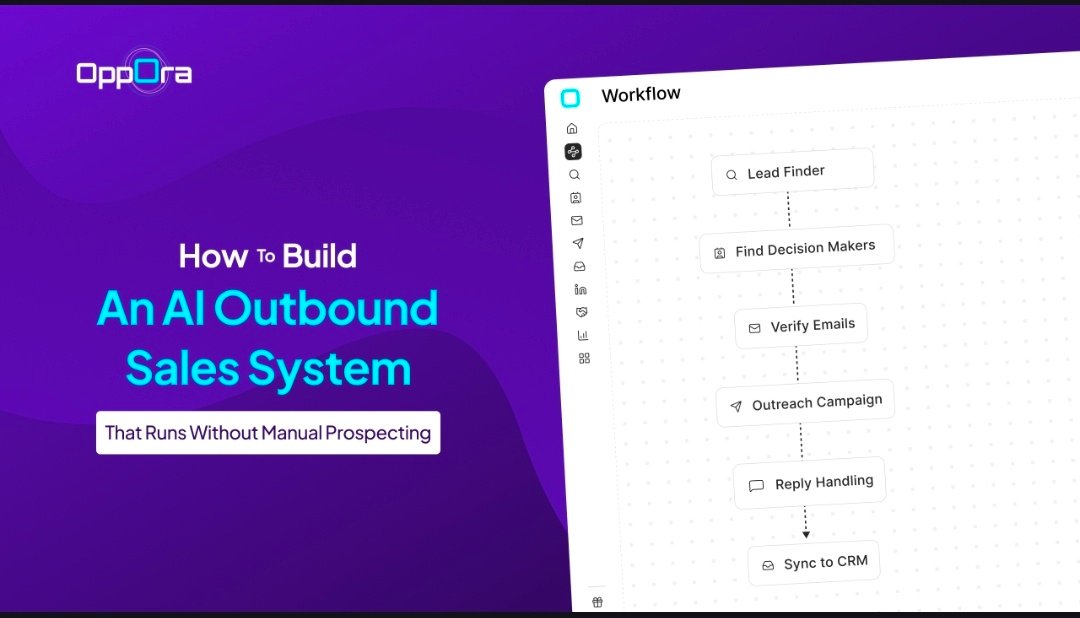
You can build a sequence where different steps happen in order, such as prospecting, enrichment, email creation, sending, follow-ups, reply handling, and CRM syncing.
A strong AI sales workflow may include:
- Find companies matching your ICP
- Find contacts inside those companies
- Verify email addresses
- Enrich each contact
- Generate personalized emails
- Send the first email
- Wait for a defined period
- Send follow-ups if there is no reply
- Stop outreach if the person responds
- Send positive replies to the right next step
- Sync activity to your CRM
This is where campaign automation saves a lot of time.
Instead of manually checking who needs a follow-up, the system follows the sequence for you.
You can also create multi-step sequences for different buyer journeys.
One sequence may target founders.
Another may target sales leaders.
Another may target agencies or service providers.
Follow-up automation is especially important because most outbound conversations do not start from the first email.
People are busy.
They miss emails.
They open messages and forget to reply.
A smart workflow keeps the conversation moving without forcing you to manually track every prospect.
Step 6: Scale Outreach Without Hurting Deliverability
Scaling outbound is not only about sending more emails.
If you send too many emails too quickly from one inbox, your domain reputation can suffer.
Then even good emails may start landing in spam.
That is why deliverability needs to be built into your AI outbound sales system from the beginning.
You need safeguards that help you grow outreach without damaging your sender reputation
Oppora helps with multi-mailbox support, auto warm-up, sender matching, and high-volume email sending.
Multi-mailbox support lets you connect and rotate multiple inboxes.
This helps distribute sending volume instead of forcing one mailbox to carry the entire campaign.
Auto warm-up helps prepare your inboxes before heavy sending.
It builds trust signals gradually so your outreach looks more natural to email providers.
Sender matching is another useful layer.
If your lead uses Gmail, sending from a Gmail inbox can help create a more natural sender-recipient match.
If your lead uses Outlook, the system can match that as well.
This may seem like a small detail, but outbound performance often depends on small technical factors.
To scale safely, you should also control:
- Daily sending limits
- Time gaps between emails
- Mailbox rotation
- Bounce rates
- Spam-triggering words
- Email verification
- Reply tracking
- Domain health
High-volume outreach only works when quality and deliverability grow together.
Otherwise, you may reach more people but get fewer replies.
Step 7: Let Your AI SDR Reply, Qualify Leads, and Book Meetings
Outbound does not end when someone replies.
In many ways, that is where the real sales process starts.
A prospect may ask a question, raise an objection, request more information, or show interest but not book a meeting yet.
If replies sit unread for hours, warm leads can go cold.
That is why an AI SDR can be useful.
Oppora’s Reply Ora helps handle inbound replies directly from your inbox.
It can help generate AI replies, qualify leads, answer common questions, and guide interested prospects toward booking a meeting. .
This does not mean you lose control of your sales conversations.
It means AI can handle the first layer of response and keep the conversation moving.
An AI SDR can help with:
- Answering basic product questions
- Responding to objections
- Sharing useful resources
- Identifying buying intent
- Tagging interested leads
- Routing warm prospects
- Sending meeting links
- Booking meetings
This is especially helpful when your outreach volume increases.
More campaigns usually mean more replies to manage.
Some replies are positive.
Some are neutral.
Some need follow-up.
Some need a human.
A good AI reply workflow helps sort those conversations faster.
So your team can spend less time checking every inbox and more time talking to qualified prospects who are actually ready for a conversation.
Step 8: Track Performance and Continuously Improve the Workflow
A self-running outbound system still needs improvement.
AI can execute the workflow, but you need to understand what is working and what should change.
That is why tracking performance is the final step.
You should monitor campaign results across every stage of your AI outbound sales system.
The goal is to find bottlenecks.
Maybe your list quality is strong, but your first email is not getting replies.
Maybe your open rate is good, but your offer is not clear enough.
Maybe one audience segment performs much better than another.
Oppora helps with analytics, A/B testing, campaign reporting, and workflow optimization.
You can use these insights to improve your outbound system over time.
Important metrics to track include:
- Email open rate
- Reply rate
- Positive reply rate
- Bounce rate
- Meeting booking rate
- Follow-up performance
- Best-performing subject lines
- Best-performing audience segments
- Best-performing email angles
A/B testing is useful because you do not have to guess which message works better.
You can test different subject lines, opening lines, offers, CTAs, and follow-up angles.
Then you can scale the version that gets better replies.
Campaign reporting also helps you understand whether the issue is targeting, messaging, deliverability, or timing.
This is what makes the system stronger over time.
You are not just launching one campaign and hoping for the best.
You are building a workflow that learns, improves, and keeps generating better outbound results with each campaign cycle.
Why Oppora.ai Makes AI Outbound Sales Simpler Than Using Multiple Tools
Building an AI outbound sales system becomes harder when every step sits inside a different tool.
You may use one platform for lead search, another for email verification, another for campaigns, another for inbox replies, and another for CRM updates.
Oppora.ai simplifies this by bringing the main parts of outbound into one connected AI sales workflow.
Instead of managing separate AI sales tools for every stage, your team can find prospects, enrich data, verify contacts, personalize outreach, automate follow-ups, manage replies, and track results from one workflow.
One Platform for Prospecting, Outreach, AI, and Meetings
Instead of managing a scattered outbound stack, Oppora.ai helps you run the full process from one place.
You can use it to:
- Find companies and decision-makers that match your ICP
- Search verified contacts using built-in prospecting data
- Enrich leads before outreach begins
- Create personalized AI email messages
- Run automated email sequences
- Manage replies from a shared inbox
- Qualify interested leads with AI
- Book meetings and sync activity to your CRM
This matters because outbound breaks when tools do not talk to each other.
Oppora.ai keeps prospecting, enrichment, outreach, replies, and meeting booking connected inside the same system.
Build AI Workflows by Chatting with AI
You do not need to build complex automations manually.
With Oppora.ai, you can tell AI what you sell and who you want to reach.
From there, the system helps you create a workflow around your sales goal.
You can build workflows for:
- Finding target accounts
- Identifying relevant contacts
- Verifying emails
- Researching each prospect
- Writing personalized outreach
- Sending follow-ups
- Handling replies
- Updating your CRM automatically
This makes AI outbound sales easier for founders, solopreneurs, SDRs, agencies, and small teams that want a system without daily manual setup.
Scale Outbound Without Scaling Your Sales Team
The real value of Oppora.ai is that it helps you increase outbound activity without increasing manual workload.
You can scale:
- Prospecting volume
- Email personalization
- Follow-up sequences
- Inbox reply handling
- Lead qualification
- Meeting booking
- Campaign reporting
Your team still controls the sales strategy, offer, audience, and positioning.
Oppora.ai handles the repetitive execution, so you can reach more qualified prospects without hiring more SDRs just to manage manual tasks.
Conclusion
Manual prospecting will always slow you down when every lead, email, follow-up, reply, and CRM update depends on you.
That is why an AI outbound sales system is so valuable.
It turns scattered sales tasks into one connected workflow that can find qualified prospects, enrich them, personalize outreach, send follow-ups, manage replies, and help book meetings.
But the system works best when the foundation is clear.
You still need a strong ICP, clean targeting criteria, reliable data, thoughtful messaging, and regular performance reviews.
AI helps with execution, but your strategy guides the direction.
With Oppora.ai, you can bring prospecting, enrichment, outreach, reply handling, and workflow automation into one place.
So instead of spending your day doing manual research, you can build a system that keeps your outbound moving while you focus on conversations that matter.
Frequently Asked Questions About AI Outbound Sales
What is AI outbound sales?
AI outbound sales is the process of using AI to find prospects, research accounts, write personalized emails, send follow-ups, manage replies, and help book meetings. Instead of doing every prospecting task manually, you use AI to handle repetitive work while you focus on strategy and sales conversations.
What is an AI sales workflow?
An AI sales workflow is a connected sequence where AI helps move prospects through each outbound step automatically. It can include lead search, email verification, enrichment, personalized messaging, campaign sending, follow-ups, reply handling, lead qualification, and CRM updates.
How does an AI SDR work?
An AI SDR works like a virtual sales assistant that supports the early stages of outbound sales. It can research prospects, write outreach messages, respond to replies, qualify interest, answer common questions, and guide warm leads toward booking a meeting with your team.
Can AI replace manual prospecting?
AI can replace most repetitive parts of manual prospecting, such as finding leads, enriching data, verifying emails, and preparing personalized outreach. But you still need a clear ICP, strong positioning, and regular performance review to make sure the system targets the right people.
How does Oppora.ai automate outbound sales?
Oppora.ai automates outbound sales by connecting prospecting, enrichment, AI email writing, campaign automation, reply handling, meeting booking, and CRM syncing in one workflow. You tell Oppora what you sell and who you want to reach, then its AI sales agents help execute the process without constant manual work.