You don’t need Photoshop, a laptop, or a design degree to make a meme that lands in the group chat. You need a phone, an idea, and about thirty seconds. That’s it.
Memes have quietly become one of the most shared formats on the internet. More than a million are posted to Instagram every single day, and the habit isn’t slowing down. Whether you’re roasting a friend, reacting to the news, or building a brand voice that doesn’t feel like a press release, knowing how to make a meme on your phone is a genuinely useful skill in 2026.
This guide walks through exactly how to do it. The fast AI way, the classic template way, and the small details that separate a meme people share from one they scroll past.
Key Takeaways
- More than 1 million memes are shared on Instagram daily, up from 500,000 in 2018 (ElectroIQ, 2025).
- Memes earn roughly 60% higher organic engagement than standard marketing visuals (Amra & Elma, 2025).
- You can make a meme on your phone in under a minute with an AI meme generator, no editing skill required.
- The format you choose matters as much as the joke. Reaction, comparison, and caption memes still carry the most reach.
Why Bother Making Memes at All?
Because they outperform almost everything else you can post. Memes pull in about 60% more organic engagement than traditional graphics and can reach up to ten times more people than a standard marketing image (Amra & Elma, 2025). That’s a big return on a format that costs nothing to make.
The audience is already there, too. Around 75% of people aged 13 to 36 share memes regularly, and 85% of Gen Z say they prefer brands that use memes or cultural references appropriately (Amra & Elma, 2025). A meme speaks a language people already use with their friends, which is exactly why it spreads.
There’s a business angle as well. The global meme economy is projected to grow from $2.3 billion in 2020 to roughly $6.1 billion in 2025, a compound annual growth rate of about 21.6% (ElectroIQ, 2025). Creators, small brands, and solo marketers are all leaning on memes because the math works.
What Do You Actually Need to Make a Meme on Your Phone?
Almost nothing. You need three things. A phone, an idea you find funny, and an app that does the heavy lifting. Since 92% of all social media time now happens on mobile, your phone isn’t a compromise. It’s the primary tool most creators use (GeoPoll, 2025).
You can technically make a meme in any photo editor. But generic editors make you fight with layers, fonts, and export settings. A dedicated meme maker skips all of that. The best ones now include AI that writes the joke and picks the template for you, so going from “I have a thought” to “I have a meme” takes seconds instead of minutes.
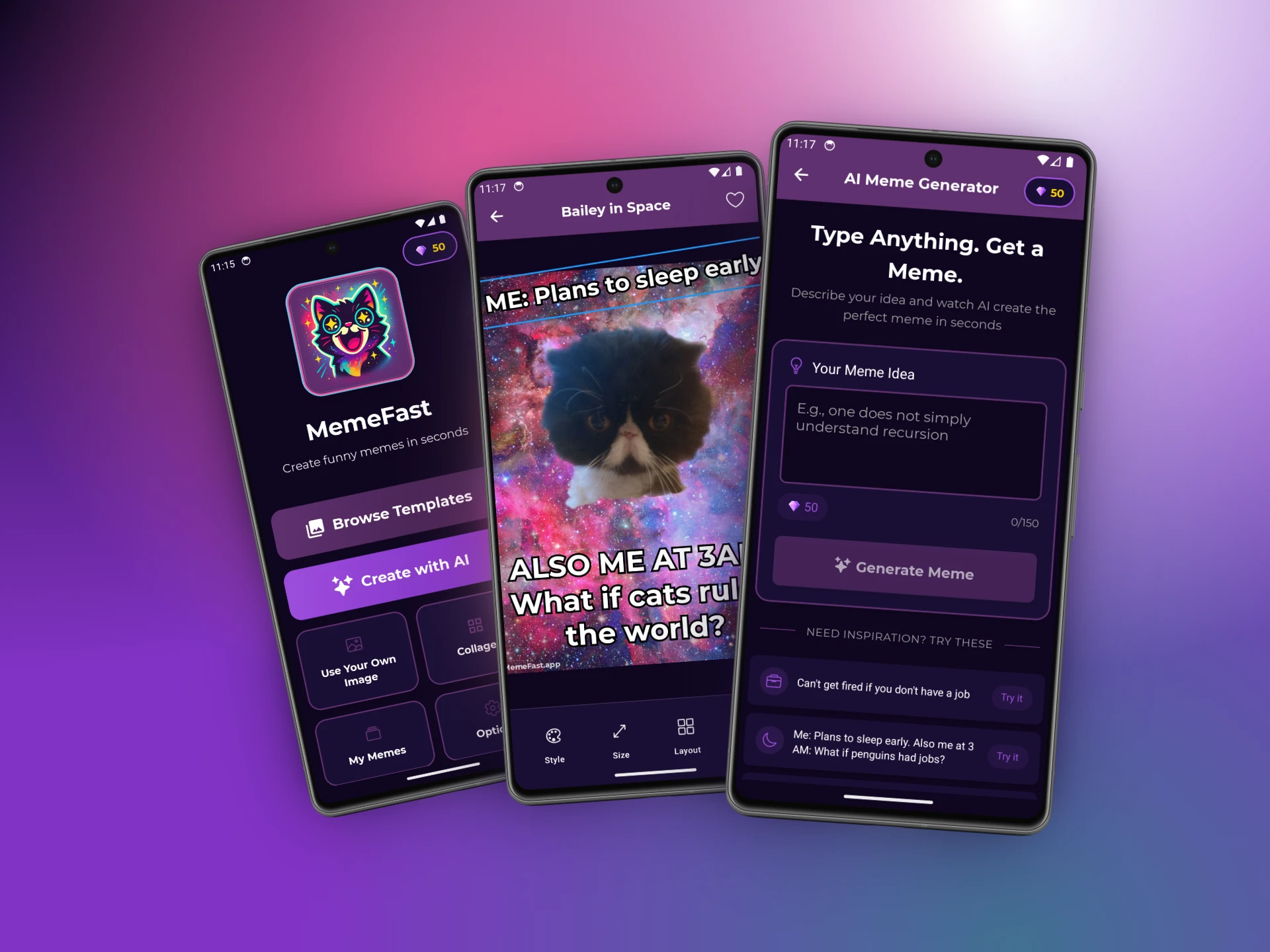
For the steps below, I’ll use MemeFast, a free AI meme generator built for exactly this, typing an idea and getting a finished meme back. The same general steps work in most modern meme apps, so follow along with whatever you’ve got installed.
How to Make a Meme on Your Phone: Step by Step
There are two ways to do this, and you’ll probably use both depending on your mood. The first lets AI do the writing. The second gives you full manual control with a template. Here’s each one.
Method 1: Let AI Write the Meme for You
This is the fastest route, and it’s the one I reach for when I have a feeling but not a finished joke.
- Open your meme app and find the AI generator. In MemeFast, it’s the “AI Meme Generator” on the home screen.
- Type your idea in plain language. Something like “When you finally find free WiFi at the airport” or “Me explaining a TV plot to my mom.” Don’t overthink the wording. The rough idea is enough.
- Let the AI build it. It picks a fitting template, writes the caption, and renders the meme. Good apps now hand you several versions at once, so you can pick your favorite instead of settling for the first.
- Tweak if you want. Swap a word, change the template, or adjust the text size. Or don’t. Sometimes the first one is already the one.
- Save or share. Export to your camera roll, or send it straight to Instagram, TikTok, WhatsApp, or your group chat.
The whole thing takes about as long as reading this paragraph. That speed is the entire point. The funniest reaction is usually the immediate one, and a tool that keeps up with your thought captures it before the moment passes.
Method 2: Build It Yourself From a Template
Sometimes you have a very specific joke in mind and you want to place every word yourself. Templates are perfect for that.
- Browse the template library. Look for the format that matches your joke, funny animals, or a crying cat. A deep library helps here. MemeFast ships with more than 2,000 templates, so you’re rarely stuck.
- Add your text. Tap the caption zones and type your top and bottom lines. Keep them short. The best meme captions are punchy, not paragraphs.
- Customize the look. Adjust the font, color, and size so the text is readable even on a tiny phone screen. White text with a black outline is the classic for a reason. It reads on any background.
- Drop in your own photo if you want. Many memes are funnier with a personal image. Add a picture from your camera roll, or use an AI caption feature that writes a line to match a photo you upload.
- Export and post. Save it, then share it wherever your people are.
Manual mode takes a minute or two instead of seconds, but you get total control. For anything where the exact wording is the joke, this is the way.
6 Meme Formats That Still Work in 2026
Trends churn fast, but a handful of formats keep working year after year because they map to how people actually communicate. If you’re not sure where to start, start here.
- Reaction memes. A single image that captures a feeling, like relief, secondhand embarrassment, or pure chaos. The most flexible and most shared format there is.
- Comparison memes. Two panels, “this versus that.” Drake and the Two Buttons formats live here. Great for opinions and hot takes.
- Caption memes. A photo with one perfectly timed line of text. Simple, fast, and endlessly remixable, and AI captioning makes these effortless.
- Relatable “POV” memes. “Me when…” or “Nobody: … Me:” setups. They work because the reader sees themselves in them.
- Pop culture mashups. A trending show, movie, or moment bent toward your own joke. High reach while the reference is hot, so post fast.
- Wholesome and animal memes. Cats and dogs are undefeated. When in doubt, a baffled pet plus a relatable caption rarely misses.
Pick the format first, then write to it. It’s far easier than writing a joke and hunting for an image afterward.
How Do You Make a Meme People Actually Share?
The memes people pass along follow a pattern, and it isn’t really about being the funniest. It’s about being the most relatable and the most readable. A meme that 75% of young adults would recognize themselves in beats a clever one that only you understand (Amra & Elma, 2025).
A few rules that consistently pay off:
- Keep the text short. If it doesn’t fit in a glance, rewrite it. People read memes at scroll speed.
- Make it legible. Use high contrast text, big enough to read on a phone, with an outline so it survives any background.
- Match a current feeling. The best memes name something everyone is already thinking but hasn’t said yet.
- Post while it’s hot. Topical memes have a short shelf life. The reaction you make in the first hour beats the polished one you make the next day.
- Don’t force the brand. If you’re a business, let the joke lead. The Gen Z audience that likes brands using memes likes the ones that feel native, not sponsored.
One more thing. Make a lot of them. Memes are cheap to produce, so volume beats perfectionism. The creators who go viral aren’t getting it right once. They’re posting often and letting the audience pick the winners.
Common Mistakes to Avoid
The fastest way to kill a meme is to overexplain it. If you have to add a paragraph of context, the joke didn’t land on its own. Trim it.
Two other traps worth dodging are using a stale format weeks after it peaked, and cramming so much text into the image that nobody reads it. When in doubt, less text and a fresher template will almost always do better. And if you’re stuck staring at a blank template, that’s exactly when an AI generator earns its keep. Describe the vibe and let it draft the first version for you to sharpen.
Frequently Asked Questions
What’s the easiest app to make a meme on your phone?
The easiest options are dedicated meme makers with AI built in, because they write the caption and pick the template for you. Free apps like MemeFast let you type an idea and get a finished meme in seconds, which is far faster than fighting with a general photo editor.
Can I make a meme without any design skills?
Yes. Modern meme apps need zero design experience. You type an idea or pick a template, add text with a tap, and the app handles layout, fonts, and export. With AI generation, the app can even write the joke, so the only skill required is having something you want to say.
Is it free to make memes on my phone?
Mostly, yes. Many quality meme makers are free to use, with optional paid tiers for extras like unlimited AI generations or premium fonts. You can make and share unlimited basic memes without paying, which is why memes remain one of the cheapest content formats. Over a million are posted to Instagram daily (ElectroIQ, 2025).
How long does it take to make a meme?
With an AI meme generator, under a minute, often closer to ten seconds. You type your idea, the AI builds it, and you share. Building one manually from a template takes a minute or two. Either way, it’s fast enough to react to a moment before it passes.
Do memes really help brands?
They do. Memes drive about 60% higher organic engagement than standard visuals and can reach up to ten times more people, while 85% of Gen Z prefer brands that use them well (Amra & Elma, 2025). For small brands and creators, that’s an enormous advantage in reach per dollar.
Start Making Memes Today
Making a meme on your phone is no longer a skill. It’s a thirty second habit. Pick a format, type your idea, and let the tools handle the rest. The only real mistake is overthinking it.
If you want the fastest path from idea to finished meme, an AI meme generator does the heavy lifting. Type a thought, and a tool like MemeFast writes the joke, picks from 2,000+ templates, and builds the meme for you, free, with no account and no design skills needed. Ready to make a meme on your phone? Your group chat is waiting.