AI in project management has moved from experimental pilot programs to mainstream adoption faster than most industries anticipated. According to recent surveys, the majority of project professionals now report their organizations actively use AI-supported project management tools in some capacity—a dramatic shift from just a few years ago, when adoption hovered around one-third of organizations.
This guide walks through what AI in project management actually means in practice, the benefits it delivers, core use cases across the project lifecycle, how to implement it responsibly, and how platforms like Lark Suite can help teams put these capabilities into action.
What is AI in project management?
AI in project management refers to the deliberate use of machine learning, natural language processing, predictive analytics, and generative AI to support planning, execution, monitoring, and reporting throughout the project lifecycle. Rather than a single technology, it encompasses a family of capabilities that work together to make project work more efficient and informed.
Core capabilities include pattern recognition on historical project data, where models learn from past initiatives to forecast timelines, identify risks, and recommend realistic effort estimates. AI can auto-generate status updates, summaries, and reports, freeing project managers from hours of manual documentation. Natural language processing enables summarization of unstructured content like emails, chat messages, and meeting transcripts—turning scattered conversations into actionable insights.
It’s worth being realistic about what AI cannot yet do. It does not replace governance frameworks or its own accountability for outcomes. It struggles with novel situations that lack historical precedent. It cannot fully capture the nuance of human conflicts, team dynamics, or non-verbal communication that experienced project leaders navigate intuitively.
Benefits of AI in project management
The practical advantages of AI adoption span planning, execution, and communication, touching nearly every aspect of how project professionals work.
- Improved planning accuracy: AI learns from previous projects to recommend realistic timelines, effort estimates, and contingency buffers. Instead of optimistic guesses, teams get data-driven schedules that account for historical patterns and known risks.
- Faster risk identification: AI continuously scans task updates, comments, and metrics to surface emerging risks earlier than periodic manual reviews. This proactive approach helps project teams address issues before they escalate into crises.
- Reduced administrative workload: Automated status reports or automated approval, meeting summaries, and schedule adjustments free managers from low-value administrative tasks. Studies indicate that project professionals using automation tools report nearly a fifty percent reduction in admin work.
- More informed decisions: Scenario analysis and “what-if” simulations let leaders compare options—for example, the impact of adding a contractor, cutting scope, or shifting timelines. This supports more confident, data-driven decision-making.
- Better resource utilization: AI balances workloads across teams, prevents burnout, and spots underused capacity. This is particularly valuable when managing multiple projects with shared specialists.
- Stronger stakeholder communication: AI can generate tailored updates for executives, clients, and technical teams at varying levels of detail and complexity, saving time while improving clarity.
- Support for hybrid and remote teams: AI-generated summaries, asynchronous updates, and intelligent notifications keep distributed teams aligned across time zones, reducing dependency on synchronous meetings. Team collaboration tools with AI functions will help boost teams’ productivity.
- Continuous learning from outcomes: Feedback loops in which project results feed back into the models, gradually improving forecasts and recommendations over time, creating a system that gets smarter with use.
Using Lark to implement AI in project management
Lark offers an all-in-one, AI-enhanced collaboration and project management platform that brings together the capabilities discussed throughout this guide. By unifying messaging, video meetings, documents, spreadsheets, tasks, and workflows in a single workspace, Lark provides the rich, connected context that AI needs to deliver accurate insights and useful automation.

Lark Base: AI-ready work hub for structured project data
Lark Base serves as the foundation for AI-powered project management, providing structure and consistency.

- Unified project database: Lark Base stores tasks, owners, dates, custom fields, and relationships, creating clean, structured data that AI can analyze effectively.
- Flexible views for teams: Grid, kanban, Gantt chart, and form views give AI clear signals about status, stage, and priority while letting teams work in their preferred format.
- Linked records and dependencies: Connected items across tables—risks, milestones, requirements—help AI understand project context and relationships.
- Automation triggers: Built-in automated workflows can create tasks, send notifications, or update fields when conditions are met, extending AI capabilities into workflow execution.
- Template-based rollout: Base templates ensure PMO standards apply consistently across projects, programs, and portfolios, improving AI accuracy over time.
Lark Sheets: AI for project data analysis
Project data analysis becomes more efficient with AI assistance built into collaborative tools.
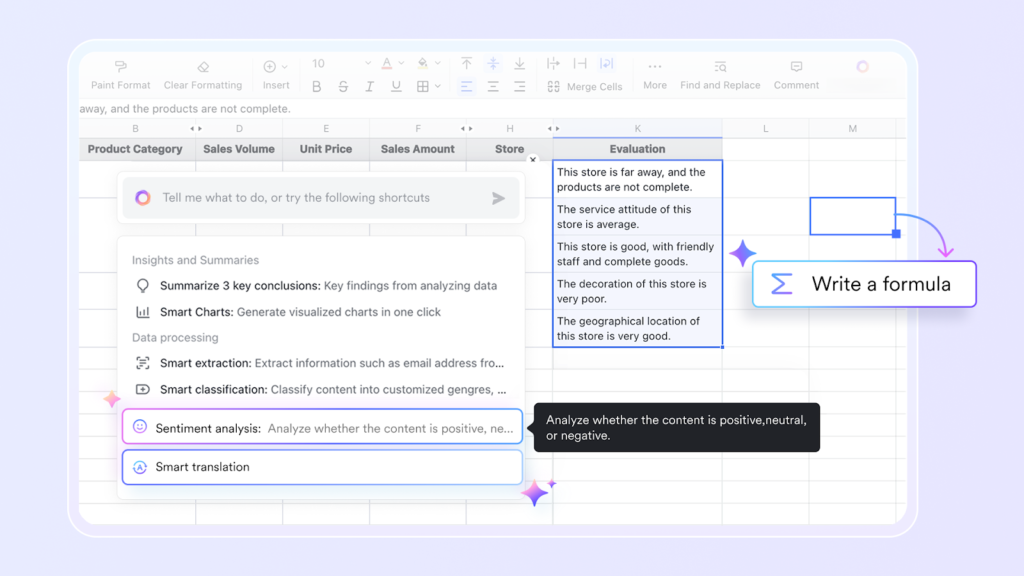
- Structured analysis in Sheets: Lark Sheets handle budgets, resource plans, and timelines that AI can help analyze and forecast.
- Formula and forecast support: AI assists with building formulas, exploring what-if scenarios, and interpreting patterns in schedule or cost data.
- Embedding project context: Tasks, Base views, and dashboards can be embedded inside Docs, giving AI a richer, connected context for better recommendations.
Lark Meetings and AI Meeting Notes: Turning discussions into actions
Meetings generate valuable information that AI can capture and transform into actionable outcomes.
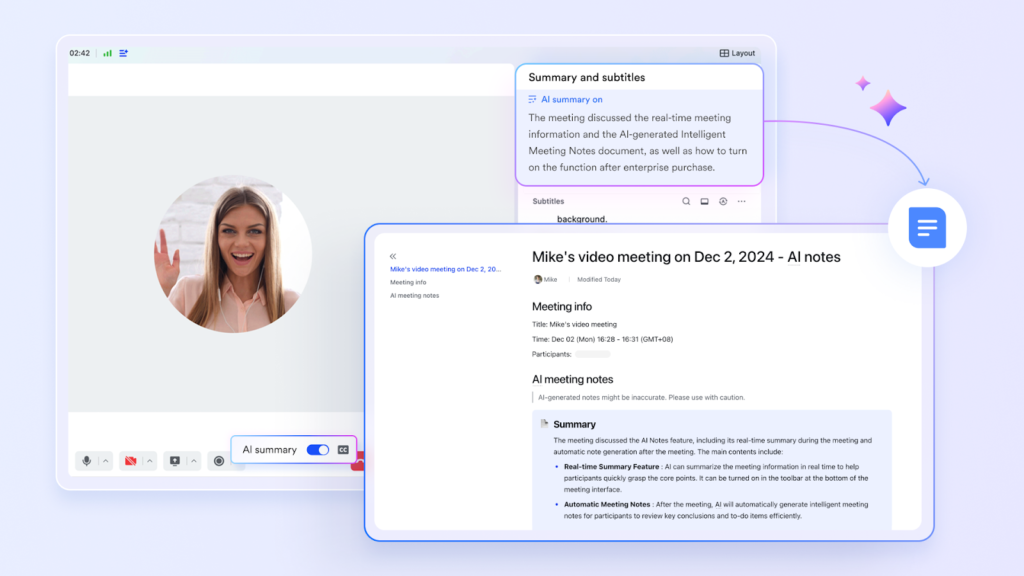
- Built-in video meetings: Lark Meetings serves as the hub for sprint reviews, steering committees, and cross-team workshops within the same platform.
- AI Meeting Notes for capture: With a simple click, AI Meeting Notes automatically transcribe, summarize, and extract key decisions and action items from sessions.
- Actionable outcomes: AI-captured items can become tasks or entries in Lark Base, ensuring nothing from the conversation is lost.
- Support for distributed teams: Global teams who cannot attend every call can rely on concise AI-generated summaries instead of full recordings.
- Knowledge retention: Meeting summaries become part of the long-term project knowledge base accessible via search, building institutional memory.
Lark Tasks: Unified execution and follow-through
Task management benefits from AI that reduces fragmentation and improves follow-through.

- Centralized task tracking: Lark Tasks provides a single view of assignments across chats, Docs, and Meetings, reducing the fragmentation that plagues many teams.
- Smart task creation: Smart creation of tasks from meeting notes, chat messages, or Docs captures action items automatically.
- Intelligent reminders: Chatbot reminders and nudges based on upcoming due dates, priority, and dependencies keep work on track.
- Cross-project visibility: Managers can see at-a-glance workloads and blockers, which AI can highlight as risks requiring attention.
Lark’s Help Center AI assistant: On-demand guidance and upskilling
Learning and support become faster with an AI assistant available whenever questions arise.
- Instant product support: Lark’s Help Center AI assistant answers questions about features, configuration, and best practices in natural language.
- Faster onboarding: New project team members can quickly learn how to set up workflows, templates, and automations without waiting for live support.
- Just-in-time learning: Project managers can ask for guidance on using AI features, automations, or integrations while they work.
- Reduced training overhead: The AI assistant complements formal training and documentation, making adoption smoother for large teams.
- Support for continuous improvement: Teams can use the assistant to explore new capabilities and refine their practices over time.
Organizations can start with Lark’s free Starter plan, which includes essential tools for up to twenty users, and then scale to Basic, Pro, or Enterprise tiers as adoption grows and needs expand.
Core use cases of AI across the project lifecycle
Many of these use cases come built into modern project management platforms, while others may require specialist tools or custom models depending on organizational complexity. Importantly, AI, as a form of productivity tools, augments existing methodologies like Agile, Scrum, or PRINCE2 rather than replacing them—it enhances the frameworks project teams already use.
AI in project planning and scheduling
Planning sets the foundation for project success, and AI brings several capabilities to this critical phase.
- Historical pattern analysis: AI reviews past similar projects to suggest realistic start dates, durations, and dependencies for new initiatives. A software development team, for instance, can draw on historical sprint data to forecast future velocity more accurately.
- Adaptive schedule recommendations: When velocity changes, new constraints appear, or scope evolves mid-project, AI provides dynamic re-forecasting rather than requiring manual schedule overhauls.
- Scenario-based planning: Teams can quickly compare alternative plans—parallelizing tasks, changing sprint length, adjusting scope—and see projected impacts on project timelines and resource needs.
- Dependency risk alerts: AI highlights fragile parts of the schedule before execution begins, identifying single points of failure, overloaded critical paths, or tasks with no slack buffer.
- Effort estimation support: Based on task descriptions, complexity tags, and historical estimates, AI suggests effort ranges while leaving final judgment to humans who understand context.
- Calendar and availability alignment: Integration with calendars and holidays helps auto-avoid unrealistic deadlines and scheduling conflicts, ensuring plans account for actual team availability.
AI for resource and capacity management
Effective resource management prevents burnout, reduces delays, and maximizes team potential across project environments.
- Skill-based assignments: AI recommends matching tasks with people based on skills, past performance, and current workload, improving both efficiency and team members’ satisfaction.
- Capacity forecasting: Forecasts predict when teams will be over capacity and where hiring, outsourcing, or re-prioritization may be needed—catching problems before they cause project delays.
- Multi-project balancing: When specialists are shared across programs and portfolios, AI helps reduce conflicts by adjusting timelines and priorities across initiatives.
- Workload health indicators: Signals such as chronic overtime, task queue growth, or repeated delays trigger AI alerts to managers, enabling intervention before team health suffers.
- Onboarding and upskilling support: AI can surface relevant documentation, training, and context for new team members joining a project mid-stream, accelerating their contribution.
AI-driven risk and issue management
Proactive risk management is one of AI’s strongest contributions to project success, catching issues before they become crises.
- Document and chat mining: NLP scans requirements, change requests, and chat channels to detect language patterns that often signal potential risks—phrases like “blocked,” “waiting on,” or “unclear requirements.”
- Continuous risk scoring: Risk heatmaps update in near real time as progress, dependencies, and external conditions change, giving project leaders current rather than stale information.
- Early anomaly detection: AI catches subtle deviations in cycle times, defect rates, or response times before they become visible crises, enabling earlier intervention.
- Suggested mitigations: Based on similar historical risks and their outcomes, AI proposes mitigation options while humans choose the appropriate path forward.
- Impact simulations: “What-if” views model events like supplier delays, scope changes, or team attrition, projecting impact on delivery and budget so teams can prepare accordingly.
- Escalation support: Critical risks are automatically surfaced to sponsors and steering committees with concise, AI-generated summaries that save time and ensure visibility.
Project execution, monitoring, and control with AI
Once projects are underway, AI supports continuous monitoring and course correction.
- Real-time performance dashboards: Dashboards highlight exceptions, bottlenecks, and slipping milestones rather than presenting static progress reports, focusing attention where it matters.
- Adaptive work reprioritization: AI suggests reshuffling backlog items or tasks based on shifting constraints, dependencies, and customer priorities, helping teams stay responsive.
- Quality and defect analytics: Clustering defects and incidents helps uncover root causes and quality hotspots during execution, enabling targeted improvement efforts.
- Compliance checks: In regulated environments, AI flags deviations from defined processes, missing approvals, or incomplete documentation, reducing compliance risk.
- Smart notifications: Targeted alerts reach the right individuals at the right time, avoiding notification overload for the whole team while ensuring nothing critical is missed.
- Support for agile and hybrid delivery: AI analyzes sprint data, burndown trends, and throughput to improve planning for future iterations, making retrospectives more data-driven.
AI for communication, reporting, and knowledge management
Communication consumes significant project management time, and AI offers substantial efficiency gains.
- Automated meeting summaries: AI extracts decisions, action items, owners, and due dates from meeting recordings and distributes them automatically, eliminating manual note-taking.
- Status report generation: One-click or prompt-based generation of weekly status reports tailored to executives, sponsors, or technical stakeholders saves hours of writing time.
- Cross-channel summarization: AI consolidates information from chats, emails, and tickets into a single, coherent project update, reducing information fragmentation.
- Stakeholder-specific narratives: The same underlying facts get rephrased differently—business value language for leadership, technical detail for engineers—without requiring manual rewriting.
- Knowledge base construction: AI organizes project documentation into searchable wikis, FAQs, and playbooks for future reuse, building organizational memory.
- Semantic search and Q&A: Team members can ask natural-language questions like “What was decided about the Q3 rollout?” and get precise answers without hunting through documents.
- Language translation support: AI translates updates and documents to support multilingual, globally distributed project teams, removing language barriers.
How to implement AI in project management responsibly
Adopting AI effectively requires a thoughtful approach that balances opportunity with risk. A step-by-step implementation—starting with small pilots and expanding based on demonstrated value—typically outperforms big-bang transformations.
Assessing current processes and defining AI goals
Before selecting tools, understand where AI can deliver the greatest impact.
- Identify friction points: Map where time is currently wasted—manual reporting, scheduling, chasing updates, or consolidating data from multiple sources.
- Prioritize high-impact areas: Start with use cases where AI can show quick wins, such as automated summaries, risk alerts, or resource balancing.
- Clarify success metrics: Define concrete goals like reduced cycle time for status reports, fewer missed deadlines, or improved forecast accuracy.
- Inventory existing tools: Review current project, communication, and documentation tools to understand integration possibilities and data availability.
- Engage stakeholders early: Involve project managers, team members, PMO, IT, and compliance in shaping AI objectives to ensure broad support and realistic expectations.
Selecting the right AI tools and platforms
Tool selection should match organizational complexity and readiness.
- Match tools to complexity: Lighter, integrated AI features work well for smaller teams, while advanced platforms suit large, multi-project portfolios.
- Look for unified workspaces: Platforms that combine chat, tasks, docs, meetings, and analytics give AI a richer context and reduce data fragmentation.
- Check integration capabilities: Verify APIs and connectors to existing systems like CRM, code repositories, or ERP for holistic insights across the organization.
- Evaluate usability: Intuitive interfaces and conversational AI assistants help non-technical users adopt quickly without extensive training.
- Consider security and compliance: Review data residency options, encryption, access controls, and audit logs, especially for regulated industries.
- Pilot before scaling: Run time-bound pilots on a few projects to validate value and refine requirements before organization-wide rollout.
Ensuring data quality and governance
AI is only as good as the data it learns from, making data foundations critical.
- Standardize project data: Consistent naming, fields, and workflows ensure AI models learn from clean, comparable data across projects.
- Promote disciplined updates: Team members must log progress, issues, and decisions promptly for AI to provide accurate, timely insights.
- Define ownership: Assign clear responsibility for data stewardship within the PMO or operations team to maintain quality over time.
- Set access controls: Role-based permissions ensure sensitive project information is visible only to appropriate stakeholders.
- Monitor AI outputs: Periodic reviews of AI recommendations and summaries help detect errors, drift, or unintended biases before they cause problems.
- Document decision rules: Clarify when AI suggestions can be auto-applied versus when human approval is mandatory.
Change management, training, and human oversight
People ultimately determine whether AI adoption succeeds or fails.
- Address fears and expectations: Open communication about AI’s role as an assistant, not a replacement, builds trust among project professionals.
- Provide hands-on training: Workshops where teams practice prompting AI, interpreting predictions, and using generated outputs in real workflows accelerate adoption.
- Encourage experimentation: A culture where teams can experiment with AI features on non-critical tasks helps build confidence before applying them to high-stakes projects.
- Maintain human control: Critical decisions—scope changes, major timeline shifts, budget moves—must stay under human accountability regardless of AI recommendations.
- Create feedback loops: Teams should regularly share what works, what doesn’t, and where AI needs tuning so adoption steadily improves.
- Update roles and responsibilities: Revisit RACI charts and role descriptions as AI takes over certain tasks and frees time for higher-value work.
Future trends and outlook for AI in project management
The capabilities available today represent just the beginning of what AI will bring to project environments over the coming years. Several trends are shaping the direction of ai project management tools and practices.
Rise of agentic AI and autonomous workflows
AI is evolving from reactive tools to proactive agents that can take initiative within defined boundaries.
- Multi-step task execution: AI agents can string together several actions—gathering data, drafting updates, suggesting schedule changes—based on a single request from a project manager.
- Continuous monitoring loops: AI watches key indicators and automatically prepares options when thresholds are breached, rather than waiting for human queries.
- Deeper tool orchestration: Intelligence expands from single-tool capabilities to cross-system coordination across project, CRM, HR, and finance platforms.
- Guardrails and approvals: Approval workflows and constraints around what agents can execute independently remain essential as autonomy increases.
- New collaboration patterns: Project teams increasingly interact with AI “teammates” alongside human colleagues, changing how work gets distributed and coordinated.
Expanding portfolio-level and strategic applications
AI is moving beyond individual projects to support portfolio management and organizational strategy.
- Strategic alignment analysis: AI helps leaders rank initiatives by expected impact, risk, and alignment with organizational objectives, improving investment decisions.
- Cross-portfolio capacity planning: Planning spans departments rather than single projects, with AI optimizing resources at the enterprise level.
- Investment scenario modeling: Simulations of different funding and prioritization choices over multiple quarters help leaders understand long-term implications.
- Value realization tracking: AI tracks post-implementation benefits and feeds that data back into future business cases, closing the loop on project outcomes.
- Support for OKRs and outcomes: Integration between project delivery metrics and broader objectives and key results frameworks keeps execution aligned with strategy.
Human-AI collaboration as a core project skill
Working effectively with AI is becoming as important as traditional project management competencies.
- AI-augmented teams: Every role—from PMs to engineers to analysts—regularly uses AI tools in daily work, making AI literacy a universal requirement.
- Prompting and interpretation skills: Asking clear questions and critically evaluating AI responses becomes essential for getting reliable, useful outputs.
- Ethical decision-making: Guidelines around data use, fairness, transparency, and accountability in AI-augmented projects require active attention from project leaders.
- Continuous upskilling: Project professionals must invest in ongoing learning about AI capabilities, limitations, and project management best practices as the technology evolves.
- Collaboration norms: Teams develop shared understandings about when to rely on AI summaries versus attending meetings or reading full documents, balancing efficiency with engagement.
Final thoughts: Building a practical roadmap for AI in your projects
AI in project management helps teams achieve better planning accuracy, earlier risk visibility, more balanced workloads, and clearer communication—all while preserving the essential role of human leadership in driving project success. The technology has moved from experimental to practical, with the majority of organizations now actively using AI tools in their project work. Starting small with one or two targeted use cases, measuring impact, and expanding based on demonstrated value creates a sustainable path to broader adoption. Lark offers a unified workspace with AI features built into documents, tasks, meetings, and data management, making it a practical platform for teams ready to experience AI in project management firsthand. Consider trying Lark’s free Starter plan to explore how AI-enabled collaboration can transform your project delivery.