When you take a photo, the subject is often the star, but the background can make or break the overall image. A cluttered or mismatched background can distract from your subject, while a clean, captivating backdrop can elevate the entire photo. VisualGPT’s AI Background Changer gives you the power to swap backgrounds effortlessly, opening up a world of creative possibilities. While tools like Image Editor offer background editing, VisualGPT takes it further by offering advanced, AI-powered features that allow you to change backgrounds with a level of precision and ease that sets it apart.
Whether you’re working on a personal project, creating content for social media, or enhancing product photos for an online store, VisualGPT’s AI Background Changer lets you experiment with endless backgrounds and bring your vision to life. In this article, we’ll explore how this tool can help you achieve seamless background replacements, no matter the scenario.
(Switch to outdoor scene by VisualGPT)
Why VisualGPT’s AI Background Changer is the Ultimate Tool for Photographers and Creators
1. Create Stunning Visuals Without the Need for Complex Editing
Challenge: Traditional photo editing often requires you to manually cut out subjects and match them with backgrounds, a task that can be time-consuming and requires a high level of skill.
Solution: VisualGPT’s AI Background Changer automates the background removal and replacement process, giving you professional-level results without the hassle. Whether you want to isolate a subject or replace a busy background with something more fitting, VisualGPT takes care of the heavy lifting in seconds. Just upload your image, let the AI work its magic, and select the perfect background to complement your subject.
2. Perfect for Creating Themed Content
Challenge: Whether you’re shooting for a holiday campaign, a themed event, or a seasonal promotion, creating the right atmosphere through backgrounds can be time-consuming and difficult to execute.
Solution: With VisualGPT, you can easily place your subject in any setting that matches the theme you’re aiming for. Imagine creating Halloween content: You can take a regular portrait photo and transform the background into a spooky, foggy forest or a haunted house scene. For holiday campaigns, swap out a dull background for a festive, winter wonderland. VisualGPT’s AI Background Changer allows you to adapt the background to suit any occasion, bringing the perfect ambiance to your visuals.
3. Enhance Professional Portfolios with Clean, Elegant Backgrounds
Challenge: When creating a portfolio, you need to ensure every photo looks polished and professional. A distracting background can detract from your work, whether you’re showcasing portraits, design work, or products.
Solution: VisualGPT gives you the tools to replace an unsatisfactory background with something more neutral or elegant. For example, if you’re showcasing a portrait or a design project, you can replace a busy background with a clean, soft gradient or a simple, neutral color. This feature is perfect for professionals, photographers, and artists who need their portfolios to reflect high-quality, polished work.
(Transition to an indoor garden scene by VisualGPT)
Real-Life Scenarios Where VisualGPT’s AI Background Changer Shines
1. For Travel Bloggers: Create Stunning Visual Journeys
Scene: You’ve taken a fantastic selfie or travel photo, but the background doesn’t capture the beauty of the place you’re visiting. Maybe it’s too crowded, or the lighting isn’t perfect for the post you want to share.
Solution: With VisualGPT, you can swap that background for a breathtaking view or an iconic landmark, allowing you to transport your followers to the exact spot you want them to see. Whether you want to add a sunset over a mountain range or the skyline of a famous city, VisualGPT lets you craft a travel experience that matches your story.
2. For Event Planners: Enhance Event Photos with Custom Backgrounds
Scene: You’ve hosted an event, and the photos are great, but the background doesn’t reflect the theme or ambiance you worked hard to create. The venue might have been underwhelming or cluttered, making it hard to convey the atmosphere you envisioned.
Solution: VisualGPT lets you transform those event photos by replacing the venue’s background with a more fitting setting. Imagine replacing a bland conference room background with an elegant ballroom scene or swapping a crowded expo hall for a stylish cocktail party setup. With VisualGPT, you can ensure that every event photo conveys the right mood, no matter what the original background looked like.
3. For E-Commerce: Elevate Your Product Photos with Professional Backgrounds
Scene: You’ve captured great product shots, but the background is too distracting. Maybe you’ve shot the product at home, but the environment doesn’t suit your brand’s aesthetic.
Solution: VisualGPT’s AI Background Changer allows you to remove the existing background and replace it with a clean, neutral backdrop that highlights your product. Whether you want a pure white background for simplicity, a soft gradient for sophistication, or even a custom setting that reflects your brand’s personality, VisualGPT provides the flexibility to present your products in the best light possible.
4. For Social Media Influencers: Keep Your Content Fresh and On-Brand
Scene: As an influencer, your social media feed needs to stay fresh, creative, and aligned with your personal brand. Sometimes, an image might have great subject matter but the background just doesn’t match your usual aesthetic.
Solution: VisualGPT allows you to swap backgrounds quickly, giving you the ability to align your content with your brand. Whether you’re posting a casual selfie, a product review, or a behind-the-scenes moment, you can ensure that the background complements your personal style. From bright, cheerful settings to sleek, minimalistic backdrops, VisualGPT makes it easy to create consistent, visually appealing content.

(Product images enhanced using the VisualGPT AI image editor)
Key Features of VisualGPT’s AI Background Changer
1. Effortless Background Removal
Challenge: Manually isolating subjects and removing backgrounds can be time-consuming and challenging, especially when dealing with complex images.
Solution: VisualGPT’s AI automatically detects and removes backgrounds with precision, preserving fine details like hair and edges, leaving you with a clean, isolated subject. Whether you’re working with simple images or complex ones with intricate edges, VisualGPT ensures the background is removed with high accuracy.
2. Endless Background Possibilities
Challenge: Many background changers only offer a limited set of stock backgrounds, which might not suit your needs or creative vision.
Solution: With VisualGPT, you can upload your own custom backgrounds or choose from a wide variety of built-in options. Whether you need a dreamy landscape, a futuristic cityscape, or a minimalist setting, VisualGPT offers the flexibility to match any vision.
3. Customizable AI-Driven Features
Challenge: Some background changers apply generic replacements, which may not always fit well with the subject of your image.
Solution: VisualGPT uses AI to ensure that the subject fits seamlessly with the new background. The AI adjusts the subject’s lighting and shadows to match the new environment, making the final image look natural and cohesive.
4. User-Friendly Interface
Challenge: Many advanced photo-editing tools can be difficult to navigate, especially for beginners.
Solution: VisualGPT provides an intuitive, easy-to-use platform that makes background editing accessible to everyone, regardless of skill level. You don’t need to be a photo-editing expert to create stunning, professional-looking images with VisualGPT.
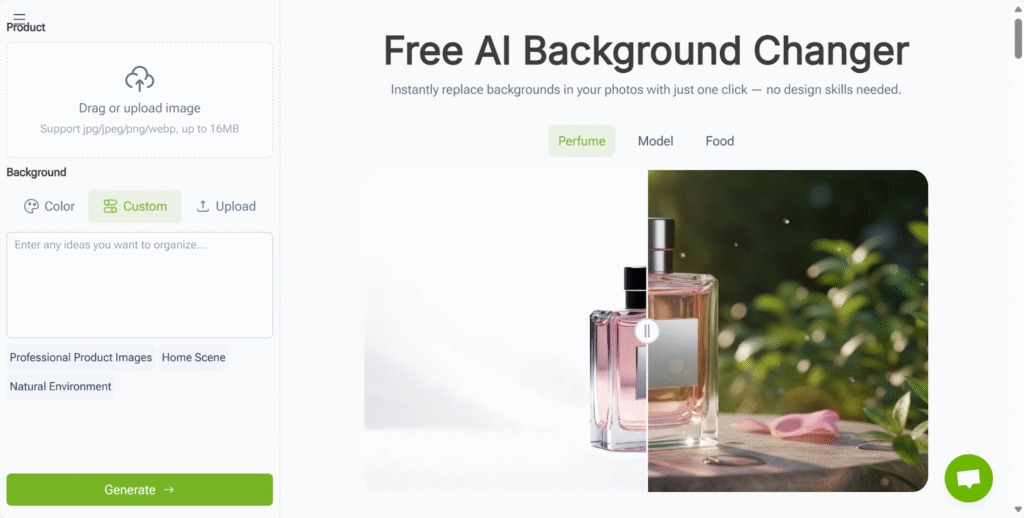
(VisualGPT’s AI Background Changer Feature Page)
Why VisualGPT is Perfect for Background Editing
- Time-Saving: Remove or replace backgrounds in seconds, without the need for complicated editing steps.
- High-Quality Results: Achieve professional-grade background changes that seamlessly blend with your subject.
- Endless Customization: Whether you’re creating content for social media, e-commerce, or personal use, VisualGPT gives you complete creative freedom over your backgrounds.
- Ideal for Any User: Whether you’re a photographer, influencer, or business owner, VisualGPT has the tools you need to elevate your images.
Conclusion: Transform Your Photos with VisualGPT’s AI Background Changer
With VisualGPT’s AI Background Changer, you can quickly and easily replace or remove backgrounds, turning your images into professional-quality visuals. Whether you’re enhancing your personal content, upgrading your business photos, or creating new, captivating scenes, VisualGPT offers a fast, intuitive, and powerful solution to meet all your background editing needs.Get started today with VisualGPT’s AI Background Changer (https://visualgpt.io/ai-background-changer) and explore the endless possibilities of background transformation.