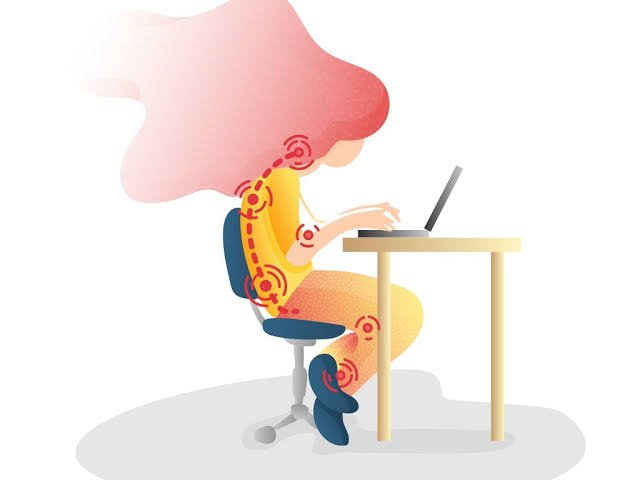
Ergonomics plays a crucial role in workplace health, ensuring employees can work comfortably and efficiently while minimising the risk of injury. One key aspect of workplace ergonomics is the correct positioning of Display Screen Equipment (DSE), as improper setup can lead to various health concerns. Understanding the implications of poorly positioned DSE and how to mitigate these risks is essential for a safe and productive work environment.
Understanding Display Screen Equipment (DSE)
Display Screen Equipment (DSE) refers to devices with screens, such as computers, laptops, tablets and display monitors, that are used for work-related tasks. These devices are common in modern workplaces, where employees spend significant hours in front of screens for communication, data entry, design work and more. Proper DSE setup is vital for preventing health issues and ensuring long-term productivity.
Health and Ergonomic Implications of Poorly Positioned DSE
Poor DSE positioning can lead to various health problems, affecting both physical and mental well-being. Enrolling in an office health and safety course can help individuals understand the risks and learn best practices for ergonomic setup.
Immediate Physical Discomfort
One of the first signs of poor DSE positioning is physical discomfort. Employees may experience:
- Neck and shoulder pain from looking too high, low or sideways at a screen.
- Backaches caused by slouching or improper chair height.
- Eye strain, headaches and dryness due to excessive screen time or poor lighting.
Long-term Musculoskeletal Disorders
Chronic exposure to a poorly arranged workstation can result in severe musculoskeletal disorders, including:
- Carpal tunnel syndrome due to improper wrist positioning while typing.
- Chronic back pain from an unsupportive chair or incorrect screen height.
- Tendonitis and repetitive strain injuries (RSIs) from repetitive motions without proper ergonomic support.
Visual Impairment
Prolonged screen use, especially without proper adjustments, can lead to:
- Temporary blurring of vision and difficulty focusing.
- Increased risk of developing conditions like computer vision syndrome.
- Worsening eyesight due to continuous exposure to glare and improper screen brightness.
Reduced Productivity and Efficiency
Discomfort and health problems from poor ergonomics can directly impact worker productivity. Employees experiencing physical pain may take longer to complete tasks, require more breaks or struggle with concentration, reducing overall efficiency.
Increased Risk of Workplace Injuries
Compensating for an uncomfortable workstation setup can lead to poor posture and increased risks of workplace injuries. Employees may be more prone to slips, trips and falls if they constantly adjust their seating position or stretch awkwardly to view their screens.
Mental Health Impact
Physical discomfort can take a toll on mental well-being. Employees dealing with chronic pain or fatigue due to poor ergonomics may experience:
- Higher stress levels and frustration.
- Reduced job satisfaction and engagement.
- Increased absenteeism due to discomfort-related health issues.
Cumulative Effect Over Time
Small ergonomic issues might not seem significant initially, but over time, they can accumulate and result in serious health conditions. Early intervention and proper ergonomic adjustments are necessary to prevent long-term complications.
Guidelines for Proper DSE Placement
To mitigate health risks and promote well-being, workplaces should follow ergonomic guidelines for DSE placement. A DSE course can educate employees on best ergonomic practices, ensuring they understand how to adjust their workstations for maximum comfort and productivity.
Here are a few guidelines to minimise risks associated with DSE.
Correct Screen Height and Distance
- The top of the screen should be at or just below eye level.
- Maintain an arm’s length distance from the screen to reduce eye strain.
- The screen should be directly in front of the user to avoid unnecessary neck movement.
Lighting and Glare Reduction
- Position screens perpendicular to windows to minimise glare.
- Use blinds or curtains to control natural light.
- Adjust monitor brightness and contrast settings to comfortable levels.
- Consider anti-glare screen filters if needed.
Desk Setup and Posture
- Keep the keyboard and mouse at elbow height for a relaxed arm position.
- Ensure feet are flat on the floor or on a footrest.
- Maintain a neutral spine posture with a properly adjusted chair.
Adjustable Equipment
- Use height-adjustable desks to alternate between sitting and standing.
- Invest in chairs with lumbar support and adjustable armrests.
- Consider monitor stands or arms to fine-tune screen positioning.
Monitor Configuration for Multi-Screen Setups
- Arrange screens side by side, with the primary screen directly in front.
- Ensure the most frequently used screen is at the correct height and distance.
- Avoid excessive head-turning by positioning screens within a comfortable viewing range.
Breaks and Microbreaks
- Take a short break every 20-30 minutes to rest the eyes and stretch.
- Follow the 20-20-20 rule: Every 20 minutes, look at something 20 feet away for 20 seconds.
- Perform simple desk exercises to reduce muscle fatigue.
Use of Ergonomic Accessories
- Monitor arms allow easy screen height adjustments.
- Footrests support proper leg positioning for shorter individuals.
- Document holders reduce neck strain by keeping reference materials at eye level.
Conclusion
Proper DSE positioning is essential for workplace health, preventing discomfort, injuries and long-term health conditions. Employers and employees should proactively implement ergonomic principles to create a safe and efficient work environment. By following these guidelines and participating in relevant training, individuals can safeguard their well-being and enhance productivity.
I wanted to compose you that little bit of word to help give many thanks again on your splendid solutions you’ve provided in this article. This is extremely open-handed with you giving openly what exactly numerous people would’ve offered for sale as an e-book to help with making some dough for themselves, even more so considering that you could have tried it in case you desired. These things additionally acted to become easy way to comprehend some people have the identical fervor the same as my personal own to see many more with regard to this problem. I am certain there are some more fun situations up front for individuals that start reading your website.
The following time I read a blog, I hope that it doesnt disappoint me as much as this one. I imply, I know it was my option to read, but I truly thought youd have one thing interesting to say. All I hear is a bunch of whining about one thing that you could possibly fix if you happen to werent too busy on the lookout for attention.
Hello there, I discovered your website via Google whilst looking for a similar topic, your website came up, it looks good. I have bookmarked it in my google bookmarks.
Hi there, just turned into alert to your blog through Google, and located that it’s truly informative. I am going to watch out for brussels. I’ll appreciate if you continue this in future. Numerous people will probably be benefited out of your writing. Cheers!
I have been browsing on-line greater than 3 hours as of late, but I by no means discovered any interesting article like yours. It?¦s beautiful value sufficient for me. In my view, if all web owners and bloggers made just right content as you probably did, the internet shall be a lot more helpful than ever before.