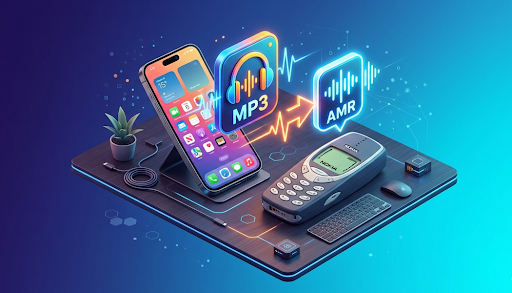
In the world of technology, we use many different types of files. If you love music, you probably know what an MP3 is. It is the most common way to save songs. But did you know there is another type of file called AMR?
Sometimes, an MP3 file is too big for a phone, or it does not work on older mobile devices. That is where an MP3 to AMR Converter comes in. In this guide, we will learn everything about these files, why people convert them, and how you can do it for free online.
What is an MP3 File?
Before we talk about converting, let’s look at the starting point. MP3 stands for “MPEG Audio Layer III.” It is like a magic box for music. It takes a very large sound file and shrinks it down so it can fit on your phone or computer.
Even though it is small, it still sounds great. This is why almost every song you download is an MP3. However, even “small” MP3s can sometimes be too large if you have hundreds of them or if you are using a very old device.
What is an AMR File?
AMR stands for “Adaptive Multi-Rate.” Think of AMR as a specialist. While MP3 is good for music (with drums, guitars, and singing), AMR is specially designed for the human voice.
In the early days of mobile phones, companies needed a way to save voice recordings and ringtones without using up all the memory. They created AMR. It is much smaller than an MP3. If an MP3 is a big heavy book, an AMR is a small thin notepad. It gets the job done using very little space.
Why Should You Convert MP3 to AMR?
You might wonder, “Why would I want a smaller, lower-quality file?” There are actually several very good reasons:
1. Saving Storage Space
If you have a phone with very little storage left, MP3s will fill it up fast. If you are recording a long speech, a lecture, or a voice note, converting that file to AMR can save a huge amount of space. You can fit ten times more voice recordings on your phone if they are in AMR format.
2. Using Older Mobile Phones
Do you have an old “brick” phone or a classic keypad phone? Many of these older devices were built before MP3s were popular. They love AMR files. If you want to put a custom ringtone on an old Nokia or Motorola phone, you usually need to convert your MP3 to AMR first.
3. Voice Clarity
Because AMR is designed for talking, it focuses on the frequencies of the human voice. This makes it perfect for journalists, students, or anyone who records interviews. It keeps the talking clear while cutting out the extra background noise that MP3s try to keep.
4. Fast Sharing
Because AMR files are so tiny, they are very easy to send over the internet. If you have a slow internet connection and need to send a voice message to a friend, an AMR file will upload much faster than a heavy MP3.
How to Use an Online MP3 to AMR Converter
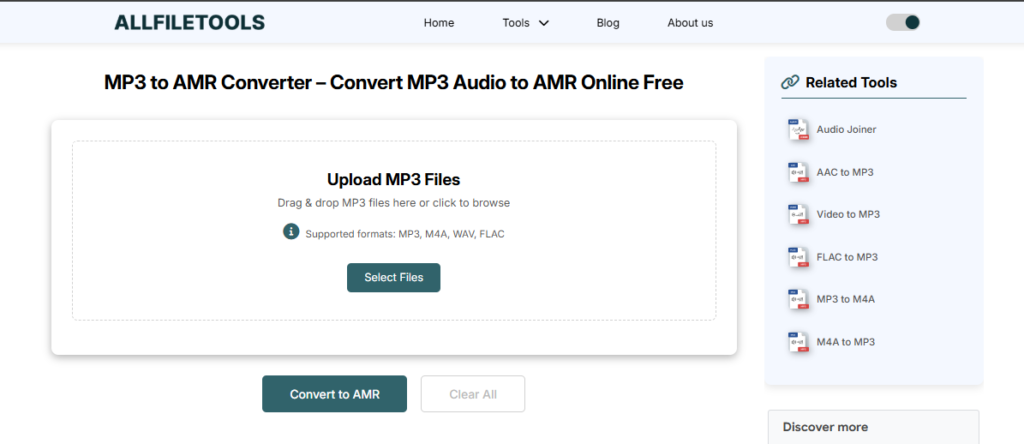
The best part about technology today is that you don’t need to be a computer expert to change your files. You can use an Online MP3 to AMR Converter for free. You don’t even have to download any software!
Here is the simple step-by-step process:
Step 1: Upload Your MP3
Go to the converter website. Look for a button that says “Upload” or “Choose File.” Click it and select the MP3 song or voice clip from your computer or phone.
Step 2: Select AMR as the Output
Most tools will ask you what format you want. Since we want a smaller voice file, make sure AMR is selected in the list of options.
Step 3: Click Convert
Press the “Convert” button. The website’s “brain” will start working. It will take the big MP3 and turn it into a tiny AMR file. This usually takes only a few seconds.
Step 4: Download Your New File
Once the conversion is finished, a “Download” button will appear. Click it, and the AMR file will be saved to your device. You are done!
Is It Safe to Convert Files Online?
Many people worry about their privacy. “Is my file safe on the internet?” This is a great question.
Most high-quality online tools are very safe. They use a “private tunnel” to upload your file. After you finish converting and downloading, the website usually deletes your file from its server within an hour. This ensures that no one else can listen to your recordings.
Pro Tip: Always look for a small padlock icon next to the website address. This means the site is secure!
Comparing MP3 and AMR: Which One is Better?
To help you understand which one to use, look at this simple comparison:
| Feature | MP3 | AMR |
| Best For | Music and Songs | Human Voice / Speech |
| File Size | Medium | Very Small |
| Quality | High (Sounds like a CD) | Lower (Sounds like a phone call) |
| Compatibility | Works on everything | Works on old phones and voice apps |
As you can see, neither is “better” than the other. They just have different jobs! If you want to listen to a rock band, keep it as an MP3. If you want to save a recording of your grandmother telling a story, AMR is a great choice.
Important Tips for Best Results
When you are converting your files, keep these simple tips in mind to make sure your audio sounds good:
- Start with a Good MP3: If your original file is very noisy or quiet, the AMR file will be even harder to hear. Try to use a clear recording.
- Short Clips for Ringtones: If you are making a ringtone for an old phone, try to keep the clip under 30 seconds. This makes the AMR file even smaller and easier for the old phone to play.
- Check the Connection: Make sure your Wi-Fi is steady while uploading. If the internet cuts out, the conversion might fail, and you’ll have to start over.
The Future of Audio Conversion
Even though we have very fast internet and huge phones today, AMR is still very important. Apps like WhatsApp and Telegram often use formats very similar to AMR for their voice notes because they want the messages to send instantly, even if your signal is weak.
Learning how to use an MP3 to AMR converter is a great skill. It helps you manage your digital life, save space, and keep your old devices working.
Common Questions (FAQs)
Can I convert AMR back to MP3?
Yes! Just like you can turn an MP3 into an AMR, you can do the opposite. However, remember that if you turn a low-quality AMR into an MP3, it won’t suddenly sound like high-quality music. It will just be a bigger file that sounds the same.
Will I lose my original MP3 file?
No. When you use an online converter, the tool makes a copy of your file in the new format. Your original MP3 will stay exactly where it was on your phone or computer.
Do I have to pay for this?
No. There are many great tools online that let you convert MP3 to AMR for free. You don’t need a credit card or a subscription.
How many files can I convert at once?
Most free tools let you convert one or two files at a time. If you have a hundred files, you might have to do them in small groups, but it is still free!
Final Thoughts
Converting audio shouldn’t be scary or hard. Whether you are trying to save space, make a ringtone for a classic phone, or share a voice note quickly, the MP3 to AMR process is the perfect solution.
By using a free online tool, you can change your files in just a few clicks. It is fast, safe, and very easy to do. Next time you see a “Memory Full” message on your phone, remember that you can always shrink those big audio files down!
🔹 Explore more powerful file conversion and online utilities at AllFileTools –
🔹 For technical support, digital solutions, and expert services, visit LetDigitalFly IT Services –
🔹 Discover additional career and productivity resources at Resume Slip Builder –