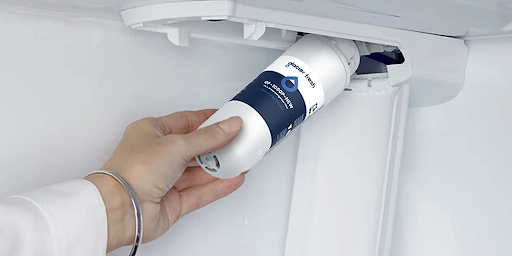
Keeping a refrigerator water filter in top condition is crucial for maintaining water quality. The LG LT1000P water filter is engineered to deliver safe, clean water consistently, but proper replacement and care are essential. This guide by Glacier Fresh covers lifespan, replacement schedules, and practical tips to ensure your filter performs at its best.
Lifespan of LG LT1000P Water Filter
The LG water filter LT1000P typically lasts up to six months or filters approximately 200 gallons of water, depending on usage and water quality. While some households may use more water and require more frequent replacement, following this general guideline ensures consistent filtration and optimal taste. Regular replacement also prevents bacteria buildup, maintains water clarity, and avoids potential appliance issues caused by expired filters.
The filter’s long lifespan is a major advantage over generic alternatives, which often require replacement every few weeks. The LT1000P combines durability and reliability, providing an efficient solution for families relying heavily on their refrigerator’s water dispenser.
How to Know When Replacement Is Needed
Signs that the LG LT1000P water filter needs replacement include reduced water flow, changes in taste or odor, and cloudy ice cubes. Most LG refrigerators feature an indicator light that signals when replacement is necessary. Ignoring these signals may result in decreased filtration efficiency, potentially exposing household members to contaminants. Regular monitoring ensures that the filter continues to provide safe, clean water consistently.
Step-by-Step Replacement Guide
Replacing the filter is simple:
- Locate the filter: Check your refrigerator manual for exact placement. Most LG models have a compartment inside or at the bottom grille.
- Remove the old filter: Turn it counterclockwise and gently pull out. Keep a towel handy to catch minor leaks.
- Install the new filter: Insert the new LG LT1000P water filter, turn it clockwise until it locks in place, ensuring a secure fit.
- Flush the filter: Run water for several minutes to remove air and loose carbon particles. This ensures fresh-tasting water immediately.
- Reset the indicator light: Press and hold the filter reset button until the light turns off, confirming replacement.
Following these steps guarantees that your filter works efficiently and provides safe water consistently.
Care Tips for Maximum Performance
To extend the filter’s life and maintain optimal performance:
- Always replace on time according to usage or indicator alerts.
- Flush the filter after every installation or replacement.
- Clean the dispenser area regularly to prevent mold or debris buildup.
- Monitor water taste and flow for early signs of reduced efficiency.
These simple practices enhance both water quality and appliance longevity, offering a long-term solution for household hydration.
Glacier Fresh Recommendations
Glacier Fresh emphasizes the importance of using certified and compatible filters like the LG LT1000P water filter. Non-certified or generic alternatives may compromise both water safety and refrigerator performance. By following proper care and replacement schedules, households can enjoy consistent, high-quality water while avoiding unnecessary costs or complications.
Environmental Benefits
Replacing the filter on schedule helps reduce reliance on bottled water, decreasing plastic waste and contributing to a more sustainable lifestyle. Choosing a long-lasting, certified filter like the LT1000P is both health-conscious and environmentally responsible.
Conclusion
Understanding the lifespan, replacement schedule, and proper care of the LG water filter LT1000P is essential for maintaining safe, clean, and great-tasting water at home. With clear guidelines and support from Glacier Fresh, households can enjoy long-term water quality, appliance safety, and overall convenience. Timely replacement and proper care ensure that the filter continues to deliver its maximum benefits every day.