Businesses that rely on visual communication often struggle to present documents in a way that feels modern and user friendly. Whether you run a restaurant, a retail store, a spa, or a service-based brand, your menus, catalogs, and brochures play a major role in how visitors perceive your offerings. A visually cluttered document display can easily ruin a good design and discourage users from exploring your content. The good news is that WordPress gives you several elegant ways to embed documents without compromising the aesthetic of your website.
This guide explores practical design strategies, user experience enhancements, and technical methods that help you display documents beautifully. By combining smart design principles with the right tools, you can elevate your website and make essential information easier to consume.
Understanding What Makes a Document Display Appealing
Before diving into plugins and tools, it helps to understand what a polished document presentation actually requires. A good display does not slow the page, overwhelm the layout, or force users to pinch and zoom endlessly on a mobile device. It should load quickly, adapt to screen sizes, and match the overall style of your brand.
At a basic level, an elegant document display includes the following:
- A clean interface that does not distract from the document itself.
- Fast loading times, especially on mobile devices.
- Easy navigation inside the document, whether pages flip, slide, or scroll.
- Visual consistency with the rest of the site.
- Accessibility features that help all users interact with the content.
With these components in mind, you can decide which tools and techniques will help you create a better viewing experience.
Choosing the Right Format for Menus, Catalogs, and Brochures
Most businesses store their materials as PDF files, which makes embedding PDFs in WordPress a common starting point. However, simply uploading a PDF and linking to it is rarely enough. It opens in a new tab, breaks the visual flow of your page, and does not feel interactive.
Different document types require different presentation formats. Here are a few practical approaches:
- Menus often look their best as flipbooks or single-page displays where users can swipe through sections quickly.
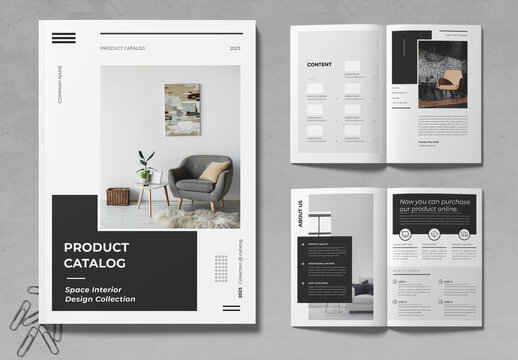
- Catalogs benefit from magazine-style layouts that allow page flipping and zoom.
- Brochures usually require a more immersive format where images and text are easy to scan.
For all three formats, an embedded, responsive, and interactive viewer helps you maintain design consistency while keeping users engaged.
Making Your Document Displays Mobile Friendly
Many site owners overlook how frustrating it is to open a PDF on a phone. Visitors are forced to zoom, scroll, and adjust repeatedly, which leads to a poor experience. Using responsive PDF viewers for mobile helps you solve this issue. These viewers resize documents automatically and adapt the layout to fit smaller screens.
Here are a few reasons mobile responsiveness is essential:
- A large percentage of visitors access websites from smartphones.
- Google ranks mobile friendly websites higher.
- Users prefer interactive, tap-friendly controls over static files.
- Responsive viewers reduce bounce rates and increase conversions.
When you choose a viewer or plugin, always test it on multiple devices. This ensures your menus and catalogs look as good on a phone as they do on a desktop.
Enhancing the Experience With Interactive or 3D Elements
One of the fastest ways to create a memorable viewing experience is by enhancing UX with 3D elements. These interactive touches can turn static PDFs into dynamic visual journeys. A subtle page flip effect can make a catalog feel more refined, while soft animations can help guide the user through sections.
Examples of enhancements include:
- Page flip animations that mimic real printed materials.
- Light 3D shadows that help pages appear layered.
- Smooth zooming that lets users inspect details closely.
- Navigation buttons or thumbnails that help users explore faster.
Using these effects sparingly is key. The goal is to add visual interest without overwhelming the content. The right tool should give you control over animation speed, page transitions, and interface styling so everything aligns with your brand.
Using WordPress Flipbook Plugins to Create a Realistic Viewing Experience
One of the most effective ways to present menus, catalogs, and brochures is by using a WordPress Flipbook plugin. Flipbooks transform plain PDFs into interactive, magazine-like experiences that look polished on all devices. This format is ideal for businesses that want a modern presentation style without compromising load time or usability.
A few advantages include:
- Realistic page flipping that feels intuitive.
- Clean, lightweight interfaces that enhance focus.
- Mobile optimized layouts for easier reading.
- The ability to include clickable links, images, and multimedia.
- Customizable colors and controls that match your brand style.
By incorporating a WordPress Flipbook into your document display, you create a more immersive environment for your audience. Visitors spend more time exploring your materials because the format feels familiar, smooth, and enjoyable.
Design Tips for Document Heavy Sites
Web design tips for document heavy sites often come down to organization and clarity. When you have many menus, catalogs, and brochures, the way you present them matters as much as the documents themselves.
Here are practical strategies to follow:
- Use a grid layout for large collections so users can scan visually.
- Add clear labels and descriptions to help visitors identify the right document.
- Keep your page margins clean to avoid visual clutter.
- Avoid embedding too many documents on a single page to reduce load time.
- Use collapsible sections when sharing multiple variations of a document.
Consistency is key. When users know where to find information and how to navigate it, they feel more confident exploring your site.
Steps to Embed Documents Properly in WordPress
Embedding documents effectively requires a process that balances performance and aesthetics. There are several methods to place documents inside your site, but not all deliver a seamless experience.
Follow these basic steps to achieve the best results:
- Compress your PDF before uploading to improve loading speed.
- Choose a viewer that offers responsive and customizable options.
- Avoid embedding large documents directly into page content without a viewer.
- Use a plugin that allows inline display rather than forcing a user to open a new tab.
- Test your document on multiple devices, especially tablets and phones.
- Keep the surrounding page layout simple so the document remains the focus.
Embedding PDFs in WordPress becomes more effective when you consider both design and performance at the same time.
Why Interactive Document Displays Improve Engagement
Users tend to stay longer on pages that feel interactive. A static PDF link requires extra steps to open, download, or zoom in, which discourages engagement. When a document is embedded directly into the page, users can browse freely without interruptions.
Interactive displays improve engagement because they:
- Create an immersive reading environment.
- Reduce friction by eliminating unnecessary clicks.
- Encourage users to browse multiple pages or sections.
- Offer a visually appealing experience that feels modern and polished.
Using features like zooming, page previews, or 3D interactions makes even complex documents easier to digest.
Bringing It All Together for a Better User Experience
Showcasing menus, catalogs, and brochures on your WordPress site does not have to be complicated. With the right combination of design practices, responsive tools, and interactive features, you can turn essential documents into a seamless part of your website. Whether you choose a simple viewer or upgrade your presentation using a WordPress Flipbook, focusing on user experience will always deliver stronger results. The goal is to make your most important documents easy to access, beautiful to explore, and a natural extension of your brand.