Signing a managed service contract isn’t just a checkbox—it’s how you set the rules for your entire IT relationship. If you’re a small business relying on outside tech support, knowing what’s actually in that contract can save you from nasty surprises later. We’re talking billing clarity, response times, what’s covered (and what’s not), and even how to end the agreement if things go south. This article breaks it all down so you know what to expect before you sign.
What Is a Managed Service Contract?
A managed service contract is basically a playbook between you and your IT provider. It outlines what they’ll take care of, how fast they’ll do it, and what you’ll pay for the service. Rather than calling in tech support when things break, you’re getting ongoing, proactive support on a regular schedule. These contracts often cover help desk services, security, cloud systems, monitoring, and more—giving you peace of mind and predictable costs.
What’s Typically Included in a Managed Service Agreement?
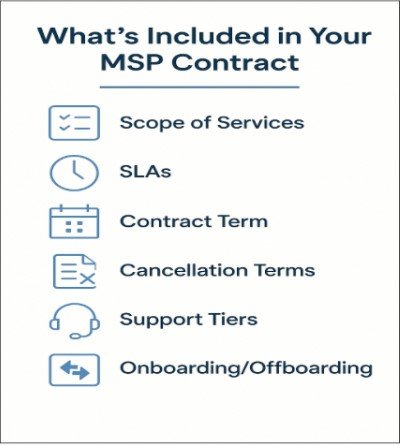
No two contracts are exactly the same, but most cover the same core areas:
Scope of Services and SLAs
This is the “what’s included” part—like help desk access, backup solutions, antivirus, monitoring, and more. The SLA (Service Level Agreement) outlines how fast they’ll respond or resolve issues based on urgency.
Contract Length and Termination Terms
Look for how long the contract lasts, what happens at renewal, and how you can cancel. Some MSPs auto-renew unless you say otherwise, so know what you’re committing to.
Onboarding, Offboarding, and Support Tiers
We recently spoke with Theo Soumilas, the local IT strategist and founder of Northern Arizona IT, advises small businesses in Prescott to double-check terms before choosing any MSP in Prescott AZ.
Some contracts charge setup fees or offer tiered support levels based on user count or services required. These impact your long-term value.
Northern Arizona IT pairs 24×7 SOC monitoring with automated patching and cloud-based backups that are tested weekly—so even if a zero-day slips through, recovery is measured in minutes, not days. For SMBs relying on managed service contracts in Prescott, speed, clarity, and resilience can mean the difference between hours of downtime—or none at all.
How Managed Service Contracts Differ From Break/Fix IT Models
If you’ve been using an on-call IT tech when things break, switching to a managed contract can feel like a big shift. But it’s a smart one. Break/fix models are reactive—you pay each time there’s a problem. It’s unpredictable and often more expensive in the long run. Managed service contracts flip the model: you’re paying to prevent problems before they happen. This makes budgeting easier and gives your business more uptime, less stress.
Popular Pricing Models Used in Managed Service Contracts
Most MSPs keep it simple with flat-rate pricing. You’ll usually see either:
- Per-user pricing (you pay for each employee or endpoint)
- Per-device pricing (you pay based on how many PCs, servers, etc. you have)
Some contracts also blend in usage-based fees or offer premium services for specific compliance or security needs. Either way, the point is to keep IT costs predictable while making sure you get the right level of coverage.
What to Look For Before Signing a Managed IT Contract
Before you commit, take a close look at:
- Hidden fees: Watch out for charges on after-hours work or extra services that aren’t clearly labeled.
- Unclear service descriptions: Know exactly what’s covered—and what’s not.
- Termination clauses: Some providers make it difficult or expensive to exit early.
- SLA promises: Are they reasonable? Do they match your business needs?
- Escalation process: If something goes wrong, how is it handled?
A good contract makes expectations clear and protects both sides. Don’t be afraid to ask questions or request edits.
Final Thoughts on Managed Service Contracts
A managed service contract isn’t just paperwork—it’s the backbone of your IT support. Done right, it ensures you get fast help when you need it, fewer problems over time, and technology that actually supports your business goals. If you’re a small or growing business, the right contract can mean the difference between scrambling when something breaks—or staying focused while someone else handles it for you.
FAQs About Managed Service Contracts
1. What’s the difference between a managed service contract and break/fix IT support?
Break/fix support is reactive—you call for help when something goes wrong and pay by the hour. Managed service contracts are proactive and ongoing, with a fixed monthly fee and continuous support designed to prevent issues before they happen.
2. How long are managed service contracts usually?
Most contracts range from 12 to 36 months. Some providers offer shorter or flexible terms, but always read the fine print for renewal policies and cancellation terms.
3. What happens if my business grows or shrinks during the contract?
Good MSPs build scalability into their contracts. You can usually adjust your service level or pricing if you hire new staff, downsize, or add more devices.
4. Are all IT services included in a managed service contract?
Not always. Many contracts include core services like help desk, monitoring, and cybersecurity—but advanced support like project work or compliance audits may cost extra. Always check the scope section.
5. Can I cancel a managed service contract early?
It depends on the terms. Some contracts have early termination fees, while others allow cancellation with 30–60 days’ notice. Make sure you understand the exit terms before signing.