
Programming is the act of writing instructions that a computer can follow and carry out to perform a task. Programming languages vary in syntax and capabilities, but there are a number of basic concepts common to all of them. Many programs are written in programming languages like Python, Java, JavaScript, C++, and C# and these elements—variables, constants, data types, operators, expressions, functions, and input and output—are the building blocks of those programs.
It is necessary to grasp them as they can be translated to different languages and it is easier for the readers to learn new technologies later. New programmers should learn what each building block does, why it is required, and how various concepts come together to address problems; they should not simply memorize an assortment of commands. After these foundations get known, writing and reading apps becomes much more rational and possible.

Understanding Variables in Programming
A variable is a named address within a program where a value can be stored, and then retrieved later. A variable can contain data like a person’s name, age, price, score or outcome of a calculation. Variables are used to make programs flexible since programmers can use different values of information within their programs instead of hard coding the same value throughout their program. For instance, a program to add up the prices of products can have variables where the price and quantity of the products are stored, and then use the stored variables to calculate the total price. There are many different methods for variables in programming languages. In Java, C++, and C#, a variable must be declared before it can be used, but in Python, it is possible to create a variable without specifying its type. A variable is used to assign a meaningful name to information that a program uses, regardless of the syntax.
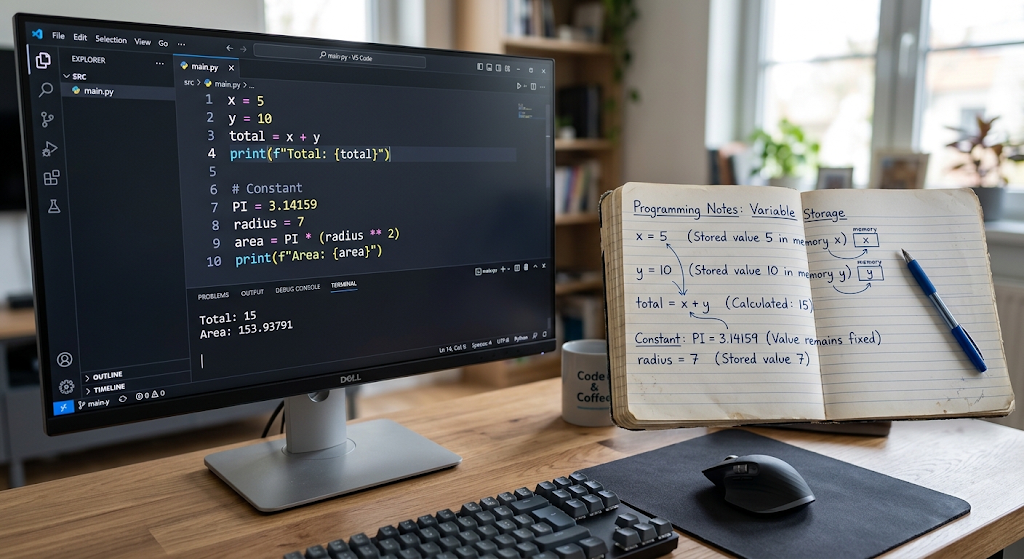
The value of variables can change during the execution of a program, which is often useful. For instance, a student’s score could start at 0 and rise every time they score a point. A shopping app can change the total on a shopping cart anytime a product is either added or removed from it. Variables can be used to store a player’s score, health, level, etc. in a game. It also makes programs easier to understand and maintain when they have meaningful variable names. totalPrice tells more than x does. As programs get bigger, the more important good names become, since the programmer will have to come back to the code weeks or months after. As such, variables not only provide storage space for data, but also provide a way to clarify the purpose and logic of a program to humans.
Constants and Fixed Values
Fixed values are numbers that do not change; they are also known as constants. A value that is supposed to stay the same throughout the running of a program is called a constant. Useful when a program requires the same value many times, and the value is unlikely to be accidentally changed. It can be a number, like pi, a score limit, a length of days used in a calculation or a rate. In some programming languages, there are certain features that are used to declare constants, whereas other programming languages use a naming convention or a programming practice to show that a value should not change. For instance, Java, C++ and C# offer ways to create values that are not normally reassignable. While Python doesn’t strictly enforce this rule, it’s a convention that programmers will follow to indicate that a value should not change. Constants simplify maintenance by making it possible for the programmer to define an important value once and refer to it anywhere.
It is helpful when designing a program that’s reliable to know the difference between variables and constants. A variable is something that can change and a constant is something that shouldn’t change. Suppose you have a program that determines the area of a circle. The radius could be a variable since it might vary for different circles and the number pi could be a constant. Clearly separating these concepts helps avoid accidental changes and the purpose of the program becomes more evident. Another advantage of constants is that they can eliminate duplicate data, as the programmer doesn’t need to type in the same number many times in the program. If a fixed value is to be changed later, it may be sufficient to simply update the value in the place where it is used. This makes your program easier to read and may help to prevent mistakes, especially in large programs where some information is required for several different calculations.
Data Types: What are the various types of data?
A data type specifies the type of value that a program is operating on. Common data types are integers, floating point numbers, strings, characters and Boolean values. An integer is a whole number, e.g., 5, 20, -10, etc., and a floating-point number is a number that has a fractional part, e.g., 3.14 or 19.95. A string is used to store a block of text, e.g., a name or a sentence; a Boolean is normally used to store one of two possible logical states: true or false. Some programming languages offer other data types besides integers, such as arrays, lists, objects, dictionaries, structures, and enumerations. It’s important to know the different types of data, as they can act in different ways when used with operators and functions. In other words, if you concatenate two numbers, you will get another number, but if you concatenate two strings, you will get a longer text.
Every language is different with respect to how it treats data types. Python is dynamically typed: a variable can hold different types of values at different locations in a program. Java, C++ and C# are typically called statically typed languages as they have strict type checking for variables and expressions. JavaScript also has a type system, and a variety of primitive and object-based values. Despite these distinctions, there is a concept that can be transferred from one language to another: When programming, the programmer should know what sort of data is being handled and what operations are appropriate. For instance, someone who knows about data types can be more alert to issues like trying to add or multiply characters or trying to treat a Boolean as a number.

Operators and How Programs Work With Values
Symbols or keywords used to operate on one or more values. Arithmetic operators are some of the most common ones, such as add, subtract, multiply, divide, and in some cases, remainder. For instance, 10 + 5 gives the value of 15 using the + operator. Comparisons are used to check the relationship between values, for example, if one value is less than or greater than another. Logical operators enable programmers to use more than one condition, and build more complex decisions. To assign values to variables, assignment operators are used, and some languages have operators for incrementing, decrementing, bit manipulation and membership, among others. Learning operators is a crucial task, because they offer many of the fundamental ways in which programs manipulate information.
The operators can also be classified by the type of operation they carry out. Arithmetic operators are mainly used for numerical calculations, comparison operators return a true or false result, and logical operators are used for conditions. The assignment operators are used to assign values to variables and store the results for future use. The programmers should be familiar with Operator Precedence—It refers to the order of the operations performed on the parts of an expression. In arithmetic, for instance, the order of operations usually is multiplication before addition, so if the program requires it to be added first, the programmer must use parentheses. It is important to understand these rules to avoid unwanted effects and to be able to reason about expressions. The operators may have slightly different meanings in the different languages, but the overall meaning of the operators is the same in each language.
Expressions: How to Evaluate Expressions.
An expression is a set of values, variables, operators, function calls, etc. that yields a value. Expressions appear in programming, even early on when a novice programmer might not see them. Here’s a simple calculation, price multiplied by quantity, that produces a value and is therefore an expression. The score >= 50 statement is also an expression because it returns a logical value. Multiple operations, variables, function calls can be combined into more complex expressions. Expressions will help a programmer in his/her understanding of the evaluation of individual pieces of code. Beginners can see a line of code as being made up of smaller instructions, and understand what each instruction does. This skill is especially useful when debugging, as a programmer can check intermediate values to see where an unexpected value is coming from.
Expressions may be chained to create more complex program logic. For instance, an application could check if a customer is old enough to use a service, and if a customer has taken a necessary step during registration. These can be used in combination with logical operators to form a larger expression. Expressions are thus related to variables, data types and the operators. A value is provided by a variable; the data type defines the type of value; operators dictate processing of values. The resulting expression will yield a new value which can then be stored in another variable, displayed to a user, passed to a function, or used in another expression. This connection between concepts is one of the main patterns of programming.
Functions: Reusable Blocks of Code
A function is a named block of code that is used to accomplish a specific task. Functions are among the most significant tools of a programmer to organize a program as they can break down a big problem into smaller and more manageable ones. To avoid repeating these instructions, a programmer can execute the instructions inside a function, and then call the function any time the task is needed. A function can take information in as a parameter, perform an action, and return a value. For instance, there’s a program that comes with a function to determine the area of a rectangle. The function can accept length, width and return the area (which is the product of length and width). This makes programs easier to understand and more functions reusable.
Functions also help programmers to think about programs in terms of individual tasks. The large application could have functions to calculate totals, to validate data, to process payments, to display results, or to search through data. If each function is designed for a specific task, then the programmer can test and maintain each function without needing to know the complete program. Functions can also have varying input parameters, hence flexibility. For example, there is a calculation function that may be called with a large number of different numbers when it performs the calculation, but not separately for each case. Functions are supported in most popular programming languages, with the syntax varying. In Python, functions are defined using the def statement; in JavaScript, function is defined in a number of different ways; and in Java, C++, and C#functions and methods have their own shapes. The universal concept is that functions represent encapsulated groups of functionality.

Parameters, Arguments and Return Values.
Functions are tightly coupled with parameters and arguments, so there is a distinction between them. A variable that appears in a function’s definition and that represents information passed to the function is a parameter. The actual value provided when the function is called is called an argument. For instance, a function to compute the area of a rectangle could take length and width as arguments. If the function is called with the arguments 10 and 5, then those are the values that are passed into the function. This is a fine difference, but at some level it will help make function-based programming easier to understand. A function becomes powerful when it can accept various arguments and carry out the same basic function on each set of arguments. This enables the programmer to develop a general solution rather than developing a solution for each and every input.
A function may also have to return a value to the caller of the function. The return value enables a function to calculate something or process information without necessarily printing out the result of the calculation. For instance, a function could add together two numbers and return the result. That answer could then be stored in a variable, displayed, or used in a subsequent calculation using the calling code. Not all functions have to return something. Some functions are intended primarily for the purpose of executing an action, like printing out data or altering some aspect of the state of a program. Knowing about inputs and outputs can help make functions easier to design: programmers can easily state what data a function requires, what it does, and what it returns.
Basic Input and Output
Input and output are ways a program can communicate with the outside world. Data which enters a program is called input data, and data that a program produces for the user or another program is called output data. Input may be from keyboard, file, sensor, database, network or another application. The output may be displayed on a screen, be written to a file, sent across a network, stored in a database, or passed to another system. Many start with getting their hands dirty with keyboard input and screen output. Very simple, such as asking a user for their name, they respond, and then a message is displayed indicating their name. The syntax varies from language to language, but the concept is consistent in all programming environments: information fed in, processed, and information returned.
Input and output also illustrate the interaction of the other programming basics. The input to a program could be a text string, which can be converted into a number, stored in a variable, fed to an operator to perform a calculation, passed to a function, and then output as a number. This series can include almost all the basic concepts discussed in this article. In the case of a simple calculator application, it would ask for two numbers, store them in two variables, add them together with an operator and output the answer. Even for more advanced programs, the input is derived from a complex source (e.g., web application, database, sensor, or external service), but the structure of the program remains the same. Basic input and output, then, provides a working example for beginners to follow to see how individual programming concepts relate to each other.

How these Elements are Connected.
Programming fundamentals can be more easily understood when used together to solve a complete problem. Suppose you were to develop an application to find out the sum of the prices of multiple items. The program might require variables to hold the prices and quantities of products, data types to hold numbers and text, operators to multiply and add, and functions to do some calculations. Constants might be set to a value that is not going to change, such as a predetermined tax rate. Input might be used to accept quantities or product information, and output might be used to show the final total. There is a specific responsibility for each concept, but the concepts are interdependent and part of a greater whole. Programming learning is not just a matter of memorizing definitions. It’s the ability to grasp how these components work together to deliver valuable outcomes from data.
The same concepts are employed in vastly different applications and on a much smaller scale. A small student project could have a few variables and functions, a large commercial project could have thousands of functions, complex data structures, databases, external services and multiple programming languages. The scale is different, but many things are still the same. The concepts of variables, functions, expressions, operators, input, output, etc., can be encountered by a programmer in Python, and equivalent concepts can be encountered in Java, JavaScript, C++, or C# using different syntax and language constructs. Learning basics is more beneficial than learning only the commands of a single language, because of this. Understanding the concepts makes it much easier for programmers to learn the syntax of another language; they are learning how to express ideas they know in a new language.
Importance of Programming Fundamentals
The basics of programming are used in other more advanced areas of software development. Basic programming knowledge is essential for various concepts, including object-oriented programming, databases, web development, application development, artificial intelligence, cybersecurity, and automation. Having learned a number of the concepts he or she needs to understand more advanced programming methods, a beginner who has learned about variables, data types, operators, expressions, functions, and ways to input and output data has learned a portion of the concepts required for more advanced programming methods. These basics also develop problem-solving abilities as the programmer will learn to partition large jobs into smaller tasks, discover what information is needed, manipulate the information and create something useful. There are good fundamentals that can help stop novices from copying code without understanding it. Rather, they are able to look at examples, spot patterns, adapt pre-existing programs, and later create their very own programs.
It is important to note that it is not best to learn these concepts all at once, but rather slowly. Someone new to programming can begin by writing very small programs that store values in variables, perform calculations, read in simple input, and output. Then they can start to use conditions, loops, and functions before progressing to more complex projects. The same basic concept can be expressed in multiple languages, which can be helpful in understanding the common, as well as the distinct, characteristics of each. For instance, a student could program a basic calculator in Python and then in JavaScript or C++. The syntax will be different but the intended logic will be clear. This will help to develop transferable knowledge and equip learners for future programming technology developments.
Conclusion
The programming fundamentals are the fundamental elements that enable a computer to manipulate information and execute useful tasks. Values can be stored in variables, and constants are values that will not change; Data types are the types of information that a program can process. Operators and expressions are used to calculate and compare values, and used to create the results by combining programming elements. Functions bundle together units of logic that can be reused and passed arguments and return results.
The input and output provide a way for programs to communicate with the user, files, devices, and other programs. While the syntax and features differ from one language to another, these basic concepts are found in each language in a recognizable form in Python, Java, JavaScript, C++, and C#. Programming concepts are more important than memorizing a lot of commands for new programmers. Having a solid understanding of the basics gives a solid foundation to learn the new language, develop practical projects, fix bugs, and move on to more complex sections of software development.