Introduction
Not choosing the right accounting software for your business that doesn’t provide you with a reliable solution is akin to driving at night with your headlights off. You can go on but it’s difficult to prevent the problems from becoming costly blunders. Many of the business owners put off when they have to select an accounting platform because the terms and jargon used in accounting seem like a daunting challenge, but modern accounting tools are built for non-accountants. With the right software you will be able to generate the invoice, track cash flow, monitor expenses, reconcile your bank transactions, manage inventory and generate reports without any need to be an advanced bookkeeper. But, the wrong platform can mean lost money, duplicate work and future migration hassles.
There are a lot of products that offer the promise of automation and simplicity in the market, and it can be hard to know which product will be a right fit for your business. Business owners tend to compare the well-known brands like QuickBooks, Xero and Wave, and they also look at the local accounting options that would be more suitable for tax regulations, payment methods and currencies in their region. Business owners should consider different platforms based on their functionality and whether it meets their business needs, their technical competency and their growth plans. This article offers an easy-to-digest overview of the must-have features, pricing options, and usability considerations for nonaccountants seeking to make the right choice.
Start with the Needs of your Business before Comparing Software
Unfortunately, many business owners choose accounting software based on a friend or online review without first deciding what they need in business software. Prior to examining features lists, perform a basic list of procedures you’ll have and objectives you want. Think about the way you send out bills, receive payments, manage your money, keep track of products, pay your staff, and track your profit. For a freelance consultant, it might suffice to just have an invoice writer and an expense tracker, whereas an e-commerce business will need inventory management, multi-currency support, and online sales channel integration. For companies with multiple locations or international customers, there might be need for more sophisticated reporting and automation capabilities.
Consider who will be using the software on a regular basis. If you’re doing your own bookkeeping, it’s more important that the software is easy to use than that it has all the advanced capabilities you never use. If you are using a bookkeeper or an outside accountant, you should ask them which software they like to work with, and if they can log on to your books remotely. Take into account the growth you would expect in the next 2-3 years. It’s also best to pick a solution that can grow with your business, not one that’s the least expensive option on the market right now, as you may need to switch accounting systems at a later stage and this can cause time-consuming and disruptive issues.
Difference between Cloud and Desktop Accounting Software
The first choice you must make when you start using accounting software is whether to opt for cloud-based or desktop software. With cloud accounting systems, your monetary data is saved on the cloud and can be accessed on any internet-connected gadget. Desktop solutions are software applications that are installed on a particular computer or company server and are usually subject to manual updates and backups. There are pros and cons to both methods, but cloud accounting is the preferred method for most small and medium-sized businesses due to its flexibility, automation and reduced maintenance.
Features get updated automatically, backed up automatically, linked directly to bank accounts, and can be used simultaneously by multiple users. Reports can be viewed on the go by business owners, accountants can access reports from anywhere and team members can work from different locations without sharing files. For businesses in regions where internet access is less reliable or organizations seeking to have full control over their data storage infrastructure, desktop software might still be of interest. While desktop systems may have higher initial investments, they are not as accessible and may require extra maintenance and security costs, however. Non-accountants find that the learning curve and user-friendliness of cloud-based accounting software are less steep.
When shopping for the best software for small business accounting, consider the following key features:
Many accounting software providers boast a huge list of features; however, not all of them offer the same benefit to business owners. Prioritize functions that save time and reduce errors and enhance financial visibility. The invoice should be easy to use and flexible, with options to customize the layout and automate recurring billing, as well as accept digital payments. Expense tracking is also a crucial feature to consider, as it saves you from having to manually enter your expenses and ensures you have accurate records for the entire year.
Bank feeds are interesting options that import your transactions automatically, based on your rules, from your financial institutions. The automation allows to considerably decrease the bookkeeping workload and makes reconciliation easier. For those companies that sell physical goods, they should be implementing inventory trackers that offer inventory monitoring, COGS tracking, and reorder alerts. Multi-currency is essential when you have international clients or suppliers, as it allows you to take care of exchange rates and foreign transactions. Simplifying reporting is also a feature you should look for, so that you can check profit and loss summaries, cash flow statements, balance sheets and tax statements without having to know accounting. Last but not least, determine if the software works with your current tools, such as payroll software, payment processors, e-commerce platforms, and customer management software.
1. QuickBooks Designed All-in-One for growing Businesses
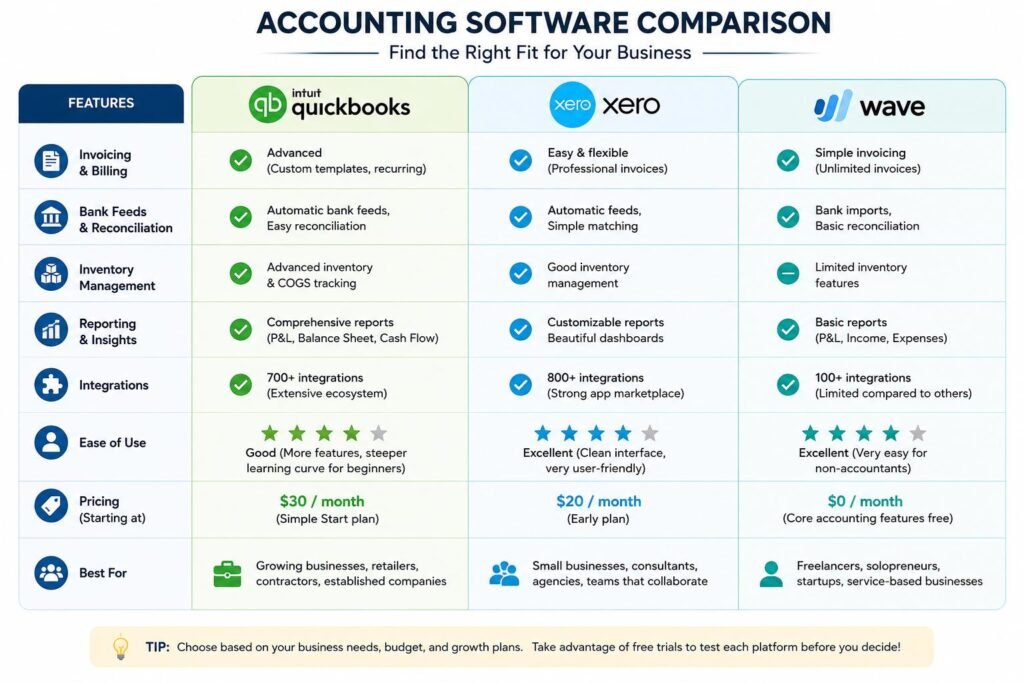
QuickBooks continues to be widely known accounting software due to its various features that are applicable to businesses in various stages of growth. Invoicing, expense management, inventory, bank feeds, payroll, project profitability tools and comprehensive reporting are all in the software. For businesses that deal with international customers or suppliers, QuickBooks offers the option of multi-currency transactions on certain plans as well.
If you’re up to research, you can consult the most recent QuickBooks pricing tiers to figure out which would suit your spend and feature requirements.
QuickBooks’s extensive integration capabilities and popularity amongst accountants and bookkeepers is its greatest strength. Most companies have tutorials or professional services to help you get started or implement it, so you shouldn’t have trouble finding something to help you. For those who are new to using it, however, the more options and menu items can make it a daunting experience. Additional users, payroll services, or more sophisticated features also may lead to higher subscription fees. QuickBooks can be suitable for businesses with a lot of expansion and growth potential, but it might be overpowering for businesses that have minimal financial needs.
Best For
QuickBooks is perfect for service companies, retailers, contractors, expanding small-scale businesses and companies with robust reporting needs and more extensive third-party integrations.
2. Xero: Collaboration, easy user experience and robust integrations.
Xero’s strong emphasis on simplicity, collaboration and modern design has created a loyal customer base. There is no limit on users with most plans, making it more affordable than its competitors that have extra fees for added team members. Some of the core features include invoicing, bank reconciliation, inventory management, bill payment, fixed asset tracking and customizable financial reporting. Though integration with hundreds of business apps, Xero also features multi-currency integration on higher tier plans.
Because of its easy-to-use interface and navigation, non-accountants love Xero. The tasks like matching bank transactions, sending of invoices, Cash flow reports are made as to require the least accounting knowledge. The platform focuses on collaboration with its ability to furnish shared details to business owners, accountants, and team members at the same time. Xero’s ease of use is excellent, but some users have found that the advanced features of inventory are not as sophisticated as they would like them to be to meet their specific needs. Businesses may also be charged a higher price when they seek out premium features or additional services. However, for owners looking for ease of use and streamlined workflow, Xero is a great option.
Best For
Xero is great for small businesses, agencies, consultants or companies with a widely spread team requiring easy collaboration and robust automation.
3. Wave: Affordable Accounting for Startups and Freelancers
Wave has emerged as a popular choice for freelancers, solopreneurs and early-stage businesses due to its core accounting features for free or at low cost. The website features invoice management, receipt scanning, expense tracking, simple reporting and bank transaction imports. Wave may be a good option for businesses that have lower budgets, as it helps to cut initial software costs and offers businesses the specific financial management tools they need.
Wave’s primary benefit is its ease of use. The platform is designed to be simple and easy to use, making it accessible even for owners who may not have accounting expertise. But, companies need to be aware of the compromises that come with the lower price. Wave does not have as many customization options as QuickBooks or Xero and it doesn’t have quite as many advanced reporting features as the other options. Depending on your location and business set-up, you may have limited support for multi-currency. When businesses expand and their financial needs evolve, eventually many businesses move onto more powerful platforms. But for startups looking to get a start on financial management, Wave can be a great introduction to the world of organized financial management.
Best For
Wave is ideal for freelancers, consultants, independent professionals and small service companies that have simple bookkeeping requirements.
Analyzing the Local Accounting Software Choices
While international platforms are given a strong focus, local accounting software may provide valuable benefits that are often missing from the international accounting software services. Businesses must explore solutions that cater to the local requirements of tax obligations, payment gateways, banking integrations, and currency usage, which are crucial for ensuring seamless operations in Nigeria and other markets. Some providers locally may also have customer-specific support during the business hours in the region, and can be more familiar with the compliance issues that your business is likely to be encountering in your market.
If you’re assessing local options, assess them in terms of the global platforms. Check out the invoicing features, inventory management systems, bank feed options, reporting quality, data security and integration features. Is the software VAT compliant, local payroll compliant, and e-payment compliant. There can also be major price differences between domestic and international platforms, giving local platforms an edge for small businesses. But make sure that the provider has a very clear roadmap for products, dependable technical support as well as the funds necessary to keep developing the software with time.
The impact of Pricing Tiers on Long-Term Value
Some business owners will only compare the accounting software on a monthly subscription basis, but the overall value is not limited to the price tag. Basic plans may come with a maximum number of users, a limited number of reports or a maximum number of transactions. If your business expands, you might require more advanced features and supports, such as inventory tracking, multi-currency, payroll integration, and advanced automation, which are only available on premium plans. Before making a decision, it is important to understand upgrade paths to avoid any unforeseen costs.
Make use of the total cost of ownership calculation, which takes into account such factors as implementation time, employee training, add-on applications, payment processing fees, and the need for professional support. It’s possible that the software may cost more upfront, but it can save you money in the long run because you won’t have to do as much work or make as many accounting mistakes. Free trials are great ways to find out how easy it is to use them before subscribing. In periods of trial, undertake real work like sending out invoices, reconciling bank transactions, and creating reports. Even having a lovely feature list won’t make it the perfect solution if it doesn’t let you perform routine activities after a few days of use.
Conclusion
There’s no need to have all of the accounting skills to select accounting software, but there is a process of evaluation. First, you need to determine what business needs are critical and make a list of features by priority. Determine if it’s important to access the cloud or control it on the desktop, check the usability of the user interface, and verify that the platform can be used with other software you’re already using. Think about the need for inventory management, multi currencies, automated bank feeds, advanced reporting etc.
When possible, ask demos, take advantage of free trials and include your accountant or bookkeeper in the decision. Keep in mind you don’t need the most robust accounting software when the one you choose enables you to manage your finances with peace of mind without introducing an unnecessary level of complexity. QuickBooks has great capabilities for companies that are growing, Xero is best for collaboration and usability, Wave is great for startups and local solutions might better serve local needs. When it comes to usability, scalability, and real business requirements, you can choose a system that will facilitate more intelligent decisions and long-term growth for years.
Get more well researched information on how to choose right accounting software for your business here.