Have you ever opened a PDF file only to find that the pages are upside down? Or maybe you scanned a document, but it saved sideways? It is very frustrating to tilt your head just to read a single sentence. You should not have to struggle with your digital files.
Today, we are talking about a special tool that solves this problem in seconds. With the Rotate PDF Pages Instantly tool, you can turn your pages any way you want. Whether it is for school, work, or personal use, this tool makes sure your documents look exactly how they should.
Why Do We Need to Rotate PDF Pages?
Sometimes, technology makes mistakes. When we use a scanner or a mobile camera to make a PDF, the orientation might get mixed up. Here are a few common reasons why people need to rotate their PDF pages:
- Scanning Errors: Sometimes the scanner pulls the paper in the wrong way.
- Mobile Photos: If you take a picture of a document with your phone, it might save in “Landscape” mode when it should be “Portrait.”
- Better Reading: Some charts or maps inside a book are meant to be viewed sideways.
- Professionalism: Sending an upside-down resume or contract to a boss looks unprofessional.
By using an instant rotator, you can fix these issues without needing any expensive software.
How to Use the “Rotate PDF Pages Instantly” Tool
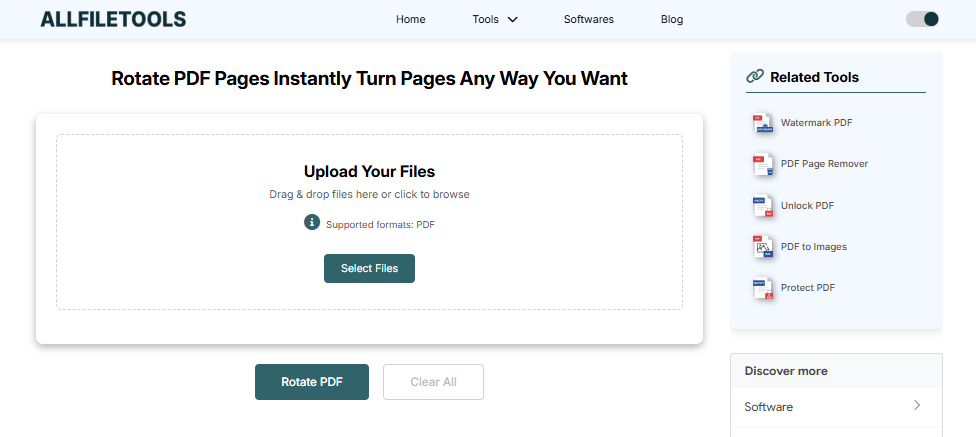
You do not need to be a computer expert to use this tool. In fact, if you can click a mouse, you can fix your PDF. Here is a simple step-by-step guide:
Step 1: Open your browser and go to a trusted site like AllFileTools.com. And use this Tool Rotate PDF Pages Instantly
Step 2: Click “Select Files” or “Upload” to choose your PDF file from your device.
Step 3: Use the “Rotate” arrows to turn your pages left, right, or upside down.
Step 4: Click the “Apply Changes” button and wait a few seconds for the tool to process.
Step 5: Click “Download” to save your perfectly aligned PDF file to your device.
Key Features of This Instant PDF Rotator
Why should you use this tool instead of others? Here are the best things about it:
1. It is Completely Free
You do not have to pay for a subscription. Many big software companies charge a lot of money just to edit a PDF. This tool gives you the same power for zero dollars.
2. No Installation Required
You don’t need to download any heavy apps or programs. It works entirely in your web browser (like Chrome, Safari, or Firefox). This saves space on your computer and keeps your system fast.
3. Works on All Devices
Whether you are using a Windows PC, a Mac, an iPhone, or an Android tablet, the tool works perfectly. As long as you have internet, you can rotate your PDFs anywhere.
4. High-Quality Results
Some tools make the text blurry when they change the file. Our tool keeps the original quality. Your text will stay sharp, and your images will stay clear.
5. Fast and Instant
Time is precious. You don’t want to wait ten minutes for a file to process. This tool is built for speed. It finishes the job in just a few heartbeats.
Is it Safe to Use Online Tools for PDFs?
Many people worry about their privacy. “Is my bank statement safe?” “Can anyone see my school project?” These are good questions.
The Rotate PDF Pages Instantly tool is built with security in mind.
- Privacy: Your files are only stored temporarily while they are being rotated.
- Auto-Delete: Most modern tools delete your files from their servers after an hour or once you close the page.
- No Sharing: Your data is never sold or shared with third parties.
Why This Tool is Great for Students and Teachers
In the world of online learning, PDFs are everywhere.
- For Students: If you take a picture of your math homework and it’s sideways, your teacher might find it hard to grade. Rotating it first shows that you care about your work.
- For Teachers: If you are sharing a worksheet with your class, you want it to be easy for them to read on their screens.
Using an easy tool like this helps everyone stay organized and makes learning much smoother.
Pro Tips for Managing Your PDF Files
To make your life even easier, here are some tips for when you are rotating files:
- Check the Rotation Twice: Before you click download, do a quick scroll to make sure every single page is facing the right way.
- Rename Your File: After downloading, give your file a new name like “My_Document_Fixed.pdf” so you don’t get it confused with the old, crooked one.
- Check File Size: Sometimes rotating files can change the size slightly. Our tool tries to keep it as small as possible so it’s easy to email.
Conclusion: The Best Way to Handle Crooked PDFs
Digital documents should make our lives easier, not harder. If you have a file that is difficult to read because the pages are turned the wrong way, don’t waste time trying to fix it manually.
The Rotate PDF Pages Instantly tool is the fastest, safest, and easiest way to get your documents back in order. It is built for everyone—from a 4th-grade student doing a project to a professional businessman preparing a report.
Stop struggling with your screen. Go ahead, upload your file, and turn those pages the right way today!
🔹 Explore more powerful file conversion and online utilities at AllFileTools –
🔹 For technical support, digital solutions, and expert services, visit LetDigitalFly IT Services –
🔹 Discover additional career and productivity resources at Resume Slip Builder –