Artificial Intelligence (AI) and robots are changing the lifestyle and the workplace. The AI tools are now affordable to all people, not only tech professionals, to streamline routine processes, improve creativity, and decision making. Still, the AI and automation world can be overwhelming to you if you are not familiar with these terms. This guide will take you through simple AI tools that can be easily incorporated in your personal or professional life and break the intimidation barrier that might have been in place and enable you to start in the same breath.
Table of Contents
- What Is AI and Automation?
- Why Do You Have to Use AI and Automation?
- List of Popular AI Tools as a Beginner
- Chatbots
- Workflow Automation Platforms
- AI Writing Assistants
- How to Use AI Tools Step-by-Step
- Using a Chatbot
- Setting Up Workflow Automation
- Writing Using an AI Assistant
- Conclusion
What Is AI and Automation?
AI is the term used to describe the imitation of human intelligence by computer systems, in particular, by machines. The processes are learning, reasoning, problem-solving, perception, and language understanding. The opposite is automation, which involves the application of technology to do things without the involvement of human beings. AI and automation can be used together to streamline complicated operations, decrease human error, and conserve time.
In short, AI and automation have the capability of making work and life efficient. You can delegate some of the repetitive or time-intensive tasks to AI, which will leave you with more creative or strategic tasks to do.
Why Do You Need AI and Automation?
AI and automation are becoming more popular among both individuals and businesses, and there are some reasons behind this:
- Time-Saving: Artificial intelligence can be used to accomplish repetitive tasks, so you have more time to do other valuable tasks.
- Cost-Effective: Automation of routine tasks saves companies on labor and allows them to save money.
- Increased Precision: AI systems are less likely to suffer from human error, particularly with regard to data entry or analysis.
- Scalability: As your business or personal needs grow, AI tools can scale accordingly, managing increased workloads seamlessly.
- Enhanced Productivity: You will be able to work on more valuable activities, instead of being overwhelmed with mundane ones, with the assistance of automation.
List of Popular AI Tools as a Beginner
At this point, you know the fundamentals of AI and automation, so now it’s time to explore some of the beginner-friendly tools you can use today.
Chatbots
Chatbots are artificial intelligence (AI) applications capable of mimicking human dialogues. They are also utilized to serve the customers with prompt responses to commonly posed questions and even do bookings or recommendations. When communicating with a customer support agent online, you have probably been using a chatbot.
Mechanism: Chatbots are based on Natural Language Processing (NLP) to comprehend and produce human language. They can be programmed to respond to a broad spectrum of queries, from simple queries to complex problems.
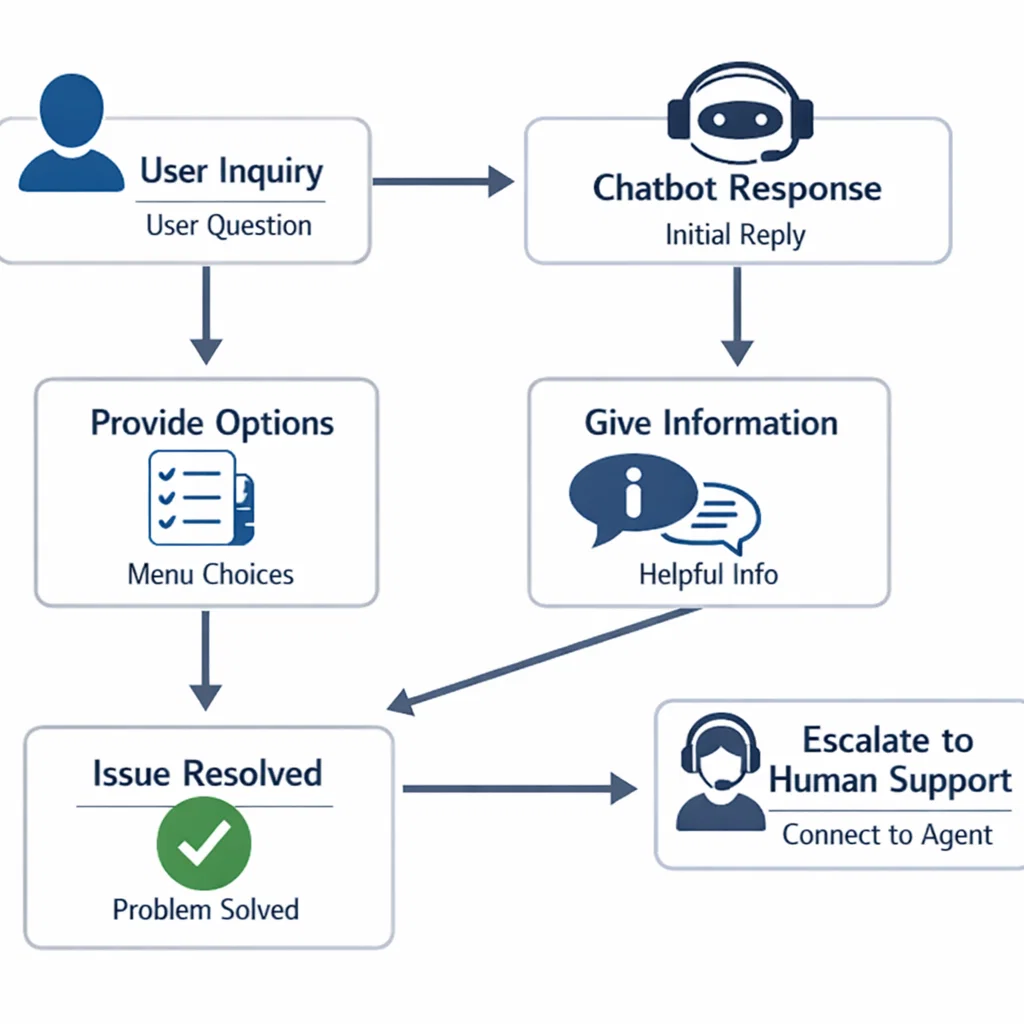
Use Case: Automating Customer Service
Suppose you are an e-commerce store owner. You will not have to answer the same questions about the shipping time or the opportunities to return the product on a daily basis: you can install a chatbot on your website or social media. The robot will reply immediately to questions and enhance response time and customer satisfaction.
Workflow Automation Platforms
Plug-and-play workflow automation tools enable you to automate tasks and integrate various applications to automate workflows among them. These tools may assist you in minimizing manual data entry, automatically classifying your emails, or even using certain actions as a trigger.
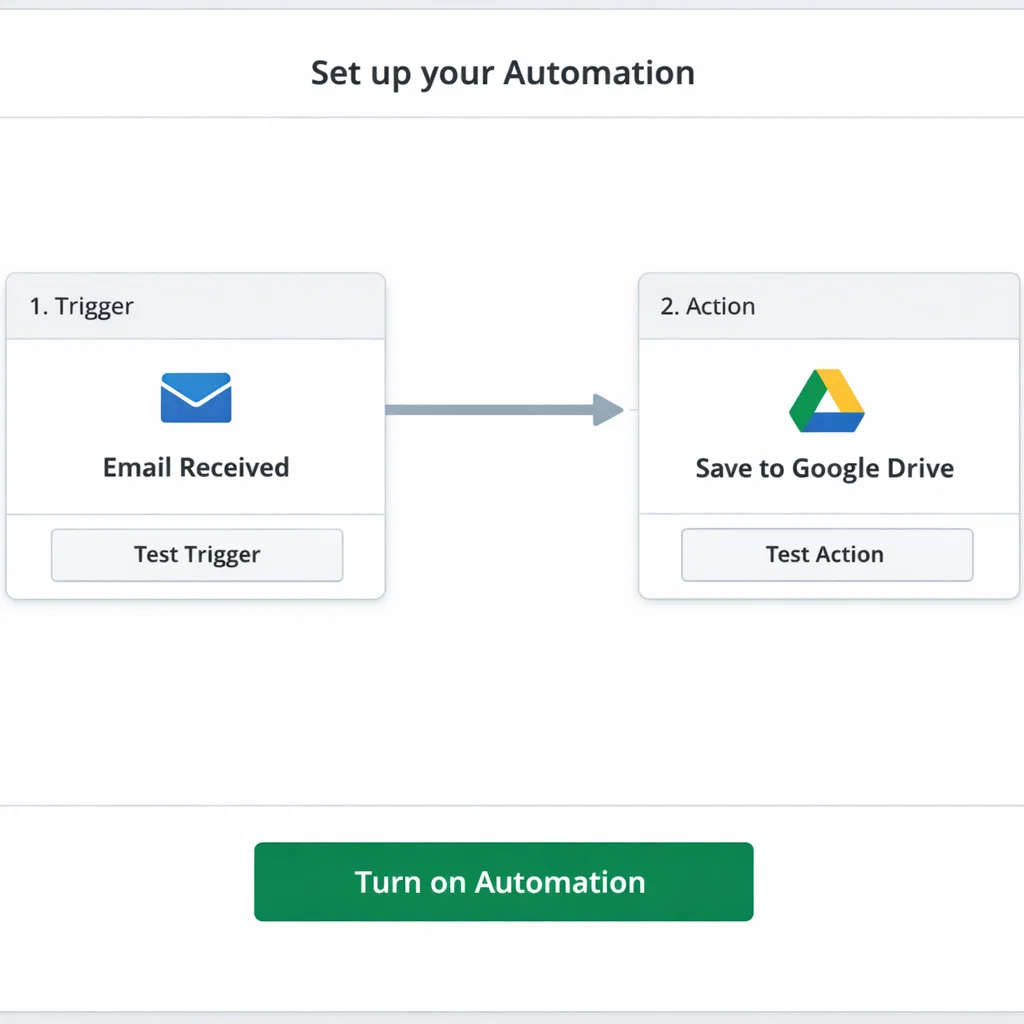
How It Works: Workflow automation systems enable you to make triggers and actions. As an example, an email containing an attachment can be a trigger, and saving the attachment to your cloud storage can be an action. Popular services that allow you to integrate without any coding experience include tools such as Zapier, Integromat, and IFTTT.
Application: Automation of Social Media Posts
Suppose you would like to plan social media posts for your business. Rather than manually publishing your posts daily, you can install a workflow automation application that would automatically publish your posts at the designated time, saving you hours of work per week.
AI Writing Assistants
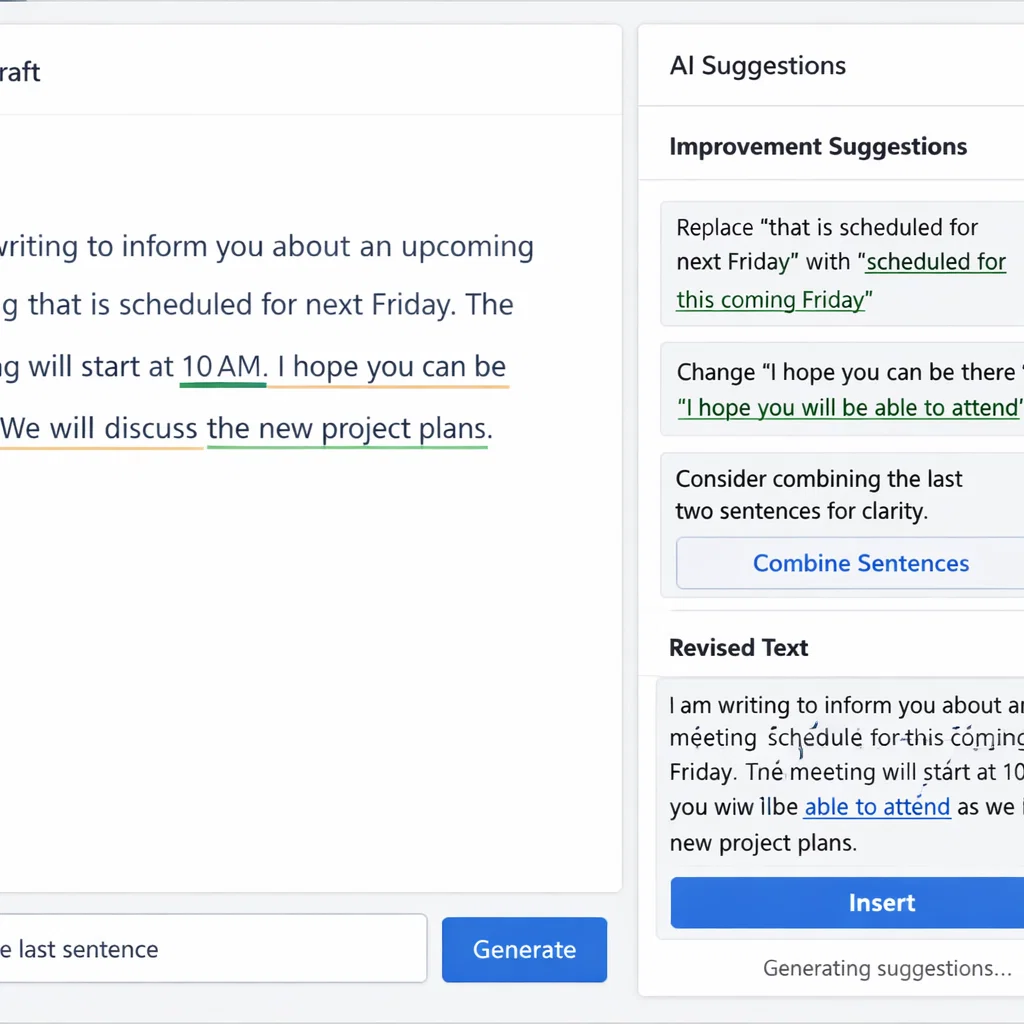
Writers, marketers, and content creators are starting to use AI writing assistants, including Grammarly, ChatGPT, or Copy.ai, as a crucial tool in their writing process. These apps can aid in the creation of content ideas, editing your writing to have grammatical and stylistic correctness, and even create complete articles on the basis of mere prompts.
How It Works: AI writing assistants use large language models to analyze and generate text. Others are aimed at correcting grammar, whereas others can assist you in creating creative content or writing optimally to achieve SEO.
Use Case: Blog Posts or Reports
As a student or a content creator, AI writing assistants can also be used to kick-start your writing process. As a case in point, you can type in several keywords and the assistant will create a sketch or even a first draft that you can write. This can save you a lot of time spent on research and writing.
How to Use AI Tools Step-by-Step
You are now more familiar with the tools that are out there, so how about getting started with each of them?
Using a Chatbot
- Select a Platform: A number of chatbot platforms such as Tidio, ManyChat, or Drift are available. Select one which fits your purposes (business or personal).
- Create Your Bot: Customize or use the templates of the platform. Numerous platforms have simple drag-and-drop interfaces to create your chatbot.
- Determine Conversation Flows: Brainstorm on questions individuals may have and establish answers.
- Test: Make a test to check if your chatbot is answering. Adjust it to your liking to be more accurate.
Setting Up Workflow Automation
- Select Your Tool: Select a workflow automation tool, such as Zapier, Integromat, or IFTTT.
- Connect Your Apps: E.g., connect your email account and cloud storage to automate email attachments saving.
- Create Your Workflow: Set up your trigger and action steps. An example is: “I save an email with an attachment to my Google Drive when I get it.”
- Activate and Monitor: When you have an established workflow, monitor its performance to make sure it is running smoothly.
Writing Using an AI Assistant
- Select Your AI: Grammarly, ChatGPT, and Jasper are good platforms to use to create content.
- Formulate Your Objective: What would you have the assistant do? Enhance your grammar, create content, or help brainstorm?
- Enter Your Material: Paste your text or type in your keywords.
- Edit and Review: Check through the recommendations of the AI and edit them according to your preferences.
Conclusion
AI and automation are not only the possessions of tech experts but of anyone. No matter your profession, whether you are a student, small business owner, or you need to enhance your productivity, AI tools can be used to assist you. These tools can make your life easier and more efficient, starting with chatbots that automate customer service to AI assistants that can assist you in writing something better.
Don’t let the idea of using AI and automation overwhelm you. Begin with the small, by trying out the tools listed in this guide, and you will soon be using these technologies to save time, decrease error, and increase productivity.
This guide provides a simple introduction to AI and automation tools, helping you get started on your journey to becoming more efficient and productive. You can automate the tasks that previously required hours with the appropriate tools and be focused on what truly matters.