Taking the perfect picture is just the first step. Getting it to look exactly how you want, without complicated software, used to be a real challenge. We’ve all been there, trying to remove a distracting object from the background or wishing we could make the colors pop just a little more. Thankfully, you no longer need to be a professional designer to make stunning edits. The right tools can transform your everyday photos into something special.
AI-powered photo editors have completely changed how we approach image editing. They use smart technology to handle the heavy lifting, giving you professional results in just a few clicks. These tools can automatically enhance lighting, erase unwanted people from your travel shots, or even change the entire style of your image. This guide will walk you through the best free options available in 2026, so you can start editing your photos with confidence.
Our Top Picks for AI Photo Editing
When it comes to getting powerful results without a price tag, one platform stands out for its versatility and user-friendly design. It delivers a full suite of tools that are perfect for both quick fixes and creative projects.
1. The Best All-Around AI Editor: Photoeditor.ai
For a complete and intuitive editing experience, our top recommendation is a powerful web-based tool that makes advanced editing accessible to everyone. It packs a surprising number of features into a clean, simple interface. You can easily remove objects, replace backgrounds, and unblur images without needing to watch lengthy tutorials. The platform is designed for speed, allowing you to upload a photo, make your desired changes, and download the result in minutes. This is the ideal Free AI photo editor online for anyone who wants to improve their photos quickly and efficiently.
What makes it a top choice is its focus on core editing needs. The AI is incredibly effective at identifying and removing unwanted elements. Imagine erasing a photobomber from a wedding picture or cleaning up a product shot by removing stray clutter. It handles these tasks seamlessly, leaving behind a clean and natural-looking image. The automatic enhancement features are also impressive, adjusting brightness, contrast, and color saturation with a single click to bring a dull photo to life.
2. The Most Creative AI Art Tool: Ghibli Style Photo Editor
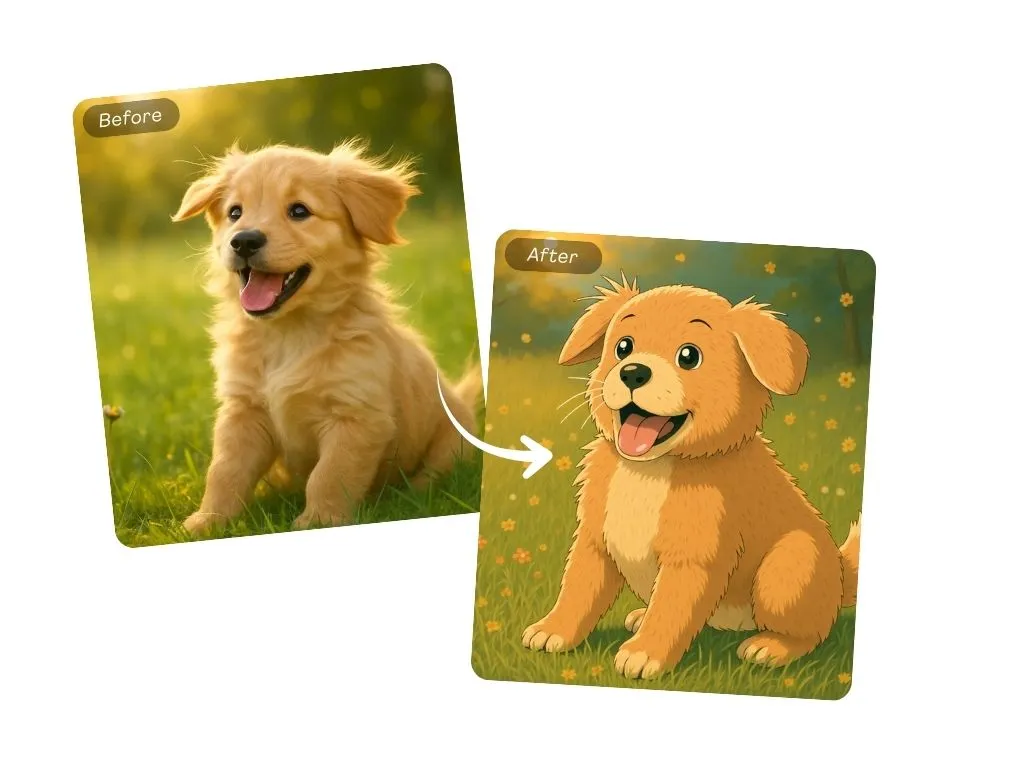
Sometimes editing isn’t just about fixing mistakes; it’s about exploring your creativity. If you’ve ever wanted to turn your ordinary photos into enchanting works of art, this unique tool is for you. It uses AI to apply a specific, beloved animation aesthetic to your images, giving them a whimsical and magical feel. This is a perfect example of how AI can go beyond simple touch-ups and open up new artistic possibilities for your pictures. For anyone looking to create something truly unique, the Free AI Ghibli style photo editor online offers an amazing one-click transformation.
This feature is more than just a simple filter. The AI analyzes the content of your photo, from the shapes of buildings to the colors of the sky, and re-imagines it in a distinct, painterly art style. It’s a fantastic way to turn landscape photos, portraits, or even pictures of your pets into shareable art. You can create custom avatars, unique social media posts, or even personalized gifts. It’s fun, easy to use, and produces results that are sure to get people talking.
What Makes a Great Free AI Photo Editor?
With so many tools on the market, it helps to know what features to look for. A top-tier AI editor isn’t just about one or two functions; it’s about providing a reliable and comprehensive toolkit. Here’s what you should expect from the best platforms.
Effortless Object Removal
This is one of the most popular uses for AI in photo editing. A great editor allows you to simply “paint” over an unwanted object, person, or blemish, and the AI will intelligently fill in the space. The best tools do this so well that you can’t even tell something was removed. The AI analyzes the surrounding pixels and reconstructs the background in a way that looks completely natural. This is perfect for:
* Removing tourists from travel photos.
* Erasing distracting power lines from a beautiful landscape.
* Cleaning up stray objects in real estate or product photography.
One-Click Photo Enhancement
Not every photo is taken in perfect lighting. Sometimes pictures come out too dark, washed out, or just a bit flat. An AI-powered enhancer fixes these issues automatically. With a single click, the tool can adjust brightness, contrast, shadows, and color balance to make your photo look its best. This saves you the time and guesswork of manually adjusting multiple settings. The AI is trained on millions of images, so it understands how to make corrections that look balanced and professional.
Smart Background Replacement
Changing the background of a photo used to require meticulous outlining with complex tools. AI makes this process instant. A good editor can automatically detect the main subject of your photo, whether it’s a person, a pet, or a product, and separate it from the background. From there, you can replace the original background with a solid color, a scenic landscape, or even a transparent background for use in other designs.
Creative Style Transfer and Art Generation
The best AI editors also offer tools for artistic expression. Style transfer is a feature where the AI applies the artistic style of one image (like a famous painting) to your photo. This can transform a simple portrait into something that looks like a classical masterpiece. Some platforms are also introducing generative AI features, allowing you to add new elements to your photos or expand the canvas using simple text descriptions.
How to Get Started with an Online AI Editor
Using these tools is incredibly straightforward, which is a huge part of their appeal. You don’t need any prior experience to get great results. Here’s a typical workflow:
1. Upload Your Image: Most online editors have a simple drag-and-drop interface or an upload button. Just select the photo you want to work on from your computer or phone.
2. Choose Your Tool: On the editor’s dashboard, you’ll see a menu of options. Select the feature you need, such as “Object Removal,” “Background Changer,” or “Enhance.”
3. Apply the AI Magic: Follow the simple on-screen instructions. For object removal, you might brush over the item you want to erase. For enhancement, you might just click a single button. The AI will process the image in seconds.
4. Download and Share: Once you’re happy with the result, you can download the edited photo to your device. The final image is yours to share on social media, use in projects, or print.
Frequently Asked Questions (FAQ)
Are free AI photo editors safe to use?
Reputable online photo editors prioritize user privacy. They typically process your photos on their servers and do not claim ownership of your images. Many platforms automatically delete your files after a certain period. It’s always a good practice to review the privacy policy of any online service you use.
Do I need to download any software?
No, the biggest advantage of these tools is that they are entirely web-based. You don’t need to install any heavy software on your computer. All you need is a web browser and an internet connection, making them accessible from anywhere and on any device.
Can AI truly improve the quality of a blurry photo?
AI can significantly improve a photo that is slightly out of focus or suffering from motion blur. AI “unblur” tools analyze the image and intelligently sharpen the details to make it look clearer. While it can’t perform miracles on extremely blurry images, the results are often very impressive for photos that are just a little soft.
What’s the difference between an AI editor and a traditional editor?
Traditional editors like Photoshop give you manual control over every little detail, which requires a lot of skill and time. AI editors automate these complex processes. Instead of manually cloning, masking, and adjusting layers, you tell the AI what you want, and it does the work for you in a fraction of the time.
Final Thoughts
The world of photo editing is more accessible than ever before, thanks to the power of artificial intelligence. You no longer need to spend money on expensive software or hours learning complex techniques to make your photos look incredible. Free online AI editors provide a powerful suite of tools that can handle everything from simple touch-ups to amazing artistic transformations. Whether you’re fixing a family photo or creating a masterpiece for your social media feed, the right tool is just a click away.