The Steam Deck has revolutionized portable gaming, delivering console-quality experiences in the palm of your hand. Yet despite its impressive capabilities, the device’s compact 7-inch screen can feel limiting during extended gaming sessions or when you crave that immersive, big-screen experience. This is where a quality dock becomes essential, transforming your handheld powerhouse into a full-fledged desktop gaming station. How do you bridge the gap between portable convenience and the expansive world of external monitors, mechanical keyboards, and wired network connections? The answer lies in choosing the right docking solution. The Mokin Steam Deck Dock emerges as a comprehensive answer to this challenge, offering the connectivity and performance needed to unlock your device’s true potential. By seamlessly connecting your Steam Deck to multiple displays, peripherals, and stable network connections, this dock doesn’t just expand your options—it fundamentally transforms how you experience gaming, creating a versatile setup that adapts to your needs whether you’re grinding through competitive matches or exploring vast open worlds.
Why Your Steam Deck Needs a Dedicated Dock
While the Steam Deck excels as a portable gaming device, relying solely on its handheld mode leaves significant capabilities untapped. The 7-inch screen, though impressive for its size, strains your eyes during marathon sessions and fails to showcase the visual splendor of modern games. The built-in controls, while functional, can’t match the precision of a mechanical keyboard and gaming mouse for competitive titles or strategy games. Without a dock, you’re also limited to wireless connectivity, which introduces latency and stability issues during crucial online matches.
A docked setup fundamentally changes this equation. Suddenly, your Steam Deck becomes a legitimate desktop gaming system, capable of driving large monitors with crystal-clear resolution while simultaneously managing multiple peripherals. Tech enthusiasts understand that stable power delivery prevents performance throttling during demanding gameplay, while dedicated video output ports ensure signal integrity that USB-C adapters often compromise. A robust Ethernet connection eliminates the packet loss and ping spikes that plague WiFi, giving you the competitive edge in online gaming.
The right dock addresses these challenges through purpose-built engineering. It provides consistent power delivery to maintain peak performance, offers multiple port options for simultaneous device connections, and handles video signal conversion without introducing lag or artifacts. This transforms your Steam Deck from a portable-only device into a flexible gaming solution that seamlessly transitions between handheld mobility and desktop power, giving you the best of both worlds without compromise.
Unpacking the Mokin Dock: Features and Specifications
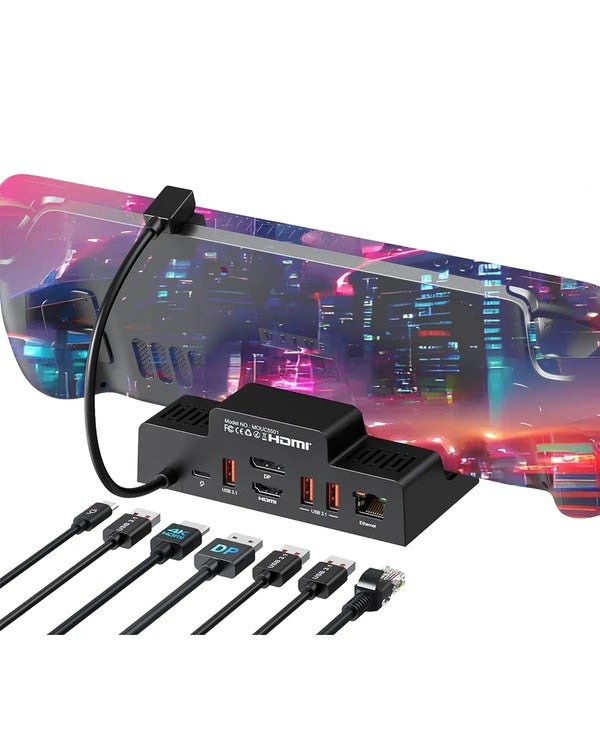
The Mokin Steam Deck Dock presents itself as a compact, thoughtfully designed hub that prioritizes both functionality and aesthetics. Its matte black finish complements the Steam Deck’s industrial design, while the angled stand ensures your device stays visible and accessible during gameplay. The port arrangement is strategically positioned for cable management, with rear-facing connections keeping your desk clutter-free.
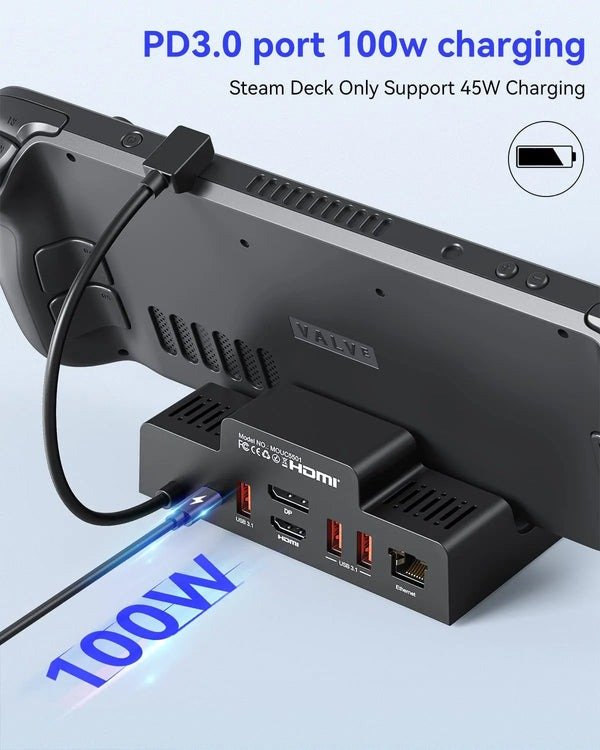
At the heart of this dock’s capability is its 4K@60Hz HDMI output, delivering crisp, fluid visuals that bring your game library to life on external displays. The Gigabit Ethernet port provides a direct network pipeline, eliminating the inconsistency of wireless connections. For peripherals, you’ll find three USB-A 3.0 ports capable of handling everything from external SSDs to wireless headset dongles, plus an additional USB-C port for newer accessories. The 100W Power Delivery charging ensures your Steam Deck remains fully powered during extended sessions while simultaneously feeding power to the dock’s operations.
What distinguishes this dock from generic USB-C hubs is its specialized design for gaming workloads. Generic hubs often struggle with sustained data throughput, causing stuttering or disconnections during intense gameplay. They typically offer lower power delivery, forcing you to choose between charging speed and peripheral connectivity. The Mokin Dock eliminates these compromises through dedicated chipsets that handle video processing, network traffic, and power distribution independently, preventing the bottlenecks that plague all-in-one adapters.
Key Mokin Dock Features for Enhanced Gameplay
The 4K@60Hz capability transforms visually demanding titles, rendering intricate textures and particle effects with stunning clarity that the handheld screen simply cannot convey. This resolution and refresh rate combination strikes the perfect balance between visual fidelity and performance, ensuring smooth frame delivery without overwhelming the Steam Deck’s GPU. The Gigabit Ethernet connection reduces latency to single-digit milliseconds, crucial for competitive shooters and fighting games where split-second reactions determine victory. Meanwhile, the multiple USB ports enable a complete gaming ecosystem—connect your mechanical keyboard, precision mouse, external storage for your expanding game library, and a USB DAC for audiophile-grade sound, all simultaneously without juggling connections or reaching for adapters.
Step-by-Step Guide: Building Your Ultimate Multi-Monitor Setup
Before you begin, gather everything you’ll need: the Mokin Dock, your Steam Deck, an HDMI cable compatible with 4K@60Hz output (typically High Speed HDMI or better), an Ethernet cable if you’re connecting to a wired network, a USB-C power adapter that supports at least 65W output (though 100W is recommended), your monitor, and any peripherals like keyboards, mice, or external storage drives. Having everything within reach prevents frustrating interruptions mid-setup.
Start by connecting the power adapter to the Mokin Dock’s USB-C Power Delivery port—this is crucial as the dock needs power to function properly and charge your Steam Deck simultaneously. MOKiN’s charging technology ensures efficient power distribution across all connected devices while maintaining optimal charging speeds for your Steam Deck. Next, plug your HDMI cable from the dock’s HDMI port to your monitor’s HDMI input. If you’re using a wired network connection, connect your Ethernet cable to the dock’s Gigabit Ethernet port. Now attach your peripherals to the USB-A ports: keyboard, mouse, and any other accessories you plan to use. Finally, connect your Steam Deck to the dock’s front-facing USB-C port. Your device should immediately recognize the connection and begin charging.
On your Steam Deck, press the Steam button and navigate to Settings, then Display. Here, you’ll find options for external display configuration. Enable “Use external display when available” and select your preferred resolution—for 4K monitors, choose 3840×2160 at 60Hz. For audio output, return to Settings and select Audio, then choose your monitor’s speakers or any connected audio device from the output dropdown menu. Some monitors automatically switch audio input, but manual selection ensures consistent results.
To optimize performance, match your display settings to your monitor’s native resolution and refresh rate. The Steam Deck handles 1080p more easily than 4K, so if you experience frame drops in demanding games, consider running at 1920×1080 with scaling—the visual difference is minimal while performance gains are substantial. If your monitor shows “No Signal,” verify that your HDMI cable is securely connected at both ends and that your monitor is set to the correct input source. Audio issues typically resolve by manually selecting the output device in Steam Deck settings rather than relying on automatic detection. If the dock isn’t charging your device, confirm your power adapter meets the minimum wattage requirement and that you’ve connected it to the dock’s PD port, not the data port.
Maximizing Your New Gaming Setup
Your docked Steam Deck isn’t just a gaming machine—it’s a versatile entertainment and productivity hub. Stream movies and shows through your favorite services on the big screen, transforming your gaming station into a media center during downtime. The full keyboard and mouse support makes the Steam Deck surprisingly capable for light productivity tasks like browsing, email, or even document editing through Linux desktop mode, giving you a secondary workstation without additional hardware investment.
Cable management transforms a functional setup into a professional-looking station. Route cables behind your monitor stand using adhesive clips, bundle excess length with velcro straps rather than zip ties (which allows for future adjustments), and position the dock behind your monitor or under your desk to hide the connection hub. This approach keeps your gaming space clean and prevents accidental disconnections during intense sessions.
Complementary accessories elevate the experience further. A mechanical keyboard with dedicated media controls lets you adjust volume and skip tracks without leaving your game, while a high-DPI gaming mouse provides the precision that competitive titles demand. Consider a USB DAC and quality speakers or studio headphones—the Steam Deck’s audio processing shines when paired with equipment that can reproduce its full dynamic range. For extended sessions, an adjustable monitor arm positions your display at the perfect ergonomic height, reducing neck strain.
Display optimization requires balancing visual quality with performance. In Steam’s per-game settings, experiment with resolution scaling—running games at 1440p on a 4K monitor often provides the sweet spot between clarity and frame rates. Enable the performance overlay to monitor GPU usage and adjust graphics settings accordingly, prioritizing frame stability over maximum detail levels for the smoothest experience.
Unlock Your Steam Deck’s Full Potential
The Mokin Steam Deck Dock fundamentally redefines what’s possible with your portable gaming device, eliminating the compromise between mobility and immersive desktop experiences. By providing robust 4K video output, stable Gigabit Ethernet connectivity, and comprehensive peripheral support through multiple USB ports, this dock solves the critical limitations that confined your Steam Deck to handheld-only gaming. You’re no longer choosing between portability and performance—instead, you’ve created a hybrid system that adapts to your needs, whether you’re commuting with your Deck or commanding a full battlestation at home. The investment transforms your device from a single-purpose portable into a versatile gaming hub that rivals traditional desktop setups while maintaining the freedom to disconnect and game anywhere. Your Steam Deck deserves to reach its full potential, and the right docking solution makes that transformation effortless. Take the next step in evolving your gaming experience—upgrade your setup today and discover the expansive possibilities waiting beyond that 7-inch screen. The future of flexible gaming isn’t about choosing between formats; it’s about embracing both, and your journey starts with a single connection.