Choosing the right visual editing tool can make a huge difference in how polished your photos, designs, and social media posts appear. Whether you are a content creator, marketer, or business owner, you have likely used tools like a background eraser, pdf editor, image resizer, or background generator. Each tool plays a different role, and understanding these differences helps you pick the right option for your workflow.
In this guide, we will break down what a background eraser does, how a background generator works, and when each tool is the better choice. The goal is to help you avoid confusion and choose the right tool depending on your project.
Understanding What a Background Eraser Does
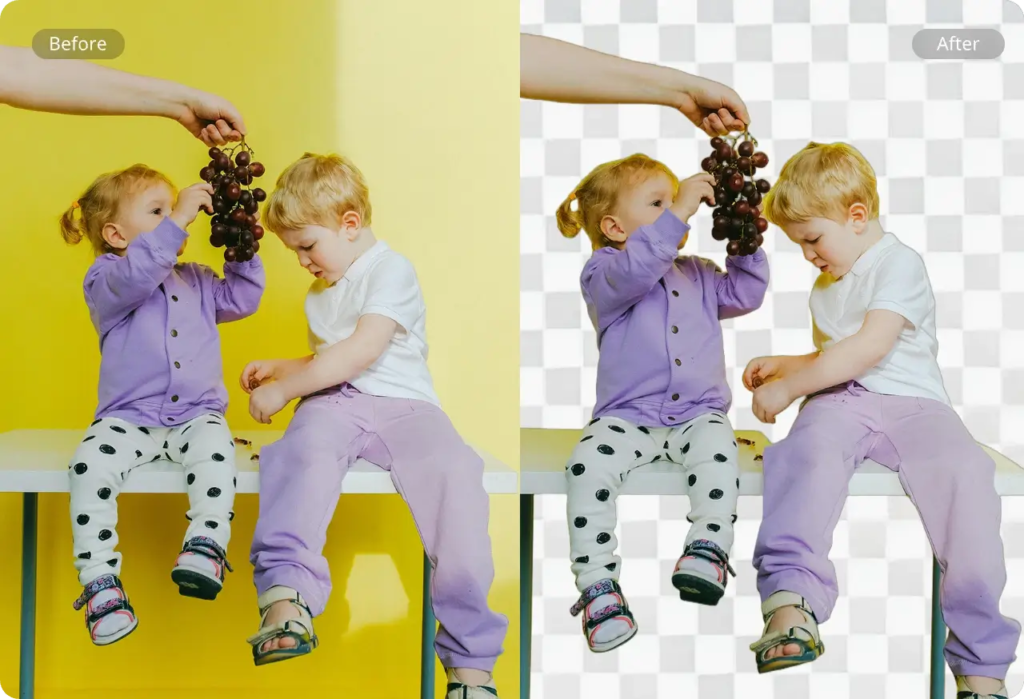
A background eraser is one of the simplest and most reliable tools for isolating a subject in a photo. Whether you want a transparent background for your product shot or you want to cut out an object for a new design, this tool is often the easiest solution.
A background eraser works by identifying the main subject and removing everything around it. Most modern tools do this automatically using AI. This saves time, especially for users who do not have advanced design skills.
What Makes a Background Eraser Useful
A good background eraser can help you:
- Create clean product photos for online stores
- Prepare cutouts for posters and advertisements
- Remove cluttered or distracting backgrounds
- Convert images into PNGs with transparent backgrounds
- Prepare pictures for use in collages or graphics
Because the tool focuses on subtraction rather than addition, it is ideal for projects where the subject is already perfect but the background is not.
Many creators combine a background eraser with other tools like an image resizer and a pdf editor when preparing visual assets for websites or marketing materials.
Understanding What a Background Generator Does
A background generator does the opposite job. Instead of removing something, it creates a completely new background for your image. These tools use AI to generate patterns, scenes, gradients, or environments that match your selected style.
A background generator can change the mood of an image instantly. You can turn a normal selfie into a professional portrait, transform a plain object into a studio-style product shot, or build fully fictional scenery for creative projects.
What Makes a Background Generator Useful
A background generator is helpful when you want to:
- Add more personality or style to images
- Create professional backgrounds for profile photos
- Generate thematic visuals for marketing campaigns
- Design posters or social media graphics quickly
- Place objects into creative or fantasy environments
Because the tool builds something new, it gives creators more control over the storytelling aspect of an image.
Key Differences Between the Two Tools
While both tools improve photos, their functions are not the same. Understanding these differences helps you decide which one to use.
1. Purpose
- A background eraser removes what you do not need.
- A background generator adds something new to enhance your photo.
2. Level of Creativity
- A background eraser focuses on accuracy and precision.
- A background generator focuses on creativity and visual impact.
3. Editing Time
- Erasing backgrounds usually takes a few seconds with modern AI tools.
- Generating a background may take a little longer because the tool creates something from scratch.
4. Skill Requirements
Both tools are beginner friendly, but a background generator gives you more room for artistic customization.
5. Common Use Cases
A background eraser is perfect when you want your subject to stand out alone. A background generator is best when you want the entire visual to have a theme or atmosphere.
When You Should Choose a Background Eraser
A background eraser is the better choice for practical editing needs. If you are working on product listings, brand assets, or professional visuals, simplicity is often more effective.
Choose a background eraser when:
- You are preparing a product for an e-commerce listing.
- You want a transparent background for logos or icons.
- You need clean cutouts for digital marketing materials.
- You want to remove unwanted elements from the scene.
- You are combining multiple cutouts into a design.
Many modern workflows use a background eraser along with tools like an image resizer and a pdf editor to prepare final assets for websites or client projects.
When You Should Choose a Background Generator
On the other hand, choose a background generator when creativity is your priority. Instead of just cleaning up an image, you want to transform its entire appearance.
A background generator is ideal when:
- You want to match your photo to a brand theme or color palette.
- You need interesting visuals for blog headers or social media posts.
- You want to add a custom background to your portraits or product photos.
- You do not have a studio or professional setting available for photography.
- You want instant access to different styles like digital art, gradients, or landscapes.
A background generator offers more flexibility for storytelling and visual appeal.
Choosing the Right Tool for Your Project
Many creators wonder which option is best. The truth is that both tools serve different purposes. Instead of choosing one, think about what the final image should look like.
Use a background eraser if:
- You need precision.
- You want to isolate a subject.
- You prefer a professional, clean look.
Use a background generator if:
- You want to add creativity.
- You want the entire image to feel visually complete.
- You need a quick way to add themes or moods.
In many cases, using both tools together produces the best results. For example, you can erase the background from a product photo and then use a background generator to place it into a matching aesthetic scene.
How Supporting Tools Enhance Your Workflow
As an SEO expert, I often encourage creators to use multiple tools together rather than relying on just one. Tools like an image resizer or a pdf editor fit naturally into this workflow.
Why an Image Resizer Matters
After editing an image, you often need to resize it for websites, social media, or print. An image resizer helps maintain clarity without reducing quality. This ensures faster loading times and better user experience.
Why a PDF Editor Helps
A pdf editor becomes useful when you are preparing documents such as brand guidelines, product catalogs, or client proposals. You can insert your edited images, organize them, and export professional files easily.
Combining Tools for Maximum Efficiency
A complete workflow may look like this:
- Remove the unwanted background using a background eraser.
- Create a new environment with a background generator if needed.
- Resize the final image using an image resizer.
- Insert everything into a document using a pdf editor.
This approach saves time and produces consistent results across all platforms.
Tips for Using These Tools Effectively
To get the best outcome, consider these practical tips:
- Keep your subject well-lit to improve background removal accuracy.
- Choose background styles that match your brand or content theme.
- Avoid overly complex generated backgrounds that distract from your subject.
- Use consistent colors and tones across all photos.
- Always check image quality after resizing.
These simple steps help ensure your visuals look polished and professional.
Final Thoughts on Choosing the Right Tool
Both a background eraser and a background generator are essential tools for modern creators. One focuses on precision while the other focuses on creativity. When used correctly, each tool can dramatically improve your photos and your overall visual content strategy.
Instead of choosing only one, consider how both can work together in your editing process. Whether you are working on product photos, marketing visuals, digital art, or business documents, combining these tools helps you produce high-quality images in less time.
If you integrate them with an image resizer and a pdf editor, your workflow becomes even more powerful. This gives you the flexibility to create engaging visuals that support your brand, impress your audience, and perform well across search engines.