Source: Pexels
A server room cooling system failure can turn IT infrastructure into a pile of overheated silicon within just a few minutes. Clogged filters, failing compressors—every malfunction sends warning signals that are often ignored. We’ll show you the five most common failures of data center cooling solutions and how to spot an impending collapse before you lose data.
A properly designed server room cooling system operates so discreetly that we forget about it—until it fails. The following lines reveal the mechanics of malfunctions that start innocently but end catastrophically. Will you recognize them in time?
Why the Server Room Cooling System Determines the Survival of Your Data
Servers generate heat as a byproduct of their operation. A processor running at full capacity can reach temperatures above 190°F, while hard drives heat up to around 140°F. Without active cooling, the server room temperature in a closed server room can rise to critical levels within 10–15 minutes. Although hardware includes safety mechanisms against overheating, these work at the cost of drastically reduced performance or complete shutdown.
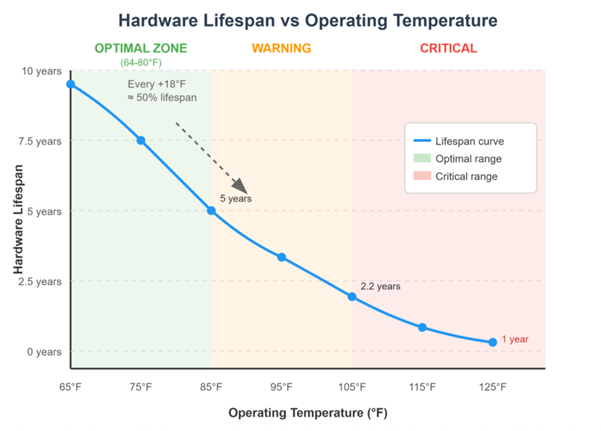
Exceeding the optimal operating server room temperature (ideally 64–80°F according to ASHRAE) triggers a chain reaction of destruction. Every additional 20°F cuts the lifespan of electronics in half. A server expected to last five years will endure barely two under chronic overheating. Capacitors in power supplies dry out, thermal expansion weakens contacts on printed circuit boards, and the mechanical parts of drives suffer from increased friction.
The financial impact goes far beyond the cost of replacing hardware. An unplanned e-shop outage during Black Friday, the collapse of an airline reservation system in summer, or the failure of banking systems on payday—every minute of downtime translates into losses ranging from thousands to millions. Customers move to competitors, the company’s reputation suffers, and restoring trust takes months.
Five Critical Server Room Cooling System Failures That Kill Business
1. Clogged Filters and Blocked Vents
Clogged filters reduce airflow by 30–50%, while cooling units futilely run at full capacity. Server room temperature sensors report hot spots 10–20°F higher than the surrounding area. Fans roar like a jet taking off, and servers throttle their performance.
Solution: Replace filters every 3–6 months, check vents, and remove obstacles to airflow. A clean server room with MERV 13 filters will last longer than a dusty room in an industrial zone.
2. CRAC/CRAH Unit Failures
Compressors fail gradually—first with longer cooling cycles, then refrigerant leaks, and finally total collapse. Warning signs include unusual vibrations, metallic grinding noises, and oil stains beneath the unit. The air conditioning runs continuously, yet the temperature keeps rising. Prevention requires regular maintenance, refrigerant pressure checks, and replacing worn components before a breakdown.
Tip: Redundancy in the form of an N+1 configuration ensures cooling even if one unit fails.
3. Humidity Issues
Low humidity (below 40%) causes electrostatic discharges that destroy components. High humidity (above 60%) condenses on electronics and causes short circuits. Failures of humidifiers or dehumidifiers can be identified by fogging on glass surfaces, corroded connectors, and random server restarts. Data center cooling solutions require precise humidity regulation at 45–55% using calibrated sensors and automatic controls.
4. Power Outages of Cooling Systems
UPS systems protect servers, but cooling systems are often powered directly from the grid—a fatal mistake. Even a brief power outage shuts down cooling, while servers keep running and generate heat. Within 20 minutes, the temperature exceeds the critical threshold. The solution lies in powering at least part of the server room cooling system through a UPS or a fast-starting diesel generator. An automatic transfer switch ensures seamless switching.
5. Undersized Cooling Capacity
Gradually adding servers without increasing cooling leads to a schizophrenic situation—the units run 24/7 at maximum capacity, yet the temperature keeps creeping upward. Every new rack worsens the problem until the system collapses on the first hot day. A heat load calculation (watts per square foot) reveals whether the server room cooling system can handle both current and planned loads. Free cooling or in-row units can boost capacity without a complete reconstruction.
Investing in Prevention Saves Millions
Monitoring temperature, humidity, and airflow creates an early warning system. Regular maintenance prevents 80% of failures. Redundancy ensures operational continuity in case of component breakdown. Every dollar invested in reliable cooling saves tens of thousands in repairs, data loss, and business downtime.
Sources: