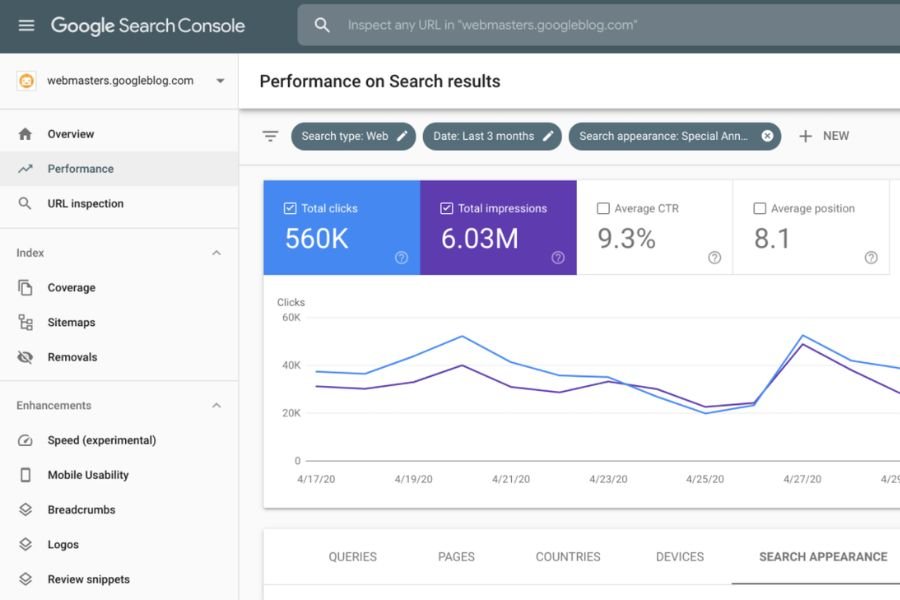
A URL Inspection tool is a critical feature used by webmasters, marketers, and SEO professionals to analyze how search engines, such as Google, view a specific webpage. It provides detailed reports on a page’s performance, index status, and errors that could affect its search ranking. When you inspect a URL, the tool gives insights into how Googlebot crawls and renders your page, helping you identify any issues that might be hindering your site’s SEO performance.
One popular URL inspection tool online is Google Search Console’s URL Inspection tool, which is freely available to all website owners. This tool enables you to see how Google indexes your site and provides suggestions for optimization.
What is URL Checking?
URL checking refers to the process of verifying the status, health, and indexing of a particular URL. This process ensures that the URL is accessible to both users and search engines, is correctly indexed, and has no underlying issues that could affect its visibility on search results.
With tools like the Google URL Inspection tool, you can check whether a page is indexed or if there are crawl errors, issues with mobile usability, or structured data problems. By performing regular URL checks, website owners can maintain a healthy website and ensure higher rankings in search engines. There are both free URL inspection tools and premium services that can help you check your website URLs for any errors.
What are URL Tools?
URL tools encompass a range of utilities designed to help you analyze, monitor, and optimize URLs. These tools can perform a variety of tasks, from checking for broken links, analyzing URL structure, and inspecting how a webpage is indexed by search engines, to performing site audits.
The best URL inspection tools offer features like:
- Detailed crawling reports
- Insights into how Google interprets your content
- Error detection and recommendations
- Mobile usability checks
- Insights on structured data and schema issues
One of the most commonly used tools is Google Search Console, which provides the URL Inspection tool in Google Search Console for free, offering valuable insights on your site’s performance.
What is the URL Inspection API Quota?
The URL Inspection API allows developers to programmatically request the same data available through the Google URL Inspection tool. This API provides information about URL indexing, structured data, mobile usability, and more.
However, the URL Inspection API quota is limited in terms of the number of requests you can make. As of the most recent update, the quota is set to 2,000 queries per day for Search Console users, and up to 600 queries per minute. This limit ensures that the API is not overused and helps balance server load.
Website owners and developers use this API to track URL performance in bulk and integrate it with other tools, such as Google Analytics, to get comprehensive insights about their website’s health.
In summary, understanding and utilizing a URL Inspection tool is crucial for maintaining a website’s search engine visibility. From manual checks through Google Search Console to API integrations for advanced users, these tools help diagnose and improve the SEO performance of any site.
Conclusion:
In today’s digital landscape, maintaining a website’s health and optimizing its performance on search engines is vital for success. The URL Inspection tool—especially the one available in Google Search Console—provides invaluable insights into how Google views, crawls, and indexes your pages. By regularly performing URL checking, webmasters can ensure that their pages are error-free, mobile-friendly, and structured properly to rank higher in search results.
Whether you’re using the free URL inspection tool in Google Search Console or leveraging more advanced features like the URL Inspection API with its quota limits, these tools offer powerful data to enhance your SEO strategies. With a combination of manual checks and automated API requests, businesses and developers can continuously monitor their website’s performance, integrating it with tools like Google Analytics to maintain visibility and growth.



Good info and right to the point. I don’t know if this is really the best place to ask but do you folks have any ideea where to get some professional writers? Thanks in advance 🙂
Hey would you mind stating which blog platform you’re working with? I’m going to start my own blog in the near future but I’m having a tough time making a decision between BlogEngine/Wordpress/B2evolution and Drupal. The reason I ask is because your layout seems different then most blogs and I’m looking for something unique. P.S Apologies for getting off-topic but I had to ask!
I feel that is among the most important information for me. And i am glad studying your article. However want to observation on some basic things, The web site taste is perfect, the articles is actually excellent : D. Just right process, cheers
I am constantly invstigating online for tips that can aid me. Thanks!
This really answered my downside, thanks!