In today’s digital world, a new music trend is taking over the internet. Whenever you open YouTube, Instagram, or TikTok, you often hear songs that sound slower, deeper, and have a beautiful “echo” effect.
These are called Slowed + Reverb songs. This style of music is loved by millions because it feels relaxing and creates a “dreamy” or “aesthetic” vibe.
But did you know that you don’t need a professional music studio to make these tracks? You can create your own Slowed and Reverb music for free using simple online tools.
In this complete guide, you’ll learn:
- What Slowed + Reverb music is
- Why people love this music style
- How to convert your songs easily
- The best free online tools for creators
Let’s start with the basics.
What Is a Slowed & Reverb Studio?
A Slowed & Reverb Studio is an online tool or platform that transforms any regular song into a “Lo-fi” or “Aesthetic” version.
The tool focuses on two main changes:
- Tempo (Speed): It slows down the speed of the song.
- Reverb (Echo): It adds an echo effect, making the music sound like it’s playing in a large, empty hall or a cathedral.
Advantages of Slowed + Reverb Music
✔ Relaxation: It helps reduce stress and calms the mind.
✔ New Vibe: It gives a fresh, modern touch to old classic songs.
✔ Social Media Ready: Perfect for Instagram Reels and background music.
✔ Easier Listening: The slower pace makes it easier to focus on the lyrics.
✔ Emotional Impact: Deepens the feeling of sad or romantic songs.
Disadvantages of Slowed + Reverb
❌ Not for Every Song: High-energy dance tracks might sound strange.
❌ Rap Issues: Very fast rap songs can become hard to understand.
❌ Not for Parties: This style is for chilling, not for dancing.
Slowed vs. Normal vs. Lo-fi
This table helps you understand the differences between these popular music formats:
| Feature | Normal Music | Slowed + Reverb | Lo-fi Music |
| Speed | Original Speed | 10% to 20% Slower | Slow & Relaxed |
| Atmosphere | Sharp & Clear | Dreamy & Echoey | Warm & Rainy |
| Usage | Everyday Listening | Aesthetic Videos | Study & Sleep |
| Best For | All Music Genres | Sad & Romantic | Instrumental Beats |
When to Use Slowed Music
You should use the Slowed version when:
- You want to Relax after a long day.
- You are creating an Aesthetic Video for social media.
- You want to feel the Deep Emotions of a song.
When to Use the Reverb Effect
Reverb works best when:
- You want to add “Depth” to the sound.
- You want the music to sound like a Live Concert.
- You are making Sad or Atmospheric content.
How to Create Slowed & Reverb Music (Fastest Method)
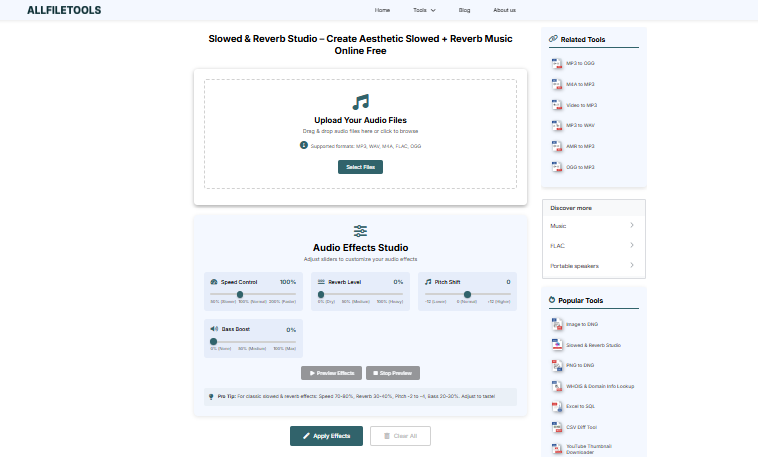
The easiest way to convert your favorite songs is by using an online converter tool. No technical skills are required.
Step 1: Open the Online Tool
Go to a trusted Slowed & Reverb Studio website:
👉 https://www.allfiletools.com/slowed-reverb-studio/
Step 2: Upload Your Audio File
Select the MP3 file from your device. Most tools allow you to simply drag and drop the file into the browser.
Step 3: Adjust the Settings
- Speed: Set it between 0.8x and 0.9x for the best effect.
- Reverb: Add a moderate amount (around 30% is perfect).
Step 4: Convert and Download
Click the “Convert” or “Process” button. In just a few seconds, your new aesthetic track will be ready to download.
Why Millions Search for “Slowed & Reverb” Every Month
This trend is huge because of three main reasons:
- YouTube Growth: Many creators have built massive channels just by uploading slowed versions of popular songs.
- Gaming Culture: Gamers love playing these tracks in the background while streaming or playing.
- Ease of Use: Thanks to online studios, anyone can be a music editor without learning complex software.
Benefits of Using an Online Studio
Using a web-based tool provides several major advantages:
1. No Software Installation
You don’t need to download heavy apps that take up space on your phone or computer. Everything happens in your browser.
2. Works on Any Device
Whether you are using an iPhone, Android, Mac, or Windows PC, these tools work perfectly everywhere.
3. Completely Free
Professional music editing software can cost hundreds of dollars. Online studios offer these specific effects for free.
Frequently Asked Questions (FAQs)
1. Is it legal to make Slowed + Reverb music?
It is generally fine for personal use and social media edits. However, if you upload it to YouTube, you should always credit the original artist.
2. What is the best speed for a slowed song?
Reducing the speed by 10% to 15% (0.90x to 0.85x) usually creates the best “vibe.”
3. Can I do this on my mobile phone?
Yes! You can use online tools through your mobile browser (like Chrome or Safari) just as easily as on a computer.
4. Does Reverb make the audio quality worse?
If used correctly (around 30-40%), it actually enhances the atmosphere. If you add too much, the music might sound too “blurry.”
Final Thoughts
Slowed & Reverb music is more than just a trend—it’s a way to experience music in a deeper, more relaxing way. Whether you are a content creator looking for the perfect background track or someone who just wants to chill, creating these songs is now easier than ever.
Simply upload, adjust the vibe, and enjoy the music.
🔹 Explore more powerful file conversion and online utilities at AllFileTools –
🔹 For technical support, digital solutions, and expert services, visit LetDigitalFly IT Services –
🔹 Discover additional career and productivity resources at Resume Slip Builder –