Have you ever tried to play a song or a voice recording on your phone, but it just wouldn’t start? You click the file, and nothing happens. Or maybe you get an error message that says, “File format not supported.” This is a very common problem. Most of the time, this happens because your audio is saved as an OGG file.
While OGG is a good format, it is not as famous or as friendly as MP3. MP3 is like the “universal language” of music. Every phone, car stereo, laptop, and smart speaker understands MP3. That is why we built our OGG to MP3 Converter. We wanted to make sure that your music and recordings work everywhere, every time, without any headache.
What is an OGG File? (The Simple Explanation)
To understand why you need a converter, you first need to know what you are converting from. An OGG file (often called Ogg Vorbis) is a type of compressed audio file. It was created to be a free alternative to other formats.
Many professional apps, like Spotify, use OGG because it keeps the sound quality high even when the file size is small. However, the problem is compatibility. If you move an OGG file from your computer to an older MP3 player or a basic car audio system, it probably won’t play. This is where our tool steps in to help.
What is an MP3 File? (The King of Audio)
MP3 is the most popular audio format in the world. It has been around for a long time, and for a good reason. It takes a large, heavy audio file and “shrinks” it down so it doesn’t take up too much space on your phone or computer.
The best part about MP3 is that it works on everything. Whether you use an iPhone, an Android, a Windows PC, or even a digital picture frame that plays music—MP3 is the standard. By converting OGG to MP3, you are making your life easier.
Why You Should Use Our Online OGG to MP3 Converter
There are many ways to change a file format, but our tool is designed to be the best for the average person. You don’t need to be a computer expert to use it an OGG to MP3 Converter . Here is why our users love this tool:
1. It is 100% Free
Many websites try to charge you money or ask for a credit card just to convert a simple file. We believe that basic tools should be free for everyone. You can use our converter as many times as you want without paying a single cent.
2. No Software to Install
In the old days, you had to download big, scary programs to your computer just to change a music file. Those programs often came with viruses or slowed down your PC. Our tool works entirely in your web browser (like Chrome, Safari, or Firefox). You just visit the site, convert, and leave.
3. High-Quality Sound
A big fear people have is that their music will sound “tinny” or “scratchy” after conversion. Our tool uses smart technology to ensure the quality stays high. We make sure the MP3 sounds just as clear as the original OGG file.
4. Fast and Simple
We know you are busy. You don’t want to wait thirty minutes for a song to convert. Our servers are very fast. Most conversions take less than ten seconds. It is a “click and go” experience.
How to Convert OGG to MP3 (Step-by-Step Guide)
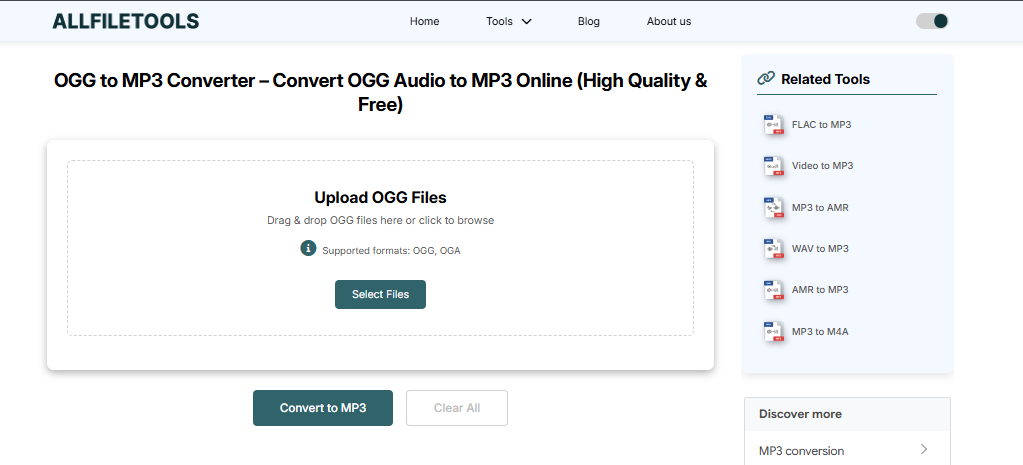
We promised that a 4th grader could do this, and we meant it! Follow these four simple steps:
Use this tool OGG to MP3 Converter
- Upload Your File: Look for the big button that says “Upload” or “Select File.” Click it and find the OGG file on your device.
- Choose Your Quality: Most people just leave it on the standard setting, but you can choose “High Quality” if you want the best sound.
- Click Convert: Press the “Convert” button. You will see a small bar showing that the tool is working.
- Download: Once it finishes, a “Download” button will appear. Click it, and your new MP3 file will be saved to your device.
The Technical Side: What Happens During Conversion?
You might be wondering, “How does the file actually change?”
When you upload an OGG file, our tool “reads” the digital code of the sound. It then “re-writes” that code into the MP3 language. Think of it like translating a book from French to English. The story (the music) stays the same, but the language (the format) changes so that more people can read (hear) it.
We use high-grade servers to do this work so your own computer doesn’t have to work hard. This keeps your device cool and fast while we do the “heavy lifting” in the cloud.
When Should You Use This Tool?
There are many situations where converting OGG to MP3 is a lifesaver:
- For Students: If your teacher gives you a lecture recording in OGG format and your phone won’t play it, you can convert it in seconds so you can study on the bus.
- For Content Creators: If you find a cool sound effect online but it’s in OGG, you can turn it into an MP3 to use it in your video editing software.
- For Music Lovers: If you downloaded music from a specific platform that only uses OGG, you can convert it to play on your home stereo or car.
- For Business Professionals: If a client sends you a voice memo in an odd format, converting it to MP3 ensures you can listen to it on any office computer.
Is it Safe to Use an Online Converter?
Security is very important. When you upload a file to a website, you want to know it is safe.
- Privacy First: We do not look at your files. Our system is automated.
- Auto-Delete: After your file is converted and you download it, our system deletes it from our server after a short time. We don’t keep your data forever.
- No Malware: Since you aren’t downloading any “exe” files or software, there is no risk of getting a virus on your computer.
Comparing OGG and MP3: Which is Better?
To be fair, both formats have their strengths. Let’s look at them side-by-side:
| Feature | OGG Vorbis | MP3 Format |
| Popularity | Low (Used by pros) | Very High (Used by everyone) |
| File Size | Very Small | Small |
| Sound Quality | Excellent | Very Good |
| Device Support | Limited | Works Everywhere |
| Licensing | Free / Open Source | Standardized |
The Verdict: OGG is great for saving space on a server, but MP3 is the winner for everyday use. That is why having a converter bookmarked in your browser is so handy.
Common Questions (FAQs)
Can I convert multiple files at once?
Yes! Our tool allows you to upload several OGG files at the same time. This is called “batch conversion,” and it saves you a lot of time if you have a whole album to change.
Will I lose my file name?
No. Our tool keeps the name of your file the same. It only changes the end part from .ogg to .mp3.
Does this work on Mac and Windows?
Yes. Since it is an online tool, it doesn’t matter what computer you have. It even works on Chromebooks and Tablets.
What is the best “Bitrate” for MP3?
If you want the best sound, choose 320kbps. If you want a smaller file that still sounds good, 128kbps or 192kbps is perfect.
Pro Tips for Better Audio Conversion
To get the most out of our OGG to MP3 converter, keep these tips in mind:
- Check the Source: If the OGG file sounds bad or fuzzy, the MP3 will also sound bad. Always start with the cleanest file you have.
- Stable Internet: Since this is an online tool, make sure you have a steady internet connection while uploading large files.
- Organize Your Folders: Once you download your MP3s, move them into a specific folder so you don’t lose them in your “Downloads” pile.
Why Google Loves Helpful Tools Like This
Google wants to show people websites that actually solve problems. When you use our OGG to MP3 converter, you are using a tool built for humans. We don’t fill our page with annoying pop-up ads or fake buttons. We provide a clean service that helps you get your work done. This “User Experience” is what makes a website truly great.
Conclusion: Start Converting Today!
Don’t let a “file format” error stop you from enjoying your music or finishing your project. Technology should help you, not frustrate you. Our OGG to MP3 Converter is here to bridge the gap between different devices and formats.
It’s fast, it’s free, and it’s incredibly easy to use. Whether you are a student, a professional, or just someone who loves music, our tool is the perfect companion for your digital life.
🔹 Explore more powerful file conversion and online utilities at AllFileTools –
🔹 For technical support, digital solutions, and expert services, visit LetDigitalFly IT Services –
🔹 Discover additional career and productivity resources at Resume Slip Builder –