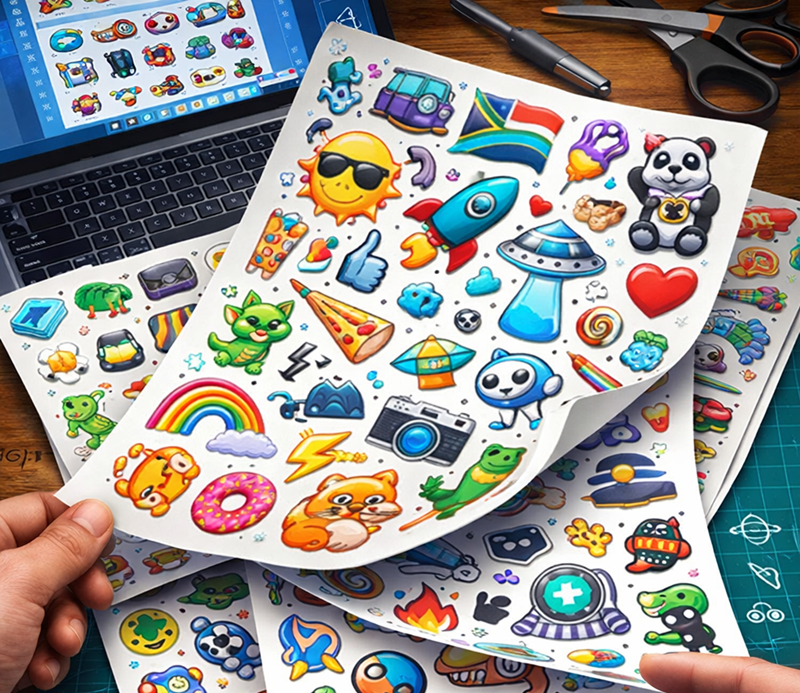
There is a particular kind of frustration that comes with having five great sticker designs and no clear way to print them without paying five separate minimums. Custom sticker sheets solve that problem cleanly. One sheet, many designs, one order.
Whether you are building a brand kit, packaging products, creating merch for your Etsy shop, or putting together event swag, multi-design sticker sheets offer a cost-effective and professionally polished solution. Even if you’re new to print design, the process is manageable once you understand a few key concepts. This guide covers everything you need to know to get them right, from file setup to material selection to placing an order you won’t need to redo.
The anchor for all of this is planning your sticker sheet layouts before you touch a single design file. How you arrange your artwork on the sheet determines how many designs fit, how cleanly each one cuts, and how usable the final product is for your audience. Get this part right, and the rest of the process becomes considerably more straightforward.
What Are Custom Sticker Sheets, Exactly?
A custom sticker sheet is a single printed sheet, typically 8.5″ × 11″ or 4″ × 6″, that carries multiple individual sticker designs, each kiss cut from the backing liner for easy peeling. Unlike die-cut stickers, which are fully separated and delivered in stacks, sticker sheets keep every design organized on one piece of vinyl.
The kiss cut method cuts through the sticker layer and stops at the backing liner. This means each design stays neatly in place until the end user peels it off. It is the same format used by brands like Glossier, whose unboxing sticker sheets became a social media phenomenon largely because they were well-designed and genuinely useful to the customer receiving them.
Kiss-cut sticker sheets are distinct from die-cut stickers in one practical way: sticker sheets are designed for variety and distribution, while die-cut stickers are optimized for a single design at scale. If you have multiple designs, a sheet is often the more efficient format.
Material and Finish: Decisions That Define Quality
Not all vinyl sticker sheets perform the same way. The material and finish you select affect durability, appearance, and the surfaces your stickers can be applied to.
Material options worth knowing:
- 3M vinyl — A benchmark material in professional sticker printing. It uses a thick, bubble-free adhesive that bonds cleanly and removes without residue and can offer multi-year outdoor durability depending on the specific product and laminate used.
- Standard white BOPP — A cost-effective vinyl alternative. Water-resistant and suitable for most indoor and outdoor use, though performance varies by application.
- Clear vinyl — Allows the surface underneath to show through the sticker. Works well for product labels and window applications.
- Holographic vinyl — A prismatic, iridescent film that catches light. Popular for artist sticker packs and limited-edition merchandise.
- Kraft paper — A textured, natural-look material suited for indoor use. Not waterproof, but widely used for handcrafted and artisan product packaging.
Finish options:
- Gloss laminate — Adds a reflective shine that makes colors appear more saturated. The UV laminate also protects against scratch damage and fading over time.
- Matte laminate — A non-reflective finish with a premium, tactile feel. Easier to read text on, and popular for minimalist and brand-oriented designs.
The laminate layer is typically recommended for durability, acting as the protective barrier that separates a sticker that lasts years from one that starts peeling at the edges after a few weeks. For short-term or indoor label applications, it may be optional depending on the use case.
Artwork Setup: Common Mistakes to Avoid
Substandard file submission is the most common reason sticker orders require revision or reprint. Getting your artwork right before upload saves time, money, and the particular disappointment of receiving a proof that does not match what you designed. Most print providers also offer file checks or setup assistance if needed, which simplifies the process for first-time buyers.
Key technical requirements:
- Color mode — Set your file to CMYK before exporting. RGB is optimized for screens, not print, and colors can shift unexpectedly during conversion. What looks vivid on your monitor may print dull or with an unexpected hue.
- Resolution — 300 DPI at 100% final output size is the standard. Low-resolution files produce soft edges and pixelated details, especially noticeable on small sticker designs.
- File format — EPS, AI, PDF, and high-resolution PSD or TIFF files are preferred. JPEG files introduce compression artifacts that are visible in print, particularly along edges and in flat color areas.
- Bleed — Extend your artwork at least 1/16″ beyond each cutline. Without bleed, slight cutting variation can leave thin white edges on designs that run to the sticker border.
- Cutlines — Printers require a separate cutline layer to define where each sticker will be cut. Most suppliers will provide templates or guidelines for setting this up correctly in your design software.
- Spacing — Leave a minimum of 1/16″ between each sticker’s cutline. Too little space causes designs to cut into one another, making individual stickers harder to peel cleanly.
Most modern print suppliers also handle layout assistance or proof adjustments, which further simplifies the process for first-time buyers working with more complex multi-design sheets.
One practical tip that rarely appears in basic guides: if your sticker sheet includes very small designs alongside larger ones, proof each small sticker at actual print size before submitting. What is legible at 200% zoom on screen may not be legible at 0.75″ printed.
Use Cases: Who Actually Buys Multi-Design Sticker Sheets and Why
Personalized sticker sheets serve a wider range of applications than most buyers initially realize. Understanding the use case before you design your sheet helps you make better decisions about layout, size, and quantity.
Common use cases with specific considerations:
- Packaging inserts for e-commerce brands — A mixed-design sticker sheet tucked into an order adds perceived value at low cost. The sheet format means one print run covers multiple design variants without separate SKUs. A 4″ × 6″ sheet fits neatly in most poly mailers without folding.
- Etsy shops and independent artist sticker packs — Printed sticker collections are a product category in their own right on resale platforms. A well-designed sheet with thematic cohesion, a consistent color palette, and varied sizes reads as a premium product. Holographic vinyl performs particularly well in this context.
- Event giveaways and conference swag — Kiss-cut sticker sheets outperform individual stickers for events because recipients self-select their favorites, increasing the chance that at least one design gets placed somewhere visible. A single sheet order can distribute ten designs across a crowd with one hand-off.
- Teacher and classroom reward systems — Vinyl sticker sheets are durable enough to survive a supply bag and light enough to produce in high quantities at low cost. Mixed design sheets let teachers vary rewards without reordering individual packs.
- Product label variety sets — If your product line includes multiple SKUs that each need a different label, a single sheet order combining all variants is more cost-effective than separate label runs, particularly at low quantities.
- Brand sticker kits for marketing and PR — A multi-design sticker sheet that includes a logo mark, icon set, tagline, and seasonal design functions as a portable brand kit. These are often included in media packages and influencer seeding.
The U.S. Small Business Administration notes that consistent visual branding across physical and digital materials is one of the most cost-effective ways for small businesses to build recognition. Vinyl sticker sheets, when designed cohesively, serve that function at a price point almost any budget can accommodate. Full guidance is available at sba.gov/business-guide/manage-your-business/marketing-sales.
The Ordering Process: Step by Step
Ordering custom sticker sheets is more straightforward than many buyers expect. Here is the standard process across most professional print suppliers.
- Select your sheet size — Standard sizes are 4″ × 6″ and 8.5″ × 11″. Custom sizes are available at most suppliers for an additional setup cost.
- Upload your artwork — Submit a print-ready layered file with cutlines on a separate layer. If you are submitting multiple designs, a ZIP file containing individual artwork files allows the printer to arrange them onto the sheet.
- Request a digital proof — This is non-negotiable. A proof shows exactly how each design will be positioned, how the cutlines fall, and whether any artwork extends into the spacing zones between designs.
- Review and approve — Check the proof at 100% zoom for each individual design. Verify cutline placement, spacing, and color before approval.
- Production and shipping — Standard turnaround for sticker sheet printing is three to five business days after proof approval. Rush options reduce this to one business day at most professional suppliers, with shipping calculated separately.
The CMYK color mode issue catches more first-time buyers than any other single step. If you have been designing in RGB for web use and are transitioning those files to sticker printing, convert each file individually and proof the color before submitting.
Pricing and Quantity: Getting Cost-Effective Results
Sticker sheet printing is priced per sheet, not per individual sticker on the sheet. A sheet carrying ten designs costs the same as a sheet carrying three, assuming the sheet size is the same.
Practical pricing considerations:
- Minimum order quantities — Most professional suppliers set a minimum of 25 sheets for custom sticker printing. Some allow single-sheet test orders, which is worth doing before committing to a full production run.
- Volume pricing — Per-sheet cost can significantly reduce as quantities increase. If you know your quantity need exceeds 50 sheets annually, ordering in larger runs is typically the more economical approach.
- Test before scaling — Order a small run, evaluate the material, and finish and cut the accuracy in person, then scale. Material samples are available from most suppliers at low or no cost.
The FTC’s advertising guidance for small businesses is worth reviewing if your sticker sheets will carry any product claims, since labeling regulations apply to stickers used as product labels in commerce. Their guidance is available at ftc.gov/business-guidance/resources/advertising-faqs-guide-small-business.
Final Checklist Before You Submit
Before placing your order for mixed-design sticker sheets, run through this list.
- File is in CMYK color mode at 300 DPI
- All cutlines are on a separate, correctly labeled vector layer
- Bleed extends at least 1/16″ beyond every cutline
- Minimum 1/16″ spacing between all sticker cutlines
- Small designs have been proofed at actual print size
- Sheet size selected matches intended use
- Finish selected matches the design aesthetic and intended surface
- Digital proof has been requested and reviewed at 100% zoom before approval
Getting these details right before submission removes the most common causes of delay, reprint, and disappointment. The designs themselves may be the creative work, but the technical setup is what determines whether those designs print the way you intended.
Custom sticker sheets are one of the more versatile, cost-effective print products available to brands, creators, and businesses at any scale. When the artwork setup is correct, the material is appropriate for the application, and the layout makes efficient use of the sheet, the result is a product that works as hard as any branded material in your toolkit. Ready to put multiple designs on one sheet? Start with your layout, get your files print-ready, and let the proof do the rest.