
Are you struggling to get your products noticed on Google Shopping? The key is learning how to manage Google Shopping feed effectively. A well-structured feed ensures your products appear correctly, attract the right customers, and drive more sales. By optimizing every element of your feed, from titles to pricing, you can make your products stand out and improve overall performance.
Short Summary
Managing your Google Shopping feed is essential for product visibility and sales. By optimizing your feed, you ensure accurate product details, improve search ranking, and enhance the shopping experience.
- Keep product information accurate and up to date.
- Use clear titles and descriptions for better visibility.
Understanding Google Shopping Feed
A Google Shopping feed is a file that contains detailed information about your products, including titles, descriptions, pricing, images, and availability. Learning to manage the Google Shopping feed properly allows you to control how your products appear in search results. Accurate feeds help Google understand your offerings, which improves the chances of your products showing up for relevant searches.
When you manage a Google Shopping feed, every detail counts. Titles should be clear, concise, and naturally include relevant keywords. Descriptions need to highlight product benefits without overloading with unnecessary words. Including high-quality images and correct pricing ensures potential buyers have the information they need to make a purchase.
Steps to Optimize Your Google Shopping Feed
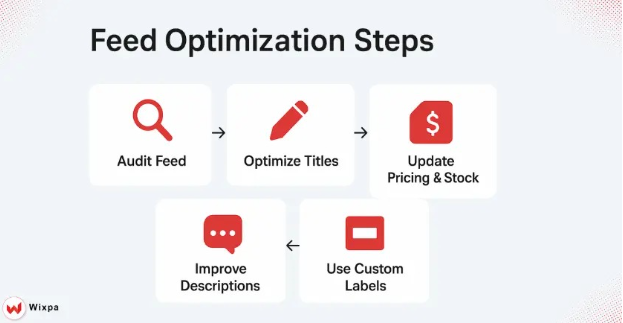
Audit Your Current Feed
Begin by reviewing your existing feed to spot errors or missing data. Incomplete or inaccurate feeds can prevent your products from appearing in searches. Focus on key areas like product titles, descriptions, categories, and images.
- Use High-Quality Images
Images are often the first thing shoppers notice. Make sure your product images are clear, properly sized, and follow Google’s guidelines. Avoid using watermarks or promotional text that could reduce your feed’s performance.
- Optimize Product Titles
Titles are crucial for visibility. Include the most important product attributes, such as brand, model, size, or color, without overstuffing. A well-crafted title improves search relevance and attracts the right buyers.
- Refine Product Descriptions
Descriptions should provide concise, informative details about the product. Focus on features and benefits that matter to your target audience. Avoid repetitive language or generic phrases that add no value.
- Maintain Accurate Pricing and Availability
Google prioritizes accuracy. Regularly update your feed to reflect current prices, stock levels, and shipping information. Inaccurate data can lead to disapproval of products or poor customer experience.
- Use Custom Labels for Campaigns
Custom labels help you group products for better advertising management. They allow targeting specific items in promotions, seasonal campaigns, or best-seller lists. Using them strategically improves ad performance.
Common Challenges in How to Manage Google Shopping Feed
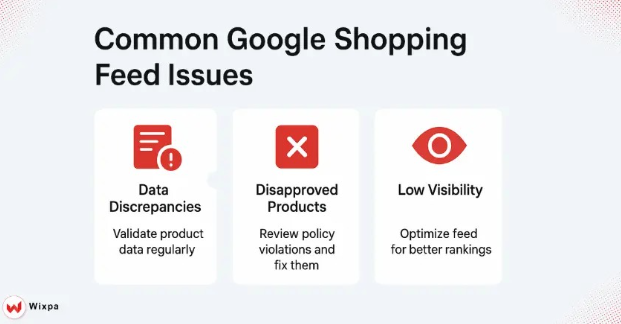
Even experienced sellers face hurdles when managing the Google Shopping feed. Common issues of a product feed include:
- Data discrepancies: Incorrect or inconsistent product information.
- Disapproved products: Products rejected due to policy violations.
- Poor visibility: Feeds lacking optimization may appear lower in search results.
These challenges can be addressed with regular audits, compliance checks, and attention to feed quality. Automated tools or spreadsheet-based solutions can simplify updates and prevent errors.
Benefits of Effectively Managing Your Product Feed
Proper feed management has tangible benefits:
- Increased product visibility: Accurate and optimized feeds show your products to the right audience.
- Higher conversion rates: Clear images, titles, and descriptions encourage purchases.
- Better ad performance: Well-structured feeds improve the effectiveness of Shopping campaigns.
Additionally, managing your feed ensures compliance with Google’s policies, reducing the risk of disapproved products and lost sales opportunities.
Pro Tips for Feed Optimization
- Regular Updates: Keep your feed current with seasonal products or changes in pricing.
- Keyword Integration: Naturally incorporate relevant terms without stuffing titles or descriptions.
- Performance Tracking: Monitor which products perform well and adjust feeds accordingly.
- Structured Data: Use Google Merchant Center guidelines for product categories and attributes to improve visibility.
By following these steps, you not only enhance the shopping experience but also maintain a competitive edge in your market.
Conclusion
Knowing how to manage Google Shopping feed is essential for sellers looking to boost product visibility and drive sales. A well-optimized feed ensures accurate product information, improves search performance, and enhances the overall shopping experience. By optimizing titles, descriptions, images, and pricing, you can make your products more discoverable and appealing to customers.
Staying proactive with feed updates and audits ensures long-term success and reduces the risk of errors or disapprovals.
FAQs
1. How do I manage Google Shopping feed effectively?
Focus on accurate titles, descriptions, images, and pricing. Regular updates and audits ensure your products appear correctly and reach the right customers.
2. What common errors occur in Google Shopping feeds?
Typical issues include missing product data, incorrect pricing, disapproved items, or poor-quality images that reduce product visibility.
3. How frequently should a Google Shopping feed be updated?
Update your feed whenever pricing, stock, or product details change. Frequent updates keep your listings accurate, prevent disapprovals, and help maintain strong visibility in shopping results.
4. Can feed optimization improve ad performance?
Yes! Optimized feeds with accurate data, high-quality images, and clear titles improve product visibility, click-through rates, and overall ad efficiency.


Useful guide