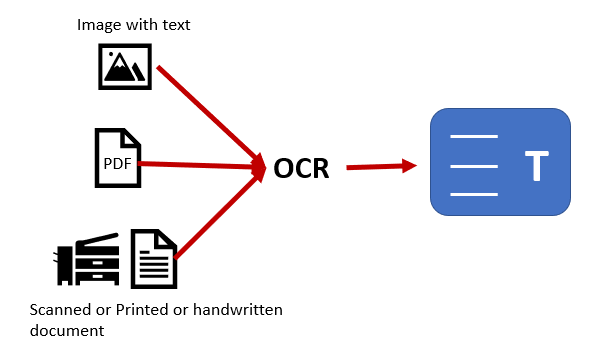
In today’s digital era, businesses handle vast amounts of documents, from invoices and contracts to customer information and reports. Managing this documentation manually can be time-consuming, prone to errors, and inefficient. This is where Python OCR (Optical Character Recognition) can transform your business by automating the process of digitizing and extracting data from scanned documents, images, and PDFs.
What is Python OCR?
Python OCR is a technology that allows computers to recognize and extract text from scanned documents, images, and PDFs. Using machine learning and image processing techniques, OCR tools can identify characters and words from printed or handwritten text and convert them into machine-readable data. It refers to using the Python programming language to build or implement OCR solutions.
The Python language is widely used for OCR due to its rich ecosystem of libraries and frameworks, such as Tesseract, OpenCV, and pytesseract, which make it easy to build powerful and efficient OCR systems. OCR Python programming offers the flexibility and scalability needed for automating document-based tasks in businesses across various industries.
How Does Python OCR Work?
Python OCR uses a combination of image preprocessing, text detection, and pattern recognition techniques to extract text from images. Here’s an overview of how the process typically works:
1. Image Preprocessing
The first step in Python OCR is preparing the image for text recognition. This step includes techniques such as:
- Grayscale conversion: Converting the image to grayscale to simplify the analysis.
- Noise reduction: Removing unwanted noise or distortions that could affect the accuracy of the text extraction.
- Thresholding: Converting the image into a binary format (black and white) to enhance text visibility.
- Deskewing: Adjusting the image to align the text if the document is tilted or rotated.
2. Text Detection
Once the image is preprocessed, the next step is to detect the text. OCR tools identify patterns and shapes in the image that correspond to letters, numbers, and words. Python libraries like Tesseract use machine learning algorithms to recognize characters based on trained models and dictionaries.
3. Text Recognition
After detecting the text regions, Python OCR software decodes the characters and translates them into machine-readable text. This process involves comparing the shapes of characters to a predefined set of known patterns, such as letters, numbers, and punctuation marks.
4. Post-processing
To improve accuracy, post-processing is applied to the recognized text. This may involve techniques such as spelling correction, removing extra spaces, and validating the structure of the text (for example, ensuring addresses or dates are correctly formatted).
Benefits of Using Python OCR for Document Automation
Implementing Python OCR in your business can bring numerous benefits, particularly in automating document-based processes. Below are the key advantages:
1. Increased Efficiency and Productivity
Manual document processing is time-consuming and often involves tedious tasks like data entry, sorting, and scanning. By automating these tasks with it, businesses can process large volumes of documents in a fraction of the time it would take human workers. This leads to increased productivity and allows employees to focus on higher-value tasks that require critical thinking and decision-making.
2. Enhanced Accuracy
Manual data entry is prone to human errors, especially when dealing with large volumes of information. It can significantly improve accuracy by reducing the risk of mistakes in transcription. OCR technology recognizes characters and extracts data consistently, ensuring that the information is captured correctly every time.
For instance, using OCR Python programming, businesses can scan invoices and automatically extract key details such as vendor names, amounts, and dates, reducing the chances of errors compared to manual data entry.
3. Streamlined Document Management
With Python OCR, businesses can convert physical documents into digital formats quickly and efficiently. This means that important documents can be stored in electronic systems, making them easier to search, access, and share. By automating the digitization process, you can streamline document management and ensure that all your records are organized in a searchable format.
4. Cost Savings
Automating document processing with Python OCR can lead to significant cost savings. By eliminating the need for manual data entry, businesses can reduce labor costs and the risk of errors that may lead to costly mistakes. Furthermore, digitizing documents reduces storage costs associated with physical document management, such as filing cabinets, physical storage space, and printing costs.
5. Better Compliance and Security
Python OCR can help businesses comply with regulations by ensuring that data is captured accurately and stored securely. With OCR, sensitive information can be stored in encrypted digital systems with controlled access, ensuring that data is protected from unauthorized access.
For industries that require strict record-keeping, such as healthcare and finance, it provides an effective way to automate compliance and ensure that all documentation is stored and managed according to industry regulations.
Use Cases of Python OCR in Business
Python OCR can be applied across a wide range of business processes to improve efficiency and accuracy. Here are a few examples of how businesses can use OCR for document automation:
1. Invoice Processing
One of the most common use cases for OCR in businesses is automating invoice processing. With Python OCR, businesses can extract data from invoices, including vendor names, amounts, dates, and item descriptions, and input this information directly into accounting or ERP systems.
This not only saves time but also eliminates the errors that often occur when data is manually entered into financial systems.
2. Data Entry and Forms Processing
Businesses that handle forms (such as surveys, applications, or customer feedback forms) can benefit from it by automating the process of data entry. OCR can recognize handwritten or printed text from forms and input the data into digital systems for analysis or follow-up actions.
3. Contract Management
In industries such as legal or real estate, contract management can be a lengthy and error-prone task. It can automate the extraction of key clauses, terms, and dates from contracts, ensuring that the most relevant information is available when needed and reducing the time spent reviewing documents.
4. Document Digitization and Archiving
Many businesses still rely on paper documents for storing important records. Python OCR helps in automating the digitization process, converting paper documents into searchable digital formats. This simplifies archiving and improves document retrieval times, especially in industries with large amounts of documentation.
How to Implement Python OCR in Your Business
Integrating Python OCR into your business processes requires a structured approach. Follow these steps to implement OCR effectively:
1. Identify the Processes to Automate
Start by identifying which business processes involve high volumes of documents and repetitive tasks. These processes are ideal candidates for OCR automation. Examples include invoice processing, form entry, or document archiving.
2. Choose the Right OCR Tool
There are several OCR libraries available in Python, with Tesseract being the most widely used. Tesseract is open-source and supports multiple languages, making it a great choice for businesses worldwide. Other libraries, such as pytesseract (Python binding for Tesseract), OpenCV, and EasyOCR, also provide robust OCR functionality.
3. Train Your OCR System
While Python OCR tools are powerful, they often require training to improve accuracy, especially when dealing with unusual fonts, handwriting, or poor-quality images. Train the OCR model to recognize the specific types of documents in your business processes.
4. Integrate OCR with Your Workflow
Once the OCR system is set up, integrate it with your existing document management systems or business applications (such as ERP or CRM). This will automate the flow of information and ensure that extracted data is used effectively.
5. Test and Optimize
Before deploying it across your organization, conduct thorough testing. Evaluate its performance in different scenarios and fine-tune the system to improve accuracy. Continually optimize the system to ensure that it works smoothly across various document types and formats.
Conclusion
Python OCR offers businesses a powerful solution for automating document processing and improving overall efficiency. By converting scanned documents, images, and PDFs into machine-readable text, businesses can reduce manual labor, minimize errors, and streamline workflows.
Whether you’re automating invoice processing, digitizing documents, or extracting data from forms, Python OCR can provide significant time and cost savings. By carefully implementing OCR Python programming, businesses can gain a competitive edge and improve their document management systems.