In today’s workplace, experts like data analysts, consultants, and educators are juggling complex data, crafting strategies, and driving innovation. But when their ideas are trapped in poorly designed slides with messy layouts and bad colors, their impact is lost.
This happens because most content experts aren’t design professionals. In the past, they had to waste time tweaking fonts, aligning elements, and picking images, taking away from the time they could spend on their actual content. Luckily, AI slide generators like WorkPPT are changing all of that.
AI Slide Generator like WorkPPT: Let You Focus on Text
Before, creating polished slide deck meant mastering design tools like PowerPoint and following rigid design rules. But now, AI slide makers like WorkPPT AI slides generator are breaking those rules, using smart algorithms to automatically handle the complex and time-consuming design tasks for you.
The key advantage of WorkPPT technology is that AI becomes your reliable assistant, allowing you to focus on content creation and refining your ideas. AI-powered slide generation typically solves your design challenges in three simple steps:
Turning Content into Perfect Layouts Automatically: Let AI Handle the Design
Imagine this: you just enter the key points from your mind, and the WorkPPT AI slide generator instantly understands the meaning and focus of your text. It then adjusts the layout automatically, ensuring every slide looks great without dragging anything manually. Here’s how it works:
- Layout Optimization: It automatically balances text and white space, so each slide looks clean and professional.
- Simplifying Text: It splits complex paragraphs into simple, digestible bullet points, which dramatically improves how quickly your audience can process information.
AI Visual Optimization: One-Click Perfection
WorkPPT AI PPT maker doesn’t just organize your content, it knows what looks good too. The AI scans your text and automatically applies the most relevant visual effects, selecting high-quality images, icons, and color schemes that match your content. This means you don’t have to spend time adjusting fonts or colors—WorkPPT does it for you.
- Smart Image Selection: Automatically selects the best high-resolution, commercially licensed images and icons from a vast library based on the theme of your slide.
- One-Click Style Adjustment: Quickly switches the overall visual style, saving you from manually adjusting colors and fonts across multiple slides, and maintaining visual consistency.
3. Highlight Key Content to Maximum Impact
Your content’s message is important, and WorkPPT ensures it stands out. The AI scans your presentation, identifies key data and keywords, and emphasizes them by adjusting font sizes and colors. This helps guide your audience’s attention to the most important points, making your presentation more persuasive and engaging.
WorkPPT: Your Ultimate Go-To Design Assistant
Among the many AI presentation tools out there, WorkPPT stands out. It understands professional workflows, making it the ideal choice for content experts who need to break free from design barriers.
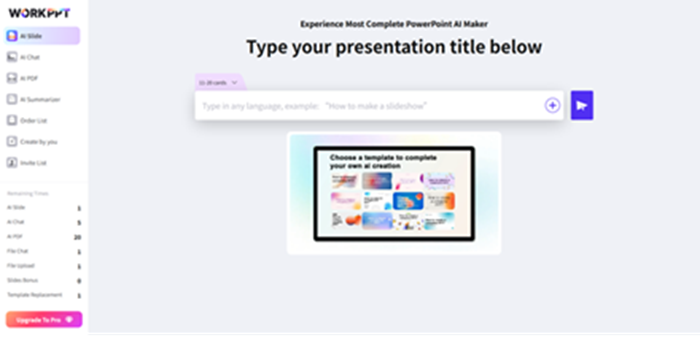
WorkPPT acts like an all-in-one office assistant, combining features from AI-powered tools like PPT, Mind Maps, and PDFs to help users go from “zero design skills” to “designer-level deck”, all while quickly creating content-rich, beautifully designed slides.
Why Choose WorkPPT?
1. Industry-Specific Pre-designed Templates
WorkPPT’s template library goes beyond aesthetics, it’s designed with content structure and logic in mind. Based on best practices from fields like consulting, finance, and marketing, it intelligently selects templates that match your content’s intent, ensuring each presentation is well-organized.
When you enter your key points, WorkPPT automatically applies a layout that makes sense for the structure of your presentation, whether it’s problem analysis, solutions, or budget breakdowns. This keeps your content clear and professional.
2. Innovative Office Suite
WorkPPT integrates tools like AI PDF, AI Mind Map, and AI Chat into one platform, offering a comprehensive office solution. You can easily create presentations, seamlessly switch between different file formats, and boost your productivity, all without the hassle of switching between multiple tools.
3. Efficient “Text-to-Visual” Logic
For content experts, conveying data and information clearly is essential. WorkPPT has powerful comprehension capabilities that can identify key data and relationships in text, automatically transforming them into infographics and flowcharts. This helps users present complex data in the simplest way possible.
WorkPPT AI slides maker shines by seamlessly combining professional design, content structure, and productivity tools. It works like a smart AI assistant, improving both the look and the impact of your presentations. Content experts can now craft visually impressive slides with the same effect as a design team, all while focusing on what they do best.
Conclusion: Let WorkPPT Free Your Focus
The days of content experts being held back by design limitations are over. Tools like WorkPPT are changing the game, making it easy for anyone to create professional presentations, no matter their design skills.
WorkPPT isn’t just software, it’s a powerful tool that gives your content a visual edge. It’s the missing piece that transforms great ideas into impressive results, letting you achieve both speed and quality. Create content that truly makes an impact.