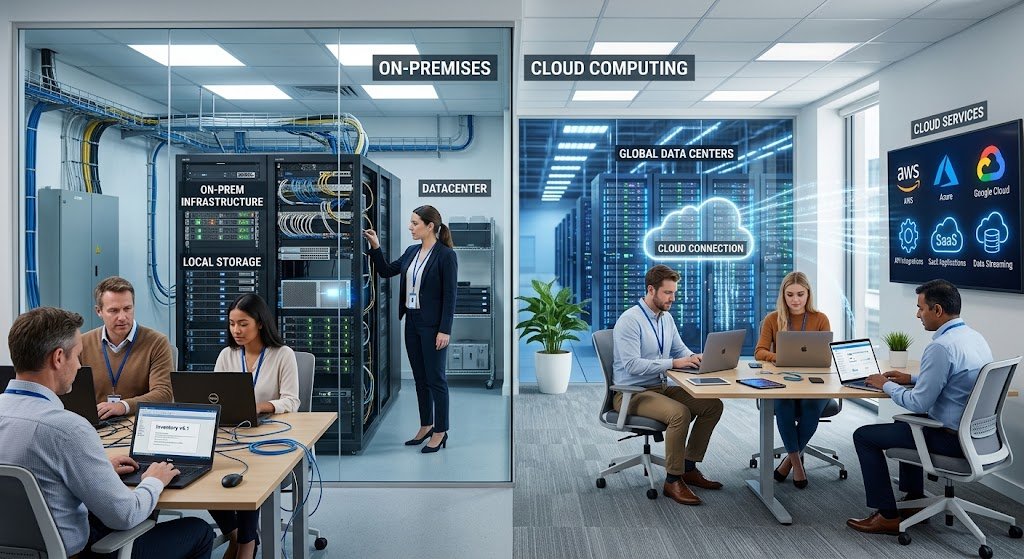
Whether you’re a small business, startup, organization or professional, selecting the appropriate cloud computing service is a vital technology choice. Cloud platforms offer access to computing power, data storage, applications, databases, security solutions, and more digital services, and don’t require an organization to build and home all of its technology infrastructure on its own. But with so many cloud vendors, services, pricing models, and technical capabilities, it can be complex to choose the provider that’s right for your business, particularly if your IT team is not large.
A good foundation is having a basic cloud-computing understanding of cloud concepts, but businesses must also evaluate how a specific service will apply to their business. The largest provider of features isn’t always the best cloud service. Rather than that, it is the answer that delivers the performance, security, reliability, scalability, support, integrations and value that fits the organization’s needs.

Importance of Selecting the right Cloud Service
Cloud computing can impact virtually every facet of today’s modern organisation’s technology landscape. A small business may rely on cloud storage to ensure documents are available to its staff, a startup may rely on cloud infrastructure to serve a developing application. An online resource like collaboration software might be needed for a professional, and a more extensive organization might need databases, analytics platforms, backup systems, development environments, and business applications.
These workloads have various needs, so matching them to the popularity and cost of the cloud service provider will lead to issues down the road. An inappropriate service can lead to wasteful expenses, substandard service, security vulnerabilities, poor integration capabilities, or trouble scaling with the growing size of the business. Choosing wisely at the outset can help companies build a technology base that not only meets existing demands, but also provides room for growth.
Start With Your Business Requirements
It is important for a business to have a clear idea of what they want the cloud service to do before comparing cloud providers. This is a very crucial part of the selection process as technical details are of little use if they are not able to solve business issues. Cloud services can be needed for storage, website hosting, application hosting, databases, productivity applications, data analysis, backup and recovery, communication channels, or a mix of a variety of services.
They should also be able to recognize the amount of users, workload, data types, current technology systems, and the business processes that the cloud platform will need to support. A written list of requirements makes it easier to distinguish essential capabilities from what’s just nice to have and to help decision makers avoid picking a service because of advertising, brand recognition or the length of the feature list.
Determine your current and future workloads
Prior to cloud migration, businesses should look at the way their current workloads work. If an organization has a primary business of storing documents, for instance, their needs will be very different to a software business operating a customer-facing application. Workloads should be assessed based on the processing requirements, storage requirements, traffic patterns, database requirements, ease of user access, expectations for availability and data protection requirements.
Also, the workloads and how they might evolve in the future should be taken into account. It is possible that a startup will have only a few users at this point of time, but may experience a rapid growth rate once it releases a successful product. Choosing a service that will allow them to expand without having to move to another platform too early could save the organization from having to move prematurely. Having information on current and future workloads is thus a practical basis for assessing cloud services.
Identify Your Technical Needs
Tech specs must be prepared in advance and compared in detail before comparing providers. They may involve storage, computing power, memory, networking, operating systems, databases, programming languages, application frameworks, backup systems, monitoring systems, and the ability to support existing systems. Organizations should also decide if they will need simple applications or if their technical teams will need infrastructure and build tools.
Managed services can provide cost savings for businesses with limited IT expertise, but for businesses with a more technical team, the managed services may lack the flexibility to configure the infrastructure. The requirements are used to narrow down the choice of cloud services to the most realistic requirements and not the ones that may be less utilized in the organization.
Analyze the Cloud Service Models.
First off, what type of cloud service model is most suitable? Infrastructure as a Service (IaaS): Virtualized servers, storage, networking resources and customers have a lot of control over their environment. Platform as a Service (PaaS) offers a managed platform where developers can create and deploy applications with less managing of underlying infrastructure. SaaS, or Software as a Service, provides the software application via the internet typically via a web browser or a specific software and is ready-to-use.
The models are of varying degrees of responsibility and technical management. For a small business requiring accounting or collaboration software, SaaS might fit the bill, while a development team looking to create a custom application might require PaaS or IaaS. This distinction is important for businesses to consider when choosing a service that aligns with their technical expertise and goals.

Evaluate Pricing and Total Cost
While price is definitely a factor, companies should not make their decision on cloud services just by the advertised price. Cloud pricing might contain various factors such as compute, storage, data transfer, databases, software license, support plans, backups, monitoring, and more. The ones that charge by usage may do so, others may charge the subscription fee, and others may have reserved pricing or a mixture of pricing structures.
A low-cost service can turn to be expensive if the business expands or needs extra services. Therefore, decision makers need to take into account realistic usage patterns to calculate the total cost of ownership. They should also look into the expense of migration, training employees, administration, security solutions, backup solutions, and future changes. A comprehensive cost comparison is generally more insightful to determine whether a cloud service is a worthwhile long-term investment.
Understand Usage-Based Pricing
While usage-based pricing may be advantageous in many cases since the client will typically get charged based on what resources they use, it can also be a disadvantage because the monthly costs may be less predictable. Variable workload companies might want to be able to scale up or down instead of buying fixed infrastructure. But if there is more traffic, storage, data transferring, or processing activity than you expected, it will cost you more.
Organizations must review the billings and determine what additional services are subject to extra costs. Planning budgets, tracking your usage, and creating spending alerts can help you avoid unplanned expenses. It is also necessary for businesses to simulate a few cases such as peak usage, seasonal demand, rapid growth and normal operation. Making a comparison between these scenarios is more useful than just making a comparison between lowest published prices as it illustrates how the costs might operate in various business situations.
Evaluate Storage & Data Requirements
There are wide variations in storage needs across organisations. An office that handles documents will only need a little capacity, while a company dealing with photos, video, databases, research files, or large amounts of data will need more storage. As well as storage capacity, factors such as performance, durability, backup, access controls, geographic availability, and retrieval cost can be important considerations in choosing a suitable organization.
Cloud storage can vary from services for storing recent data to archival data, backup storage, or application workloads. The information of the business should be categorised and how fast each category requires to be accessed. This can enable them to choose appropriate storage methods rather than buying higher-grade storage when it is not necessary to make the investment due to the lower cost of its alternatives.
Consider Performance and Speed
The performance of cloud services may directly impact employee productivity and customer experience. Otherwise useful systems can be frustrating to use due to slow applications, slow database response, or insufficient computing resources. Therefore, businesses should consider processor capacity, memory, speed of network, storage speed, response time of applications, and location of the processor to users. The standard’s performance requirements should be based on the specific workloads and not simply assumptions.
An online service that provides goods to customers in various regions may require more powerful infrastructure and a well-thought-out distribution system, while an internal administrative system can have more moderate performance demands. It is also important to explore if the provider provides performance monitoring and resource scaling capabilities for the organization. This function to detect bottlenecks and make them more powerful if needed, can prove more useful than choosing the most powerful configuration from the start.
Look for Scalability and Flexibility
If it’s a startup or a growing business, the technology may change rapidly and scalability is of great significance. Ideally, a cloud-service provider should give an organization the flexibility to scale up or down resources such as computing and storage without having to redesign its technology environment. Horizontal scaling can be achieved by adding additional instances or resources to accommodate more demand, and vertical scaling can be achieved by scaling up the capacity of the existing resources.
It is important for businesses to identify the available scaling options and if they can be automated. Another aspect of flexibility is when workloads fluctuate seasonally or unexpectedly. For instance, a retailer may have a lot more business coming in during some time, and a software start up can increase business quickly on the acquisition of a new group of clients. One solution that can help organizations adapt to these changes during the year without paying for and maintaining redundant infrastructure is a flexible cloud platform.

Examine Security Features
Security must be a minimum requirement and not an optional feature. Cloud environments can be used to store customer data, financial data, intellectual property, employee data, and more. An organization should consider identity and access management, authentication options, encryption, network security, monitoring, logging, backups, vulnerability management and security incident processes when evaluating a provider.
They should also know the shared responsibility when it comes to security between a provider and a customer. While using a reputable cloud provider is an effective first step, customers can pose risks in their use of applications via weak passwords, granting too many permissions, insecure configurations or poorly protected applications. Hence, businesses should assess the security features that the provider offers and their ability to set up and run security effectively within their business.

Check Compliance Requirements
There are also some businesses that have laws, contractual terms or internal policies that regulate the way information is stored and processed. Organizations should first understand their compliance needs for the cloud services they will implement and check if the cloud provider can meet the requirements. Factors might include data locations, access controls, auditing, retention policies, encryption, reporting, as well as available compliance certifications or attestations.
Organizations need to not presume that all workloads are automatically compliant because a provider is generally compliant. The configuration and use of the service may also impact compliance. In some organizations, it is important to consult with the appropriate legal, compliance or security professionals when the information is highly sensitive or regulated.
Measure Reliability and Availability.
Another key factor to consider when selecting a cloud service is reliability. In the event of an important business application being unavailable, employees may not be able to work and customers may not be able to access services that are essential to them. Providers often make announcements about services’ availability and may also provide service-level agreements which set out commitments for specific services. These commitments must be taken seriously by businesses, and it is important that they know what they are and what they do not cover, and that if they are not met, there may be remedies.
Reliability is also dependent on the provider’s advertised availability percentage. Redundancy, backup systems, disaster recovery measures, regional architecture, monitoring and service disruption procedures should all be considered. Businesses might require other resiliency measures besides a single configuration for critical workloads.
Check to Verify Integrations and Compatibility.
A cloud service is not likely to be a standalone service. Companies may depend on accounting systems, customer relationship management systems, communication systems, databases, websites, analytics platforms and payment systems and more. The ease of integration with the organization’s current technology should therefore be used to evaluate a cloud provider. Key factors to consider are APIs, connectors, standards support, authentication methods, data import/export capabilities, and applications integration.
Integration can help to minimize repetitive manual tasks and enhance communication between systems. There is potential for more administrative work and the need for custom development when integration is poor. Prior to signing a contract with a provider, businesses need to determine the most critical systems in place and ensure the proposed cloud system will effectively communicate with them.
Consider Technical Support
Technical support can play a crucial role, particularly for companies with smaller in-house IT staff. Different levels of support, response, communication methods, documentation, monitoring and expert help are available from providers. Companies need to figure out what assistance they really require. For a company that has more cloud engineering experience, they might be okay with relying on a lot of documentation and standard support, whereas a small company without much technical know-how may prefer to have the specialists available to them quicker.
The total cost should also contain support pricing. If a major technical issue requires costly extra support or a long troubleshooting process, then the lowest-cost cloud service might not be the most appropriate. When looking for a business continuity management provider, businesses should consider the provider’s availability to support, response expectations, escalation procedures, documentation quality and the provider’s capacity to help when major incidents occur.
Consider Data Backup and Disaster Recovery.
Backup and disaster recovery planning are not a thing of the past when it comes to cloud adoption. Businesses need to decide how data is secured for accidental deletion, corruption, failure, security breaches, and other issues. Some key factors are backup schedules, backup periods, recovery time objectives, recovery point objectives, geographic redundancy and restoration procedures. It is also important to make sure that organizations are aware if backups come with the standard service or if they have to pay extra for the backing up services.
Businesses should also regularly test their restoration procedures to ensure that the backup is effective and can be recovered if needed. More complex designs for disaster recovery, such as having redundant systems or multiple sites, may be needed for critical applications. By assessing these capacities before a disaster happens, organizations have a greater potential to continue operations during an unanticipated disruption.
Think About Vendor Lock-In
Vendor lock-in is the phenomenon in which it is easy, cheap or technically challenging to transfer workloads and data from one vendor to another. Proprietary technologies, specialized databases, application interfaces, management tools and unique architectures can all create dependencies in the cloud services. There’s no need for businesses to avoid any of the provider-specific services; specialized features can offer a lot of advantages.
They should be aware of the implications that may arise if they rely on a specific platform. Consider options for data export, migration tools, standards support, contract terms and possible exodus costs. Good documentation and, where possible, portable technologies can ease the way to future migration. Thinking about exit strategies prior to signing a long term agreement adds options and control to technology selection.
Use a Practical Scorecard to Compare Providers
After business requirements are identified, organizations can develop a scorecard to compare the short-listed cloud services. The scorecard should cover pricing, storage, performance, scalability, security, reliability, integrations, support, compliance and backup, ease of management, and future flexibility. A provider can be given a rating for each category according to how well the provider meets the organization’s needs. The weight of more important categories can be increased.
For instance, a business that deals with confidential data could prioritize security and compliance over anything else, whereas a fast-growing startup may focus more on scalability and performance. This helps to minimize the impact of the subjective beliefs and opinions of the decision makers and helps several decision makers to assess providers on the same basis. This final decision should be based on what the business needs, and not just the one that has the most features.

Test Before Making a Long-Term Commitment
Businesses should always test a cloud service before relocating critical workloads to the cloud permanently whenever possible. Issues can only be identified by a trial, proof of concept, or limited deployment that can uncover problems not evident in product documentation. In testing, organisations can test application performance, user experience, integrations, administrative controls, security configuration, billing behaviour and the responsiveness of their support.
Tests should involve realistic workload, rather than just simple demonstrations. Those who will use it should also be involved as technical teams and day to day users may have different expectations. A controlled pilot can help detect issues early on, when they are more easily and less cost-effectively solved. The organization can make changes before they invest heavily in migration and training if the provider doesn’t meet their requirements during the test.
Plan For Growth and Changing Requirements
A cloud decision should benefit the organization in more ways than just the short-term. When deciding on the number of users, volume of data, application needs, geographic scope and security needs, businesses should anticipate what they may require in the next few years. This doesn’t mean that you can foretell everything next week. Rather, it will involve using a platform that’s flexible enough to allow for sensible changes.
Price is also a key consideration for startups when usage levels increase as an over-optimized platform can quickly become costly to the company. For established organizations, they will also want to factor in the possibility changes in the technology may result from new applications or acquisitions. A provider with several service models, integrations, scalability options and migration routes can provide an organization with more flexibility.
Common mistakes to avoid:
A common mistake is choosing a cloud provider solely because of the cost. Although it is essential to keep technology costs under control, the lowest cost service may not deliver the necessary performance, security, reliability or level of support. Another common error is selecting a provider that is popular but does not offer the necessary services to the organization’s workload. Another common mistake is not accounting for secondary costs like data transfer fees, support fees, storage increases, and more.
Another big vulnerability is not planning for backups and recovery, as cloud availability does not ensure that data will be safe from all losses. It’s also important for organizations to not move everything right away without testing apps and dependencies. A carefully planned and phased process typically offers better time to recognize that there are issues to address and then modify the strategy before it impacts critical operations.
A step-by-step process for reaching the final decision.
In the final process of selection, it can be divided into the following practical steps. First, write down the organization’s business goals and technological needs. Second, determine the workloads that might be suitable for the cloud and prioritize them. Third, set up a sensible budget with direct and indirect costs. Fourth, narrow the list of providers down to those that fulfill the critical factors of security, performance, reliability, scalability and compatibility.
Fifth, analyse pricing structures and estimate costs for given usage scenarios. Sixth, pilot or do a proof of concept for promising services. Seventh, Assess contracts, support agreements, data transferability and exit factors. Lastly, choose a service that offers the best overall capabilities, cost, risk and long-term suitability. This process will enable an organization to make a technology decision without choosing a platform because of its sexy feature set or name.
Conclusion
When selecting a cloud computing service, it isn’t just about storage capacity or monthly payments. When looking at cloud platforms, small companies, startups, organizations, and professionals should take into account their specific business needs, technical workloads, budgets, security needs, and future vision. Before committing to a specific product, there are several factors to take into account, including pricing, storage, performance, scalability, security, reliability, integrations, technical support, backup and compliance, and vendor flexibility.
The best solution is the one that will give an organization the capabilities that it requires, and still be manageable, secure, financially sustainable and adaptable to changing requirements. Focusing on the requirements first and then comparing providers on a systematic basis, testing shortlisted services and assessing the long-term consequences, will minimize the risks of businesses and make better use of cloud technology. With a thoughtful selection process, cloud computing transforms from being a technology option into a business tool that can help to boost productivity, growth, innovation, and ensure reliable digital operations.