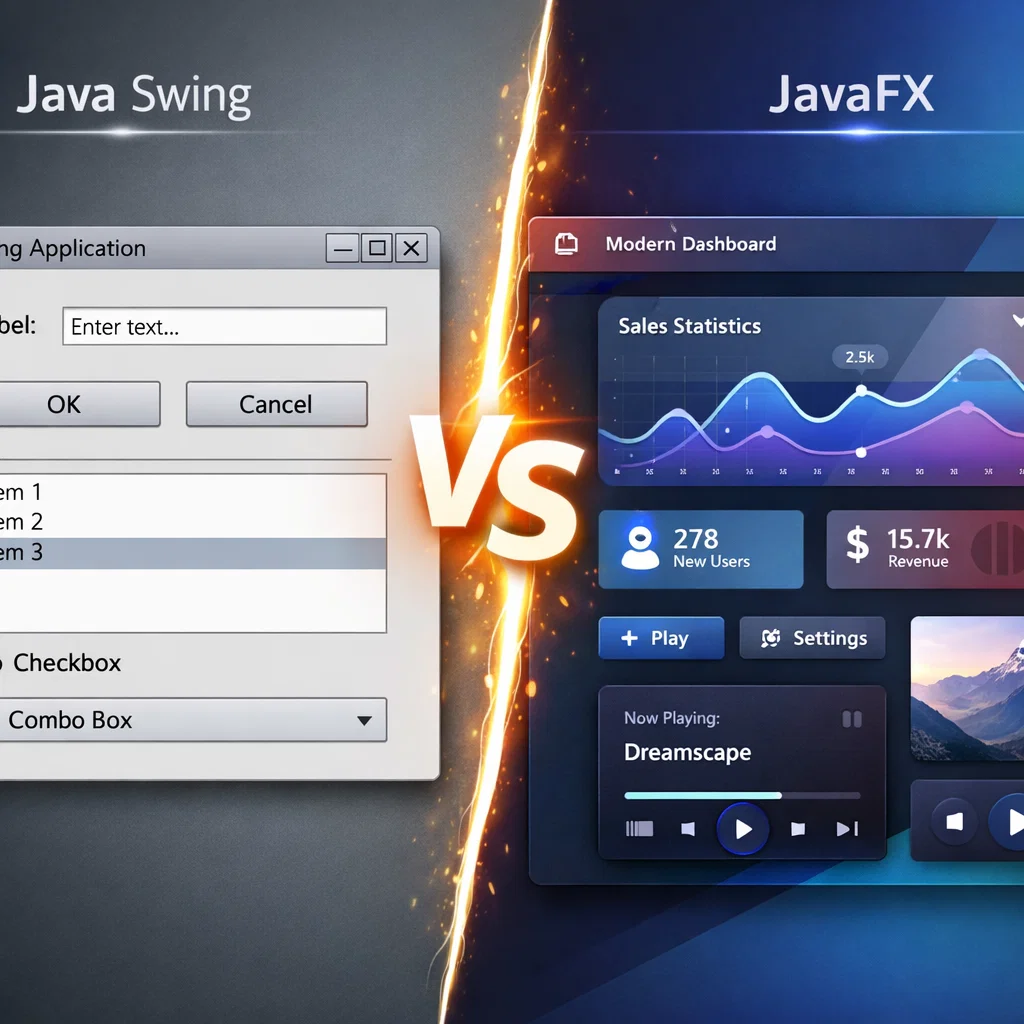
In the design of interactive desktop applications, a user-friendly interface should be created. Java Swing and JavaFX are the two most used frameworks in the design of Graphical User Interfaces (GUIs). These two technologies can be used for certain types of applications and have their advantages and disadvantages. This paper will make the comparisons between Java Swing and JavaFX and teach the reader how to create a simple interactive GUI using the tools.
Java Introduction to Graphical User Interface Development
Graphical User Interfaces (GUIs) are significant elements of existing software applications. These interfaces provide the end-users with the capability of communicating with programs through graphical features in terms of buttons, labels, text fields, and other graphical elements. There are several GUI development tools in Java, but two of the most distinguished ones are Java Swing and JavaFX. These two technologies are applied to the same purpose but are not similar in terms of usage.
This paper will discuss the key differences between Java Swing and JavaFX, the strengths and weaknesses of each, and will give some practical recommendations regarding how to build a simple Java application with the assistance of both of them.
What is Java Swing?
Java Swing is a subset of Java Foundation Classes (JFC) and it was introduced in the Java update 1.2. Swing is a good collection of GUI components that are employed to create interactive desktop software. Swing is usually known to be platform-independent and may produce complex UIs.
Key Features of Java Swing:
- Platform Independent: Swing is based on the Abstract Window Toolkit (AWT) and can be used to create UIs that can be run on other operating systems in the same way.
- Lightweight Components: Swing components are lightweight, meaning they are not pegged to the native UI components of the underlying operating system.
- High Count of Components: Swing contains numerous elements, such as checkboxes, text fields, labels, tables, trees, and all of those can be styled and customized.
- Customizable Appearance: Swing also provides the chance to create a custom appearance and feel, allowing it to be customized regarding the appearance of the UI when used across platforms.
Simply Swing: Building a GUI
The process of creating a simple login form in Java Swing will be discussed.
import javax.swing.*;
import java.awt.*;
public class SwingExample {
static public void main(String[] args) {
JFrame frame = new JFrame(“Login Form”);
frame.setSize(300, 200);
frame.setDefaultCloseOperation(JFrame.EXIT_ON_CLOSE);
// Create components
JLabel labelUsername = new JLabel(“Username:”);
JTextField textFieldUsername = new JTextField(20);
JLabel labelPassword = new JLabel(“Password:”);
JPasswordField passwordField = new JPasswordField(20);
JButton buttonLogin = new JButton(“Login”);
// Layout
JPanel panel = new JPanel(new GridLayout(3, 2));
panel.add(labelUsername);
panel.add(textFieldUsername);
panel.add(labelPassword);
panel.add(passwordField);
panel.add(buttonLogin);
frame.add(panel);
frame.setVisible(true);
}
}
In this code, we have used basic elements such as JLabel, JTextField, and JButton to come up with a simple form of the login. These components are placed on the window with the help of layout managers such as GridLayout of Java Swing.
What is JavaFX?
JavaFX is a more recent graphical user interface construction framework in Java, which was released as an upgrade to Swing. JavaFX has enhanced functionalities over Swing and has rich user interfaces with 2D and 3D graphics as well as media functionalities and others.
Key Features of JavaFX:
- Modern UI Design: JavaFX is developed to take advantage of modern hardware and software features. It possesses rich graphics, animations, and other high-end UI features.
- JavaFX FXML as UI Design: FXML means that it is possible to separate the logic and design of the application and the structure of the user interface, with the help of the XML-based markup language. This helps in the development of complex interfaces.
- CSS Styling: JavaFX supports CSS styling that provides it with flexibility and power when it comes to designing UIs.
- Inbuilt Graphics and Media Support: JavaFX also has inbuilt graphics and media support that allows creating 2D and 3D graphics and also audio and video content in the application.
JavaFX Simple GUI Building
The following is a sample of a basic JavaFX Login Form.
import javafx.application.Application;
import javafx.scene.Scene;
import javafx.scene.control.*;
import javafx.scene.layout.GridPane;
import javafx.stage.Stage;
class JavaFXExample extends Application {
@Override
public void start(Stage primaryStage) {
primaryStage.setTitle(“Login Form”);
// Create components
Label labelUsername = new Label(“Username:”);
TextField textFieldUsername = new TextField();
Label labelPassword = new Label(“Password:”);
PasswordField passwordField = new PasswordField();
Button buttonLogin = new Button(“Login”);
// Layout
GridPane grid = new GridPane();
grid.setVgap(10);
grid.setHgap(10);
grid.add(labelUsername, 0, 0);
grid.add(textFieldUsername, 1, 0);
grid.add(labelPassword, 0, 1);
grid.add(passwordField, 1, 1);
grid.add(buttonLogin, 1, 2);
Scene scene = new Scene(grid, 300, 200);
primaryStage.setScene(scene);
primaryStage.show();
}
static public void main(String[] args) {
launch(args);
}
}
In this JavaFX example, the author develops the same login form as in the Swing example, but this time he uses easier and more contemporary layout options offered by JavaFX. The application window is created through the use of the classes Stage and Scene, and the organization of the form is made with the help of GridPane.
Java Swing and JavaFX: Significant Differentiators
Java Swing and JavaFX possess their peculiarities. The most noticeable differences between them are the following:
UI Design and Appearance
- Swing: Swing is conventional and aims at providing fundamental features like buttons, text fields, and labels. It is uniform in design but may be outdated compared to modern UI designs.
- JavaFX: JavaFX delivers the latest UI controls that include 2D and 3D graphics, animations, and advanced UI controls. It is more suited to the production of beautiful and modern apps.
Layout Managers
- Swing: Swing provides layout managers such as FlowLayout, GridLayout, and BorderLayout to organize components. These layouts are easy to use and might not be applicable to complicated layouts.
- JavaFX: JavaFX has stronger layout features like HBox, VBox, and GridPane, with a higher level of control over the positioning of the elements.
Performance
- Swing: Swing is less hardware optimized and cannot cope with applications that demand sophisticated graphical display or animation.
- JavaFX: JavaFX is designed to utilize hardware acceleration and advanced graphics and therefore is more appropriate in high-performance applications.
Styling and Theming
- Swing: Swing has very little appearance customization, and more complicated styles require manual customization.
- JavaFX: JavaFX enables you to style applications with CSS, which is an easy method to change the look and feel of an application without making any changes to the underlying code.
Multimedia Support
- Swing: Swing does not support multimedia and cannot be utilized in applications that require audio, video, and sophisticated graphics.
- JavaFX: JavaFX also has integrated multimedia functionality that allows programmers to add audio and video support to their application.
Advantages of Java Swing
- Mature and Stable: Swing is a more mature, well-documented, and stable framework.
- Broad Use: Swing is extensively used in legacy systems and by those developers who are well-versed with its components.
- Platform Independence: Swing-based applications may be executed on other platforms without having to fundamentally rewrite the software.
Advantages of JavaFX
- Modern Features: JavaFX has modern features like advanced graphics, animations, and multimedia support, making it more relevant to current software requirements.
- Rich UI Design: JavaFX provides more flexibility and simplicity to use with CSS styling and FXML to create UIs.
- Performance: JavaFX is optimized for modern hardware and will be more well-structured in resource-intensive applications.
Java Swing vs. JavaFX
When comparing Java Swing and JavaFX, one should take into consideration the following:
- For Simple Applications: Swing is an excellent platform for simple desktop applications with no strong performance or complex UI requirements.
- For Rich, Modern UIs: JavaFX is the best choice when it comes to requiring high-quality graphics, animation, and media integration.
Conclusion
In conclusion, Java Swing and JavaFX are both practical for creating GUIs with their advantages and disadvantages. Java Swing is, on one hand, a stable and easy platform, whereas JavaFX, on the other hand, has a more modern and feature-rich platform that can be used to create visually appealing and high-performance applications. The decision between the two will depend on the requirements of your project and the complexity of the user interface.
Having a clear understanding of the main differences and advantages of each framework will help you make an informed decision that best fits your development needs. Whatever choice you make (Swing or JavaFX), mastering these tools will allow you to develop interactive and efficient desktop applications.