In the digital world, sound is everywhere. From the music we stream on our way to work to the sound effects in our favorite video games, audio files are a huge part of our lives. However, not all audio files are created equal. Sometimes, you have an MP3 file, but your device or software requires an OGG file.
If you have ever felt frustrated because a file wouldn’t play or was too large to upload, you are in the right place. In this guide, we will talk about why a Free MP3 to OGG Converter is a must-have tool for everyone—from students to professional game developers.
What is an MP3 File? (The Simple Version)
Before we dive into the “how,” let’s talk about the “what.”
MP3 stands for MPEG-1 Audio Layer III. It is the most common audio format in the world. Almost every device—your phone, your laptop, your car’s stereo—can play MP3s. It works by “compressing” the audio, which means it makes the file smaller by removing sounds that the human ear can’t really hear anyway.
However, while MP3 is famous, it isn’t always the best choice for every situation. This is where OGG comes in.
What is an OGG File? (And Why It’s Special)
OGG Vorbis (usually just called OGG) is a high-quality audio format. Unlike MP3, which is owned by a company, OGG is Open Source. This means it is free for anyone to use, develop, or improve.
Think of it this way: MP3 is like a popular brand-name shoe that everyone wears. OGG is like a custom-made high-performance running shoe that is lighter, faster, and free to replicate.
Key Features of OGG:
- Smaller Size: OGG files are often smaller than MP3s but keep the same sound quality.
- Better Sound: At lower bitrates, OGG usually sounds much clearer than MP3.
- No Licensing Fees: This is why platforms like Spotify and gaming companies love OGG—they don’t have to pay to use the format!
Why Should You Use an MP3 to OGG Converter?
You might be asking, “Why should I bother converting my files?” Here are several reasons why using Free MP3 to OGG Converter is a smart move:
1. Saving Storage Space
If you have thousands of songs on your phone, you know how quickly storage runs out. By converting your MP3 library to OGG, you can save significant space without losing the “crispness” of the music.
2. Game Development and Coding
If you are learning to build games or apps, OGG is the gold standard. Most game engines (like Unity or Unreal Engine) prefer OGG because it loops perfectly and takes up less memory while the game is running.
3. Website Performance
If you run a blog or a website and want to include an audio clip, OGG is your best friend. Smaller files mean your website loads faster. Google loves fast websites, which helps you rank better in search results!
Introducing Our Free MP3 to OGG Converter
We created this tool because we believe technology should be easy and accessible to everyone. You don’t need to be a computer genius or a sound engineer to use our converter.
Why our tool stands out:
- 100% Free: No subscriptions, no credit cards, and no “premium” locks.
- No Installation Required: You don’t need to download bulky software that slows down your computer. Everything happens in your web browser.
- Fast Processing: Our servers are optimized to handle conversions in seconds, not minutes.
- Privacy First: Your files are your business. We automatically delete all uploaded files from our servers after the conversion is done.
How to Convert MP3 to OGG (Step-by-Step Guide)
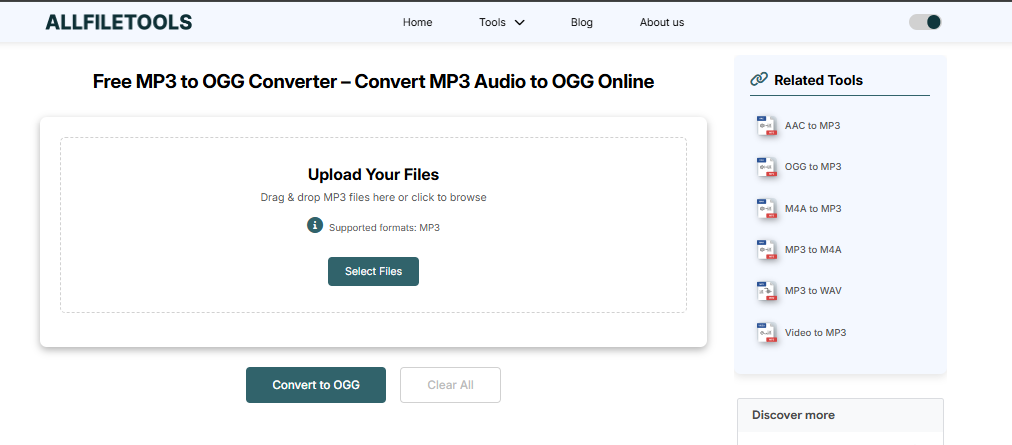
Converting your files shouldn’t be a headache. We have designed our tool to be as simple as possible. Here is exactly how you can do it in just a few seconds:
Step 1: Open your browser and go to a trusted site like AllFileTools.com. And select the Free MP3 to OGG Converter tool.
Step 2: Click “Select Files” or “Upload” to choose your MP3 file from your device.
Step 3: Select “OGG” as your output format.
Step 4: Click the “Convert” button and wait a few seconds for the process to finish.
Step 5: Click “Download” to save your new OGG file to your computer or phone.
Comparing MP3 vs. OGG: Which is Better?
To help you understand the technical side without the headache, here is a simple comparison:
| Feature | MP3 | OGG |
| Popularity | Extremely High | High (In Tech/Gaming) |
| File Size | Larger | Smaller |
| Sound Quality | Good | Excellent (even at low sizes) |
| License | Proprietary | Open Source (Free) |
| Gapless Playback | Difficult | Supported Naturally |
As you can see, while MP3 is great for general use, OGG wins when it comes to efficiency and quality-per-kilobyte.
Tips for the Best Conversion Results
To get the absolute best sound out of our Free MP3 to OGG Converter, keep these tips in mind:
- Start with High Quality: If your original MP3 sounds “scratchy,” the OGG file will also sound scratchy. Always try to use the best source file you have.
- Check Your Bitrate: For most music, a bitrate of 128kbps to 192kbps in OGG is plenty. If you are an “audiophile” (someone who loves perfect sound), go for 256kbps or higher.
- Stable Internet: Since this is an online tool, make sure you have a steady internet connection while uploading and downloading large files.
Conclusion: Make the Switch Today!
Whether you are a developer looking for the perfect game loop, a student trying to save space on your phone, or just someone who loves exploring new technology, our Free MP3 to OGG Converter is the perfect companion.
It is fast, it is free, and it is built with the user in mind. Stop struggling with incompatible formats and start enjoying high-quality, efficient audio today.
🔹 Explore more powerful file conversion and online utilities at AllFileTools –
🔹 For technical support, digital solutions, and expert services, visit LetDigitalFly IT Services –
🔹 Discover additional career and productivity resources at Resume Slip Builder –
Frequently Asked Questions (FAQs)
Q: Is there a limit on how many files I can convert?
A: No! You can use our tool as many times as you like. We believe in keeping the internet free and helpful.
Q: Can I convert OGG back to MP3?
A: Yes, our platform supports many formats. However, this specific page is optimized for the MP3 to OGG journey.
Q: How long does it take?
A: Most conversions take less than 10 seconds, depending on the file size and your internet speed.
Q: Will this work on my Mac?
A: Yes! Since it is a web-based tool, it works on Windows, Mac, Linux, Android, and iOS.
