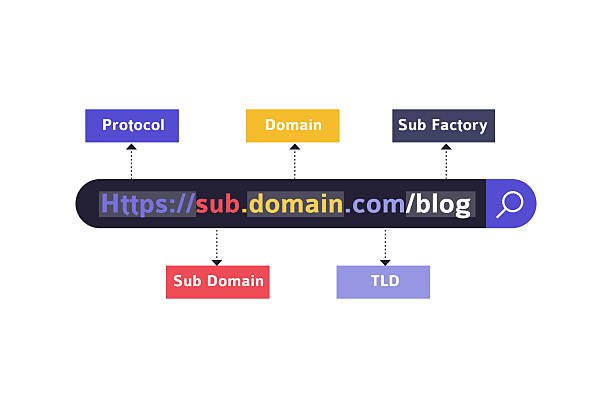
Introduction to Subdomain
A Subdomain is an essential part of modern website architecture that helps businesses, developers, and content creators organize their online presence more efficiently. When used correctly, a Subdomain can improve website navigation, enhance user experience, and even support SEO strategies. From hosting blogs and eCommerce stores to managing multilingual content, Subdomains play a critical role in scaling websites effectively.
In today’s digital landscape, understanding how a Subdomain works and when to use it can give your website a strong competitive edge. This comprehensive guide explains everything you need to know about Subdomains, including their structure, benefits, SEO impact, real-world use cases, and best practices.
What Is a Subdomain?
A Subdomain is a prefix added to your primary domain name to create a separate section of your website. It appears before the main domain and allows you to organize content under distinct web addresses.
Example of a Subdomain
- Main domain: example.com
- Subdomain: blog.example.com
In this case, “blog” is the Subdomain, and it functions as a separate area while still being connected to the main website.
How a Subdomain Works
A Subdomain operates under the main domain but can function independently. Technically, it is created through DNS (Domain Name System) settings, where records point the Subdomain to a specific server or directory.
Key characteristics of a Subdomain include:
- It can host different content than the main site
- It may use a different CMS or platform
- It can have its own design, structure, and functionality
This flexibility makes Subdomains ideal for expanding websites without affecting the core domain.
Why Use a Subdomain?
Using a Subdomain is not just a technical choice—it’s a strategic one. Below are the most common reasons website owners rely on Subdomains.
1. Better Content Organization
A Subdomain allows you to separate content clearly. For example:
- blog.example.com for articles
- shop.example.com for eCommerce
- support.example.com for customer help
2. Improved User Experience
Visitors can instantly understand what a Subdomain is about, making navigation easier and more intuitive.
3. Platform Flexibility
A Subdomain can run on a completely different system without affecting the main website.
4. Brand Expansion
Businesses often use Subdomains to test new ideas, launch products, or target specific audiences.
Subdomain vs Subdirectory: Key Differences
Understanding the difference between a Subdomain and a subdirectory is crucial for SEO and site structure.
| Feature | Subdomain | Subdirectory |
| Structure | blog.example.com | example.com/blog |
| SEO Authority | Treated separately | Shares domain authority |
| Flexibility | High | Limited |
| Setup | DNS configuration | CMS-based |
A Subdomain is ideal when you want separation, while a subdirectory works best for tightly connected content.
SEO Impact of a Subdomain
One of the most common questions is whether a Subdomain helps or hurts SEO. The answer depends on how it’s used.
Advantages for SEO
- Allows niche content targeting
- Useful for international or language-based SEO
- Helps isolate specific site sections
Challenges for SEO
- Search engines may treat a Subdomain as a separate website
- Authority may not automatically transfer from the main domain
- Requires independent SEO efforts
To maximize SEO value, each Subdomain must be optimized with high-quality content, internal linking, and proper indexing.
Best Use Cases for a Subdomain
A Subdomain is most effective in specific scenarios. Below are common and proven use cases.
Subdomain for Blogging
Many brands host their blogs on a Subdomain to separate informational content from commercial pages.
Subdomain for eCommerce
Online stores often run on Subdomains to support complex product systems.
Subdomain for International Websites
Language-specific Subdomains such as:
- fr.example.com
- es.example.com
Subdomain for Testing and Development
Developers use Subdomains to test features without affecting the live website
How to Create a Subdomain
Creating a Subdomain is a straightforward process and usually takes only a few minutes.
Step-by-Step Guide
- Log in to your domain hosting panel
- Navigate to DNS settings
- Choose “Add Subdomain”
- Assign a name (e.g., blog, store, app)
- Point it to the correct server or directory
- Save and wait for propagation
Most hosting providers offer one-click Subdomain creation.
Subdomain Best Practices
To ensure your Subdomain performs well, follow these best practices.
1. Keep It Relevant
Use descriptive names that reflect the content purpose.
2. Maintain Brand Consistency
Design and tone should align with your main website.
3. Optimize SEO Separately
Each Subdomain should have:
- Unique metadata
- Optimized URLs
- Quality backlinks
4. Avoid Overusing Subdomains
Too many Subdomains can confuse users and dilute SEO value.
Common Mistakes to Avoid with Subdomain
Even experienced website owners make mistakes when using a Subdomain.
- Creating unnecessary Subdomains
- Ignoring SEO optimization
- Poor internal linking
- Duplicate or thin content
- Inconsistent branding
Avoiding these errors ensures better performance and search visibility.
Subdomain and Website Security
A Subdomain can enhance security when configured properly.
Security benefits include:
- Isolating sensitive areas
- Applying different access rules
- Testing security updates safely
However, each Subdomain must have its own SSL certificate to maintain trust and encryption.
Future of Subdomain Usage
As websites grow more complex, the use of Subdomain structures is expected to increase. Businesses are moving toward modular web design, where different functions operate independently yet remain connected under one brand.
With the rise of SaaS platforms, headless CMS solutions, and global digital expansion, Subdomains will continue to play a vital role in scalable website development.
Strong Conclusion
A Subdomain is more than just a technical feature—it’s a powerful tool for organizing content, expanding functionality, and supporting long-term digital growth. When implemented strategically, a Subdomain can improve user experience, enhance SEO performance, and provide the flexibility needed to scale your website efficiently.
Whether you’re launching a blog, managing an online store, or targeting international audiences, understanding how to use a Subdomain correctly can make a significant difference. By following best practices and avoiding common mistakes, you can unlock the full potential of Subdomains in today’s evolving digital ecosystem.
FAQs About Subdomain
1. What is a Subdomain in simple terms?
A Subdomain is a part of your main domain used to organize and separate website content under a unique web address.
2. Does a Subdomain affect SEO?
Yes, a Subdomain can impact SEO positively or negatively depending on content quality, optimization, and linking strategy.
3. Is a Subdomain better than a subdirectory?
A Subdomain is better for independent sections, while subdirectories work best for closely related content.
4. Can a Subdomain have a different website design?
Yes, a Subdomain can use a completely different design, platform, or CMS.
5. How many Subdomains can a website have?
There is no fixed limit, but using only necessary Subdomains is recommended for better SEO and user experience.