Modern organizations rely heavily on Microsoft technologies like Microsoft 365, SharePoint, Teams, OneDrive, and Azure to power collaboration, communication, and cloud infrastructure. These platforms are incredibly powerful—but they are also complex. As businesses scale, so do the challenges of managing permissions, securing data, maintaining compliance, and ensuring consistent performance across their Microsoft environment.

Many internal IT teams find themselves stuck in a reactive cycle—fixing issues as they arise rather than proactively optimizing and securing their systems. This is where Microsoft managed services make a measurable difference. By partnering with specialists who continuously monitor, manage, and improve Microsoft ecosystems, businesses can transform their IT operations from reactive support to strategic enablement.
This article explores how Microsoft managed solutions and services significantly enhance security, compliance, and performance across Microsoft 365 and Azure environments.
What Are Microsoft Managed Solutions and Services?
Microsoft managed services refer to the ongoing administration, monitoring, optimization, and support of Microsoft platforms by a specialized provider. Instead of relying solely on in-house resources, organizations outsource the day-to-day management of:
- Microsoft 365 administration
- SharePoint and Teams governance
- OneDrive configuration and data control
- Azure cloud infrastructure and cost management
- Security, identity, and compliance frameworks
Unlike traditional IT support that operates on a break/fix model, managed services are proactive. They operate under service level agreements (SLAs), continuous monitoring systems, and structured governance practices designed to prevent issues before they impact users.
This approach ensures Microsoft environments remain secure, compliant, and high-performing as the business grows.
The Security Challenges Businesses Face in Microsoft Environments
Microsoft platforms are frequent targets for cyber threats because they hold sensitive business data and provide access to critical systems. While Microsoft provides powerful security tools, they must be properly configured, monitored, and maintained.
Common security gaps include:
- Misconfigured permissions in SharePoint and Teams
- Weak identity and access controls
- Uncontrolled external file sharing through OneDrive
- Lack of multi-factor authentication and conditional access policies
- Limited visibility into suspicious activities or breaches
Without continuous oversight, even small configuration mistakes can expose an organization to data leaks, ransomware attacks, and unauthorized access.
How Microsoft Managed Services Strengthen Security
A Microsoft managed service provider implements layered security strategies across the entire Microsoft ecosystem.
Continuous Monitoring and Threat Detection
Managed services include real-time monitoring of user activity, login behavior, file access patterns, and system alerts to identify threats early.
Identity and Access Governance
Experts configure and maintain:
- Multi-factor authentication (MFA)
- Conditional access policies
- Role-based access control
- Privileged identity management
This ensures only the right users have the right level of access at the right time.
Secure Configuration of Collaboration Tools
SharePoint, Teams, and OneDrive are optimized with secure sharing policies, permission structures, and external access controls to prevent accidental exposure of sensitive information.
Regular Security Audits
Ongoing audits identify configuration drift, unused accounts, outdated policies, and potential vulnerabilities—keeping the environment aligned with Microsoft security best practices.
Compliance Is Not a One-Time Setup
Many businesses believe compliance is achieved once policies are configured. In reality, compliance requires ongoing governance, documentation, and monitoring.
Regulations like GDPR, HIPAA, ISO standards, and industry-specific requirements demand strict control over how data is stored, shared, and accessed.
How Managed Services Support Compliance
- Implementation of data retention and deletion policies
- Configuration of eDiscovery and audit logs
- Documentation for regulatory audits
- Governance frameworks for SharePoint site structures and Teams sprawl
- Continuous reporting and policy enforcement
This structured governance ensures organizations can confidently pass audits and avoid costly penalties.
Performance Optimization Across Microsoft 365 and Azure
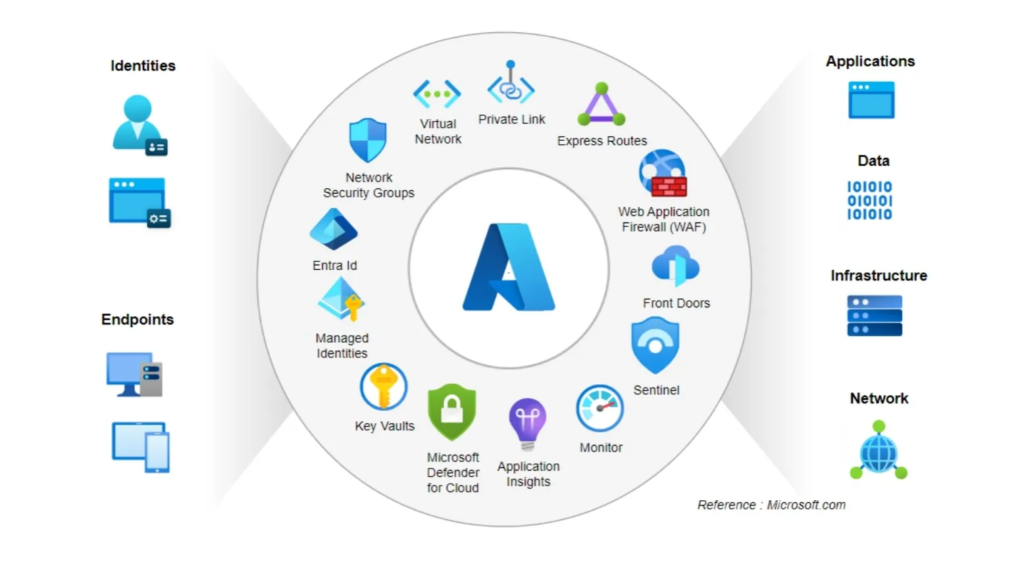
Security and compliance are critical, but performance is equally important. Slow SharePoint sites, poorly structured Teams environments, and inefficient Azure resources directly impact employee productivity and operational costs.
Tenant Health Monitoring
Managed providers continuously monitor tenant performance, usage trends, and service health to detect bottlenecks early.
SharePoint Architecture Optimization
Proper site structure, metadata usage, and permission design dramatically improve document retrieval speed and usability.
Teams and OneDrive Tuning
Optimized configurations reduce sync issues, file duplication, and collaboration friction.
Azure Cost and Resource Optimization
Azure environments are regularly assessed to eliminate unused resources, right-size virtual machines, and control cloud spending through effective cost management strategies.
Business Benefits Beyond IT
Microsoft managed services do more than improve technical systems—they deliver tangible business advantages.
- Reduced workload on internal IT teams
- Predictable monthly IT costs
- Faster issue resolution with proactive support
- Improved employee collaboration and productivity
- Lower risk of downtime, data loss, and security incidents
With experts managing the environment, internal teams can focus on innovation rather than maintenance.
When Should a Business Consider Microsoft Managed Services?
Organizations often seek managed services when they experience:
- Rapid company growth and scaling Microsoft usage
- Migration to Microsoft 365 or Azure
- Security or compliance concerns
- Low adoption of Teams or SharePoint by employees
- Frequent technical issues or performance slowdowns
These signs indicate the need for structured governance and professional oversight.
Choosing the Right Microsoft Managed Service Provider
Not all providers offer the same level of expertise. Businesses should look for:
- Deep experience with Microsoft 365, SharePoint, Teams, and Azure
- Proven governance and security frameworks
- 24/7 monitoring and responsive support
- Customized service plans aligned with business goals
- Microsoft certifications and real-world implementation experience
A capable partner becomes an extension of the internal IT team, ensuring the Microsoft ecosystem continuously evolves with the business.
Conclusion
Microsoft platforms are powerful enablers of modern work—but only when they are properly managed. Security gaps, compliance risks, and performance issues often stem from misconfiguration and lack of ongoing oversight rather than platform limitations.
Microsoft managed solutions and services provide the structure, expertise, and proactive care needed to keep Microsoft 365, SharePoint, Teams, and Azure environments secure, compliant, and optimized. By shifting from reactive support to strategic management, businesses gain stability, efficiency, and peace of mind.
Frequently Asked Questions
What do Microsoft managed services include?
They include monitoring, administration, security management, compliance governance, and performance optimization across Microsoft 365, SharePoint, Teams, OneDrive, and Azure.
How do Microsoft managed services improve security?
Through continuous monitoring, identity protection, secure configuration, and proactive threat detection.
Can managed services help with regulatory compliance?
Yes, they implement retention policies, audit systems, governance frameworks, and documentation required for compliance.
Are Microsoft managed services suitable for small and mid-sized businesses?
Absolutely. They are especially valuable for organizations without large in-house IT teams.
How do managed services improve Microsoft 365 performance?
By optimizing tenant settings, SharePoint architecture, Teams configuration, and Azure resource usage.
What is the difference between IT support and managed services?
IT support is reactive; managed services are proactive, ongoing, and strategic.
Do Microsoft managed services reduce Azure cloud costs?
Yes, through resource optimization, monitoring, and cost management best practices.