A modern mobile workforce moves constantly between offices, homes, airports, client sites, and shared spaces. Every location introduces new risks for devices and data, making strong, consistent security essential.
At the same time, organizations need features that keep work simple and uninterrupted. An AI PC for business meets both needs by combining advanced protection with seamless user experiences.
These devices protect identity, data, and network connections even when employees work on public Wi-Fi or unreliable links. With the right set of AI features, an AI PC becomes more than a device; it becomes a trusted security partner that learns how people work and safeguards every step.
As you plan your next device refresh, focusing on the right AI-driven capabilities can help your mobile teams stay productive, confident, and secure wherever they go.
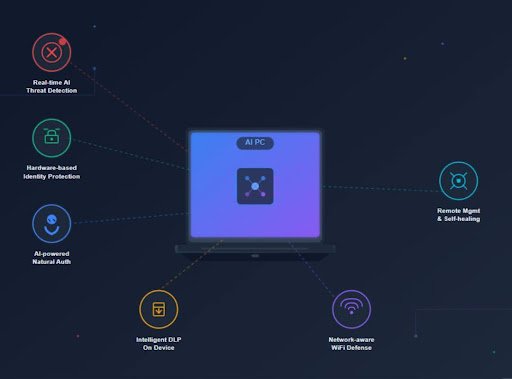
1. Real-time AI threat detection
First, your mobile teams need strong real-time defense against new threats. Attackers now use AI tools that change tactics very fast, and old-style signature tools often fall behind.
An AI PC for business utilizes on-device AI models that scan files, apps, and behavior throughout the day. These models identify unusual patterns that indicate malware or ransomware, and they block risks before damage can occur.
As the checks run on the device, your staff keep working even when they move through areas with weak network links. This approach also keeps more data local, which reduces exposure to cloud-based attacks. Your security team then gains faster insight without placing extra load on networks or users.
Key outcomes for security leaders
- Faster detection of unknown threats with less noise
- Protection that keeps working during travel and weak network access
- Strong defense that does not slow down daily work
2. Hardware-based identity protection
Next, your mobile workforce needs strong identity controls that go deeper than a password. Stolen passwords and leaked credentials still cause many attacks. You lower that risk when the device itself protects identity at the hardware level.
A modern AI PC for business uses secure chips and trusted execution zones that hold keys and tokens away from normal apps. AI tools then watch login attempts and access patterns, and they flag risky behavior very quickly. When the device blocks a high-risk login attempt, your team avoids a full account takeover.
Important identity features to seek
- Hardware root of trust that checks firmware at startup
- Secure enclave that protects keys and certificates
- AI analysis of login patterns across time and location
This blend of hardware and AI gives you a strong base for zero-trust plans, and it supports remote staff who work in many places.
3. AI-powered authentication that feels natural
Mobile employees need fast and safe ways to unlock devices and apps. When login feels slow or painful, they look for shortcuts, and that opens a new risk. AI-powered authentication offers strong security yet still feels natural for people in motion.
Your AI PC for business can use AI-enhanced face or fingerprint checks that adapt to changes over time. For example, the system can keep recognizing a user even when lighting changes or when they wear new glasses. At the same time, the AI model rejects faces or prints that do not match with high confidence.
Key benefits for mobile staff
- Quick unlock so people re-engage with work right away
- Strong protection against stolen password attacks
- Adaptive checks that keep working in many real-world conditions
This type of authentication lowers pressure on help desks, and it supports a safer and smoother workday for your teams.
4. Intelligent data loss prevention on the device
Data does not stay inside one office anymore. Staff access files in airports, client rooms, and home spaces. So your AI PC must help guard sensitive data at the device level before it leaks into unsafe hands.
AI-based data loss prevention tools can study how people handle documents over time. They learn which apps handle customer data and which tools move internal plans. When a user tries to move a sensitive file into a personal cloud app or a public USB drive, the AI model can step in and warn or block the action.
What strong data protection looks like
- On device checks that label and protect sensitive files
- Real-time alerts when staff move data to risky channels
- Clear prompts that guide people toward safer choices
This approach treats staff as partners in security and not as problems. The AI PC for business supports better habits while still guarding your most important information.
5. Network-aware defense for public Wi Fi
Mobile workers often connect through hotel networks, airports, client guest Wi F, and mobile hotspots. Each network creates a new opening for attackers who watch traffic or spoof access points. Your AI PC should help close those openings in smart and automatic ways.
Network-aware AI models can study patterns in Wi Fi behavior and spot risky networks before a person connects. The device can guide the user toward a safer choice or route all traffic through a secure tunnel without extra steps. When the AI PC for business sees signs of man-in-the-middle tactics, it can block key actions and alert your security team.
Network protection you should expect
- Automatic checks of the network trust level before connection
- Strong use of VPN and encrypted channels when risk rises
- Alerts that link device behavior to broader network events
With this support, your people stay productive on the road while your security posture stays strong.
6. Remote management and self-healing with AI
IT teams now support laptops that live everywhere. They cannot walk over to each desk when a device fails or drifts out of policy. An AI PC for business can lighten this load through smart remote management and self-healing features.
AI models can watch system health metrics across your fleet and spot early signs of trouble. For example, a device may show rising error rates or strange process activity long before a full outage. The system can then trigger safe repairs, such as rolling back a bad driver or closing a risky app.
Powerful management features to include
- Remote visibility into health and security posture for every AI PC
- Automated playbooks that fix common issues without user action
- AI-driven insights that highlight devices with rising risk
This support helps IT teams protect a wide mobile fleet with less stress, and it shortens downtime for your staff.
7. Privacy-aware collaboration and meeting tools
Mobile staff spend much of the day in calls and digital meetings. They join from shared homes, open workspaces, client halls, and public places. Your AI PC should help protect both privacy and data during those moments.
AI-enhanced meeting tools can blur background, block visual details on the screen, and filter noise that might reveal private talk in the room. They can also highlight when sensitive data appears on camera or in a shared window and then guide the user to stop or change views.
Helpful collaboration protections
- Smart background and screen controls that shield private spaces
- On-device processing of audio and video to reduce data exposure
- AI prompts that warn when screens show confidential content
When you build these tools into an AI PC for business, you help staff speak with confidence wherever they work. You also lower the chance that a quick call turns into a costly data leak.
Conclusion
Your mobile workforce wants to do great work, and they want to feel safe while they do it. Strong security should not feel like a wall that slows every move. Instead, it should feel like a calm and steady partner that travels with them on each trip and each project.
An AI PC for business can offer that partner when you choose devices with the right seven features. Real-time threat detection, strong identity, smart authentication, data loss protection network network-aware defense, remote self-healing, and privacy-aware collaboration tools. Together, these features create a living shield that learns and grows as your business moves.
As you plan your next round of device investment, you can look at each feature and ask how it will support the people behind the screens. When security lifts stress from their day, they can focus on clients’ ideas and results. That is how technology stays human and how your business stays safe and strong on the move.